
The migration to cloud computing has become an imperative for businesses seeking agility, scalability, and innovation. Amazon Web Services (AWS), as the undisputed market leader, offers an unparalleled array of services, from computing power and storage to machine learning and database solutions. However, the omnipresent question for any financial stakeholder or IT budget owner is: “How much does AWS cost?” This seemingly simple question hides a complex reality. Unlike traditional on-premise infrastructure with its predictable capital expenditures, AWS operates on a dynamic, pay-as-you-go model that can fluctuate significantly based on usage patterns, service configurations, and optimization strategies.

This article delves into the financial intricacies of AWS, guiding you through its pricing philosophy, identifying key cost drivers, and outlining robust financial strategies to optimize your cloud spend. Our focus is strictly on the money — understanding the bill, managing expenses, and maximizing the financial return on your cloud investment.
Understanding the AWS Pricing Philosophy: Pay-As-You-Go
At its core, AWS pricing embodies a philosophy of granular, pay-as-you-go billing. This model represents a fundamental shift from traditional IT budgeting and resource acquisition.
The Core Principle: Pay Only for What You Use
The foundational tenet of AWS pricing is paying only for the individual services you consume, for the duration you use them, and at the capacity you need. This contrasts sharply with the large upfront capital expenditures (CapEx) associated with purchasing servers, storage arrays, and networking equipment, which often sit idle or underutilized. With AWS, the financial model shifts predominantly to operational expenditure (OpEx), allowing businesses to avoid significant initial investments and reallocate capital more strategically. You don’t buy a server; you rent its processing power by the hour, second, or even millisecond. This flexibility is a significant financial advantage, especially for startups and rapidly growing businesses that need to scale resources up or down without being locked into long-term hardware investments.
Granularity of Billing and Cost Exploration
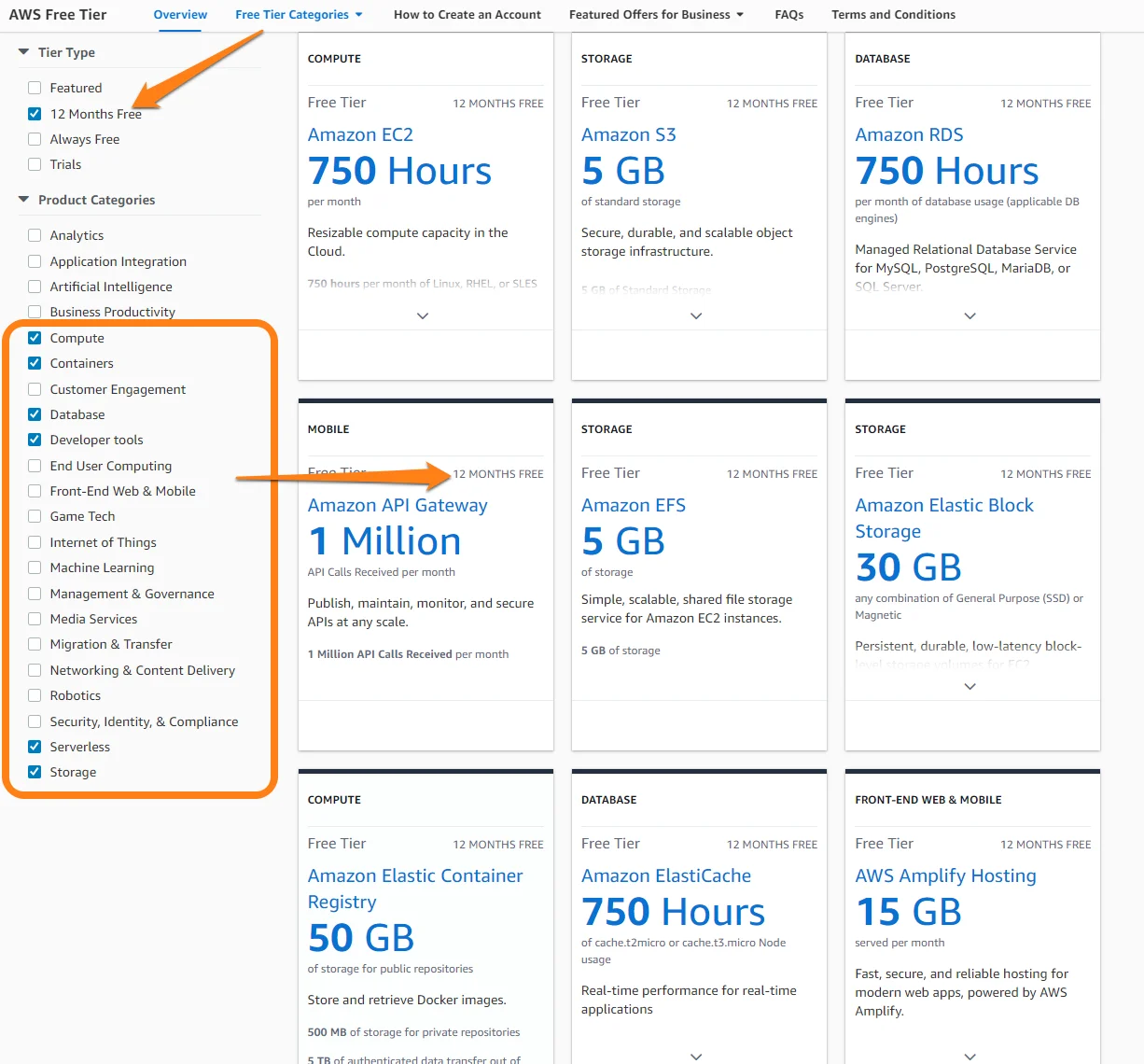
AWS takes the concept of granular billing to an extreme. Almost every component of a service—be it computing time, data transfer volume, storage capacity, I/O requests, or database throughput—is metered and billed separately. While this provides incredible transparency into exactly where your money is going, it also adds a layer of complexity for financial planning. Understanding the interplay of these micro-charges is crucial for accurate forecasting and cost management. To aid in this, AWS offers a comprehensive Free Tier, allowing new users to experiment with a selection of services up to certain limits without incurring charges. This provides an invaluable financial sandbox for learning and prototyping before committing to significant cloud expenditures. Utilizing tools like AWS Cost Explorer and AWS Budgets becomes essential for tracking, analyzing, and predicting these granular expenses effectively.
Key Cost Drivers in AWS: Where Your Money Goes
To effectively manage AWS costs, financial stakeholders must understand the primary services that accrue significant expenses. These are the engines of your cloud infrastructure, and their configuration directly impacts your monthly bill.
Compute Services (EC2): The Workhorse Expense
Amazon Elastic Compute Cloud (EC2) instances are the virtual servers that power most applications on AWS. Their pricing is a significant component of many cloud bills and depends on several factors:
-
Instance Type: Different instance families (e.g., general purpose, compute optimized, memory optimized) are priced according to their underlying hardware and performance characteristics. Choosing the right instance type—one that provides sufficient power without over-provisioning—is a critical financial decision.
-
Instance Size: Larger instances with more vCPUs and RAM naturally cost more. Rightsizing, or matching instance size to actual workload requirements, is paramount for cost efficiency.
-
Region: Pricing can vary slightly across different AWS regions due to local market conditions, power costs, and infrastructure investments.
-
Pricing Models: This is where the most significant financial optimization opportunities lie:
-
On-Demand: Provides maximum flexibility to start and stop instances at any time. Ideal for unpredictable workloads, but comes at the highest per-hour cost.
-
Reserved Instances (RIs): For workloads with predictable, steady-state usage, RIs offer substantial discounts (up to 72%) in exchange for a 1-year or 3-year commitment. This is a strategic financial commitment that requires careful capacity planning.
-
Spot Instances: Offer steep discounts (up to 90%) for unused EC2 capacity, but instances can be interrupted with short notice. Financially ideal for fault-tolerant, flexible, non-critical batch jobs.
-
Savings Plans: A more flexible commitment model than RIs, allowing for discounts across compute usage (EC2, Fargate, Lambda) for a 1-year or 3-year term. They simplify cost management by offering a consistent discount on a committed hourly spend.
-
Storage Services (S3, EBS, EFS): Data Retention Economics
Data storage is a fundamental requirement, and AWS offers a spectrum of services, each with a distinct cost profile tied to durability, availability, and access frequency.
-
Amazon S3 (Simple Storage Service): Object storage for virtually unlimited data. Pricing is based on:
-
Amount Stored: Varies by storage class (e.g., S3 Standard for frequent access, S3 Standard-Infrequent Access for less frequent access, S3 Glacier for archival). Choosing the correct class based on access patterns yields significant financial savings.
-
Data Transfer Out: Egress costs are a notable factor.
-
Requests: The number of PUT, GET, and other API requests also incurs a small charge.
-
-
Amazon EBS (Elastic Block Store): Block storage for EC2 instances. Priced by provisioned capacity, I/O operations, and snapshot storage.
-
Amazon EFS (Elastic File System): Scalable file storage for EC2 instances. Priced by the amount of data stored and depending on the performance mode.
Financial optimization here involves intelligent data lifecycle management—moving older, less frequently accessed data to cheaper storage tiers automatically.
Data Transfer: The Hidden Cost of Egress
While data transfer into AWS (ingress) is generally free, data transfer out of AWS (egress) to the internet or across regions is a significant cost factor and often a surprise for new cloud users.
-
Egress to Internet: Billed per GB, with rates decreasing at higher volumes.
-
Inter-Region Transfer: Transferring data between different AWS regions also incurs charges.
Architecting applications to minimize data egress, utilizing services like Amazon CloudFront (CDN) to cache content closer to users, and leveraging VPC peering where appropriate can significantly reduce these network-related expenses.
Database Services (RDS, DynamoDB, Aurora): Operational vs. Scaling Costs
AWS offers a variety of managed database services, removing the operational burden of patching, backups, and scaling, but still requiring careful financial consideration.
-
Amazon RDS (Relational Database Service): Managed relational databases (e.g., MySQL, PostgreSQL, SQL Server). Costs are based on instance type, storage, I/O operations, backups, and multi-AZ deployments for high availability. Reserved Instances are also available for RDS, offering financial commitment savings.
-
Amazon DynamoDB: A fully managed NoSQL database. Priced based on provisioned read/write capacity units (RCUs/WCUs), or on-demand capacity, and storage consumed. Careful capacity planning or leveraging the on-demand model can dictate cost efficiency.
-
Amazon Aurora: A MySQL and PostgreSQL-compatible relational database built for the cloud. Costs involve instance type, storage, and I/O. Its serverless option (Aurora Serverless) automatically scales and bills based on actual usage, providing immense financial flexibility for intermittent workloads.
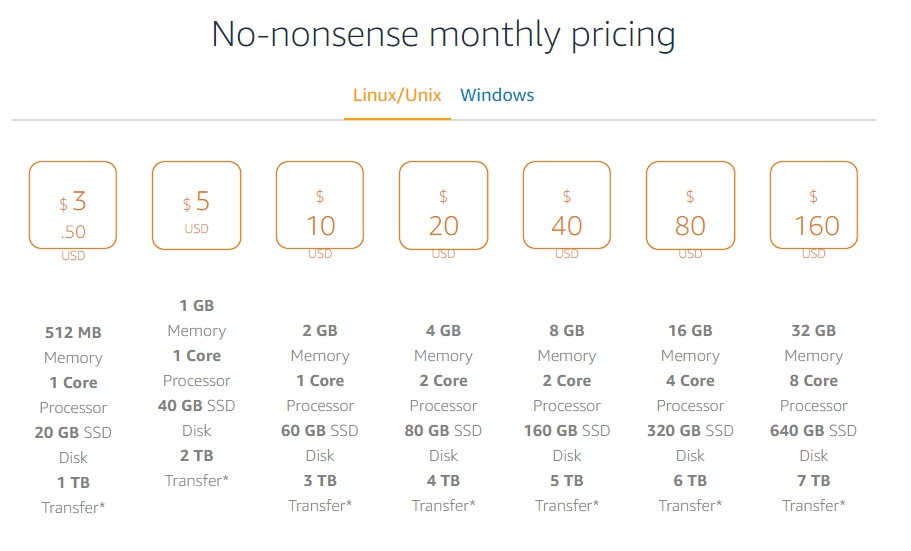
Financial Strategies for AWS Cost Optimization
Effective financial management of AWS goes beyond understanding the bill; it involves proactive strategies to ensure cost efficiency and maximize ROI.
Rightsizing & Elasticity for Maximum Value
One of the most impactful financial strategies is rightsizing. This involves continuously evaluating your compute and storage resources to ensure they precisely match your workload requirements, eliminating over-provisioning.
-
Compute Rightsizing: Utilizing tools like AWS Cost Explorer and AWS Trusted Advisor to identify EC2 instances that are either underutilized (too large for the workload) or overutilized (creating performance bottlenecks that might warrant an upgrade). Shutting down idle resources, particularly in non-production environments, can yield immediate savings.
-
Elasticity: Leveraging AWS’s inherent elasticity is a core financial benefit. Implementing auto-scaling for EC2 instances means you only pay for the capacity needed during peak demand, automatically scaling down during off-peak times. Adopting serverless architectures like AWS Lambda further refines this, billing you only for the actual compute time consumed, often down to the millisecond. This eliminates idle resource costs almost entirely for appropriate workloads.
Leveraging Commitment Discounts: Reserved Instances & Savings Plans
For stable, predictable workloads, committing to a specific usage level can unlock significant discounts, transforming a portion of your variable OpEx into a more predictable, discounted expense.
-
Reserved Instances (RIs): As discussed, RIs offer substantial discounts (up to 72%) on EC2, RDS, Redshift, and ElastiCache instances for 1-year or 3-year terms. The financial decision to purchase RIs requires careful forecasting of future resource needs to avoid over-commitment, which could lead to paying for unused capacity.
-
Savings Plans: These offer a more flexible commitment model than RIs, providing discounts (up to 66%) on your compute usage (EC2, AWS Fargate, AWS Lambda) in exchange for a 1-year or 3-year commitment to a consistent hourly spend. Savings Plans are a more modern and financially attractive option for organizations with diverse compute usage patterns, as they automatically apply to the lowest-cost compute options first.
Monitoring & Cost Management Tools: Financial Oversight
Proactive financial oversight is non-negotiable in the cloud. AWS provides a suite of tools designed to track, analyze, and optimize your spending.
-
AWS Cost Explorer: A powerful visualization tool that allows you to analyze your spending trends, identify cost drivers, and forecast future costs. It’s essential for gaining granular financial insights.
-
AWS Budgets: Enables you to set custom budgets and receive alerts when actual or forecasted costs exceed your defined thresholds. This is a crucial tool for preventing budget overruns.
-
AWS Trusted Advisor: Provides real-time guidance across five categories, including cost optimization. It identifies idle resources, underutilized assets, and recommends ways to reduce your bill.
-
Cost and Usage Reports (CUR): A highly detailed report of your AWS costs and usage. While complex, it offers the deepest level of financial data for advanced analysis, often used by finance teams or third-party cost management platforms.
-
Tagging: Implementing a robust tagging strategy (e.g., by department, project, environment) allows for granular cost allocation and chargebacks, enabling financial accountability across your organization.
Automation for Financial Governance
Automating cost optimization tasks ensures continuous efficiency and reduces manual effort.
-
Automated Resource Shutdown: Scripting the shutdown of non-production environments (development, staging) during off-hours can significantly reduce costs.
-
Lifecycle Policies: Implementing S3 lifecycle policies to automatically transition data to cheaper storage tiers (e.g., Glacier) as it ages is a set-and-forget financial optimization.
-
Automated Cleanup: Regularly identify and delete unattached or stale resources (e.g., old EBS snapshots, unattached Elastic IPs) that continue to incur small but accumulating charges.
Beyond the Bill: Total Cost of Ownership (TCO) in the Cloud
While understanding the direct AWS bill is crucial, a comprehensive financial evaluation requires considering the broader Total Cost of Ownership (TCO) implications of moving to the cloud.
Operational Savings & Reduced Capital Expenditure
The most obvious TCO benefit is the elimination of large upfront capital expenditures. Instead of investing in data center space, cooling systems, power infrastructure, and depreciating hardware, businesses can redirect that capital towards core business initiatives. Moreover, the operational burden of maintaining physical infrastructure, including patching, hardware upgrades, and troubleshooting, is largely offloaded to AWS. This translates to reduced operational costs, fewer staff hours dedicated to infrastructure maintenance, and a shift in IT personnel’s focus from “keeping the lights on” to innovation and value creation. The financial impact of not having to provision for peak capacity – with resources sitting idle for most of the time – is immense.
The Value of Agility & Innovation
While not a direct cost reduction, the financial value derived from AWS’s agility and innovation capabilities is profound. The ability to rapidly provision new environments, experiment with new technologies (like AI/ML or IoT), scale resources instantly to meet market demand, and recover quickly from failures (disaster recovery as a service) translates into faster time-to-market, enhanced competitiveness, and reduced business risk. This increased organizational agility directly contributes to revenue growth and market share, providing a significant return on investment that often dwarfs the direct infrastructure costs. The opportunity cost of not leveraging cloud capabilities can be a greater financial detriment than the cloud bill itself.
Training & Management Overheads
It’s important to acknowledge that cloud adoption isn’t entirely devoid of indirect costs. Organizations will incur expenses related to training staff on AWS services, developing new cloud-native architectural patterns, and establishing robust cloud governance frameworks. While these are necessary investments to maximize the financial benefits of the cloud, they are part of the overall TCO and should be factored into the financial planning. Additionally, the complexity of managing a large, dynamic cloud environment can necessitate new tools or specialized personnel, representing ongoing operational costs.
Conclusion
The question “how much does AWS cost?” ultimately doesn’t have a single, fixed answer. It’s a dynamic financial equation shaped by your architecture, usage patterns, and the diligence of your cost management strategies. AWS offers unparalleled flexibility and a pay-as-you-go model that can significantly reduce capital expenditure and enhance operational efficiency. However, harnessing these financial benefits requires continuous vigilance.
By deeply understanding the core pricing models, meticulously monitoring consumption, strategically leveraging commitment discounts, and employing robust cost management tools, businesses can transform AWS from a potential cost center into a powerful engine of financial efficiency and innovation. The journey to optimal cloud spending is ongoing, demanding continuous review, refinement, and a proactive approach to financial governance within your cloud environment. When managed correctly, AWS empowers organizations with financial agility, scalability, and a competitive edge that is simply unattainable with traditional infrastructure models.
aViewFromTheCave is a participant in the Amazon Services LLC Associates Program, an affiliate advertising program designed to provide a means for sites to earn advertising fees by advertising and linking to Amazon.com. Amazon, the Amazon logo, AmazonSupply, and the AmazonSupply logo are trademarks of Amazon.com, Inc. or its affiliates. As an Amazon Associate we earn affiliate commissions from qualifying purchases.