
In a digital age brimming with sophisticated design tools and cloud-based solutions, Microsoft Publisher often remains a quiet but incredibly powerful workhorse within the Microsoft Office suite. While Word handles text, Excel crunches numbers, and PowerPoint orchestrates presentations, Publisher carves out its own distinct niche as a desktop publishing (DTP) software. It is designed to empower individuals and small businesses to create professional-looking publications without requiring the steep learning curve or advanced features of professional graphic design applications. Far from being a relic of the past, Publisher continues to serve a vital role for those who need to design polished, print-ready, or digitally distributable materials with relative ease and efficiency. This article delves into the essence of Microsoft Publisher, exploring its core functionalities, key features, target audience, and its enduring relevance in today’s dynamic technological landscape.

The Core Functionality: Demystifying Desktop Publishing
At its heart, Microsoft Publisher is a desktop publishing program. Understanding what this means is crucial to appreciating its value and differentiating it from other software types.
A Desktop Publishing Powerhouse for the Everyday User
Desktop publishing (DTP) involves using a computer and specific software to create documents with a highly visual layout, integrating text, images, and other graphical elements into a cohesive, aesthetically pleasing design. Unlike a word processor like Microsoft Word, which prioritizes text flow and content creation, DTP software focuses on the layout and appearance of the document. Publisher allows users to manipulate individual elements—text boxes, images, shapes—with precise control over their positioning, sizing, and layering on a page. This object-oriented approach is fundamental to creating professional-looking brochures, newsletters, flyers, and more, where design integrity is paramount. While Word can handle some basic layout, it quickly becomes unwieldy for complex designs requiring exact placement and bleed considerations for printing. Publisher bridges this gap, offering a dedicated environment where design, not just text, takes center stage.
Intuitive Interface for Design Novices
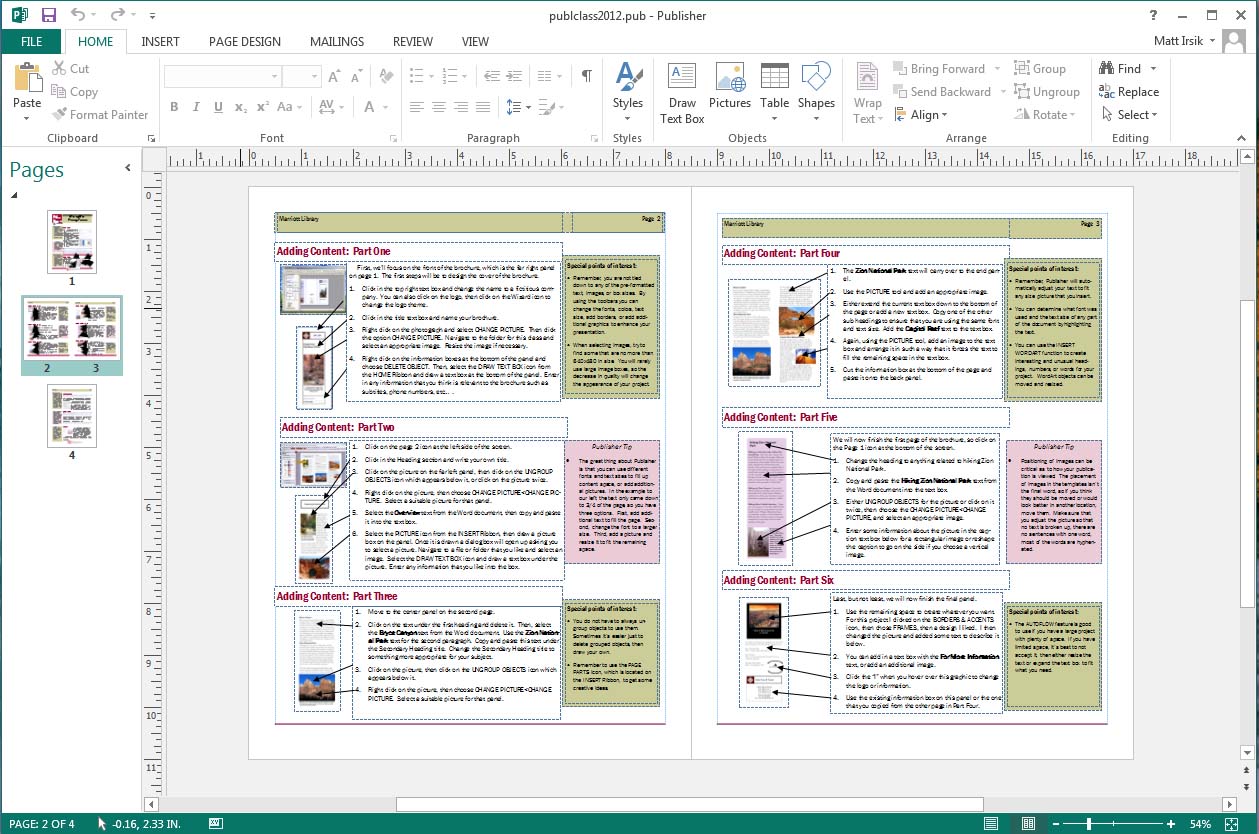
One of Publisher’s most significant strengths lies in its user-friendliness. Microsoft designed Publisher with the non-designer in mind, offering an interface that feels familiar to anyone who has used other Office applications. The ribbon interface, contextual tabs, and intuitive drag-and-drop functionality make it accessible for beginners to start creating compelling designs almost immediately. The software guides users through the creation process, often starting with a wide array of pre-designed templates. This template-driven approach drastically reduces the initial hurdle for those new to graphic design, allowing them to focus on content and minor customization rather than building a layout from scratch. The visual nature of Publisher, where what you see is largely what you get (WYSIWYG), further enhances its accessibility, making the design process less abstract and more tangible.
Versatile Document Creation for Diverse Needs
The range of documents that can be effectively created with Microsoft Publisher is extensive and caters to a wide spectrum of personal and professional requirements. From single-page flyers advertising a local event to multi-page newsletters for a community organization, Publisher offers the flexibility needed for various projects. Common applications include:
-
Marketing Materials: Brochures, flyers, business cards, postcards, advertisements.
-
Communication Tools: Newsletters, calendars, menus, bulletins.
-
Event-Specific Items: Invitations, greeting cards, programs, banners.
-
Informational Documents: Reports, manuals, resumes, forms.
This versatility makes Publisher an invaluable tool for anyone needing to produce visually appealing documents without investing in or mastering more complex and expensive professional design software.
Key Features that Set Publisher Apart
Microsoft Publisher’s enduring utility is largely attributed to a suite of features meticulously crafted to facilitate effective and efficient design for a broad user base. These features combine ease of use with robust design capabilities.
An Extensive and Customizable Template Library
The cornerstone of Publisher’s user-friendliness is its vast library of professional-grade templates. These aren’t merely basic layouts; they are fully designed, visually appealing starting points for virtually any type of publication. Users can select from categories like brochures, business cards, calendars, newsletters, postcards, and more. Each template comes with placeholder text and images, offering a clear guide for content placement. Beyond simply using them as-is, these templates are fully customizable. Users can easily change fonts, color schemes, images, and text to match their specific branding or personal aesthetic, providing a balance between guided design and creative freedom. This empowers users to achieve a polished look without needing a deep understanding of design principles or extensive experience with layout tools.
Object-Oriented Layout and Precision Tools
What truly differentiates Publisher from a word processor is its object-oriented approach to layout. Every element on a page—a text box, an image, a shape, a table—is treated as an independent object that can be freely moved, resized, rotated, and layered. This granular control is essential for desktop publishing, allowing for pixel-perfect placement and alignment. Publisher provides a suite of precision tools, including:
-
Guides and Rulers: For accurate positioning and spacing.
-
Alignment Tools: To automatically align objects relative to each other or the page.
-
Grouping and Layering: To manage complex designs by treating multiple objects as one or controlling their stacking order.
-
Nudging and Resizing Handles: For fine-tuning adjustments.
These tools ensure that even complex layouts with multiple elements remain organized, visually balanced, and professionally structured, crucial for achieving print-ready quality.
Brand Consistency and Design Customization
For businesses and organizations, maintaining a consistent brand identity across all communication materials is vital. Publisher facilitates this with features designed to promote brand consistency:
-
Color Schemes: Users can select from pre-defined color palettes or create custom schemes that can be applied across an entire publication, ensuring a unified look.
-
Font Sets: Similar to color schemes, font sets allow users to define consistent heading and body text fonts.
-
Master Pages: These are background pages where elements like headers, footers, page numbers, and logos can be placed once and then automatically appear on selected pages throughout the publication. This saves time and guarantees uniformity.
-
Image Placeholders: These allow users to define areas for images that maintain their size and aspect ratio even when images are swapped, further enhancing layout consistency.
These tools enable users to quickly apply a consistent look and feel to all their publications, reinforcing brand recognition and professionalism.
Seamless Integration with the Microsoft Office Suite
As an integral part of Microsoft Office, Publisher enjoys robust integration with its sibling applications. This interconnectedness streamlines workflow and enhances productivity:
-
Importing Text from Word: Users can easily bring in pre-written text from Microsoft Word documents, preserving formatting or allowing it to be adapted to the Publisher layout.
-
Data Merge with Excel: Publisher can leverage data from Excel spreadsheets for mail merge operations, creating personalized newsletters, address labels, or invitations with unique recipient information.
-
Embedding Objects from Other Office Apps: Charts from Excel or slides from PowerPoint can be embedded, maintaining their original appearance and functionality.
This integration significantly reduces the friction of transferring content between applications, making it easier to consolidate information and repurpose existing assets into new designs.
Diverse Print and Digital Output Options
Once a publication is designed, Publisher offers flexible options for its output, catering to both traditional print and modern digital distribution.
-
Professional Printing: Publisher includes features to prepare files for commercial printers, such as support for CMYK color, crop marks, and bleed settings, ensuring high-quality results. Users can preview how their publication will look when printed and often access printer-specific options.
-
Desktop Printing: For smaller runs, users can print directly to their office or home printers with precise control over paper size, orientation, and layout.
-
Digital Distribution: Publications can be exported as high-quality PDF files, preserving fonts, images, and layout, making them perfect for email, website embedding, or online sharing. Publisher also supports saving as standard image formats (JPEG, PNG) or even as web pages, although its web publishing capabilities are more basic compared to dedicated web design tools.
This array of output options ensures that the final design can reach its intended audience through the most appropriate medium, whether it’s a physical brochure or a digital newsletter.
Who Benefits Most from Microsoft Publisher?
While professional designers often opt for more advanced software like Adobe InDesign, Microsoft Publisher fills a crucial gap for a broad spectrum of users who need design capabilities without the associated complexity or cost.
Small Businesses and Startups
For small businesses and entrepreneurial ventures operating with limited budgets, Publisher is an invaluable asset. Hiring a professional graphic designer for every marketing collateral can be prohibitively expensive. Publisher allows these businesses to:
-
Create their own marketing materials: Design appealing brochures, flyers, business cards, and advertisements to promote their products and services without external dependencies.
-
Maintain brand consistency: With templates and branding tools, even a small team can ensure their public-facing documents project a consistent and professional image.
-
Respond quickly to market needs: Generate new promotional materials or update existing ones rapidly, allowing for agility in marketing efforts.
Non-Profits and Educational Institutions
Organizations in the non-profit and educational sectors frequently rely on effective communication with donors, volunteers, students, and parents. Publisher helps them to:
-
Produce engaging newsletters and annual reports: Keep stakeholders informed and motivated with visually appealing updates.
-
Design event flyers and banners: Announce fundraisers, school events, and community initiatives effectively.
-
Create educational materials: Teachers can design worksheets, classroom posters, and course syllabi that are both informative and visually stimulating.
Its cost-effectiveness and ease of use make it a natural fit for organizations with often constrained resources.
Individuals and Home Users
Beyond professional applications, Publisher is equally beneficial for personal projects and home use. Anyone looking to add a touch of professionalism to their personal communications can leverage its features:
-
Crafting personalized invitations and greeting cards: For weddings, birthdays, holidays, or any special occasion, creating unique, custom designs.
-
Designing family newsletters: Sharing updates, photos, and stories with extended family in an attractive format.
-
Creating resumes and personal portfolios: Presenting oneself professionally with a customized layout that stands out.
For those who enjoy DIY projects and want more control over their visual output than what a standard word processor offers, Publisher is an excellent choice.
Publisher in the Modern Tech Landscape
In an era dominated by cloud applications, mobile-first design, and increasingly powerful online tools, it’s important to contextualize Microsoft Publisher’s place and enduring relevance.
Differentiating from Advanced Design Software
It’s crucial to understand that Microsoft Publisher is not designed to compete directly with high-end professional DTP software like Adobe InDesign or QuarkXPress. These advanced tools offer:
-
More sophisticated typography controls: Fine-tuning of kerning, tracking, and ligatures.
-
Complex layout capabilities: Advanced grid systems, master page functionality for massive publications, and scripting support.
-
Robust pre-press features: Greater control over color management, trapping, and output profiles for highly specialized print jobs.
-
Integration with professional creative suites: Seamless workflow with Photoshop, Illustrator, Acrobat.
Publisher, by contrast, targets users who need a simpler, more accessible tool for everyday design tasks. Its strength lies in its ability to produce good-quality results quickly and affordably, without requiring years of design training or a significant financial investment in a professional creative suite. It serves as an excellent entry point into desktop publishing for those who may eventually transition to more complex tools as their needs and skills evolve.
Cloud-Based Alternatives and Online Design Tools
The digital landscape has seen a proliferation of cloud-based design tools like Canva, Adobe Express (formerly Spark), and various online flyer makers. These tools often emphasize:
-
Browser-based accessibility: No software installation required, accessible from any device with an internet connection.
-
Extensive stock libraries: Built-in access to photos, illustrations, and icons.
-
Collaboration features: Easy sharing and co-editing of designs.
While these online tools offer convenience and a highly collaborative environment, Publisher retains advantages in certain scenarios. For users who prefer working offline, have specific layout requirements, or need deeper integration with their locally stored Office files, Publisher remains a strong contender. Furthermore, Publisher offers greater precision in object placement and text formatting compared to many of the more template-driven online tools, which sometimes sacrifice fine-grained control for ease of use. It represents a more robust, albeit traditional, desktop application approach to design.
The Future of Desktop Publishing
Despite the rise of online alternatives, the niche for dedicated desktop publishing software like Publisher remains relevant. The need for high-quality, print-ready materials with precise layout control is not diminishing. While digital distribution is prevalent, physical media (brochures, business cards, posters) continues to play a significant role in many industries and personal contexts.
Publisher’s continued existence within the Microsoft 365 ecosystem indicates Microsoft’s recognition of this enduring need. Its future likely involves continued incremental improvements, perhaps tighter integration with cloud services where appropriate, and a focus on maintaining its reputation as an accessible yet capable DTP solution. It provides a stable and reliable platform for users who prioritize control, offline functionality, and seamless integration with the broader Office environment, ensuring that desktop publishing, in its more accessible form, continues to thrive.
Getting Started with Microsoft Publisher
Embarking on a design project with Microsoft Publisher is a straightforward process, thanks to its intuitive design and familiar Microsoft Office environment. For those looking to dive in, understanding the basics of acquiring and utilizing the software is key.
System Requirements and Availability
Microsoft Publisher is typically acquired as part of a Microsoft 365 subscription (formerly Office 365). It is included in most Microsoft 365 plans for PC, such as Microsoft 365 Personal, Family, Business Standard, and Business Premium. It is important to note that Publisher is a Windows-only application and is not available for macOS. While standalone perpetual licenses were historically available, the current model heavily favors the subscription service, which ensures users always have access to the latest version and security updates. The system requirements are generally modest, aligning with those for the broader Microsoft Office suite, making it accessible on most modern Windows PCs.
Basic Workflow for a New Project
Starting a new publication in Publisher generally follows a simple, logical sequence:
-
Launch Publisher: Open the application from your Start menu.
-
Select a Template or Start Blank: You’ll be presented with a vast array of pre-designed templates categorized by publication type (brochures, business cards, flyers, etc.). For full creative control, you can choose a blank publication.
-
Customize the Template (if applicable): If you’ve chosen a template, begin by replacing placeholder text with your own content and swapping out images with your desired visuals. Adjust fonts and colors to match your brand or preferences.
-
Add/Arrange Content (for blank or customized templates):
-
Text Boxes: Insert text boxes and type or paste your content. Use the drawing tools to manipulate their size and position.
-
Images: Insert pictures from your computer. Publisher provides tools to crop, resize, and apply basic effects to images.
-
Shapes and Drawing Objects: Add geometric shapes, lines, and other drawing elements to enhance your design.
-
-
Refine Layout and Design: Utilize Publisher’s alignment guides, rulers, and snap-to features for precise placement. Pay attention to whitespace, visual hierarchy, and overall balance. Apply master pages for consistent headers, footers, and page numbers across multiple pages.
-
Proofread and Review: Critically examine all text for typos and grammatical errors. Review the entire layout for consistency and visual appeal.
-
Save and Publish: Save your publication regularly. When ready to output, use the ‘File > Print’ options for physical copies or ‘File > Export’ to create PDFs or other digital formats suitable for sharing.
Tips for Effective Design in Publisher
Even with an intuitive tool like Publisher, a few design principles can significantly elevate your publications:
-
Start with a Clear Purpose: Before opening Publisher, know what you want to communicate and to whom. This guides your design choices.
-
Utilize Templates Wisely: Templates are a fantastic starting point, but don’t be afraid to customize them extensively to make them your own.
-
Prioritize Readability: Choose legible fonts and ensure sufficient contrast between text and background. Don’t overcrowd your pages with too much text.
-
Embrace Whitespace: Empty space around elements helps your design breathe and makes content easier to digest. It’s not wasted space; it’s design space.
-
Maintain Consistency: Stick to a limited palette of colors and a consistent set of fonts (e.g., one for headings, one for body text). This reinforces professionalism.
-
High-Quality Images: Use high-resolution images that are relevant to your content. Pixelated or stretched images instantly detract from professionalism.
-
Proofread Meticulously: A beautiful design can be ruined by typos. Get a second pair of eyes to review your work before publishing.
By following these guidelines, users can harness the power of Microsoft Publisher to create impactful and professional publications that effectively convey their message, whether for a business, an organization, or a personal project.

Conclusion
Microsoft Publisher software, though often overshadowed by its more prominent Office siblings, maintains a critical position as an accessible and robust desktop publishing tool. It expertly bridges the gap between simple word processing and complex professional graphic design, empowering individuals, small businesses, non-profits, and educational institutions to create high-quality, visually engaging print and digital materials without the steep learning curve or significant investment associated with industry-standard DTP applications.
Its core strength lies in its intuitive, object-oriented interface, extensive customizable templates, and powerful precision tools that allow for granular control over layout. Seamless integration within the Microsoft Office suite further enhances its utility, enabling users to easily incorporate existing content from Word and Excel. In a modern tech landscape increasingly populated by cloud-based design tools, Publisher continues to offer the advantages of offline functionality, deep system integration, and a level of precise control that many online alternatives cannot match.
Ultimately, Microsoft Publisher stands as a testament to the enduring need for dedicated desktop publishing capabilities. It is the go-to solution for anyone who requires professional-looking publications – from marketing brochures and newsletters to personalized invitations and academic posters – with efficiency, affordability, and a user experience that prioritizes accessibility without compromising on design quality. For those looking to translate ideas into polished visual communications, Publisher remains an invaluable and relevant component of the modern tech toolkit.
aViewFromTheCave is a participant in the Amazon Services LLC Associates Program, an affiliate advertising program designed to provide a means for sites to earn advertising fees by advertising and linking to Amazon.com. Amazon, the Amazon logo, AmazonSupply, and the AmazonSupply logo are trademarks of Amazon.com, Inc. or its affiliates. As an Amazon Associate we earn affiliate commissions from qualifying purchases.