
In the vast and intricate world of computing, where applications run seamlessly and hardware components communicate effortlessly, there lies a foundational layer that orchestrates it all: the kernel. Often operating silently in the background, out of sight and mind for the average user, the kernel is the beating heart of every operating system (OS). It is the crucial bridge that connects the high-level software you interact with to the low-level hardware components within your device, ensuring everything works in harmony. Without a kernel, your computer would be nothing more than a collection of inert electronic parts, unable to perform even the simplest task.

Understanding the kernel is akin to understanding the engine of a car; you don’t need to be a mechanic to drive, but knowing its fundamental role provides profound insight into how the entire system functions. From your smartphone to a supercomputer, every digital interaction, every byte transferred, and every program executed passes through the watchful eye and intricate logic of the kernel. This article delves into the essence of what a kernel OS is, exploring its vital functions, diverse architectures, and its indispensable role in shaping our digital lives.
The Kernel’s Fundamental Role: Orchestrating the Digital Symphony
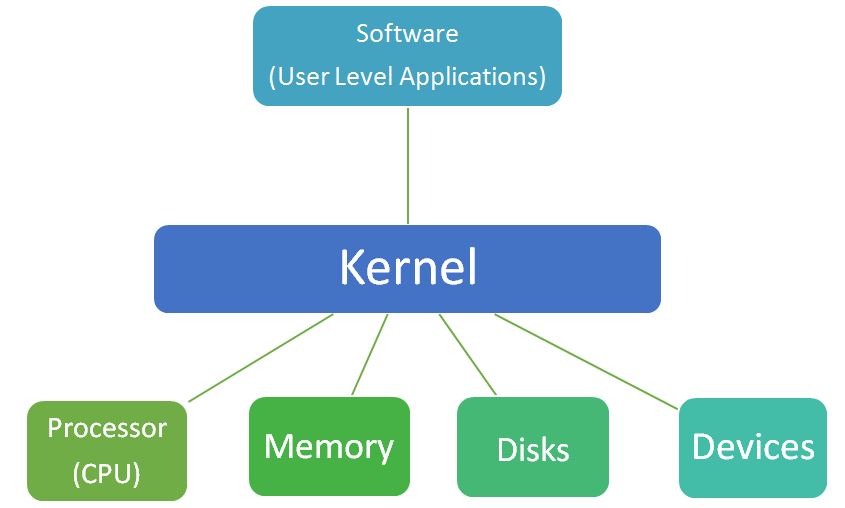
At its core, the kernel is a privileged program that manages the system’s resources and provides services to user applications. It resides in a special area of memory, often called kernel space, making it distinct from the user space where applications run. This distinction is critical for security and stability, as it prevents user applications from directly interfering with the operating system’s core functions. The kernel acts as the ultimate authority, arbitrating access to hardware and ensuring fair and efficient resource allocation.
Bridging Hardware and Software
The most straightforward way to conceptualize the kernel’s role is as a translator and mediator between the hardware and software layers. When an application, such as a web browser, needs to perform an action – say, saving a file to the hard drive or displaying an image on the screen – it doesn’t directly interact with the physical components. Instead, it sends a request to the kernel via a “system call.” The kernel then interprets this request, understands which hardware component is involved, and issues the necessary low-level commands to that component.
This abstraction layer provided by the kernel is invaluable. It frees application developers from needing to write code for every conceivable piece of hardware. Instead, they can rely on the consistent interface provided by the kernel. The kernel, in turn, uses device drivers – specialized pieces of software – to communicate with specific hardware devices like graphics cards, network adapters, and USB peripherals. These drivers translate the kernel’s generic requests into device-specific instructions, making diverse hardware compatible with a single operating system.
Resource Management Maestro
Modern computing environments are highly dynamic, with numerous applications competing for finite resources. The kernel is the master orchestrator of these resources, ensuring that they are allocated efficiently, fairly, and securely. Without effective resource management, a system would quickly become sluggish, unstable, or even crash due to conflicts or depletion of vital components.
Key resources managed by the kernel include the Central Processing Unit (CPU), memory (RAM), and Input/Output (I/O) devices. The kernel decides which program gets to use the CPU at any given moment, how much memory each program can access, and controls all data flow to and from storage devices, network interfaces, and other peripherals. This oversight prevents applications from monopolizing resources or accessing memory that belongs to other programs, which could lead to data corruption or system failure.
Process and Thread Management
Every running program on your computer is considered a “process.” Within these processes, smaller units of execution called “threads” often exist, allowing a single program to perform multiple tasks concurrently. Managing these processes and threads is a core responsibility of the kernel. It’s the kernel that initiates, suspends, resumes, and terminates processes. It allocates memory space for them, assigns them unique identifiers, and keeps track of their state.
The kernel’s scheduler component is particularly crucial here. It determines which process or thread should run on the CPU at any given time, according to various algorithms that balance fairness, priority, and responsiveness. This rapid switching between processes (context switching) creates the illusion that multiple programs are running simultaneously, even on a single-core processor. Efficient process and thread management is vital for multitasking, ensuring a smooth and responsive user experience even when many applications are active.
Key Functions of a Kernel
Beyond its overarching role as an orchestrator, the kernel performs several specific, critical functions that enable the operating system to operate effectively and reliably. These functions are the backbone of any computing system, handling the low-level details that underpin every high-level operation.
Memory Management
Memory is a finite and precious resource. The kernel’s memory management unit is responsible for allocating memory to processes, ensuring that each process has enough space to operate without encroaching on others, and protecting memory from unauthorized access. A sophisticated technique known as “virtual memory” is a cornerstone of this function.
Virtual memory allows processes to believe they have access to a contiguous, large block of memory, even if the physical RAM is fragmented or smaller than the virtual address space. The kernel achieves this by mapping virtual addresses used by applications to physical addresses in RAM or even to disk space (paging/swapping). This not only expands the apparent memory available but also isolates processes, preventing one faulty application from corrupting the memory of another or the kernel itself.
Process Scheduling
In a multi-tasking environment, many processes are ready to run, but the CPU can only execute one instruction at a time (per core). The kernel’s process scheduler is the component responsible for deciding which process gets to use the CPU and for how long. It employs various scheduling algorithms – such as round-robin, priority-based, or shortest-job-first – to balance the needs of interactive applications (which require quick responses) with background tasks (which can tolerate some delay).
An effective scheduler ensures that the system feels responsive, no single process starves for CPU time, and critical system processes are given precedence. This constant shifting of the CPU’s attention between various tasks is a complex dance choreographed by the kernel, making multitasking seem effortless.
Device Management
The kernel acts as the gatekeeper and manager for all hardware devices connected to the system. From internal components like disk controllers and network interfaces to external peripherals like keyboards, mice, printers, and USB drives, the kernel controls access and communication. It does this through a standardized interface to device drivers.
When an application needs to interact with a device (e.g., read data from a disk, send output to a printer), it makes a system call, and the kernel then uses the appropriate device driver to perform the actual hardware interaction. This centralized control prevents conflicts, ensures proper initialization and shutdown of devices, and handles error conditions, leading to stable and reliable hardware operation.
System Calls and Interrupts
System calls are the primary mechanism by which user-space applications request services from the kernel. They are essentially carefully defined functions that applications can invoke to perform privileged operations, such as creating a new process, reading/writing files, allocating memory, or communicating over a network. These calls transition the CPU from user mode to kernel mode, allowing the kernel to execute the requested operation with its higher privileges.
Interrupts, on the other hand, are signals generated by hardware devices or the CPU itself (software interrupts) to notify the kernel of an event. For example, a keyboard interrupt occurs when a key is pressed, a timer interrupt signals the passage of a specific amount of time, and a disk interrupt indicates that data has been read or written. The kernel has an interrupt handler for each type of interrupt, which pauses the currently executing process, addresses the event, and then returns control. Both system calls and interrupts are fundamental to the kernel’s ability to respond to events and manage the system dynamically.
Different Types of Kernels
While all kernels share the fundamental goal of managing system resources, they achieve this through various architectural designs, each with its own trade-offs regarding performance, modularity, security, and complexity. The choice of kernel architecture significantly influences the overall characteristics of an operating system.

Monolithic Kernels
A monolithic kernel is characterized by the fact that all operating system services – including process management, memory management, device drivers, and file systems – run together within the same kernel space. This means they all share the same address space and communicate directly with each other.
Advantages:
-
Performance: Direct communication between components within the same address space can lead to faster execution because there’s less overhead compared to inter-process communication (IPC) between separate components.
-
Simplicity (for initial design): Easier to design and implement initially as all components can be tightly integrated.
Disadvantages:
-
Stability: A bug in one driver or module can potentially crash the entire kernel, bringing down the entire system, as all components are tightly coupled.
-
Maintainability and Development: Large codebases can be difficult to manage, debug, and extend. Adding new features or updating drivers often requires recompiling and rebooting the entire kernel.
-
Security: A security vulnerability in any kernel component can expose the entire system.
Examples: Linux kernel, traditional Unix kernels (like BSD variants).
Microkernels
Microkernels take the opposite approach to monolithic kernels. They aim to keep the kernel as small and minimal as possible, providing only the most essential services in kernel space (e.g., basic memory management, process scheduling, and inter-process communication). Most other OS services, such as device drivers, file systems, and network protocols, run as separate user-space processes called “servers.”
Advantages:
-
Modularity: Services are independent, making the kernel easier to develop, debug, and maintain.
-
Stability and Reliability: A failure in a user-space server (like a device driver) does not crash the entire kernel; only that specific server needs to be restarted.
-
Security: Enhanced security as services run in isolated user-space processes, with strict access control enforced by the kernel.
-
Flexibility: Easier to modify or add new services without affecting the core kernel.
Disadvantages:
-
Performance Overhead: Communication between user-space servers and the microkernel often involves message passing (IPC), which introduces more overhead and context switching compared to direct function calls within a monolithic kernel, potentially leading to lower performance.
-
Complexity (for developers): Designing and optimizing microkernel-based systems can be more challenging due to the distributed nature of services.
Examples: Mach (used as the foundation for macOS’s XNU kernel), Minix, L4 microkernel family.
Hybrid Kernels
Hybrid kernels attempt to combine the best aspects of both monolithic and microkernels. They run some services (like IPC and some drivers) in kernel space for performance, while moving other services (like file systems or less critical device drivers) into user space to gain some of the modularity and stability benefits of microkernels. They are a pragmatic compromise designed to optimize for both performance and stability.
Advantages:
-
Balance: Aims to provide the performance benefits of monolithic kernels with some of the modularity and reliability of microkernels.
-
Popularity: Many modern operating systems adopt this approach.
Disadvantages:
- Can still suffer from some of the drawbacks of both architectures, albeit to a lesser degree.
Examples: Microsoft Windows NT kernel (and its descendants like Windows 10/11), XNU kernel in macOS, often described as a hybrid because it’s based on Mach but integrates many BSD components into the kernel space.
Exokernels and Nanokernels (Brief Mention)
-
Exokernels: A more radical approach where the kernel only provides mechanisms to allocate and ensure secure multiplexing of hardware resources, but delegates all resource management policies to user-level applications (known as “library operating systems”). This offers maximum flexibility but is complex to develop.
-
Nanokernels: An even smaller version of a microkernel, sometimes just handling interrupt management and basic scheduling, often found in embedded systems or real-time operating systems where resources are extremely limited.
The Kernel’s Impact on User Experience and System Performance
The architecture and implementation of a kernel profoundly influence virtually every aspect of a computing system, from its responsiveness to its robustness and security. While users rarely interact with the kernel directly, its silent operation dictates the quality of their digital experience.
Stability and Security
A well-designed kernel is the first line of defense against system instability and malicious attacks. By isolating processes, managing memory carefully, and strictly controlling access to hardware, the kernel prevents applications from crashing each other or the entire system. In terms of security, the kernel’s privileged status means it must be meticulously engineered to prevent vulnerabilities that could be exploited by malware to gain unauthorized control over the system. Robust error handling within the kernel ensures that minor faults don’t cascade into catastrophic failures.
Performance Optimization
The efficiency of the kernel’s algorithms directly impacts the system’s performance. How quickly it can switch between tasks, how effectively it allocates memory, and how rapidly it can process I/O requests all contribute to the overall responsiveness and speed of the operating system. An optimized kernel can make a significant difference in how smooth an application runs, how fast files are transferred, and how quickly the system boots up. Modern kernels continually evolve to incorporate new hardware features and employ more sophisticated scheduling and resource management techniques to squeeze maximum performance out of contemporary processors and memory architectures.
Hardware Compatibility
The kernel, specifically through its integration of device drivers, is responsible for the system’s ability to communicate with and utilize a vast array of hardware. A comprehensive and well-maintained set of drivers within the kernel allows an operating system to support diverse components from different manufacturers – from the latest graphics cards to legacy USB devices. The ease with which new hardware can be integrated into a system often depends on the kernel’s design and the availability of stable, performant drivers.
Future of Kernel Development
As technology advances, so too does kernel development. Trends like cloud computing, containerization (e.g., Docker, Kubernetes), and specialized hardware (like AI accelerators) are pushing kernels to become even more efficient, secure, and adaptable. Cloud-native kernels are being optimized for highly virtualized environments, while security enhancements continue to be a top priority, with features like kernel address space layout randomization (KASLR) and mandatory access control. The focus is increasingly on making kernels more resilient, performant, and flexible to meet the demands of an ever-evolving digital landscape.
Conclusion
The kernel is the unsung hero of the computing world, a complex and sophisticated piece of software that operates beneath the surface, silently enabling every digital interaction. From the moment you power on your device, it springs into action, managing resources, scheduling tasks, and bridging the divide between software and hardware. Whether it’s a monolithic powerhouse like Linux, a modular microkernel-based system, or a hybrid design, its fundamental purpose remains the same: to provide a stable, secure, and efficient foundation upon which all other software can thrive.
Understanding what a kernel OS is illuminates the intricate engineering that makes modern computing possible. It underscores why a robust and well-designed kernel is paramount to the stability, performance, and security of any operating system. As technology continues its relentless march forward, the kernel will undoubtedly evolve, adapting to new challenges and hardware, but its core role as the indispensable orchestrator of our digital lives will remain as critical as ever.
aViewFromTheCave is a participant in the Amazon Services LLC Associates Program, an affiliate advertising program designed to provide a means for sites to earn advertising fees by advertising and linking to Amazon.com. Amazon, the Amazon logo, AmazonSupply, and the AmazonSupply logo are trademarks of Amazon.com, Inc. or its affiliates. As an Amazon Associate we earn affiliate commissions from qualifying purchases.