
In the vast, interconnected landscape of digital social platforms, the simple act of “friending” someone on Facebook forms a foundational pillar of online interaction. But what about its inverse? The seemingly straightforward action of “unfriending” carries a surprisingly intricate set of technical implications, reshaping not just personal connections but also influencing the algorithms, content visibility, and privacy frameworks that govern our digital lives. Far from being merely a social gesture, unfriend-ing is a direct interaction with Facebook’s underlying technology, altering the very fabric of how the platform presents and processes information for both parties involved. Understanding these technical repercussions is crucial for anyone navigating their digital identity and managing their online experience effectively.
The Immediate Technical Repercussions
When you initiate the unfriend action on Facebook, it triggers a series of instantaneous technical changes that redefine the relationship status between you and the other user. These changes are fundamental to how the platform operates and impacts the visibility and interaction channels available.
Mutual Friendship Dissolution
The most obvious and primary technical consequence of unfriending is the dissolution of the mutual friendship status. Prior to the unfriend, both individuals existed on each other’s friend lists, signifying a two-way connection recognized by Facebook’s system. Upon unfriending, this mutual status is revoked. From a database perspective, the entry linking your user ID to theirs as “friend” is deleted, and vice-versa. This means neither of you will appear on the other’s public or private friend list. For the person unfriended, there is no direct notification from Facebook itself; the change is only evident if they actively check your profile and notice the “Add Friend” button instead of the previous “Friends” or “Message” prompt.
Content Visibility Adjustments
A critical technical implication of unfriending lies in content visibility. Facebook’s core function is to deliver personalized content, and friend connections are paramount to this process. Once unfriended, the platform’s algorithms immediately cease delivering your friend-only content to their News Feed, and vice-versa.
-
For the Unfriender: You will no longer see any of their posts, photos, or updates that were set to “Friends” or “Friends of Friends” privacy. You will still be able to see their public posts if their profile settings allow public viewing, and you may encounter them in mutual groups or events.
-
For the Unfriended: They will similarly lose access to your “Friends” or “Friends of Friends” content. Your profile picture and cover photo may still be visible depending on your public privacy settings, but the vast majority of your activity will disappear from their feed and profile view. This immediate alteration in content delivery is a direct reflection of how Facebook’s access control lists and content distribution systems update in real-time.
Messaging & Tagging Limitations
While unfriending severs the direct connection, it doesn’t always completely cut off all forms of communication, though it significantly alters them.
-
Messaging: If you were previously friends, you can generally still send messages to each other. However, messages from non-friends often get routed to the “Message Requests” folder, rather than appearing directly in the primary inbox. This is a technical filter designed by Facebook to help users manage unsolicited communication. The recipient would need to explicitly accept the message request to move the conversation to their main inbox. This mechanism relies on Facebook’s communication routing protocols, differentiating between messages from established connections and those from strangers or severed ties.
-
Tagging: Unfriending immediately disables the ability to tag each other in photos, posts, or comments. The platform’s tagging functionality is inherently tied to the friend relationship, as it implies a level of consent and connection. Without the friend status, the system prevents such direct linking.
Impact on Your Digital Footprint and Feed Algorithm
Beyond the immediate changes in connection status, unfriending has a profound, albeit often subtle, impact on your digital footprint within Facebook and how the platform’s sophisticated algorithms curate your personal experience.
Curation of Your News Feed
Facebook’s News Feed algorithm is a complex system designed to prioritize content it believes you want to see. Your friends list is a primary input for this algorithm. When you unfriend someone, you are essentially providing a direct signal to Facebook’s recommendation engine. The algorithm interprets this action as a desire to no longer see content associated with that individual. Consequently, your News Feed will become “cleaner” and more tailored to your remaining connections and interests, free from the content generated by the unfriended party. This constant refinement of your feed based on user actions is a core feature of Facebook’s content delivery technology, aiming to maximize engagement by showing you more relevant information. It’s a continuous feedback loop: your actions (like unfriending) influence the algorithm, which in turn influences the content you receive.
Privacy Settings and Interaction Controls
The act of unfriending often prompts a natural re-evaluation of privacy settings. Without the safety net of a “friend” connection, individuals might adjust their global privacy settings. For instance, if your profile posts were previously set to “Friends of Friends,” an unfriend could expose your public profile to a wider audience than intended, especially if the unfriended person had many mutual friends with you. Users might then switch to “Friends Only” or even “Public” with more careful consideration. Technically, Facebook allows for granular control over who sees what. Unfriending doesn’t alter your pre-existing privacy settings directly, but it changes the scope of who falls under categories like “Friends” or “Friends of Friends,” necessitating a review to ensure your desired level of digital exposure is maintained.
Algorithm’s Reassessment of Connections
Facebook’s algorithm isn’t just about showing you posts; it’s also about understanding your social graph and suggesting new connections or content. An unfriend action provides the algorithm with data points about social distance and preferences. Over time, a pattern of unfriending certain types of people or content can influence what Facebook suggests to you in terms of “People You May Know” or groups. The algorithm learns from these disconnections, attempting to avoid recommending similar profiles or content that led to a severing of ties. This sophisticated machine learning process continuously adapts your digital social graph, trying to predict and optimize your experience based on your explicit and implicit actions within the platform.
Unfriending vs. Other Connection Management Tools
Facebook, recognizing the nuanced nature of digital relationships, offers a suite of tools beyond simple unfriending. Understanding the technical distinctions between these options is key to effectively managing your online interactions and privacy.
Blocking: The Digital Iron Curtain
Blocking someone on Facebook is a far more absolute technical measure than unfriending. When you block a user, it creates an impenetrable digital barrier.
-
Complete Disappearance: The blocked person cannot find your profile, view your posts (even public ones), send you messages, comment on your content, or even see if you’re online. Conversely, you cannot do the same to them. It’s as if each user ceases to exist in the other’s Facebook universe.
-
Mutual Unfriending and Disconnection: Blocking automatically unfriends the person if you were previously connected. It also severs all previous interactions in terms of tags, likes, and comments from their end on your profile.
-
Group and Event Limitations: While you can be in the same Facebook group or event as someone you’ve blocked, you will not see their posts or comments, and they won’t see yours. The platform actively filters out their content from your view within these shared spaces.
Technically, blocking involves adding a user ID to a personal “blacklist” within Facebook’s system, triggering a comprehensive set of access control rules that supersede all other privacy settings.
Taking a Break: A Softer Approach
For situations where a complete severing of ties feels too drastic, Facebook introduced “Take a Break.” This feature is a more nuanced technical solution for managing temporary discomfort or reducing visibility without fully unfriending or blocking.
-
Limited Visibility: You can choose to “See Less” of someone, meaning their posts will be less prominent in your News Feed, but you remain friends.
-
Limited Interaction for Them: You can also choose to “Limit What They See,” restricting their access to your public posts without unfriending.
-
Editing Past Post Visibility: The tool also allows for bulk editing of past posts to either hide them from a specific person or hide all posts you’ve both been tagged in from your timeline.
This functionality relies on dynamic privacy filters and News Feed prioritization algorithms that adjust content delivery based on specific user requests, rather than severing the underlying friend connection. It’s a temporary adjustment to the algorithm’s input without changing the fundamental social graph.
Following vs. Friending: Public vs. Private Access
The distinction between “following” and “friending” is crucial for understanding different levels of digital access on Facebook.
-
Friending: Creates a two-way, mutual connection, granting access to “Friends Only” content and allowing for reciprocal interaction (tagging, messaging in main inbox, seeing each other’s entire profile based on privacy settings).
-
Following: Typically a one-way connection. When someone follows you, they receive updates to your public posts in their News Feed. They don’t have access to your “Friends Only” content, nor can they typically tag you directly (unless privacy settings allow it). You don’t automatically follow them back.
Technically, friending is a verified, bidirectional link, while following is an asymmetrical content subscription. Your friend list is a curated social graph, whereas your follower count reflects public interest in your profile. Unfriending removes the mutual link, but if your public settings allow, the unfriended person might still follow you.
Navigating the Aftermath: Technical Considerations
The aftermath of unfriending extends beyond the immediate changes, requiring an understanding of how data, future connections, and your overall digital social graph are managed by Facebook’s technology.
Re-friending: The Technical Path Back
Should circumstances change, and you wish to re-establish a friendship on Facebook, the process is straightforward but carries a particular technical implication. You would navigate to their profile and click the “Add Friend” button. This sends a new friend request. From Facebook’s system perspective, this is treated as a completely new request, regardless of previous friendship history. The system does not store a “record of past friendship” that automatically re-establishes the connection without explicit consent. The other person must accept the request for the mutual friendship status to be restored, and all content visibility and messaging privileges would then return to their “friend” settings.
Data Privacy and Archiving Post-Unfriend
A common concern post-unfriend is what happens to past interactions, messages, and photos.
-
Messages: Your private message history with the unfriended person remains intact in your Messenger inbox, and theirs. Unfriending does not delete message threads.
-
Tagged Photos/Posts: Photos or posts where you were mutually tagged, or where one of you tagged the other, will remain on the platform. However, the visibility of these posts might change depending on privacy settings. If a post was set to “Friends Only” and the person is no longer your friend, they might not be able to see it, even if they were tagged.
-
Data Archiving: Facebook’s general data retention policies apply. Unfriending does not typically trigger the deletion of user data; it merely alters the access permissions and visibility controls associated with that data. If you wish for more comprehensive data removal, deleting your own account or individual posts would be necessary.
Managing Your Digital Social Graph
Your “digital social graph” refers to the network of connections you have across online platforms. On Facebook, this graph is dynamically managed through friending, unfriending, blocking, and following actions. Each action serves as a data point for Facebook’s algorithms, helping them to map your relationships, interests, and online behavior. Regular maintenance of your friend list through actions like unfriending contributes to a more accurate and relevant digital social graph for you. A well-managed graph means fewer irrelevant posts, better “People You May Know” suggestions, and a more coherent online identity.
Best Practices for Digital Relationship Management
Effectively navigating the technological landscape of Facebook requires a proactive approach to managing your digital relationships and understanding the tools at your disposal.
Regular Friend List Audits
Consider periodically reviewing your friend list. This isn’t just about social preference; it’s a technical maintenance task. A bloated friend list can overwhelm your News Feed with irrelevant content, making it harder for Facebook’s algorithms to prioritize what matters most to you. Regularly unfriending individuals with whom you no longer interact or share common interests can significantly improve the quality and relevance of your News Feed, making your overall Facebook experience more engaging and less cluttered. This practice directly feeds into the algorithm’s ability to serve you better content.
Utilizing Privacy Settings Proactively
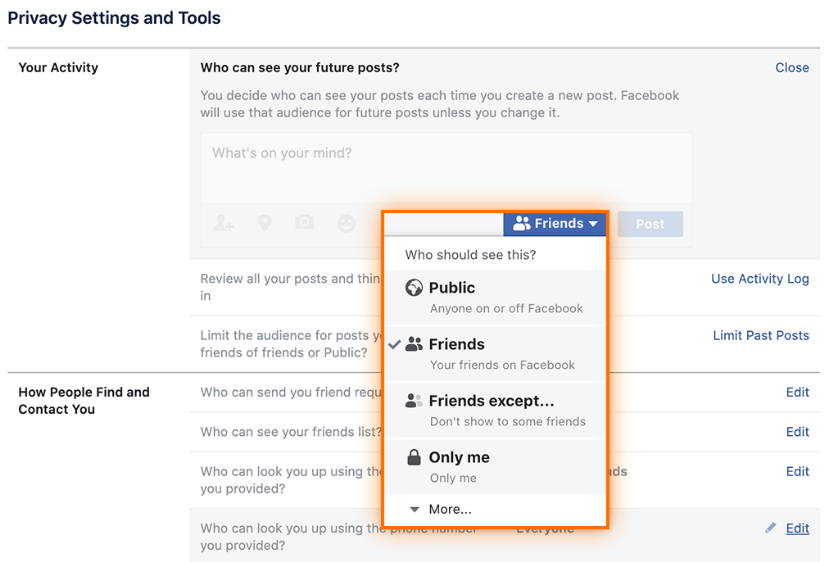
Beyond deciding who to friend or unfriend, mastering Facebook’s privacy settings is paramount. Before even considering an unfriend, ensure your posts are set to the appropriate audience (e.g., “Friends,” “Friends Except…”, “Specific Friends”).
-
Audience Selector: Use the audience selector on each post to control who sees it.
-
Custom Lists: Create “Custom Lists” of friends (e.g., “Close Friends,” “Acquaintances”) to share content with specific groups without unfriending others.
-
Profile and Tagging Review: Regularly check your “Privacy Checkup” and “Timeline and Tagging Settings” to ensure that you control who can tag you and what appears on your profile. These technical tools allow you to manage your digital presence with precision, potentially mitigating the need for frequent unfriending.

Understanding the Platform’s Intent
Facebook’s features, including the unfriend function, are designed with specific technical and user experience goals in mind. They aim to provide users with control over their social connections and the content they consume. Understanding the technical underpinnings of these features empowers you to use them strategically. Whether it’s the strict isolation of blocking, the nuanced adjustment of “Take a Break,” or the clear cut of unfriending, each tool serves a distinct purpose in managing your digital identity and environment. By grasping what happens from a technological standpoint, users can make informed decisions that align with their social comfort, digital privacy, and desired online experience. The act of unfriending, therefore, is not just a personal choice, but a direct command to Facebook’s sophisticated machinery, dictating how it constructs and presents your reality within its vast digital ecosystem.
aViewFromTheCave is a participant in the Amazon Services LLC Associates Program, an affiliate advertising program designed to provide a means for sites to earn advertising fees by advertising and linking to Amazon.com. Amazon, the Amazon logo, AmazonSupply, and the AmazonSupply logo are trademarks of Amazon.com, Inc. or its affiliates. As an Amazon Associate we earn affiliate commissions from qualifying purchases.