
Losing your phone, especially to theft, can feel like a profound violation. More than just a piece of expensive hardware, our smartphones are repositories of our digital lives: personal memories, sensitive financial information, private communications, and access to countless online services. The immediate aftermath can be a whirlwind of panic, frustration, and a chilling sense of vulnerability. However, knowing exactly what steps to take, and crucially, taking them swiftly, can significantly mitigate the damage, protect your data, and increase the chances of recovery or at least a smooth transition to a new device.
This comprehensive guide will walk you through the critical actions to take if your phone is stolen, from the moment you realize it’s gone to long-term preventative measures. We will focus exclusively on the technological aspects, digital security protocols, and device management strategies essential for navigating this challenging situation. By acting decisively and strategically, you can safeguard your digital identity, minimize financial risk, and ultimately regain control of your tech-driven life.
1. The Critical First Hour: Immediate Actions
The moments following the realization that your phone has been stolen are the most crucial. Swift, calculated actions can be the difference between a minor inconvenience and a major digital security catastrophe. Do not succumb to panic; instead, channel that urgency into a methodical response.
Do Not Panic, But Act Swiftly
While the initial shock might be overwhelming, maintaining a clear head is paramount. Every minute counts when dealing with a stolen device. The quicker you act, the less opportunity thieves have to access your data or exploit your accounts. Your primary goal in this first hour is to secure your digital presence and render the stolen device as useless as possible to the perpetrator.
Attempt to Call or Text Your Phone
Before assuming theft, try calling your phone from another device. It might simply be misplaced nearby, or you might hear it ring. If you believe it’s been stolen, calling it can still be useful: it confirms the phone is on and potentially helps locate it if the thief is still in the vicinity. You can also try sending a text message with a contact number, offering a reward for its return – sometimes, a good Samaritan might have found it. However, exercise caution if you suspect malicious intent; do not confront a potential thief.
Activate Remote Tracking and Wiping Features
Modern smartphones are equipped with powerful remote management tools designed precisely for these scenarios. This is your most potent immediate defense.
-
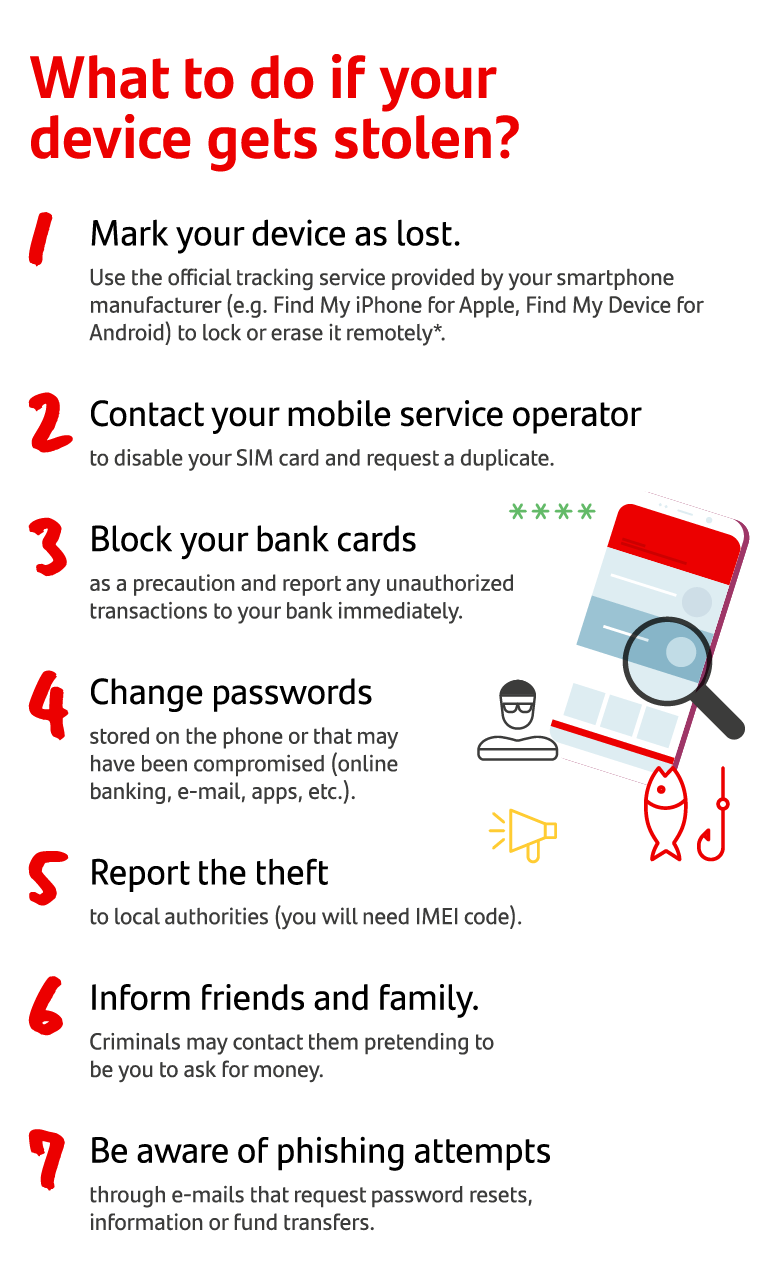
Locate (Find My iPhone / Find My Device): Immediately access your phone’s tracking service from a computer or another trusted device. For Apple users, this is “Find My” (findmy.apple.com); for Android users, it’s “Find My Device” (android.com/find). Log in with your credentials. This will attempt to pinpoint your phone’s last known location on a map. While confronting a thief is never advised, knowing the location can be critical information for law enforcement.
-
Lock (Lost Mode): If locating isn’t immediately successful or safe, activate the “Lost Mode” (Apple) or “Secure Device” (Android) feature. This remotely locks your device with a passcode, preventing unauthorized access. You can often display a custom message on the lock screen, such as an alternative contact number, and potentially deter the thief by rendering the phone unusable.
-
Erase Data (Remote Wipe): This is the nuclear option, to be used if you believe the phone is unrecoverable and your data is at significant risk. A remote wipe will factory reset your phone, deleting all personal data. Be aware that once erased, you can no longer track the device, and any chance of recovery is severely diminished. Only initiate this if you prioritize data privacy over the device itself and have recent backups.
Change Crucial Passwords Remotely
Using a computer or another smartphone, immediately begin changing passwords for your most critical online accounts. Prioritize those with direct financial implications or extensive personal data.
-
Email Accounts: Your primary email is often the gateway to all other accounts through password reset options. Secure this first.
-
Banking and Financial Apps: Change passwords for mobile banking apps, investment platforms, and payment services like PayPal or Venmo.
-
Social Media: Facebook, Instagram, Twitter, LinkedIn – prevent identity theft and impersonation.
-
Cloud Storage: Google Drive, iCloud, Dropbox, OneDrive – protect your stored files and documents.
Remember to use strong, unique passwords for each service, ideally generated by a password manager.
2. Securing Your Digital Life After Theft
The immediate actions focus on the phone itself, but the battle extends to your broader digital ecosystem. The next steps involve safeguarding your identity and preventing further misuse of your personal information.
Contact Your Carrier
Your cellular carrier plays a crucial role in preventing unauthorized use of your stolen phone and number.
-
Report the Theft: Inform your carrier that your phone has been stolen. This is a critical step for preventing someone from running up huge bills on your account.
-
Suspend Your Service: Request that your phone service be suspended immediately. This stops all calls, texts, and data usage, making the phone less valuable to a thief for communication or internet access.
-
Blacklist the IMEI: Provide your carrier with your phone’s International Mobile Equipment Identity (IMEI) number (you should have this recorded elsewhere – see preventative measures). The carrier can then blacklist this number, preventing the phone from being used on any network within their country or potentially internationally.
Revoke Access to Sensitive Accounts
Beyond changing passwords, it’s prudent to ensure no active sessions remain open on the stolen device for critical services.
-
Log Out of All Sessions: Many services (Google, Apple ID, Microsoft, major social media platforms) offer an option in their security settings to “log out of all devices” or “review active sessions.” Utilize this feature to forcibly terminate any lingering access from your stolen phone.
-
Review Linked Devices/Apps: Check the security settings of your major accounts for any unfamiliar linked devices or third-party app permissions that might have been granted. Remove anything suspicious.
Inform Close Contacts (with Caution)
It’s wise to inform your immediate family, close friends, and perhaps professional contacts that your phone has been stolen. This is particularly important for two reasons:
-
Prevent Phishing/Scams: Thieves might attempt to impersonate you via text or messaging apps, trying to extract money or information from your contacts. Warning them preemptively can prevent them from falling victim.
-
Alternative Contact: Provide them with an alternative way to reach you while your primary number is out of commission.
However, be cautious about how widely you disseminate this information, especially on public social media, as it could inadvertently reveal more personal details to potential wrongdoers.
Monitor Financial Accounts
Even if you’ve changed banking passwords, stay vigilant. Thieves might try to use stored payment information or attempt identity fraud.
-
Check Statements Regularly: Scrutinize bank statements, credit card activity, and any online payment service transactions for unauthorized charges.
-
Set Up Fraud Alerts: Consider placing a fraud alert with credit bureaus (Equifax, Experian, TransUnion) to make it harder for anyone to open new accounts in your name.
3. Reporting the Theft and Legal Steps
While you’re securing your digital life, don’t overlook the official channels. Reporting the theft appropriately is vital for insurance claims, potential recovery, and broader law enforcement efforts.
File a Police Report
This is a non-negotiable step. A police report serves multiple critical functions:
-
Official Documentation: It provides legal documentation of the incident, which is often required by insurance companies and for IMEI blacklisting.
-
Potential Recovery: While odds may be low, an official report means your phone is on record. If it’s recovered during another investigation, it can be returned to you.
-
Information for Investigation: Provide as much detail as possible: the exact time and location of the theft, a detailed description of your phone (make, model, color), and critically, its IMEI and serial number. Also include any information obtained from remote tracking (last known location). Obtain a copy of the report or at least a case number for future reference.
Notify Your Insurance Provider
If you have phone insurance (either a standalone policy, an add-on from your carrier, or coverage through your home contents insurance or credit card), contact them immediately.

-
Understand Your Policy: Review your policy to understand what is covered, your deductible, and the claims process.
-
Provide Documentation: You will almost certainly need the police report and your device’s IMEI number to file a claim.
-
Act Promptly: Most insurance policies have strict deadlines for reporting theft.
Update Relevant Institutions
Your phone might be more integrated into your life than you realize.
-
Employers/Schools: If your phone was used for work or school purposes (e.g., accessing company email, using institutional apps, or as a 2FA token), inform your IT department. They might need to revoke access or issue new credentials.
-
Other Services: Consider any other services that might rely on your phone as a primary point of contact or authentication (e.g., healthcare portals, government services).
4. Preventative Measures: Fortifying Your Device Before Disaster Strikes
While dealing with the aftermath is crucial, the most effective defense against phone theft’s impact lies in proactive preparation. Implementing robust security measures before your device is lost or stolen can drastically reduce the potential damage and stress.
Enable Strong Passcodes and Biometrics
The first line of defense against unauthorized access is a robust lock screen.
-
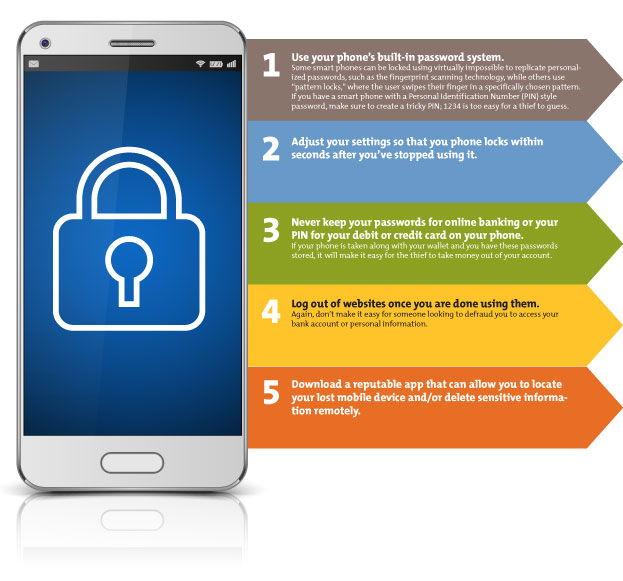
Strong Passcode: Move beyond simple 4-digit PINs. Use an alphanumeric passcode that is at least six characters long, ideally longer, and not easily guessable.
-
Biometric Security: Enable Face ID (Apple) or Touch ID/Fingerprint Unlock (Apple/Android). These offer a convenient yet highly secure layer, making it much harder for thieves to bypass your lock screen. Ensure your biometrics are properly set up and functioning.
Set Up Find My iPhone / Find My Device
This cannot be stressed enough. These services are invaluable tools for locating, locking, and wiping a stolen device.
-
Activate and Configure: Ensure these features are always enabled on your device. On iPhones, this is under Settings > your name > Find My > Find My iPhone. On Android, Settings > Security > Find My Device.
-
“Send Last Location”: Enable the option to automatically send your phone’s last known location to Apple/Google when the battery is critically low. This can provide crucial information even if the phone powers off.
Implement Two-Factor Authentication (2FA) Everywhere
2FA adds a critical layer of security to your online accounts. Even if a thief somehow obtains your password, they will still need a second verification factor (like a code from an authenticator app or a security key) to gain access.
-
Prioritize Authenticator Apps: While SMS-based 2FA is better than no 2FA, it can be vulnerable to SIM swap attacks. Opt for authenticator apps (e.g., Google Authenticator, Authy) or physical security keys for your most critical accounts (email, banking, cloud storage) where possible.
-
Backup Codes: Most 2FA setups provide backup codes. Store these in a safe, offline location (e.g., a locked drawer, encrypted USB drive) separate from your phone. These are essential if you lose your phone and need to access accounts.
Regular Data Backups
Your phone holds a treasure trove of irreplaceable data – photos, videos, contacts, documents. Regular backups ensure that even if the physical device is gone forever, your digital memories and essential information are safe.
-
Cloud Backups: Utilize automatic cloud backup services like iCloud (for iPhones) or Google Drive/Google Photos (for Android and iOS). Ensure they are configured to back up regularly, ideally daily, and verify that backups are indeed happening.
-
Local Backups: For extremely sensitive data, consider supplementing cloud backups with encrypted local backups to an external hard drive.
Encrypt Your Device
Modern smartphones are typically encrypted by default, especially when a strong passcode is set. This means that even if a thief manages to physically extract data from the phone’s storage, it will be unreadable without the encryption key, which is derived from your passcode.
- Verify Encryption Status: On Android, you can typically check encryption status in Security settings. For iOS, a strong passcode effectively enables full-disk encryption.
Be Wary of Public Wi-Fi and Phishing
General digital hygiene plays a role in overall security. Avoid connecting to untrusted public Wi-Fi networks for sensitive transactions. Be vigilant against phishing attempts (emails, texts, calls) that try to trick you into revealing your login credentials. A stolen phone can make you more vulnerable to such targeted attacks.
Record Essential Device Information
This small step can save significant headaches later.
- Key Details: Keep a record of your phone’s IMEI number, serial number, make, model, color, and purchase date. Store this information securely (e.g., in a password manager, a secure cloud note, or a physical document in a safe place) but not on the phone itself. You’ll need these details for police reports and insurance claims.
5. Replacing Your Device and Moving Forward
After the immediate crisis has passed and preventative measures are in place for the future, the final step involves replacing your device and settling back into normalcy. This is an opportunity to reflect and reinforce your digital security habits.
Device Replacement Options
Depending on your circumstances, you have several avenues for replacing your stolen phone:
-
Insurance Claim: If you had insurance, this is often the most cost-effective route, though you’ll typically pay a deductible.
-
Carrier Upgrade: If you’re due for an upgrade or have a payment plan, your carrier might offer options for a new device.
-
New Purchase: Buying a new phone outright allows you to choose exactly what you want but comes with a higher upfront cost.
Consider your budget, needs, and what you’ve learned from the theft when selecting a new device.
Restoring Your Data
This is where those diligent backups pay off.
-
Cloud Restoration: When setting up your new phone, you’ll be prompted to restore from a backup. For iPhones, this is typically from iCloud. For Android, it’s often from your Google account. This process will typically restore your apps, settings, photos, and other data.
-
Local Restoration: If you used local backups, you can connect your new device to your computer and restore from there.
-
Re-installing Apps: Some apps might need to be re-downloaded manually, but most will reappear from your backup. You’ll then need to log back into them using your newly changed passwords.
Re-evaluating Your Digital Security Habits
Use the experience of having your phone stolen as a catalyst to review and strengthen your overall digital security posture.
-
Password Audit: Conduct a full audit of all your online accounts, ensuring strong, unique passwords and 2FA are enabled wherever possible.
-
Privacy Settings Review: Re-evaluate the privacy settings on your social media and other online platforms.
-
Regular Security Checks: Make it a habit to periodically review your device security settings, confirm backups are running, and update your software.
The Emotional Toll and Moving On
Beyond the technical and financial implications, having your phone stolen can be a deeply unsettling and frustrating experience, often accompanied by feelings of invasion and loss. Acknowledge these feelings. Once you’ve taken all the necessary steps to secure your digital life and replace your device, allow yourself to move on. Focus on the peace of mind that comes from knowing you’ve done everything possible to mitigate the damage and that you are now better prepared for any future challenges.
In conclusion, while the theft of a smartphone is a distressing event, being informed and prepared is your strongest defense. Swift, systematic action in the immediate aftermath, coupled with robust preventative measures implemented beforehand, can significantly reduce the impact on your digital life. Your phone is more than just hardware; it’s a gateway to your world, and protecting that gateway is paramount in our increasingly connected age.
aViewFromTheCave is a participant in the Amazon Services LLC Associates Program, an affiliate advertising program designed to provide a means for sites to earn advertising fees by advertising and linking to Amazon.com. Amazon, the Amazon logo, AmazonSupply, and the AmazonSupply logo are trademarks of Amazon.com, Inc. or its affiliates. As an Amazon Associate we earn affiliate commissions from qualifying purchases.