
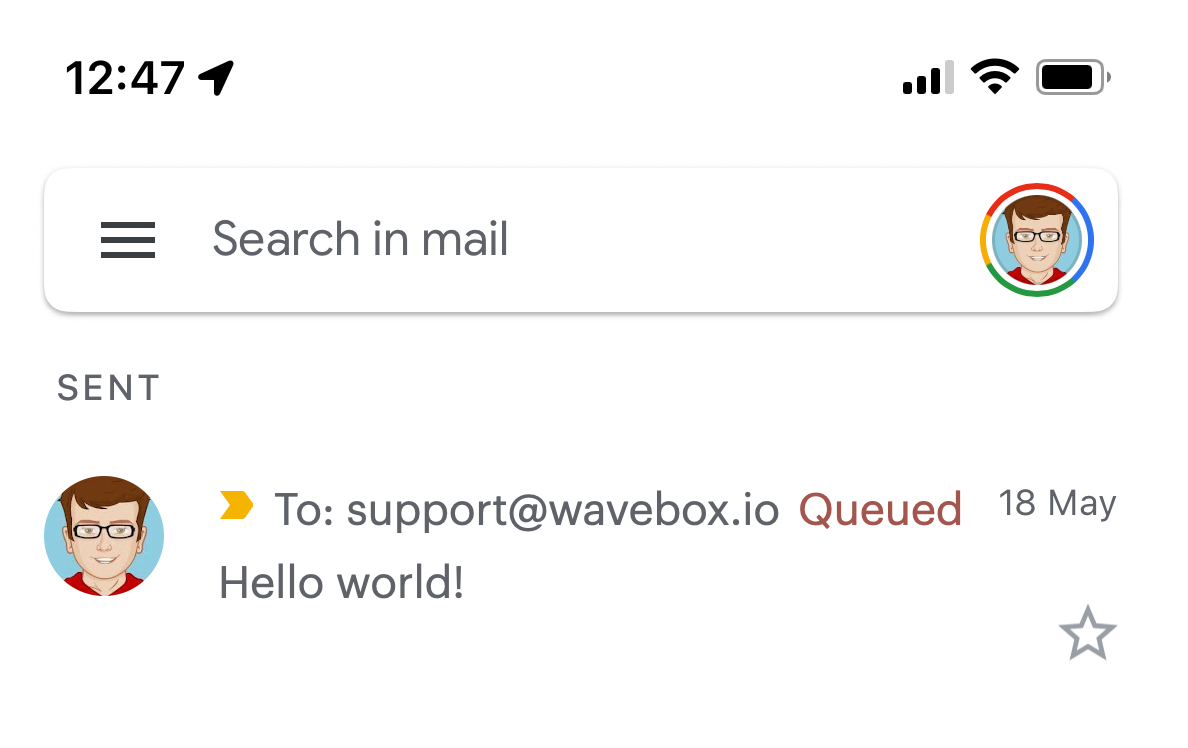
In the vast and intricate world of digital communication, few systems are as ubiquitous and taken for granted as email. We click “send,” and almost instantaneously, our messages appear in the recipient’s inbox, often across continents. Yet, behind this seamless façade lies a complex network of servers, protocols, and processes. One often-encountered, yet rarely understood, status in this intricate journey is “queued.” When an email is “queued,” it’s not simply waiting; it’s navigating a meticulously managed digital waiting room, a critical component ensuring the reliability and resilience of email delivery.
For most users, the term “queued” is an invisible backend operation, perhaps only surfacing when an email is unusually delayed or an administrator is troubleshooting. However, understanding what it signifies is crucial for anyone who relies on email for personal or professional communication. Far from being an error state, queuing is typically a healthy and necessary part of how email systems manage vast volumes of messages, mitigate spam, and ensure eventual delivery even under challenging circumstances. This article will demystify the concept of email queuing, exploring its mechanisms, the reasons behind it, and what it means for senders and recipients alike.
The Email’s Grand Tour: Where “Queued” Takes Its Place
Before an email reaches its final destination, it embarks on a multi-stage journey, each step overseen by specialized software and servers. Understanding this process illuminates precisely where “queued” fits in.
Initiating the Send: From Client to Outgoing Server
The journey begins the moment you hit “send” in your email client, whether it’s Outlook, Gmail’s web interface, Apple Mail, or a mobile app. Your client doesn’t directly send the email to the recipient’s inbox. Instead, it transmits the message, along with details like the recipient’s address and any attachments, to your own email service provider’s outgoing server. This server is typically an SMTP (Simple Mail Transfer Protocol) server. At this initial stage, your client might briefly show a “sending” status, but once the message is successfully handed off to your provider’s SMTP server, your client generally registers it as “sent,” even if the actual delivery process has only just begun.
The SMTP Server’s Crucial Role
The SMTP server is the workhorse of email transmission. Upon receiving your email, its first tasks include authenticating you as a legitimate sender to prevent unauthorized use and spam. Once authenticated, it processes the message, breaking it down into packets if necessary, and prepares it for onward transmission. Its primary goal is to find the recipient’s mail server and initiate a connection. This involves looking up the Mail Exchanger (MX) records associated with the recipient’s domain (e.g., if sending to user@example.com, it queries DNS for example.com‘s MX records). These records point to the specific servers responsible for receiving email for that domain.
Introducing the Mail Queue: A System’s Necessity
Once the SMTP server has processed the email and identified the recipient’s server, it attempts to establish a connection and deliver the message. However, direct, immediate delivery isn’t always possible or desirable. This is where the mail queue comes into play. A mail queue is essentially a temporary storage area on the sending SMTP server (or an intermediate server) where emails are held until they can be successfully transmitted to the next hop in the delivery chain. Think of it as a meticulously organized holding pen or a waiting line for digital messages. Emails enter the queue for a variety of reasons, ranging from routine traffic management to specific delivery challenges. It’s a fundamental mechanism designed to prevent message loss and ensure the system operates efficiently, even under fluctuating loads and network conditions.
The Many Reasons Behind an Email’s Queue Status
An email doesn’t just get queued arbitrarily. There are specific, often logical, reasons why a server might temporarily hold a message instead of delivering it instantaneously. These reasons highlight the complexities and safeguards built into modern email infrastructure.
Server Load and Traffic Management
Just like a physical post office experiences peak hours, email servers also contend with fluctuating workloads. During times of high traffic – perhaps a major marketing campaign by a large sender, a global news event triggering a surge of communication, or simply the busiest hours of the workday – an email server might receive more messages than it can process and deliver immediately. To prevent system overload, crashes, or a drop in performance, the server intelligently queues incoming messages. This allows it to process emails at a sustainable rate, maintaining stability and ensuring that no message is lost due to an overwhelmed system. It’s a classic traffic management strategy: slow down the flow to avoid a pile-up.
Recipient Server Dynamics and Delays
The recipient’s email server plays a significant role in whether an email gets queued. If the recipient’s server is temporarily unavailable (e.g., due to maintenance, a power outage, or a software issue), the sending server cannot connect and deliver the message. Rather than giving up, the sending server places the email in its queue and schedules multiple retry attempts. Similarly, the recipient’s server might be experiencing high load itself, or the recipient’s mailbox might be full. In such cases, the sending server holds the email, attempting delivery again later when the recipient’s server or mailbox is ready.
Network Congestion and Connectivity Issues
Email delivery relies heavily on the underlying internet infrastructure. Just as physical roads can experience traffic jams, data networks can become congested. If there’s high network traffic between the sending server and the recipient’s server, or if there are intermittent connectivity issues, the transmission might be slowed down or temporarily blocked. In these scenarios, the email sits in the queue, awaiting a stable network path to facilitate its delivery. These issues can be localized or span broader regions, affecting connectivity between various points on the internet.
Anti-Spam and Security Protocols
Perhaps one of the most significant reasons for queuing relates to the ongoing battle against spam and malicious emails. Email providers employ a sophisticated array of anti-spam and security protocols, and legitimate emails can sometimes get caught in the dragnet or simply be held for additional scrutiny.
-
Rate Limits: Servers often impose rate limits, meaning a sender can only send a certain number of emails per minute or hour to a particular domain or overall. If a sender exceeds this limit, subsequent emails will be queued until the rate limit resets, preventing potential spam floods.
-
Authentication Checks: Protocols like SPF (Sender Policy Framework), DKIM (DomainKeys Identified Mail), and DMARC (Domain-based Message Authentication, Reporting, and Conformance) are used to verify the sender’s legitimacy. If these checks are in progress or if there’s a temporary issue verifying them, an email might be queued while the system works to confirm its authenticity.
-
Content Filtering: Some recipient servers might temporarily queue emails that trigger certain content filters, holding them for manual review or further automated analysis before deciding whether to deliver them to the inbox or flag them as spam.
Large Attachments and Message Size
While modern email systems handle large files much better than their predecessors, very large attachments or unusually voluminous messages can still impact delivery speed. Transmitting gigabytes of data takes time, and during this transmission, the message might be considered “in queue” or “in transit” for a longer period. Servers might also have specific policies regarding maximum message sizes, and if an email approaches this limit, it could be processed more slowly or queued while resources are allocated for its transmission.
Inside the Queue: What Happens Next?
Once an email enters the queue, it’s not simply forgotten. Email systems are designed with sophisticated mechanisms to manage these waiting messages, ensuring eventual delivery or, failing that, providing clear notification.
The Retry Mechanism: Persistence in Delivery
A core component of any robust email system is its retry logic. When an email is queued because of a temporary issue (like a busy recipient server or network congestion), the sending server doesn’t just try once and then give up. Instead, it schedules multiple retry attempts. These retries typically follow an exponential backoff algorithm: the server might try again after 5 minutes, then 15 minutes, then 30 minutes, then an hour, and so on, over a period that can range from a few hours to several days. This persistence ensures that if the issue is transient, the email will eventually get through without requiring any action from the sender.
Monitoring and System Health Checks
Mail queues are actively monitored by the email system. Administrators use specialized tools to view the contents of queues, identify which messages are stuck, and diagnose the underlying problems. This monitoring is crucial for maintaining the health and performance of the email service. If a particular queue grows too large or if messages remain in the queue for an unusually long time, it signals a potential problem that requires investigation, such as a misconfigured server, a blocked IP address, or a widespread network outage.
The Sender’s Experience: Transparency (or Lack Thereof)
For the average individual sender, the “queued” status is largely invisible. Most common email clients (like Gmail, Outlook, Yahoo Mail) only show “sent” once the email has been successfully handed off to their own outgoing server. They don’t typically provide real-time updates on whether the email is currently sitting in a queue on the server or successfully delivered to the recipient. The only time a sender might become aware of a prolonged queuing issue is if the email fails to deliver after all retry attempts are exhausted. In such cases, the sending server will generate a Non-Delivery Report (NDR), also known as a bounce message, which is sent back to the original sender, explaining why the email could not be delivered (e.g., “mailbox full,” “recipient address doesn’t exist,” “delivery permanently failed”).
Distinguishing Normal Queuing from Potential Problems
While queuing is a normal and often beneficial part of email delivery, there are times when it can signal a more serious underlying issue. Knowing the difference is key to effective troubleshooting.
When a Queue is Healthy: Brief and Transient
In most cases, an email’s time in a queue is fleeting – mere seconds or minutes. It’s a testament to the efficiency of modern email systems that millions of messages are queued and processed without the user ever noticing. A brief queue time indicates that the system is successfully managing its load, handling temporary network blips, or waiting for a momentarily busy recipient server. This type of queuing is entirely normal and ensures the resilience and reliability of your email communication. For the end-user, this manifests as seamless, almost instant delivery.
Signs of a Persistent Problem: Beyond Normal Delays
When an email remains in a queue for an extended period – hours or even days – it’s a strong indicator of a persistent problem. This is where “queued” moves from a healthy process to a potential alert. Signs of trouble include:
-
Emails stuck for an unusually long time: If you send an email and the recipient confirms they haven’t received it after several hours, and you haven’t received a bounce message, it might be stuck in a queue.
-
No bounce message after a significant period: If an email truly fails to deliver permanently, you should receive an NDR. If you don’t receive one after 24-48 hours for an important message that hasn’t arrived, it suggests a prolonged queuing issue.
-
Other emails are going through, but a specific one isn’t: This could point to a problem with the specific message (e.g., large attachment, content triggering filters) or an issue with the recipient’s server or domain.
Proactive Steps for Senders and Administrators
Understanding queuing empowers both individual senders and email administrators to take appropriate action.
For Individual Senders:
-
Verify Recipient Address: A common cause for non-delivery (and potential prolonged queuing before a bounce) is a typo in the recipient’s email address. Double-check it.
-
Check Internet Connection: Ensure your own internet connection is stable when sending, though this primarily affects the initial hand-off to your outgoing server.
-
Confirm Mailbox Capacity: If you suspect the recipient’s mailbox might be full, consider an alternative communication method or ask them to clear space.
-
Consider Attachment Size: If sending a very large file, consider using cloud storage links (e.g., Google Drive, Dropbox) instead of attaching it directly, which can bypass some queuing issues related to message size.
-
Be Patient: For non-critical emails, sometimes patience is the best approach, as the retry mechanisms often succeed within a few hours.
For Email Administrators/Bulk Senders:
-
Monitor Mail Logs: Regularly review SMTP server logs for deferred messages, persistent errors, and queue sizes.
-
Check Server Reputation: Ensure your sending IP address and domain maintain a good reputation to avoid being flagged by spam filters, which can lead to extensive queuing or outright rejection.
-
Optimize Sending Rates: Adhere to best practices for sending volume and frequency to avoid triggering rate limits on recipient servers. Implement warm-up procedures for new IPs.
-
Ensure Proper SPF/DKIM/DMARC Setup: Correctly configured authentication records significantly improve deliverability and reduce the likelihood of emails being queued for security checks.
-
Review Server Resources: Ensure your mail servers have adequate CPU, memory, and disk space to handle your typical mail volume.
The Underlying Tech: Engineering Robust Email Delivery
Beyond the user-facing implications, the technology that underpins email queues is a marvel of distributed systems engineering, crucial for maintaining email’s legendary reliability.
Message Transfer Agents (MTAs) and Their Queuing Logic
At the heart of email queuing are Message Transfer Agents (MTAs), software programs that transfer emails from one computer to another using SMTP. Popular MTAs include Postfix, Exim, and Sendmail. These MTAs are meticulously configured to manage queues. They decide how long to hold a message, when to retry, and what error codes to report. Their queuing logic is sophisticated, often prioritizing certain messages, managing different queues for different domains or error types, and logging every attempt and status update.
Load Balancing and Scalability in Email Infrastructure
Large email providers like Gmail, Outlook.com, or corporate email systems handle billions of messages daily. This immense scale is managed through sophisticated load balancing and distributed architectures. Emails aren’t just processed by a single server; they are distributed across clusters of servers. Queues play a vital role here, acting as buffers that absorb spikes in traffic, allowing messages to be processed by any available server in the cluster. This ensures that the system can scale up to meet demand without individual servers becoming overwhelmed, thereby minimizing queuing delays.
The Importance of Resilience and Redundancy
Email systems are designed with high resilience and redundancy in mind. This means that if one server fails, another can take over its functions. Queues are integral to this resilience. If a particular outbound connection fails, or a recipient server goes offline, the messages aren’t lost. Instead, they wait patiently in the queue on the sending server until the connection is restored or an alternative route can be found. This “store and forward” mechanism, powered by queues, is what makes email so incredibly reliable, even in the face of network outages or server malfunctions. It ensures that once you hit “send,” your message has the best possible chance of reaching its destination, eventually.
Conclusion: The Unseen Efficiency of Email Queues
The concept of an email being “queued” might initially sound like a problem, implying delay or stagnation. However, as we’ve explored, it is almost always a sign of a robust, intelligent, and highly resilient system at work. Email queues are the unsung heroes of digital communication, managing server load, navigating network complexities, enforcing security protocols, and ensuring that your messages persist through temporary challenges.
For most users, “queued” remains an invisible operational detail, a testament to the efficiency with which messages are processed. For those who delve deeper, it reveals the sophisticated engineering behind a technology that has become indispensable. So, the next time you send an email, rest assured that even if it briefly enters a digital waiting room, it’s a controlled process designed to deliver your message safely and reliably, underscoring the remarkable complexity and dependability of our connected world.
aViewFromTheCave is a participant in the Amazon Services LLC Associates Program, an affiliate advertising program designed to provide a means for sites to earn advertising fees by advertising and linking to Amazon.com. Amazon, the Amazon logo, AmazonSupply, and the AmazonSupply logo are trademarks of Amazon.com, Inc. or its affiliates. As an Amazon Associate we earn affiliate commissions from qualifying purchases.