
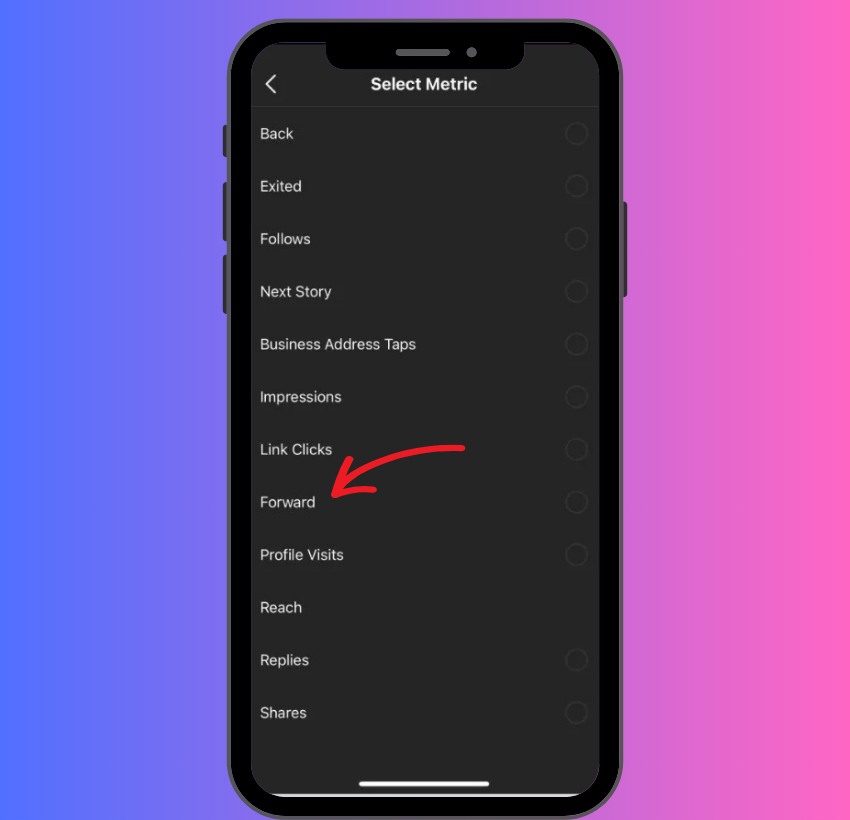
Instagram Stories have revolutionized how we share fleeting moments and interact with content. From quick updates to elaborate mini-narratives, Stories provide a dynamic, ephemeral platform that captures the essence of daily life. However, like many evolving digital features, some functionalities can lead to confusion. One such phrase that often prompts questions is “forward” in the context of Instagram Stories. Unlike traditional email or messaging where “forward” typically means sending an existing message from your inbox to someone else, Instagram’s interpretation is subtly different, yet equally powerful for connection and sharing. In the world of Instagram, “forwarding” an Instagram Story primarily refers to the act of sharing that story with another user or group via a Direct Message (DM). It’s a key mechanism for private communication, allowing users to draw specific content to the attention of their friends, family, or followers, fostering conversation and engagement around shared experiences. This article will delve into the precise meaning of “forward” on Instagram Stories, explore its functionality, discuss its nuances, and outline best practices for leveraging this feature effectively within the digital landscape.
Understanding the Core ‘Forward’ Functionality
At its heart, “forwarding” an Instagram Story is about facilitating private sharing. It’s Instagram’s way of enabling a user to say, “Hey, look at this!” to a specific individual or group, without necessarily making that content visible to their broader audience. This distinction is crucial for understanding how content moves and is consumed within the platform’s private channels.
The ‘Send Message’ Icon vs. Direct Sharing
When you’re browsing Instagram Stories, you’ll notice a distinct icon that initiates the “forwarding” process: the paper airplane. This icon, universally recognized across Instagram as the symbol for Direct Messages, is your gateway to sharing a story privately. It’s important to differentiate this from other forms of story interaction, such as simply reacting to a story with an emoji or replying to it, which sends a direct response back to the story creator. When you tap the paper airplane icon, you’re not just reacting; you’re actively taking the story and placing it into a private conversation with one or more chosen recipients. This direct sharing mechanism allows for a more curated and personal form of content distribution compared to public posts or even resharing to your own story. It empowers users to act as curators for their friends, highlighting content they believe will be relevant, interesting, or amusing to specific people.
How to “Forward” an Instagram Story
The process of “forwarding” an Instagram Story is straightforward and designed for quick, intuitive action. Here’s a step-by-step guide:
-
View the Story: Begin by watching the Instagram Story you wish to share.
-
Locate the Share Icon: While viewing the story, look for the paper airplane icon, usually located in the bottom right corner of the screen.
-
Tap the Icon: Tapping this icon will open a new screen displaying your recent conversations and a search bar to find other users.
-
Select Recipients: Choose the individual(s) or group chat(s) you want to share the story with. You can select multiple recipients if you wish to share it with several people simultaneously.
-
Send the Story: Once you’ve selected your recipients, tap the “Send” button next to their names or at the bottom of the screen.
Upon sending, the selected individuals will receive a Direct Message containing a preview of the original story. Tapping on this preview within the DM will take them directly to the original story, allowing them to view it in its full, interactive format, provided it’s still active.
What Happens When You Forward a Story?
When an Instagram Story is “forwarded” via DM, the recipient receives a notification and a message in their Instagram Direct inbox. This message doesn’t send a copy of the story itself, but rather a link or an embedded preview that points back to the original content. This has several key implications:
-
Ephemeral Nature Preserved: The original story’s 24-hour lifespan is maintained. If the story expires or the creator deletes it, the forwarded version in the DM will also become unavailable. Recipients attempting to view it after it has expired will see a message indicating that the content is no longer available.
-
Dynamic Content: If the original story included interactive elements like polls, quizzes, or question stickers, these elements remain interactive when viewed through the forwarded link, preserving the full experience.
-
Creator Visibility: The creator of the original story does not receive a notification specifically stating that their story was “forwarded” to someone via DM. However, if the recipient views the story through the forwarded link, their view will still be counted in the story’s overall viewership data, just as if they had discovered it organically. The creator will not see who forwarded it, or to whom it was forwarded. This maintains a layer of privacy for the “forwarder.”
-
Context for Conversation: The forwarded story serves as a conversation starter within the DM thread. Recipients can reply directly to the forwarded story, and their messages will appear within that specific conversation, keeping the context clear.
Nuances and Limitations of Story Sharing
While the “forward” functionality is robust, its availability and behavior are influenced by several factors, particularly concerning privacy settings and creator preferences. Understanding these nuances is key to effectively using the feature.
Public vs. Private Accounts and Sharing
The privacy settings of the original story creator’s account significantly impact whether and how their stories can be forwarded:
-
Public Accounts: If a user has a public Instagram account, their stories are generally accessible to anyone on Instagram, whether they follow them or not. Consequently, stories from public accounts can typically be forwarded via Direct Message to anyone on Instagram, regardless of whether the recipient follows the original creator. This broadens the reach of content from public figures, businesses, and content creators.
-
Private Accounts: For users with private accounts, their stories are only visible to their approved followers. In this scenario, a follower can “forward” that private story via DM, but only to other users who also follow the original private account. If the original story is forwarded to someone who does not follow the private account, that recipient will not be able to view the story, as they lack the necessary permissions. This restriction upholds the creator’s privacy settings and ensures that content shared with a private audience remains within that trusted circle.
These distinctions are fundamental to maintaining user control over content dissemination and are a cornerstone of Instagram’s privacy architecture.
Resharing to Your Own Story vs. Forwarding to DMs
It’s important to draw a clear line between “forwarding” a story to DMs and “resharing” a story to your own Instagram Story. While both involve distributing another user’s content, they serve different purposes and have different technical underpinnings:
-
Forwarding to DMs: As discussed, this is a private, one-on-one or small group sharing method. The story appears in a DM thread, and only the recipient(s) see it. The content is shared for consumption rather than for re-broadcasting.
-
Resharing to Your Own Story: This feature allows you to take a public story (or a story from a private account you follow, if enabled by the creator) and add it to your own 24-hour story feed. When you reshare a story, it becomes visible to all your followers, just like any other story you post. The reshare typically includes the original creator’s username, allowing viewers to tap through to their profile. This is a public act of endorsement or amplification.
The key difference lies in the audience and intent: DMs are for targeted, private communication, whereas resharing to your own story is for public, broader distribution to your own network. Instagram provides distinct options for each, and creators can enable or disable the ability for others to reshare their stories publicly, separate from the ability to forward them via DM.
Creator Control over Story Sharing
Instagram offers creators specific controls over how their stories can be shared, impacting the “forward” functionality:
-
“Allow Sharing via Message” (formerly “Allow Sharing”): This setting directly governs whether other users can “forward” your stories through Direct Messages. If this option is disabled in your Story settings, the paper airplane icon will not appear on your stories for other users, preventing them from sharing your content privately via DM. Most users keep this enabled as it fosters engagement and allows content to spread organically within private circles.
-
“Allow Resharing to Stories”: This setting, separate from the “Allow Sharing via Message” option, determines if other users can add your public story to their own Instagram Stories. Disabling this prevents public resharing but generally does not affect the ability to forward your story via DM, provided “Allow Sharing via Message” is enabled.
Creators can access these settings by navigating to their profile, tapping the three lines (hamburger menu) for settings, then “Settings and privacy,” and finally “Sharing and remixes.” Understanding these controls empowers creators to manage the reach and privacy of their ephemeral content effectively.
Why “Forward” Stories? Use Cases and Best Practices
The “forward” function on Instagram Stories serves as a powerful tool for connection and content curation. It’s not merely a technical feature but a social mechanism that enhances how users interact with content and each other.
Connecting with Friends and Community
One of the primary reasons to “forward” a story is to spark a conversation or share a moment directly with someone specific. It’s the digital equivalent of tapping a friend on the shoulder and pointing something out:
-
Inside Jokes: Sharing a meme or a funny clip that only a particular friend or group would understand.
-
Relevant Content: Sending an update about a mutual interest, a news item relevant to a specific discussion, or an event that you both might attend.
-
Personalized Recommendations: If a business or influencer posts about a product, service, or location, forwarding that story to a friend who might be interested acts as a personal recommendation. “Hey, you mentioned wanting a new coffee maker, check this out!”
-
Emotional Resonance: Sharing something heartfelt or inspiring that you know will resonate with a specific individual, fostering empathy and connection.
This targeted sharing allows for more intimate and meaningful interactions than a broad public post, strengthening social bonds within specific circles.
Sharing Information and Recommendations
Beyond personal connections, forwarding stories is a robust way to disseminate information and recommendations efficiently:
-
Event Promotion: If a local café posts about a live music event, forwarding it to friends who enjoy music is an effective, non-intrusive way to spread the word.
-
Product Launches/Sales: Businesses often leverage stories for flash sales or new product announcements. Forwarding these to potentially interested customers or friends helps drive awareness and sales.
-
News and Updates: For organizations or public figures, stories can be used for quick announcements. Followers can then forward these updates to inform others quickly.
-
Travel Inspiration: Seeing a friend’s vacation story and forwarding a specific part of it to a travel buddy to say, “Let’s go here next!”
In these scenarios, the “forward” function transforms individual content consumption into a network-based information exchange, making the platform more dynamic and useful for practical purposes.
Etiquette and Privacy Considerations
While forwarding is a valuable feature, responsible use requires adhering to certain etiquette and privacy considerations:
-
Avoid Spamming: Do not indiscriminately forward stories to large numbers of people without clear relevance. This can be annoying and counterproductive, potentially leading to unfollows or mutes.
-
Consider Relevance: Before forwarding, ask yourself if the recipient genuinely needs or wants to see this story. Is it relevant to them? Will they find it interesting, helpful, or entertaining?
-
Respect Sensitive Content: Be cautious when forwarding stories that might contain sensitive, private, or potentially controversial content. While Instagram provides controls, individual judgment is still paramount. If a story feels private or delicate, think twice before sharing it, even in a private DM.
-
Privacy Settings (Recap): Always remember that stories from private accounts can only be viewed by the original creator’s approved followers, even when forwarded. If you forward a private story to someone who doesn’t follow the creator, they won’t be able to see it, which can lead to confusion.
By adhering to these guidelines, users can ensure that their use of the “forward” feature enhances their digital interactions rather than detracting from them.
Technical Deep Dive: Instagram’s Messaging Infrastructure
The ability to “forward” stories seamlessly is a testament to the sophistication of Instagram’s backend infrastructure, particularly its Direct Messaging (DM) system. This feature didn’t emerge in isolation but evolved as part of a broader strategy to integrate various content formats into a unified communication channel.
The Evolution of Instagram Direct Messages (DMs)
Initially, Instagram was primarily a photo-sharing app with comments as the main form of interaction. Direct Messages were introduced in 2013, starting as a relatively simple feature for sending photos or videos directly to friends. Over the years, DMs have undergone significant transformations, becoming a full-fledged messaging platform capable of supporting:
-
Text and Emojis: Standard chat functionalities.
-
Photos and Videos: Direct sharing of media from the gallery or camera.
-
Voice Messages: Audio clips for quick communication.
-
Video Calls: Real-time face-to-face interactions.
-
Interactive Content: Polls, quizzes, and, crucially, story sharing.
This evolution signifies Instagram’s commitment to becoming an all-encompassing social hub, where users can not only share public content but also engage in rich, private conversations around that content. The integration of story sharing into DMs was a logical next step, allowing the ephemeral nature of stories to extend into private dialogues without losing their fundamental characteristics.
Backend Mechanics of Story Delivery
When you “forward” an Instagram Story, the system doesn’t create a duplicate copy of the story and send it. Instead, it sends a pointer or reference to the original story’s unique identifier. This approach has several technical advantages:
-
Efficiency: It saves storage space and bandwidth, as the actual story content (images, videos, effects) only needs to be stored once on Instagram’s servers.
-
Ephemeral Integrity: By referencing the original story, its 24-hour expiration time is inherently linked. When the original story expires or is deleted, all references to it become invalid, ensuring that its ephemeral nature is preserved across all shared instances. There’s no “permanent copy” floating around in DMs that outlives the original.
-
Real-time Updates: If a story creator makes changes to a live story (e.g., adds a poll, although usually, stories are static post-creation), theoretically, these changes could be reflected in the forwarded version instantly, as it’s viewing the source. However, most stories are static once posted.
-
Content Moderation: If an original story is deemed inappropriate and removed by Instagram, all forwarded versions automatically become unavailable, maintaining platform integrity.
This “reference-based” sharing model is common in modern social media architectures for ephemeral content, ensuring a consistent user experience and efficient resource management.
Future of Story Interaction and Sharing
The continued evolution of Instagram suggests that story interaction and sharing mechanisms will likely become even more sophisticated. We might see:
-
Enhanced Analytics for Creators: More detailed insights for creators on how their stories are being shared and discussed privately (without revealing individual privacy).
-
Cross-Platform Integration: Even smoother integration of story sharing with other Meta platforms (Facebook Messenger, WhatsApp), potentially allowing for seamless forwarding across different apps while maintaining content integrity and privacy.
-
New Interactive Sharing Formats: Introduction of novel ways to share ephemeral content privately, perhaps involving collaborative story creation in DMs or more dynamic, real-time sharing features.
As technology advances and user behaviors shift, Instagram will continue to refine its messaging and story features, striving for an experience that is both intuitive and powerful for its vast user base.
Conclusion
The term “forward” on Instagram Stories, while perhaps initially confusing due to its difference from traditional email forwarding, is a cornerstone of the platform’s private interaction capabilities. It signifies the act of sharing an Instagram Story directly with one or more users via a Direct Message. This functionality allows users to curate content for their specific friends and communities, fostering deeper connections, facilitating recommendations, and sparking targeted conversations around shared interests.
Understanding how to “forward” a story, its reliance on the creator’s privacy settings, and the distinction between private DM sharing and public resharing to one’s own story, empowers users to navigate Instagram more effectively. Leveraging this feature responsibly, with an eye towards relevance and digital etiquette, transforms individual content consumption into a dynamic, interactive experience. In essence, “forwarding” on Instagram Stories is more than just sharing; it’s a deliberate act of connection, making the ephemeral moments of Instagram even more engaging and personal. As Instagram continues to evolve, this fundamental sharing mechanism will undoubtedly remain a vital tool for users to engage with content and each other in meaningful ways.
aViewFromTheCave is a participant in the Amazon Services LLC Associates Program, an affiliate advertising program designed to provide a means for sites to earn advertising fees by advertising and linking to Amazon.com. Amazon, the Amazon logo, AmazonSupply, and the AmazonSupply logo are trademarks of Amazon.com, Inc. or its affiliates. As an Amazon Associate we earn affiliate commissions from qualifying purchases.