
Understanding how strings are indexed is a foundational concept in computer programming, crucial for manipulating text data effectively. Whether you’re a budding developer or a seasoned engineer, a clear grasp of string indexing is essential for tasks ranging from data extraction to text processing and validation. The simple string “New York” provides an excellent, straightforward example to illustrate these fundamental principles across various programming languages.
At its core, string indexing refers to the method of accessing individual characters within a string by their numerical position. This positional value, or index, acts like a coordinate, pinpointing exactly where a character resides. Most modern programming languages employ a system known as zero-based indexing, meaning the first character of a string is at index 0, the second at index 1, and so on. Let’s delve deeper into this concept using our example string, “New York.”
Understanding String Indexing: The Fundamentals
Before we dissect “New York,” it’s vital to establish a clear understanding of what a string is and how indexing works universally.
What is a String?
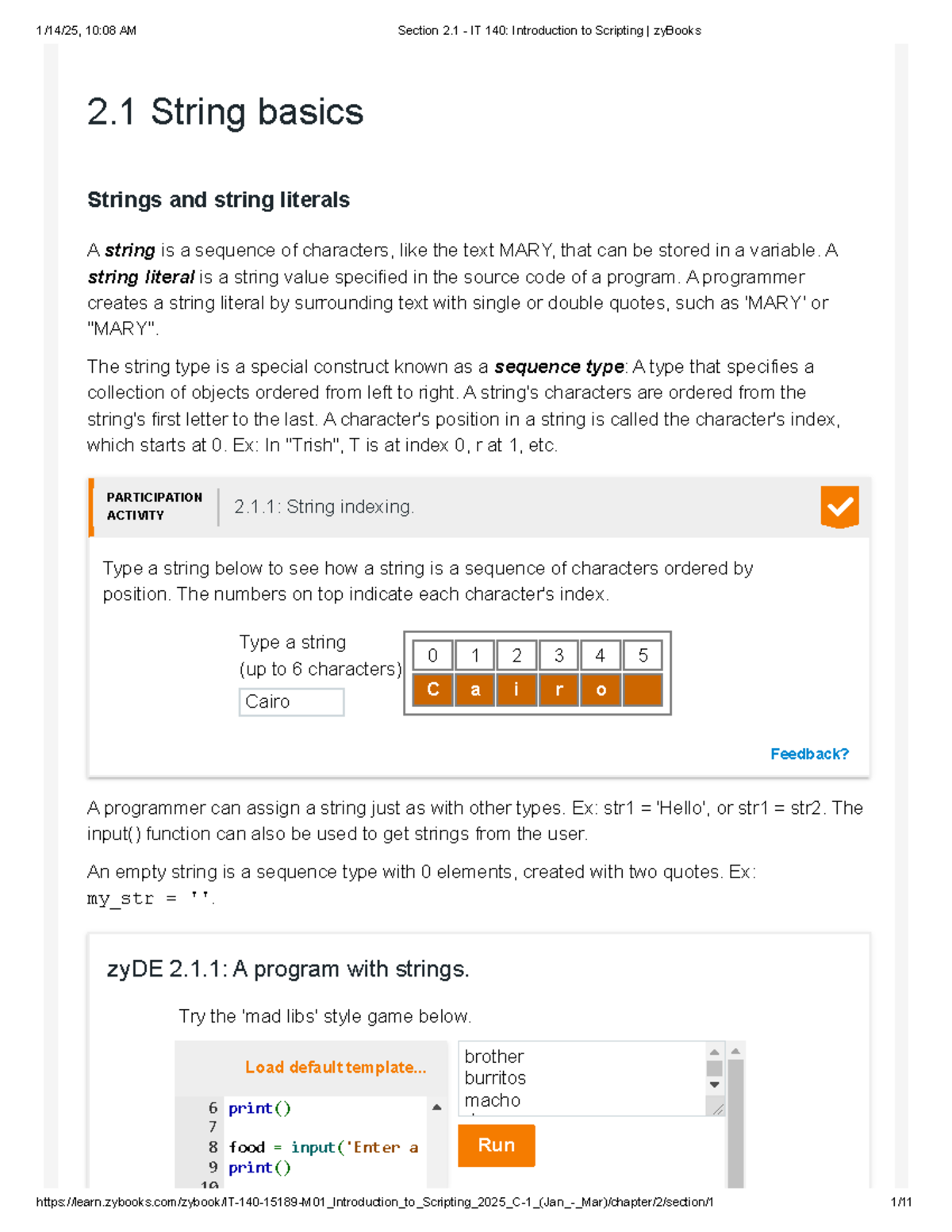
In computer science, a string is a sequence of characters. These characters can include letters, numbers, symbols, and even spaces. Strings are fundamental data types used to represent text in virtually all programming languages. The string “New York” is composed of individual characters, each occupying a specific position within that sequence.
For “New York,” the characters are:
N, e, w, , Y, o, r, k
There are 8 distinct characters in this sequence.
The Concept of Zero-Based Indexing
The most common indexing scheme in programming is zero-based indexing. This means the first character is at index 0, the second at index 1, and so forth, up to length - 1.
Let’s apply zero-based indexing to “New York”:
| Character | Index |
| :——– | :—- |
| N | 0 |
| e | 1 |
| w | 2 |
| | 3 |
| Y | 4 |
| o | 5 |
| r | 6 |
| k | 7 |
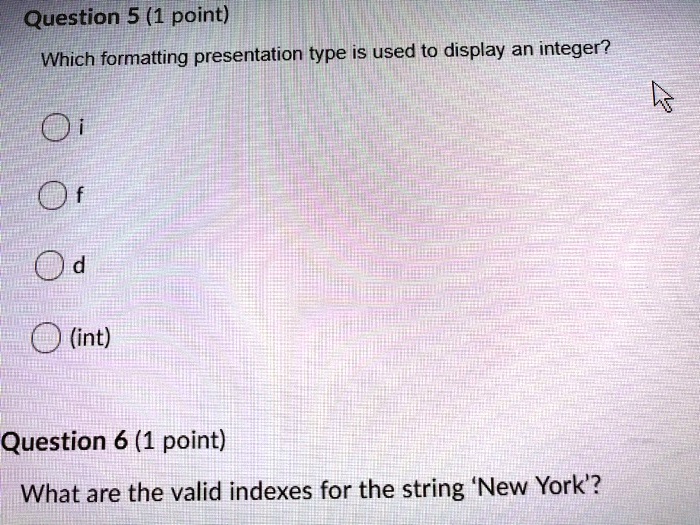
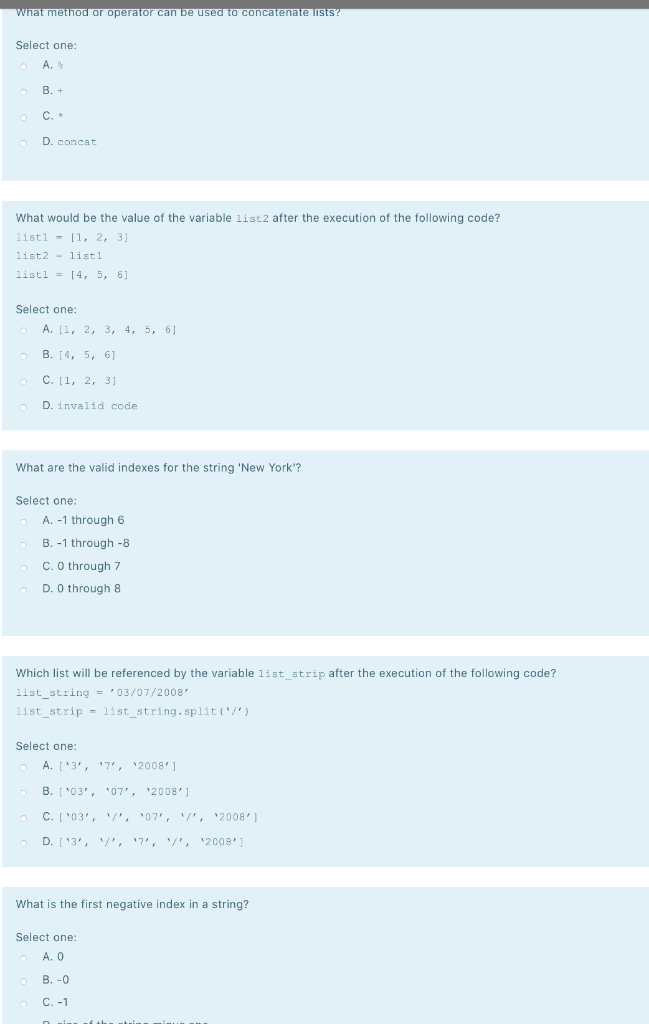
As you can see, the string “New York” has a length of 8 characters. Therefore, the valid indexes range from 0 (for ‘N’) to 7 (for ‘k’). Attempting to access an index outside this range (e.g., index 8 or index -1, if not specifically supported for reverse indexing) will typically result in an “index out of bounds” or similar error, which is a common pitfall for new programmers.
Characters vs. Bytes: Unicode Considerations
While simple ASCII strings like “New York” often have a straightforward 1-to-1 mapping between characters and bytes (and thus, simple indexing), the modern world of programming must contend with Unicode. Unicode is a character encoding standard designed to represent text from most of the world’s writing systems.
In some languages, a single “character” (or grapheme cluster) might be composed of multiple bytes, or even multiple Unicode code points. For instance, an emoji or a character with diacritics might occupy more than one byte.
Most high-level languages abstract this away, treating string[index] as accessing a “character” in a way that feels intuitive to the programmer, even if under the hood, it’s more complex. However, low-level languages or specific string operations might expose the byte-level representation, where indexing bytes would be different from indexing logical characters. For “New York,” which consists only of basic ASCII characters, this distinction is largely irrelevant as each character typically corresponds to a single byte.
Exploring Different Programming Languages and Their Indexing
While the core concept of zero-based indexing remains consistent, the syntax and specific functionalities for accessing string characters can vary slightly across different programming languages. Let’s look at how “New York” would be indexed in some popular languages.
Python: Simplicity and Readability
Python is known for its clean syntax, and string indexing is no exception. It supports both positive (zero-based from the start) and negative (from the end) indexing.
s = "New York"

print(s[0])   # Output: N

print(s[7])   # Output: k

print(s[3])   # Output: (space character)

print(s[-1])  # Output: k (last character)

print(s[-8])  # Output: N (first character)

# print(s[8]) # This would cause an IndexError: string index out of range
For “New York”, the valid positive indexes are 0 through 7. Valid negative indexes are -1 through -8.
JavaScript: Web Development’s Cornerstone
JavaScript also uses zero-based indexing for strings.
let s = "New York";

console.log(s[0]);   // Output: N

console.log(s[7]);   // Output: k

console.log(s[3]);   // Output: (space character)

// console.log(s[8]); // This would result in 'undefined', not an error, but still invalid.

// console.log(s[-1]); // This would also result in 'undefined' as JavaScript doesn't support negative indexing directly for string character access via bracket notation.
In JavaScript, attempting to access an out-of-bounds index using [] notation doesn’t throw an error; it simply returns undefined. For “New York”, the valid indexes are 0 through 7. To get the last character, one would typically use s[s.length - 1].
Java: Robustness and Enterprise Applications
Java strings are sequences of characters, and like many other languages, they are zero-indexed. Java does not support negative indexing.
public class StringIndexing {

    public static void main(String[] args) {

        String s = "New York";

        System.out.println(s.charAt(0));   // Output: N

        System.out.println(s.charAt(7));   // Output: k

        System.out.println(s.charAt(3));   // Output: (space character)

        // System.out.println(s.charAt(8)); // This would throw a StringIndexOutOfBoundsException

    }

}
In Java, characters are accessed using the charAt() method, which takes an integer index. For “New York”, the valid indexes are 0 through 7.
C/C++: Low-Level Control
In C and C++, strings are often represented as arrays of characters, terminated by a null character (). Indexing works just like array indexing.
#include <iostream>

#include <string>


int main() {

    std::string s_cpp = "New York";

    char s_c[] = "New York";


    // C++ std::string

    std::cout << s_cpp[0] << std::endl;   // Output: N

    std::cout << s_cpp[7] << std::endl;   // Output: k

    std::cout << s_cpp[3] << std::endl;   // Output: (space character)

    // std::cout << s_cpp[8] << std::endl; // Undefined behavior, potentially a crash or garbage value


    // C-style string (char array)

    std::cout << s_c[0] << std::endl;     // Output: N

    std::cout << s_c[7] << std::endl;     // Output: k

    std::cout << s_c[3] << std::endl;     // Output: (space character)

    // std::cout << s_c[8] << std::endl;   // Undefined behavior

    return 0;

}
Both C-style strings and C++ std::string use zero-based indexing. Accessing an out-of-bounds index results in undefined behavior, which is a serious issue that can lead to crashes or security vulnerabilities. For “New York”, the valid indexes are 0 through 7.
Practical Applications: Why Indexing Matters
Understanding string indexing is not just an academic exercise; it has immense practical value in numerous programming scenarios.
Data Extraction and Parsing
One of the most common uses of indexing is to extract specific pieces of information from structured strings. Imagine log files, configuration settings, or data records where certain pieces of information are always at a fixed position.
For example, if you had a string "ID:12345 Name:New York" and you knew the ID always started at index 3 and was 5 characters long, you could extract it. While slicing (which uses indexing under the hood) is more common for this, basic indexing helps identify the start and end points.
String Manipulation and Transformation
Indexing allows for precise manipulation of strings. You can replace characters, reverse parts of a string, or build new strings by concatenating characters extracted at specific indexes.
Consider capitalizing the ‘y’ in “New York” to “New York!”. While directly modifying a character at an index might not be possible with immutable strings (like in Python, Java, JavaScript), you would reconstruct the string using other methods that leverage indexing. E.g., combine s[0:4] + s[4].upper() + s[5:] in Python.
Validating User Input
When processing user input, indexing can be used to check if the input meets certain criteria at specific positions. For example, if a product code is always expected to have a letter at the first position and a digit at the second, indexing can quickly verify these rules.
For a string like “New York” (if it were user input with a specific format expectation), one might check if s[0] is an uppercase letter or s[3] is indeed a space, depending on the required format.
Common Pitfalls and Best Practices
Despite its fundamental nature, string indexing can lead to common errors if not handled carefully. Awareness of these pitfalls is key to writing robust code.
Index Out of Bounds Errors
This is by far the most frequent indexing error. It occurs when you try to access a character using an index that does not exist within the string’s valid range (0 to length - 1). As seen with “New York”, trying to access s[8] will cause an error in most languages (or undefined in JavaScript).
Best Practice: Always check the string’s length before accessing an index, especially when working with user input or dynamic data. Use s.length (or len(s) in Python) to determine the valid range.
Off-by-One Errors
A subtle but pervasive error, an off-by-one occurs when you are one index position away from the intended character. This often happens when calculating the last index (length - 1) or when defining ranges for slicing operations. For instance, forgetting that s[0] is the first character might lead to trying to access s[length] instead of s[length - 1] for the last character.
Best Practice: Carefully review loop conditions and index calculations. Test with edge cases: empty strings, strings with one character, and strings with maximum expected length.
Unicode Character Length Discrepancies
As touched upon earlier, in languages that distinguish between code points and grapheme clusters, treating all characters as single-unit indexes can lead to unexpected behavior for multi-byte or composite characters. While “New York” is straightforward, consider strings with emojis (" " which is one visual character but might be two code points or more bytes) or accented letters ("résumé").
Best Practice: When dealing with strings that might contain complex Unicode characters, use language-specific libraries or functions designed for Unicode-aware string manipulation rather than simple byte or code point indexing. For Python, this is often handled transparently, but for other languages, specific String methods might be required.
Beyond Basic Indexing: Slicing and Advanced Operations
While direct indexing accesses a single character, most programming languages offer powerful features built upon indexing for manipulating larger portions of strings.
String Slicing and Substrings
Slicing (or substring extraction) allows you to extract a contiguous sequence of characters from a string. This operation typically uses two indexes: a start index and an end index (often exclusive).
For “New York”:
-
Python:
s[0:3]would yield “New” (characters at index 0, 1, 2).s[4:8]would yield “York”. -
JavaScript:
s.substring(0, 3)ors.slice(0, 3)would yield “New”.s.substring(4, 8)ors.slice(4, 8)would yield “York”. -
Java:
s.substring(0, 3)would yield “New”.s.substring(4, 8)would yield “York”.
Slicing is incredibly powerful for parsing and restructuring text, and it’s fundamentally reliant on the concept of valid indexes.
Iteration and Enumeration
Instead of manually indexing, you can often iterate directly over the characters of a string. Many languages also provide an “enumerate” or similar function that yields both the index and the character during iteration.
s = "New York"

for index, char in enumerate(s):

    print(f"Character at index {index}: {char}")
This method is safer and often more readable than manual indexing within a loop, as it inherently respects the string’s boundaries.
Searching and Pattern Matching
Functions like indexOf, find, or regular expressions utilize complex algorithms that implicitly involve character-by-character comparisons, often starting and ending their searches based on index ranges. While you don’t directly manipulate indexes, the results of these operations (like the starting index of a match) are fundamentally tied to the indexing scheme.
Conclusion
The string “New York,” seemingly simple, serves as an excellent illustrative example for a cornerstone of text manipulation in programming: indexing. We’ve established that the valid indexes for “New York” range from 0 to 7, following the pervasive zero-based indexing standard. We’ve also explored how different popular programming languages like Python, JavaScript, Java, and C/C++ handle this concept, each with their subtle syntactic differences and behaviors regarding out-of-bounds access.
Beyond the theoretical understanding, grasping string indexing is crucial for practical tasks such as extracting data, transforming text, and validating user inputs. Being aware of common pitfalls like “index out of bounds” errors and “off-by-one” mistakes, and implementing best practices like length checks and Unicode-aware processing, are vital for writing robust and reliable code.
Ultimately, whether you’re building a web application, analyzing data, or developing an embedded system, the ability to precisely locate and manipulate characters within a string via their indexes is an indispensable skill in your technical toolkit. Mastering this fundamental concept opens the door to more complex string operations and makes you a more proficient programmer.
aViewFromTheCave is a participant in the Amazon Services LLC Associates Program, an affiliate advertising program designed to provide a means for sites to earn advertising fees by advertising and linking to Amazon.com. Amazon, the Amazon logo, AmazonSupply, and the AmazonSupply logo are trademarks of Amazon.com, Inc. or its affiliates. As an Amazon Associate we earn affiliate commissions from qualifying purchases.