
Grand Theft Auto IV (GTA IV), despite its age, remains a beloved title in the gaming community, celebrated for its gritty realism, compelling narrative, and the rich, immersive world of Liberty City. While the vanilla game offers hundreds of hours of entertainment, a vibrant and dedicated community has long extended its lifespan through modifications, or “mods.” These user-created additions can range from subtle graphical enhancements and bug fixes to entirely new vehicles, weapons, missions, and even gameplay mechanics, transforming the experience in countless ways. For newcomers or those hesitant to dive into the technicalities, installing mods might seem daunting. However, with the right guidance, unlocking GTA IV’s full modding potential is an accessible and rewarding endeavor. This comprehensive guide will walk you through the process, ensuring a smooth and enjoyable journey into the world of GTA IV customization.

Understanding the World of GTA IV Modding
Before delving into the practical steps, it’s crucial to grasp what game modifications entail, their historical significance for GTA IV, and the inherent balance between the exciting possibilities and potential pitfalls.
What Are Game Mods and Why Use Them?
Game modifications, or “mods,” are alterations to a game’s code, assets, or behavior, created by players rather than the original developers. For a sandbox title like GTA IV, mods serve multiple purposes. They can significantly enhance visual fidelity, pushing the boundaries of what was graphically possible at the game’s release with high-resolution textures, advanced lighting, and realistic weather effects. Beyond aesthetics, mods introduce new gameplay elements: from custom cars and character skins to entirely new missions, trainers that grant special abilities, and even overhauls that fundamentally change how the game plays. The “why” is simple: mods offer unparalleled customization, extend replayability, fix lingering bugs, and allow players to tailor their gaming experience precisely to their preferences, often injecting fresh life into an older title.
A Brief History of GTA IV Modding Culture
The Grand Theft Auto series has always been a fertile ground for modding, and GTA IV was no exception. Upon its release, the community quickly began dissecting its files, developing tools, and creating a vast repository of content. Early modding efforts often focused on vehicle replacements, bringing real-world cars into Liberty City, and character model swaps. The development of Script Hook IV and ASI loaders was a game-changer, enabling more complex script-based mods that could introduce dynamic gameplay changes, custom missions, and powerful trainers. Tools like OpenIV emerged as indispensable utilities, simplifying the process of injecting new assets into the game’s archives. Over the years, the modding scene evolved, with communities forming on dedicated forums and websites, sharing knowledge, collaborating on projects, and pushing the boundaries of what was thought possible within GTA IV’s engine. This rich history underscores a resilient and creative community that has kept GTA IV relevant and engaging for well over a decade.
Potential Risks and Rewards of Modding
While the rewards of modding—enhanced graphics, new content, extended gameplay—are substantial, it’s imperative to acknowledge the potential risks. The most common risk is game instability. Incompatible mods, incorrect installation, or an excessive number of modifications can lead to crashes, performance issues, or even prevent the game from launching. In rare cases, poorly coded or malicious mods could potentially introduce malware, though this is less common from reputable sources. Furthermore, modding can sometimes interfere with online play; while GTA IV’s official multiplayer is largely defunct, some private servers or specific mods might have compatibility issues or even lead to bans if strict anti-cheat is in place (though this is less of a concern for GTA IV compared to newer titles like GTA V Online).
The rewards, however, often outweigh these risks for many players. Modding breathes new life into an aging game, offering a personalized experience that the developers never envisioned. It fosters creativity, encourages problem-solving, and connects players with a vibrant community. With proper precautions and a methodical approach, the risks can be minimized, allowing you to fully enjoy the boundless possibilities that modding offers.
Essential Prerequisites for a Seamless Modding Experience
Before you embark on the exciting journey of installing mods, a few crucial preparatory steps are necessary. These prerequisites ensure that your game is ready to accept modifications, mitigate potential problems, and provide a safety net should anything go awry.
Required Software and Tools
Successful GTA IV modding relies heavily on a handful of indispensable tools that facilitate the injection and management of custom content. Acquiring these beforehand will streamline your installation process significantly.
-
OpenIV: This is arguably the most critical tool for GTA IV modding. OpenIV is an archive editor that allows you to view, extract, and replace files within the game’s proprietary archives (e.g.,
.rpffiles). Many mods, especially those involving new vehicles, weapons, or textures, require OpenIV for installation. It also has a built-in ASI manager. -
ASI Loader: This small utility is essential for loading script-based mods (
.asifiles) into the game. Most complex mods and trainers depend on an ASI Loader to function. It often comes bundled with Script Hook IV or can be installed via OpenIV’s ASI Manager. -
Script Hook IV: Developed by Alexander Blade, Script Hook IV provides a set of functions that allow custom scripts (written in C++) to interact with the game engine. Many trainers and advanced script mods rely on Script Hook IV to inject their code into the game.
-
.NET Script Hook (Optional but Recommended): For mods written in C# or VB.NET, .NET Script Hook is required. While not as universally used as Script Hook IV, many powerful and popular script mods utilize this framework.
-
WinRAR or 7-Zip: Most mods are distributed in compressed archive formats (ZIP, RAR, 7Z). You’ll need an archival tool like WinRAR or 7-Zip to extract their contents.
-
A Clean Game Installation: While not a software tool, starting with a fresh, unmodded installation of GTA IV is highly recommended. This minimizes conflicts with previous mods and provides a stable baseline. Ensure your game is fully updated to the latest patch (usually 1.0.7.0 or 1.0.8.0 for the retail version, or the complete edition for Steam/Rockstar Launcher).
Backing Up Your Grand Theft Auto IV Installation
This step cannot be overstressed: always back up your game files before installing any mods. Modding involves altering core game files, and even a single misplaced file or an incompatible mod can render your game unplayable. A backup provides an easy way to revert to a working state without having to reinstall the entire game, which can be time-consuming.
There are a few strategies for backing up:
-
Copy the Entire Game Folder: The most straightforward method is to simply copy your entire GTA IV installation directory (e.g.,
C:Program Files (x86)SteamsteamappscommonGrand Theft Auto IV) to another location on your hard drive. This creates a complete, pristine backup. If something goes wrong, you can delete your modified game folder and replace it with this backup. -
Backup Modified Files Only (Advanced): For experienced modders, you might only back up the specific files or
.rpfarchives you intend to modify. OpenIV often prompts you to create automatic backups when modifying.rpfarchives, which is a good safety feature. However, a full game folder backup is safer for beginners. -
Use a Mod Manager with Backup Features: Some mod managers offer built-in backup and restore functionalities, simplifying the process.
Understanding Game Version Compatibility
GTA IV has undergone several updates since its release, leading to different game versions (e.g., 1.0.4.0, 1.0.7.0, 1.0.8.0, and the newer Complete Edition on Steam/Rockstar Launcher). Many mods, especially script-based ones like Script Hook IV, are version-specific. Using a mod designed for one patch version on another can lead to crashes or the mod simply not working.
-
Identify Your Game Version: Before downloading any mods, determine your GTA IV version. For the Steam version, you can usually find this in the game’s executable properties or by launching the game and checking the bottom left corner of the main menu.
-
Check Mod Requirements: Always read the mod description carefully. Mod authors typically specify which game versions their mod is compatible with.
-
Complete Edition Considerations: The “GTA IV: The Complete Edition” released on digital storefronts often combines the base game with its expansions and uses a different underlying executable compared to the older retail or initial Steam versions. Many legacy mods might not work directly with this version and may require specific patches or updated versions of modding tools. Be particularly vigilant when modding the Complete Edition.
By diligently preparing your system and understanding these foundational aspects, you lay a solid groundwork for a successful and trouble-free modding experience.
Step-by-Step Mod Installation Methods
Installing mods on GTA IV isn’t a one-size-fits-all process. Different types of mods require different approaches. This section breaks down the most common installation methods, guiding you through each one.
Installing Script Mods (e.g., Trainers, Custom Scripts)
Script mods are typically .asi files, .net.dll files, or simple text configurations that alter game behavior, introduce new functions, or provide in-game menus (like trainers). They don’t usually replace graphical assets directly.
-
Download the Mod: Obtain the script mod from a reputable source (e.g., GTA5-Mods.com, Nexus Mods, GTA-Modding.com).
-
Extract the Files: Use WinRAR or 7-Zip to extract the contents of the downloaded archive.
-
Place Files in Game Directory: Most script mods require you to place their
.asi,.dll, or configuration files directly into your GTA IV game directory (whereGTAIV.exeis located).-
Ensure you have Script Hook IV and ASI Loader installed correctly, as these are prerequisites for most script mods to function.
-
For
.net.dllmods, you’ll also need .NET Script Hook.
-
-
Launch the Game: Start GTA IV. If the mod has an in-game menu (like a trainer), it will usually have an activation key specified in its documentation.
Replacing Game Files (e.g., Vehicle Textures, Character Models)
This method involves swapping original game files (textures, models, audio) with modified versions. These are often individual files that reside in the game’s pcmodelscdimages or pcdata folders, or within .rpf archives.
-
Download the Mod: Acquire the mod (e.g., a new car model, a texture pack). These typically come as
.wtd(texture dictionary) and.wft(model file) pairs for vehicles, or.yddand.ytdfor character components, or various.imgand.idefiles. -
Extract the Files: Extract the mod’s contents from its archive.
-
Open OpenIV: Launch OpenIV and navigate to your GTA IV installation. If it’s your first time, you’ll need to specify the game’s executable.
-
Enable “Edit Mode”: Click the “Edit Mode” button (usually in the top right corner) to allow modifications to game files. OpenIV will warn you about modifying original files; acknowledge this.
-
Navigate to the Target Folder: Follow the mod’s instructions to locate the specific
.rpfarchive and subfolders where the original files are located. For example, vehicle mods often go intopcmodelscdimagesvehicles.img(for older versions) orGrand Theft Auto IVpcmodelscdimagescomponentpeds.imgfor newer ones. The Complete Edition often usesx64e.rpfand similar archive names.- Crucial Tip: Always use the “Mods” folder feature in OpenIV if available for GTA IV. This creates a separate directory structure for your modified files, leaving the original game files untouched, making it much easier to revert changes or manage conflicts.
-
Replace Files: Once inside the correct
.rpfarchive or folder in OpenIV, drag and drop the mod’s files (e.g.,.wtd,.wft) into OpenIV. It will automatically replace the original files with the new ones. -
Rebuild (if prompted): For some
.rpfarchives, OpenIV might prompt you to “Rebuild” after modifications. Follow its instructions. -
Disable “Edit Mode” and Close OpenIV: Once done, turn off Edit Mode.
-
Launch the Game: The new assets should now appear in the game.
Adding Custom Content with OpenIV (e.g., Maps, New Vehicles)
Some mods, particularly those that add entirely new content rather than just replacing existing assets, might require more involved steps using OpenIV, often involving modifying data files or adding new lines to configuration files.
-
Download and Extract: Get the mod files as usual.
-
Open OpenIV and Enable Edit Mode: As above.
-
Follow Mod Instructions Precisely: These types of mods come with very specific instructions, often telling you to:
-
Place new
.wtdand.wftfiles into a specific archive (e.g.,vehicles.img,componentpeds.img). -
Edit configuration files like
handling.dat,vehicles.ide,cargrp.dat, orimages.txt(located incommondataor similar paths) to register the new content. This usually involves adding new lines of text. Use OpenIV’s built-in text editor for this. -
Create new folders and place assets within them for complex map mods.
-
-
Save Changes: After modifying text files or adding files to archives, ensure you save your changes in OpenIV.
-
Rebuild (if necessary): Rebuild
.rpfarchives if prompted. -
Launch the Game: Test the new content.
Mod Managers and Automated Installations
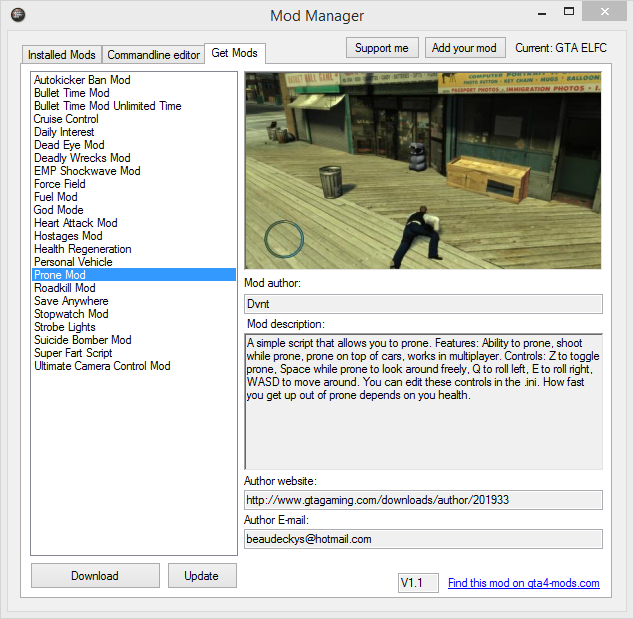
While less prevalent for GTA IV compared to games like Skyrim or Fallout, some community-developed mod managers exist to simplify installation. These tools aim to automate file placement, manage conflicts, and provide easier ways to enable or disable mods.
-
GTA IV Mod Manager: (Check for updated versions or community support) These tools might offer a graphical interface to install and uninstall certain types of mods, often by handling the file replacement process for you.
-
Script Hook IV + OpenIV Integration: OpenIV itself acts as a powerful manager for
.rpfmodifications and can manage ASI loaders, making it a central hub for many modding tasks. -
How They Work: Typically, you point the mod manager to your game directory, download mod packages (sometimes in a specific format compatible with the manager), and then use the manager’s interface to install or uninstall. They often provide features like mod profiles and conflict detection.
While automated managers can be convenient, understanding the manual installation steps detailed above provides a deeper comprehension of how mods interact with your game, which is invaluable for troubleshooting and for installing mods that don’t support managers.
Troubleshooting Common Modding Issues
Even with careful preparation, modding can sometimes lead to unforeseen problems. Knowing how to diagnose and resolve common issues is a vital skill for any modder.
Game Crashes and Instability
This is the most frequent and frustrating issue.
-
Cause: Often due to incompatible mods, incorrect installation, missing dependencies (like Script Hook IV), or an excessive number of resource-intensive mods.
-
Solution:
-
Check Mod Compatibility: Ensure all your mods are compatible with your specific GTA IV version.
-
Install One Mod at a Time: If you’re installing multiple mods, add them one by one, testing the game after each installation. This helps pinpoint the problematic mod.
-
Verify Dependencies: Make sure all required tools (ASI Loader, Script Hook IV, .NET Script Hook) are installed correctly and are up-to-date for your game version.
-
Remove Recent Mods: If the game crashes after installing a new mod, remove it. Use your backup if necessary.
-
Check Log Files: Script Hook IV and some other script mods generate log files (e.g.,
ScriptHook.log,ScriptHookDotNet.log) in your game directory. These often contain error messages that can indicate what’s going wrong. -
Resource Limits: GTA IV’s engine has limitations. Too many high-resolution textures or complex scripts can exceed its memory limits, leading to crashes. Consider reducing your mod count or choosing less demanding versions.
-
Missing Textures or Models
This manifests as “white textures,” transparent objects, or objects that simply don’t appear in the game.
-
Cause: Incorrect file placement, missing
.wtdor.wftfiles, or an incorrect.ideentry for new assets. -
Solution:
-
Double-Check File Paths: Re-read the mod’s instructions carefully and ensure you’ve placed all files into the exact directories specified within OpenIV.
-
Verify File Existence: Confirm that all necessary texture (
.wtd) and model (.wft) files are present in the designated.imgor.rpfarchive. -
IDEEntry Check: For new vehicles or objects, ensure that thevehicles.ideorobjects.idefile has the correct entry, referencing the mod’s files properly. Any typos here can cause issues. -
Rebuild Archives: If OpenIV prompted you to rebuild an archive after making changes, ensure you did so.
-
Dealing with Game Updates and Mod Conflicts
Game updates (less common now for GTA IV, but still possible with the Complete Edition) can break mods, and multiple mods can sometimes interfere with each other.
-
Game Updates: An official game update might revert core files, making your mods incompatible.
-
Backup Again: Always back up your modded game installation before applying an official update.
-
Reinstall Tools: After an update, you’ll likely need to update and reinstall Script Hook IV, ASI Loader, and other essential tools to compatible versions.
-
Reapply Mods: Reinstall your mods, especially those that replace core files, ensuring they are compatible with the new game version.
-
-
Mod Conflicts: When two mods try to modify the same file or script.
-
Identify Conflicting Files: If you suspect a conflict, try to determine which files both mods are trying to alter. This often requires careful reading of mod descriptions.
-
Prioritize/Choose: You might have to choose which mod’s changes you prefer or look for compatibility patches created by the community.
-
Use a Mod Manager (if available): Some mod managers are designed to detect and help resolve conflicts, though this is less common for GTA IV than for other games.
-
Reverting to a Clean Installation
When all else fails, or you simply want to start fresh, reverting to a clean installation is your best bet.
-
Delete Modded Game Folder: Delete your entire GTA IV game directory.
-
Restore from Backup: Copy your pristine backup game folder back to the original installation location.
-
Verify Game Files (Steam/Rockstar Launcher): If you didn’t make a full backup, you can use the game client’s “Verify Integrity of Game Files” feature (for Steam) or similar options on other launchers. This will scan your installation and replace any modified or missing files with original ones. Be aware this will remove all mods.
-
Reinstall: As a last resort, uninstall the game completely, delete any residual folders, and then perform a fresh reinstallation.
Patience and a methodical approach are key when troubleshooting. The GTA IV modding community forums can also be an invaluable resource, as many common issues have already been discussed and resolved by others.
Best Practices and Advanced Tips for GTA IV Modders
Venturing beyond basic installations opens up a world of sophisticated customization. Adopting best practices and exploring advanced techniques will not only enhance your modding experience but also ensure the longevity and stability of your modified GTA IV.
Curating Your Mod Collection: Quality Over Quantity
The sheer volume of available mods for GTA IV can be overwhelming. It’s tempting to download every exciting mod you come across, but this often leads to instability and diminished enjoyment.
-
Focus on Themes: Decide on a theme for your modded experience (e.g., ultra-realism, specific car culture, comedic mayhem) and select mods that complement this vision.
-
Read Reviews and Comments: Before downloading, always check user reviews, comments, and bug reports on modding websites. This provides insight into stability, performance impact, and potential conflicts.
-
Prioritize Essential Fixes: Start with stability patches, performance optimizations, and essential visual upgrades before adding purely aesthetic or gameplay-altering mods.
-
Test Extensively: Install mods incrementally and test the game after each major addition. This helps identify problematic mods quickly. A smaller, well-curated collection of high-quality, compatible mods will always provide a more satisfying experience than a chaotic assortment of hundreds that constantly crash.
Staying Safe: Reputable Mod Sources and Community Forums
The internet hosts countless sources for mods, but not all are created equal. Prioritizing reputable sources is crucial for security and mod quality.
-
Trusted Websites: Stick to well-established modding sites like GTA5-Mods.com (which also hosts GTA IV mods), Nexus Mods, GTA-Modding.com, and LibertyCity.net. These sites generally have moderation, user reviews, and virus scanning.
-
Avoid Shady Sites: Be wary of obscure websites, direct download links from random forums, or YouTube video descriptions without verified sources. These are more likely to host outdated, broken, or even malicious files.
-
Engage with Communities: Dedicated GTA IV modding forums (e.g., on GTAForums.com, Reddit’s r/GTAIV) are invaluable resources. Here, you can find installation guides, troubleshooting advice, compatibility lists, and recommendations from experienced modders. Learning from the collective wisdom of the community can save you countless hours of frustration.
Optimizing Performance with Mods
While mods can enhance graphics, they can also significantly impact performance. Balancing visual fidelity with smooth framerates is a key aspect of advanced modding.
-
Performance-Friendly Mods First: Look for mods specifically designed to optimize performance, such as texture optimizers, draw distance reducers, or scripts that improve memory management.
-
Texture Resolution Management: High-resolution textures are a common culprit for performance drops. Be selective; not every texture needs to be 4K. Some mod packs offer different resolution options.
-
ENB/Reshade Configuration: Graphical overhauls like ENBSeries can be incredibly demanding. Learn to configure their settings, adjusting parameters like ambient occlusion, complex shadows, and depth of field to find a balance between visual splendor and playable framerates. Experiment with different presets and fine-tune them to your hardware.
-
Monitor Resources: Use tools like MSI Afterburner or task manager to monitor your CPU, GPU, and RAM usage while playing your modded game. This helps identify bottlenecks and determine if a particular mod is excessively taxing your system.
Exploring the Depths: Creating Your Own Mods
For those with a technical inclination, the ultimate step in modding is creating your own content. This is a complex but incredibly rewarding endeavor.
-
Learn the Tools: Familiarize yourself deeply with tools like OpenIV for asset manipulation, 3D modeling software (e.g., Blender, 3ds Max) for creating custom models, and image editing software (e.g., Photoshop, GIMP) for textures.
-
Understand Game Formats: Research GTA IV’s proprietary file formats (e.g.,
.wtd,.wft,.ide,.dat). -
Scripting: For advanced gameplay mods, learn C++ for Script Hook IV development or C#/.NET for .NET Script Hook. This requires programming knowledge but offers immense creative freedom.
-
Community Resources: The same modding communities that provide installation help also often host tutorials and resources for mod creation. Donors of tools like OpenIV and Script Hook IV often provide SDKs and documentation.
Modding GTA IV is more than just installing files; it’s an art form that allows players to continuously reimagine and redefine their experience in Liberty City. By following these guidelines, you can navigate the complexities of modification with confidence, ensuring a stable, personalized, and endlessly entertaining journey. Enjoy the fruits of the community’s creativity, and perhaps, even contribute your own.
aViewFromTheCave is a participant in the Amazon Services LLC Associates Program, an affiliate advertising program designed to provide a means for sites to earn advertising fees by advertising and linking to Amazon.com. Amazon, the Amazon logo, AmazonSupply, and the AmazonSupply logo are trademarks of Amazon.com, Inc. or its affiliates. As an Amazon Associate we earn affiliate commissions from qualifying purchases.