
Grand Theft Auto V, even years after its initial release, continues to captivate millions of players worldwide. Its sprawling open world, engaging narrative, and dynamic gameplay offer countless hours of entertainment. However, for a significant portion of its PC player base, the true longevity and expanded potential of GTA V lie in its vibrant modding community. Modding allows players to transcend the boundaries of the base game, introducing everything from realistic graphical overhauls and new vehicles to entirely new missions, characters, and physics simulations. This guide aims to demystify the process of installing GTA V mods on your PC, providing a professional, insightful, and engaging roadmap for both newcomers and seasoned enthusiasts looking to breathe new life into Los Santos.
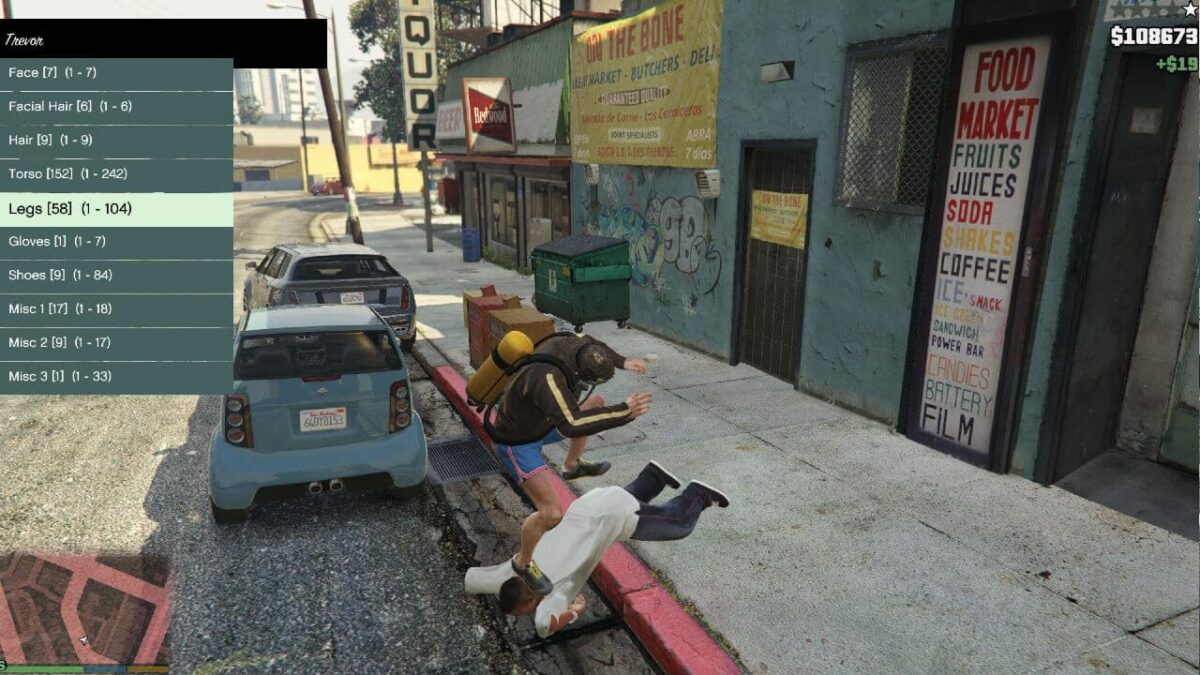
The Allure of Grand Theft Auto V Modding: Expanding Beyond the Base Game
The appeal of modding stems from a fundamental desire to customize, innovate, and extend the life of beloved software. For GTA V, this translates into an almost limitless array of possibilities, transforming the game from a fixed experience into a dynamic canvas for creativity.
Why Players Turn to Mods: Creativity, Customization, and Fresh Experiences
At its core, modding is about personalization. While Rockstar Games provides a meticulously crafted world, players often seek to tailor their experience further. This could be for aesthetic reasons, like enhancing the game’s visuals to unprecedented levels of realism with high-definition texture packs, advanced weather systems, or cutting-edge shader injections like ReShade. Or it could be for functional improvements, such as improved AI, more realistic driving physics, or quality-of-life enhancements that streamline gameplay.
Beyond mere improvements, mods frequently introduce entirely new content. Players can drive fantastical vehicles ranging from futuristic sci-fi crafts to hyper-realistic reproductions of real-world automobiles not present in the base game. Script mods open doors to new gameplay mechanics, such as superhero abilities, intricate heist planning systems, or even the ability to role-play as a civilian with a job and daily routine. This constant influx of new content, driven by a passionate community, ensures that GTA V never truly becomes stale, offering an evergreen source of fresh challenges and narratives long after the official updates cease. For many, the modded experience is the definitive GTA V experience.
Understanding the Risks and Rewards: Navigating the Modding Landscape Safely
While the rewards of modding are immense, it’s crucial to acknowledge and mitigate the inherent risks. The primary concern revolves around game integrity and digital security. Installing poorly coded or malicious mods can lead to game crashes, corrupted save files, or even introduce malware to your system. Furthermore, using certain types of mods, particularly those that confer an unfair advantage in online multiplayer (GTA Online), is strictly against Rockstar Games’ terms of service and can result in permanent bans.
The key to a rewarding modding experience lies in prudence and preparation. Sourcing mods from reputable communities and developers, understanding the installation process, and always backing up your game files are non-negotiable steps. The rewards, when approached cautiously, far outweigh the risks. Players gain access to a vast, ever-evolving universe of content, extending the game’s lifespan and personalizing their journey through Los Santos in ways the developers never envisioned. This blend of creative freedom and community-driven innovation is what truly sets PC modding apart.
Essential Preparations: Setting the Stage for Successful Mod Installation
Before diving into the exciting world of custom vehicles and crazy scripts, a few foundational steps are critical. Proper preparation ensures a smooth installation process, minimizes potential conflicts, and provides a safety net if things go awry.
Acquiring the Right Tools: Script Hook V and OpenIV
Two tools stand out as indispensable for the vast majority of GTA V mods:
-
Script Hook V: Developed by Alexander Blade, Script Hook V is essentially a library that allows custom scripts (often written in ASI format) to function within the game. Many complex mods, especially those introducing new gameplay mechanics, rely heavily on Script Hook V. It facilitates interaction between external scripts and the game engine, making it the bedrock for most script-based modifications. Without it, many of the most creative and transformative mods simply wouldn’t run. It also typically includes an ASI loader, which is necessary for the game to recognize and load .asi files.
-
OpenIV: This powerful multi-purpose editor and archive manager is the workhorse for installing mods that modify or replace game files. GTA V stores many of its assets (models, textures, audio, etc.) within proprietary RPF archive files. OpenIV allows you to open these archives, extract files, and—crucially—inject new or modified files. Its “Mods Folder” system is particularly vital, as it allows you to make modifications without directly altering the original game files, making it easier to revert changes or update the game without losing your mods. OpenIV is indispensable for installing visual overhauls, custom vehicles, and map expansions.
These two tools, consistently updated by their respective developers, form the backbone of the GTA V modding ecosystem. Understanding their function and proper installation is the first major step towards successful modding.
Safeguarding Your Game: The Critical Importance of Backups
This cannot be stressed enough: Always back up your original game files before installing any mods. Modding involves altering game files, and even with the best tools and intentions, conflicts or errors can occur. A backup serves as your safety net, allowing you to quickly revert to a pristine, unmodded state if something goes wrong – whether it’s a game crash, unexpected graphical glitches, or simply a mod not working as intended.
There are several ways to approach backups:
-
Copying the entire game directory: The most straightforward method is to simply copy your entire “Grand Theft Auto V” installation folder to another location on your hard drive. This can be time-consuming due to the game’s size but provides a complete, untouched copy.
-
Utilizing OpenIV’s “Mods Folder”: OpenIV’s ingenious “Mods Folder” system creates copies of the specific RPF archives you modify, storing them in a separate directory (
Grand Theft Auto Vmods). This means that your original game files remain untouched, and the game loads assets from themodsfolder first. This is a form of active backup and segregation, highly recommended for file-based mods. -
Backing up specific files: For script mods, backing up
ScriptHookV.dll,dinput8.dll, and anyasifiles in your game directory is often sufficient, as these are the main files introduced by script mods.
Regardless of the method, make a backup. It’s an investment in your peace of mind and prevents the frustrating prospect of a full game reinstallation.
Maintaining Game Integrity: Best Practices for a Stable Modded Environment
Beyond backups, several best practices contribute to a stable and enjoyable modding experience:
-
Start with a Clean Game Installation: Before installing any mods, ensure your GTA V installation is clean and fully updated. Any existing residual mod files from previous attempts could cause conflicts.
-
Understand Mod Compatibility: Not all mods play nice together. Some might conflict with each other, especially if they try to modify the same game assets or scripts. Always read mod descriptions carefully for known incompatibilities.
-
One Mod at a Time (Initially): When starting out, install mods one by one and test the game after each installation. This makes it easier to pinpoint which mod is causing an issue if one arises.
-
Keep Tools Updated: Script Hook V and OpenIV are regularly updated to support new game patches. Ensure your modding tools are always the latest versions to maintain compatibility and stability.
-
Avoid Online Modding (Unless Specified): As mentioned, using most mods in GTA Online can lead to bans. If you plan to play GTA Online, ensure all mods are removed or disabled. Tools exist that can quickly switch between modded and unmodded game states.
-
Read Documentation: Always read the installation instructions provided by the mod author. They often contain critical steps, specific file paths, or troubleshooting tips unique to their mod.
Adhering to these practices will significantly reduce headaches and allow you to focus on enjoying the enhanced world of GTA V.
A Step-by-Step Mod Installation Walkthrough: From Download to Deployment
With your preparations complete, it’s time to delve into the practical steps of installing different types of GTA V mods. We’ll cover the essential tools and then discuss how to integrate various mod categories.
Installing Script Hook V: The Foundation for Script Mods
-
Download Script Hook V: Visit the official Script Hook V website (usually
dev-c.com/gtav/scripthookv/). Download the latest version. -
Extract Files: Unzip the downloaded archive. You’ll typically find three important files:
ScriptHookV.dll,dinput8.dll(the ASI loader), andNativeTrainer.asi(an optional, simple in-game trainer). -
Copy to Game Directory: Copy
ScriptHookV.dllanddinput8.dlldirectly into your main Grand Theft Auto V installation folder (the one containingGTA5.exe). If you want the basic trainer, also copyNativeTrainer.asi. -
Test: Launch GTA V. If installed correctly, you should hear a small beep and see a version number displayed in the corner during loading, confirming Script Hook V is active.
Mastering OpenIV: Your Gateway to Game File Modification
-
Download and Install OpenIV: Get the official installer from
openiv.com. Run the installer, select your language, and follow the on-screen prompts. -
Locate GTA V: The first time you launch OpenIV, it will ask you to locate your GTA V directory. Point it to your main game folder (
GTA5.exeshould be inside). -
Activate “Edit Mode”: Once OpenIV loads, click the “Edit Mode” button in the top menu bar (it looks like a green pencil). This enables you to make changes to game files. OpenIV will prompt you to install the “ASI Loader” and “OpenIV.asi” plugins if they’re not already installed. Do this; they are crucial for modding and for the “Mods Folder” system.
-
Set Up the “Mods Folder”: After installing the ASI plugins, navigate to any RPF archive you intend to modify (e.g.,
updateupdate.rpf,x64e.rpf). OpenIV will usually prompt you to “Copy to ‘mods’ folder” if you try to edit an original file. Always choose this option. This creates a separatemodsfolder in your main GTA V directory and copies the RPF archive there, protecting your original game files.
Integrating Different Mod Types: Vehicles, Textures, and Scripts
With Script Hook V and OpenIV ready, you can now tackle various mod types.
Replacing Vehicle Models (Add-on and Replace)
-
Replace Method:
-
Download a vehicle mod (e.g., a custom car) that specifies
replaceinstallation. It will typically include.yft,.ytd, and.ybnfiles. -
Using OpenIV, navigate to the specified path for the original vehicle you wish to replace (e.g.,
updatex64dlcpackspatchdaydlc.rpfx64levelsgta5vehicles.rpf). -
Ensure you are in “Edit Mode” and in the “mods” folder version of the RPF.
-
Drag and drop the new vehicle’s files (
.yft,.ytd, etc.) directly into OpenIV’s window for that archive, overwriting the originals.
-
-
Add-on Method:
-
Add-on vehicles are generally safer and more flexible as they don’t replace existing cars. They usually come with a
.dlc.rpffolder. -
Create a new folder in
Grand Theft Auto Vmodsupdatex64dlcpacksand name it after the mod (e.g.,mycustomcar). -
Drag the mod’s
.dlc.rpfinto your newly created folder. -
Open
dlclist.xml(located atGrand Theft Auto Vmodsupdateupdate.rpfcommondata). Ensure you are in “Edit Mode”. -
Right-click
dlclist.xml, choose “Edit”, and add a new line:<Item>dlcpacks:mycustomcar</Item>(replacemycustomcarwith your mod’s folder name). Save the XML. -
Use a trainer (like Simple Trainer or Menyoo) in-game to spawn the car using its provided spawn name.
-
Applying Visual Enhancements (Reshade, Texture Packs)
-
ReShade: This is a generic post-processing injector.
-
Download the ReShade installer from
reshade.me. -
Run the installer, select
GTA5.exe, choose DirectX 10/11/12, and select the desired shader effects. -
Launch GTA V; ReShade will activate, often with an on-screen prompt.
-
-
Texture Packs:
-
Texture mods often come as
.ytdfiles or collections. -
Use OpenIV to locate the original
.ytdfile within the appropriate RPF archive (e.g.,x64a.rpflevelsgta5vehiclesvehicle_stream.rpf). -
In “Edit Mode” and the “mods” folder, drag and drop the new
.ytdfile to replace it.
-
Adding Scripted Mods for New Gameplay Features
-
Download Script Mod: Get the mod (often a
.asifile, or a folder containing.cs,.vb, or.luascripts). -
Install ASI Script Mods: If it’s a
.asifile, simply copy it into your main GTA V directory. Script Hook V’s ASI loader will detect and load it. -
Install .NET Script Mods: Some mods require
ScriptHookV.NET(a separate wrapper for .NET scripts). InstallScriptHookV.NETfirst, then place.cs,.vb, or.luascript files into thescriptsfolder within your main GTA V directory (create it if it doesn’t exist). -
Follow Mod Instructions: Always, always refer to the specific installation instructions provided by the mod author, as some scripts have unique requirements.
Navigating Common Challenges and Best Practices for Mod Management
Even with careful preparation, modding can present challenges. Knowing how to troubleshoot and maintain your modded game is crucial for a lasting experience.
Troubleshooting Typical Modding Issues: Crashes, Conflicts, and Load Failures
-
Game Crashes on Startup:
-
Outdated Script Hook V: The most common cause. Ensure Script Hook V is updated for your current GTA V patch.
-
Conflicting ASI files: If you installed multiple ASI mods, try removing them one by one to identify the culprit.
-
Corrupted game files: Verify game integrity through your game launcher (Steam, Epic Games).
-
-
Infinite Loading Screens:
-
Often related to
dlclist.xmlerrors (missing items, incorrect paths) orgameconfig.xmlissues (if using many add-on vehicles/maps). -
Ensure your
gameconfig.xmlis compatible with your game version and number of add-ons. Use a higher limit gameconfig if necessary.
-
-
Missing Textures/Models (Invisible Cars, Pink Textures):
-
Indicates incorrect installation paths or corrupted
.ytd/.yftfiles. Double-check your OpenIV paths. -
May also be due to exceeding game memory limits; consider a higher heap adjuster.
-
-
Mod Not Working In-Game:
-
Did you install Script Hook V? Is it up-to-date?
-
Did you follow the mod’s specific instructions precisely?
-
Is the mod compatible with your game version or other installed mods?
-
When troubleshooting, revert to your backup if needed, and try installing mods one at a time to isolate issues. Modding forums and the comment sections on mod download pages are invaluable resources.
Staying Undetected: Playing Online with Mods and Avoiding Bans
This is a critical section. Rockstar Games has a zero-tolerance policy for modding in GTA Online. Using almost any mod in the online component will result in a ban, ranging from temporary suspensions to permanent account locks.
-
Never use mods in GTA Online. This includes graphical enhancements, trainers, script mods, or any file modifications that could alter the online experience.
-
Remove or Disable Mods for Online Play:
-
For Script Hook V and ASI mods, simply remove
dinput8.dlland any.asifiles from your main GTA V directory before launching GTA Online. -
For OpenIV file modifications, if you strictly used the “Mods Folder” system, OpenIV provides an option to “disable” the mods folder, effectively reverting to the original game files. Alternatively, use a clean backup.
-
Many advanced modders use a “mod switcher” tool that automates the process of moving mod files in and out of the game directory.
-
-
Separate Game Installations: Some players maintain two separate GTA V installations: one completely clean for online play and another heavily modded for single-player. This requires significant disk space but offers complete peace of mind.
It’s paramount to respect Rockstar’s policies and keep modding strictly to the single-player experience to avoid jeopardizing your account.
Curating Your Mod Collection: Sources, Updates, and Organization
-
Reputable Sources: Always download mods from well-established websites like GTA5-Mods.com, Nexus Mods, or dedicated community forums. These sites typically vet uploads and host active communities that report issues. Avoid obscure sites.
-
Stay Updated: Mod authors frequently update their creations for bug fixes, new features, or compatibility with new game patches. Check back on mod pages periodically. Similarly, keep Script Hook V and OpenIV updated.
-
Organize Your Mods: Create a dedicated folder outside your game directory for downloaded mod archives. Sub-categorize them (e.g., “Vehicles,” “Scripts,” “Graphics”) and include
README.txtfiles or notes on their installation path and requirements. This makes managing and updating your collection far easier. -
Read Comments and Reviews: Before downloading, read comments and user reviews on mod pages. They often provide valuable insights into installation difficulties, bugs, or compatibility issues that aren’t mentioned in the main description.
The Future of GTA V Modding: Community, Innovation, and Longevity
The landscape of GTA V modding is a testament to the power of community-driven innovation. Even as new games emerge, the ecosystem around Grand Theft Auto V continues to thrive, promising an extended lifespan for this iconic title.
The Enduring Legacy of a Mod-Friendly Title
GTA V’s fundamental design, particularly on the PC platform, inadvertently laid fertile ground for a robust modding scene. Its open-world structure, vehicle physics, and character systems provide a flexible framework for countless modifications. While Rockstar has taken steps to secure GTA Online, their tacit allowance of single-player modding has fostered an environment where creativity flourishes. This openness, combined with dedicated tool developers and a passionate player base, has cemented GTA V’s status as one of the most moddable games of all time. Its longevity is directly tied to the community’s ability to endlessly reinvent and expand upon its foundations.
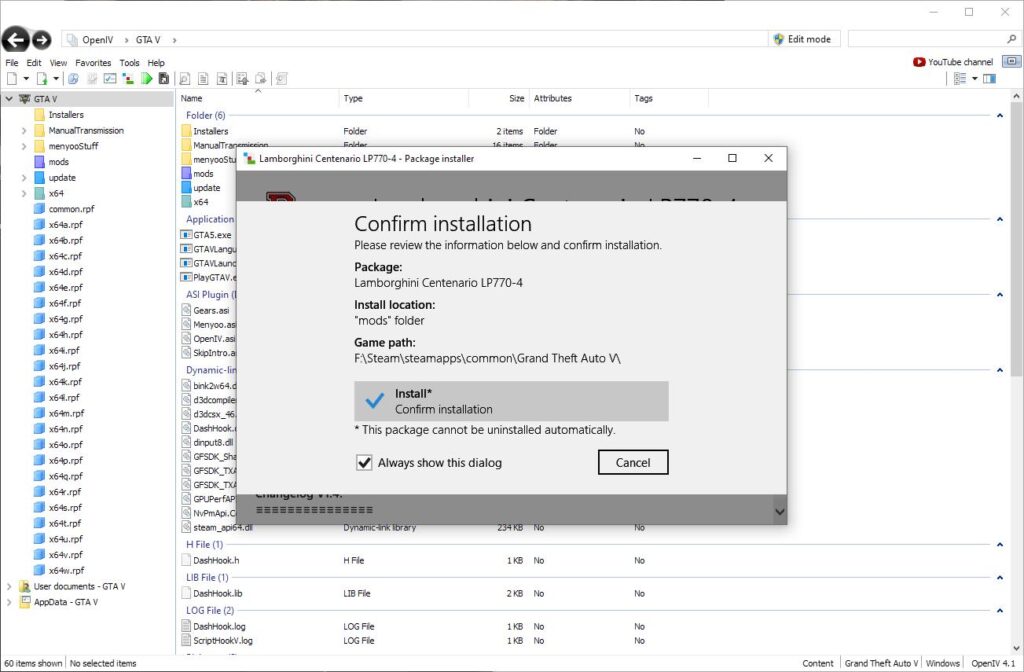
Contributing to the Modding Ecosystem: From User to Creator
The journey through GTA V modding can evolve beyond just installation. Many players, inspired by the creativity they encounter, delve into mod creation themselves. Learning basic scripting, 3D modeling, or texture editing can transform a passive consumer of mods into an active contributor. This cyclical process, where users become creators, further enriches the community, fueling new ideas, tools, and content. Platforms like OpenIV’s package installer simplify the sharing of complex mods, making it easier for creators to distribute their work and for users to install it. The collaborative spirit, the shared passion for Grand Theft Auto V, and the continuous pursuit of innovation ensure that the modding scene will remain a dynamic and exciting aspect of the game for years to come.
In conclusion, installing GTA V mods on PC is a rewarding endeavor that significantly extends the game’s appeal and lifespan. By understanding the essential tools, adhering to best practices, and approaching the process with careful consideration for safety and stability, players can unlock an extraordinary world of custom content, unique gameplay, and unparalleled personalization. Welcome to the enhanced world of Grand Theft Auto V.
aViewFromTheCave is a participant in the Amazon Services LLC Associates Program, an affiliate advertising program designed to provide a means for sites to earn advertising fees by advertising and linking to Amazon.com. Amazon, the Amazon logo, AmazonSupply, and the AmazonSupply logo are trademarks of Amazon.com, Inc. or its affiliates. As an Amazon Associate we earn affiliate commissions from qualifying purchases.