
In the intricate world of computing, where hardware and software dance in a symphony of processing power, the operating system (OS) stands as the conductor. It’s the fundamental software that manages all the hardware and software resources on your computer, allowing you to interact with your machine, run applications, and perform tasks seamlessly. Far more than just a startup screen, the OS is the very brain of your digital experience, orchestrating everything from displaying pixels on your screen to managing complex network connections.
For many users, the operating system remains a background entity – a silent workhorse whose presence is often only acknowledged when something goes wrong, or a new version brings visual changes. However, understanding what an operating system is, how it functions, and importantly, which one your computer runs, is crucial for anyone navigating the digital landscape. It impacts everything from software compatibility and digital security to troubleshooting and overall user experience. This article will demystify the operating system, explore the major players in the field, explain why this knowledge is indispensable, and guide you on how to identify the OS powering your machine.
Understanding the Core: What is an Operating System?
At its heart, an operating system is a collection of software that manages computer hardware and software resources and provides common services for computer programs. Think of it as the ultimate middleman, facilitating communication between you (the user), your applications, and the physical components of your computer. Without an OS, a computer would merely be a collection of inert electronic components, unable to process commands or run any software.
The Brain of Your Machine
The OS performs several critical functions that make your computer usable. One of its primary roles is resource management. This involves allocating CPU time to different programs, managing memory usage to prevent conflicts, and coordinating input/output operations with devices like keyboards, mice, printers, and monitors. It ensures that multiple applications can run concurrently without stepping on each other’s toes, giving you the illusion of multitasking.
Another vital function is process management, where the OS decides which processes get access to the CPU and for how long. It handles the creation, scheduling, and termination of processes, ensuring that tasks are executed efficiently. Memory management is equally important, as the OS assigns memory space to different programs and data, protecting one program’s memory from being overwritten by another. Finally, file management allows you to organize, store, retrieve, and delete files on your hard drive, presenting a structured hierarchical view of your data.
Bridging Hardware and Software
The operating system acts as the essential bridge between your computer’s hardware and its software applications. When you click an icon to launch a program, it’s the OS that loads the program into memory and instructs the CPU to execute its commands. When an application needs to access the internet, save a file, or display graphics, it doesn’t directly interact with the network card, hard drive, or graphics processor. Instead, it sends a request to the operating system, which then translates that request into a language the hardware can understand and executes it. This abstraction layer simplifies software development and ensures compatibility across a wide range of hardware configurations. Drivers, specialized software components, play a crucial role here, enabling the OS to communicate with specific hardware devices.
Common Operating Systems You Might Encounter
While there are many operating systems designed for various purposes, a few dominate the personal computing and mobile device landscape, each with its unique philosophy, ecosystem, and user experience.
Microsoft Windows: The Ubiquitous Choice
For decades, Microsoft Windows has held the lion’s share of the personal computer market. Known for its broad hardware compatibility and extensive software support, Windows has evolved significantly since its early graphical user interface (GUI) days. Modern versions like Windows 10 and Windows 11 offer a robust desktop environment, powerful multitasking capabilities, an integrated app store, and a wide array of features catering to both casual users and professionals. Its strength lies in its widespread adoption, ensuring that almost any software or peripheral you acquire will likely be compatible. The ecosystem includes services like Microsoft 365, Xbox gaming integration, and a rich developer community.
macOS: Apple’s Elegant Ecosystem
Apple’s macOS (formerly OS X) is the operating system powering Mac computers. Distinguished by its sleek, intuitive user interface, strong focus on design, and tight integration with Apple’s hardware, macOS offers a premium computing experience. It’s renowned for its stability, strong security features, and a suite of powerful built-in applications for creativity and productivity (e.g., Pages, Numbers, Keynote, Final Cut Pro). The Apple ecosystem ensures seamless continuity across devices like iPhones, iPads, and Macs, allowing for features like Handoff, Universal Clipboard, and AirDrop. While its hardware compatibility is limited to Apple devices, it offers a highly optimized and polished experience.
Linux: The Open-Source Powerhouse
Linux is a family of open-source operating systems known for their flexibility, security, and powerful command-line interface. Unlike Windows or macOS, Linux is not owned by a single company, but rather developed collaboratively by a global community. This has led to the creation of numerous “distributions” (or “distros”), such as Ubuntu, Fedora, Debian, Mint, and Arch Linux, each offering a different user experience, set of pre-installed software, and target audience. Linux is popular among developers, system administrators, and privacy-conscious users, and it dominates the server, supercomputing, and embedded systems markets. Its open-source nature allows for unparalleled customization and transparency, though it can have a steeper learning curve for new users.
Mobile Operating Systems (Android and iOS)
While this article primarily focuses on desktop OS, it’s worth noting that your smartphone and tablet also run sophisticated operating systems. Android, developed by Google, is the most popular mobile OS globally, powering a vast array of devices from numerous manufacturers. It’s known for its open nature, customization options, and deep integration with Google services. iOS, Apple’s mobile OS, powers iPhones and iPads. It’s famous for its user-friendliness, strong security, and seamless integration with Apple’s hardware and services, much like macOS. These mobile OSes share many fundamental principles with their desktop counterparts, managing resources, applications, and user interaction in a touch-centric environment.
Why Knowing Your OS Matters
Understanding which operating system your computer uses is not just a matter of technical curiosity; it’s a fundamental piece of information with practical implications for your daily computing experience. This knowledge empowers you to make informed decisions, troubleshoot issues more effectively, and ensure the security and performance of your machine.
Software Compatibility and Performance
Perhaps the most immediate reason to know your OS is for software compatibility. Applications are specifically developed to run on particular operating systems. A program designed for Windows will not run natively on macOS or Linux without special emulation software. Knowing your OS ensures you download and install the correct version of any application, whether it’s a word processor, a video game, or a specialized design tool. Furthermore, certain applications perform optimally on specific OS versions or configurations, making this knowledge key for ensuring smooth operation.
System Updates and Security
Operating systems are complex pieces of software, and like any software, they are susceptible to vulnerabilities and bugs. Regular OS updates are critical for patching security holes, improving performance, and introducing new features. Knowing your OS means you can actively check for and install these updates, protecting your computer from malware, viruses, and other cyber threats. It also allows you to understand the implications of new features or deprecations in specific OS versions. Neglecting updates can leave your system exposed to significant risks, making OS identification a cornerstone of digital security.
Troubleshooting and Technical Support
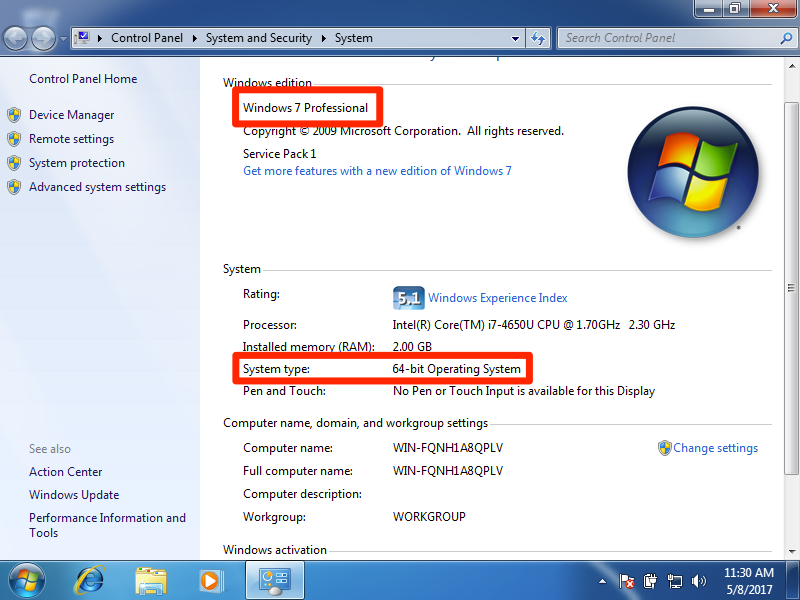
When technical issues arise, the first question a support technician will usually ask is, “What operating system are you running?” This information is vital for diagnosing problems, as troubleshooting steps and solutions are often OS-specific. Whether you’re trying to fix a network connection, resolve a software conflict, or recover lost files, knowing your OS version (e.g., Windows 11 Home, macOS Ventura 13.4, Ubuntu 22.04 LTS) allows you to find relevant help, tutorials, and drivers quickly and accurately, streamlining the resolution process.
Hardware Upgrades and Driver Management
Your operating system also dictates what hardware components are compatible with your computer and the drivers required for them to function. If you’re considering upgrading your graphics card, adding more RAM, or installing a new peripheral, you’ll need to ensure that the hardware comes with drivers that support your specific OS version. Outdated or incompatible drivers can lead to system instability, performance issues, or even prevent hardware from working at all. Understanding your OS helps you manage drivers effectively and make smart hardware upgrade decisions.
How to Find Your Computer’s Operating System
Identifying your computer’s operating system is usually a straightforward process, differing slightly depending on whether you’re using a Windows, macOS, or Linux machine.
For Windows Users
There are a couple of common ways to find your OS version in Windows:
-
Through System Settings:
-
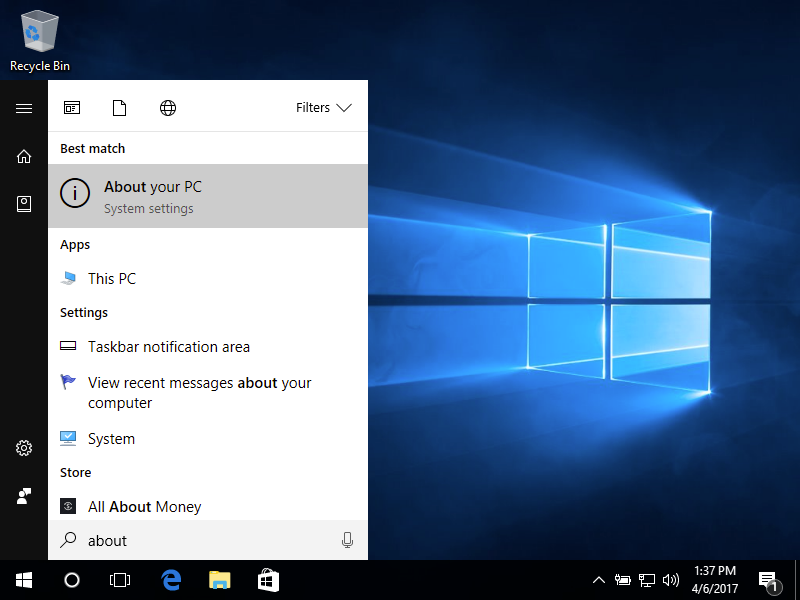
Click the Start button (Windows icon).
-
Click on the Settings icon (gear icon).
-
Select System from the left-hand menu.
-
Click on About at the bottom of the System menu.
-
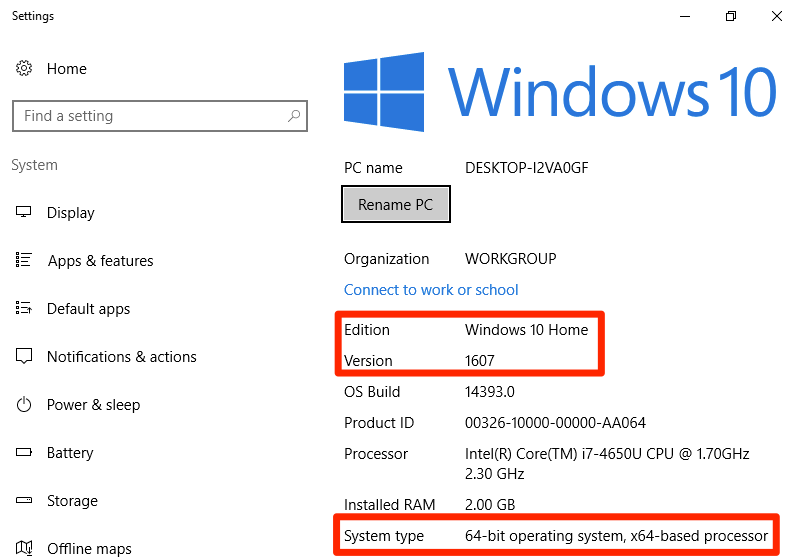
Here, you’ll find details under “Windows specifications,” including “Edition” (e.g., Windows 11 Home, Pro), “Version,” and “OS build.”
-
-
Using the
winvercommand:-
Press the Windows key + R to open the Run dialog.
-
Type
winverand press Enter. -
A small “About Windows” window will appear, displaying your Windows version and build information.
-
For macOS Users
Finding your OS version on a Mac is even simpler:
-
Click the Apple menu icon in the top-left corner of your screen.
-
Select “About This Mac.”
-
A window will appear displaying an overview of your Mac, including the macOS version name (e.g., macOS Ventura, macOS Monterey) and its version number.
For Linux Users
Identifying the specific distribution and version of Linux can vary slightly depending on the distro, but here are some common methods:
-
Using
lsb_release -a:-
Open a terminal (usually by pressing Ctrl+Alt+T).
-
Type
lsb_release -aand press Enter. This command displays LSB (Linux Standard Base) information, including distribution ID, description, release number, and codename.
-
-
Checking
/etc/os-releaseor/etc/issue:-
Open a terminal.
-
Type
cat /etc/os-releaseand press Enter. This file contains a wealth of information about your distribution. -
Alternatively,
cat /etc/issuecan sometimes provide a simpler, more concise version string.
-
-
Through Graphical Settings (e.g., Ubuntu, Fedora): Many desktop environments in Linux distributions offer a “About” section in their system settings, similar to Windows or macOS, where you can find OS details. For Ubuntu with GNOME, for example, you can go to
Settings > About.
The Future Landscape of Operating Systems
The journey of operating systems is far from over. As technology continues to advance, so too will the capabilities and form factors of our digital conductors. We are witnessing several exciting trends that promise to redefine our interaction with computers.
Cloud-Native OS and Virtualization
The rise of cloud computing is giving birth to “cloud-native” operating systems or operating environments that are heavily reliant on internet connectivity and cloud services. ChromeOS, which powers Chromebooks, is a prime example, offering a lightweight OS where most applications and data reside in the cloud. This trend points towards a future where the distinction between local and cloud computing might further blur, with OS functionalities increasingly delivered as services. Virtualization technologies also allow multiple OS instances to run concurrently on a single physical machine, facilitating development, testing, and resource isolation.
AI Integration and Enhanced User Experience
Artificial intelligence is rapidly becoming an integral part of operating systems. Modern OSes already incorporate AI for tasks like predictive text, facial recognition, voice assistants (Siri, Cortana), and intelligent search. In the future, AI will likely enhance user experience through more personalized interfaces, proactive system maintenance, advanced security features that detect anomalies, and more intuitive natural language interactions. OSes could become even more adaptive, learning user habits and preferences to optimize performance and streamline workflows autonomously. The goal is to make computing even more seamless, efficient, and predictive, reducing friction between the user and their digital tools.
Conclusion
The operating system is the unsung hero of our digital lives, a complex yet indispensable piece of software that quietly enables everything we do on our computers. From managing resources and executing applications to ensuring security and facilitating user interaction, its role is foundational. By understanding what an OS is, recognizing the major players in the field, appreciating its critical importance, and knowing how to identify the specific OS powering your machine, you gain a deeper appreciation for technology and empower yourself to be a more effective, secure, and confident computer user. As operating systems continue to evolve, integrating cutting-edge technologies like AI and cloud computing, staying informed about this core component will remain paramount in navigating the ever-changing digital landscape.
aViewFromTheCave is a participant in the Amazon Services LLC Associates Program, an affiliate advertising program designed to provide a means for sites to earn advertising fees by advertising and linking to Amazon.com. Amazon, the Amazon logo, AmazonSupply, and the AmazonSupply logo are trademarks of Amazon.com, Inc. or its affiliates. As an Amazon Associate we earn affiliate commissions from qualifying purchases.