
In the rapidly evolving landscape of digital technology, where high-speed protocols like PCIe and Thunderbolt dominate the headlines, it is easy to overlook the foundational building blocks that keep our gadgets functioning. Among these unsung heroes is the UART (Universal Asynchronous Receiver/Transmitter) interface. If you have ever programmed an Arduino, connected a GPS module to a drone, or looked under the hood of an industrial automation system, you have likely encountered UART.
Far from being a relic of the past, UART remains a cornerstone of modern electronics, providing a reliable and straightforward method for devices to talk to one another. In this comprehensive guide, we will explore what a UART interface is for, how it operates, and why it remains an essential tool in the toolkit of developers, engineers, and tech enthusiasts.
What is UART? The Fundamentals of Asynchronous Serial Communication
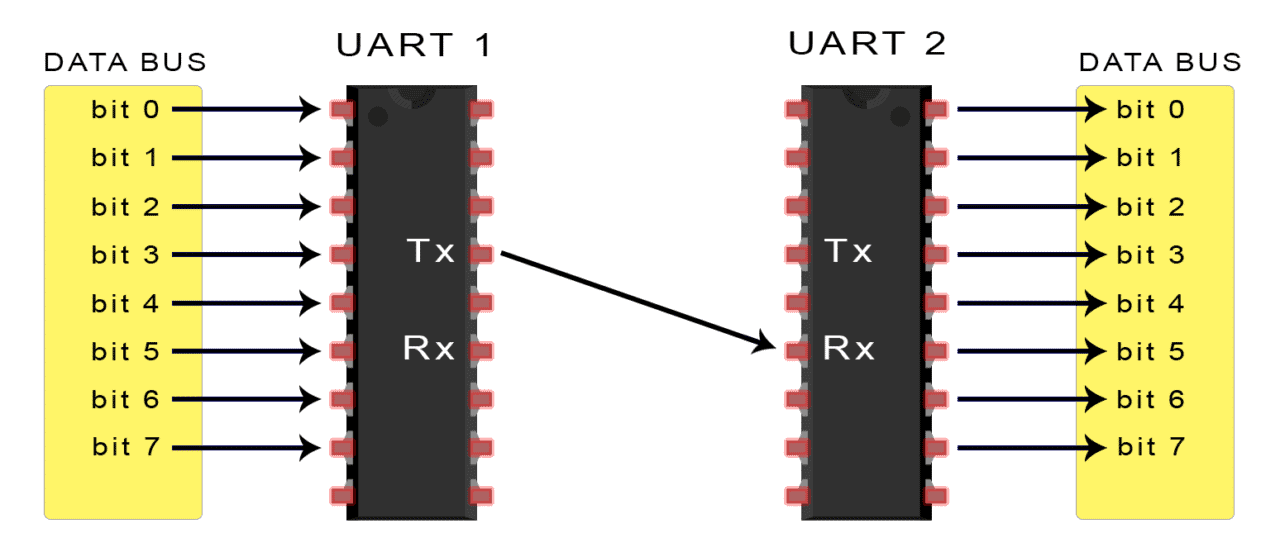
To understand what a UART interface is for, one must first distinguish between hardware and protocol. UART is not a communication protocol in the same sense as USB or Ethernet; rather, it is a physical circuit (typically an integrated circuit or part of a microcontroller) dedicated to handling serial communication.
Defining UART: Hardware vs. Protocol
UART stands for Universal Asynchronous Receiver/Transmitter. Its primary job is to translate data between parallel and serial forms. Inside a computer or a microcontroller, data is usually handled in parallel (multiple bits moving at once across a bus). However, sending parallel data over long distances requires many wires, which is expensive and prone to interference. UART takes that parallel data, converts it into a serial stream (one bit at a time), and transmits it over a single wire. On the receiving end, another UART chip converts that serial stream back into parallel data for the host processor.
How UART Works: The Frame Structure
The “Asynchronous” part of UART is its defining characteristic. Unlike synchronous interfaces (such as SPI or I2C), UART does not use a shared clock signal to synchronize the sender and receiver. Instead, it relies on predefined settings and a specific data frame structure.
A standard UART data frame consists of:
-
Start Bit: A transition from high to low voltage that alerts the receiver that data is coming.
-
Data Frame: Usually 5 to 9 bits of actual information (standardized at 8 bits or 1 byte).
-
Parity Bit: An optional bit used for basic error checking to ensure data wasn’t corrupted during transit.
-
Stop Bits: One or two bits that signal the end of the data packet, resetting the line to a high state.
The Critical Role of Baud Rate
Since there is no shared clock, both the transmitter and receiver must be configured to the same “Baud Rate”—the speed at which data is sent, measured in bits per second (bps). Common baud rates include 9600, 115200, and 921600. If the baud rates do not match, the receiver will misinterpret the timing of the bits, resulting in “garbage” data or communication failure.
Why UART Matters: Key Features and Benefits in Modern Electronics
Even with the advent of faster and more complex interfaces, UART continues to be the go-to choice for many tech applications. Its longevity is a testament to its efficiency and simplicity.
Simplicity of Wiring: The Two-Wire Advantage
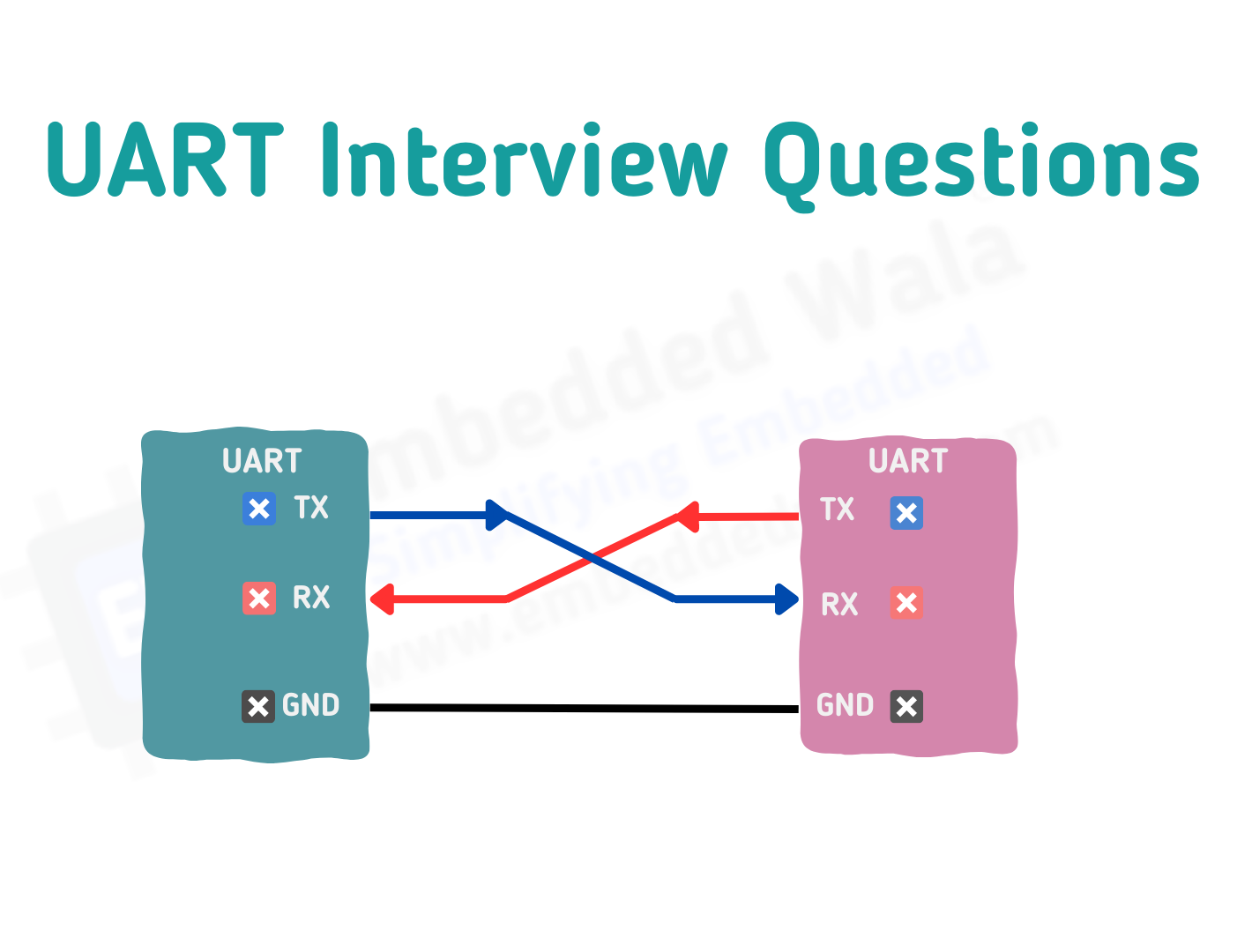
One of the most significant advantages of UART is its minimal hardware requirement. A standard UART connection requires only two wires: TX (Transmit) and RX (Receive), plus a common Ground (GND). This simplicity reduces the physical footprint on printed circuit boards (PCBs) and simplifies the design of connectors. In a world where devices are getting smaller, the ability to establish a robust communication link with just a few traces is invaluable.
Asynchronous Nature: Eliminating the Clock Signal
By removing the need for a clock wire, UART reduces electromagnetic interference (EMI) and saves an extra pin on the microcontroller. While synchronous communication is generally faster, it requires more precise hardware coordination. UART’s asynchronous nature allows two devices to communicate even if they are running on different internal clock speeds, provided they agree on the baud rate.
Flexibility in Data Formatting
UART is highly configurable. Developers can adjust the number of data bits, the type of parity checking, and the number of stop bits to suit the specific needs of their application. This flexibility makes UART a “Swiss Army Knife” for low-speed data transfers, capable of interfacing with everything from simple temperature sensors to complex cellular modems.

Real-World Applications: Where You’ll Encounter UART Interfaces
UART is everywhere, though it is often hidden behind the scenes. From the development lab to the consumer’s pocket, UART serves several vital functions.
Prototyping and Debugging with Microcontrollers
For developers working with platforms like the Arduino, ESP32, or Raspberry Pi, UART is the primary method for “Serial Debugging.” When a programmer wants to see what is happening inside the code, they use UART to send text strings back to a computer’s serial monitor. This “print” debugging is the most common way to troubleshoot logic errors in embedded software.
Interfacing with Wireless Modules
Most modular tech components utilize UART for communication. For example:
-
GPS Modules: Use UART to stream NMEA data (coordinates, altitude, speed) to a flight controller or microchip.
-
Bluetooth Modules: (Like the HC-05) use UART to receive commands from a phone and pass them to a device.
-
Wi-Fi Modems: Many IoT devices use UART to send AT commands to a Wi-Fi chip, instructing it to connect to a network or send an HTTP request.
Legacy Systems and Industrial Automation
In industrial settings, UART is the foundation for the RS-232 and RS-485 standards. While the voltage levels are different (UART usually operates at 3.3V or 5V, while RS-232 uses higher voltages), the underlying logic is the same. These interfaces are used to control programmable logic controllers (PLCs), CNC machines, and scientific instruments because they are robust and easy to implement over long cables.
Comparing UART to Other Serial Interfaces: I2C and SPI
To truly understand what a UART interface is for, it helps to see where it sits in the hierarchy of serial communication. It is frequently compared to I2C (Inter-Integrated Circuit) and SPI (Serial Peripheral Interface).
UART vs. I2C: Speed, Addressing, and Complexity
I2C is a multi-master, multi-slave interface that uses two wires (SDA and SCL). Unlike UART, I2C allows a single controller to talk to dozens of devices on the same bus using unique addresses.
-
UART is better for point-to-point communication (one device to one device).
-
I2C is better for connecting many sensors to a single chip.
-
Comparison: UART is generally easier to program but lacks the sophisticated addressing and multi-device capabilities of I2C.
UART vs. SPI: Full-Duplex Performance and Hardware Overhead
SPI is a high-speed synchronous interface that uses four wires. It is much faster than UART and is used for data-heavy tasks like driving high-resolution displays or reading from SD cards.
-
UART is asynchronous and generally slower, but uses fewer wires.
-
SPI requires a “Chip Select” wire for every device added, which can clutter a design.
-
Comparison: If you need raw speed, go with SPI. If you need simplicity and long-distance reliability at moderate speeds, UART is the winner.
Choosing the Right Interface for Your Tech Project
The decision to use UART usually comes down to the “overhead” of the project. If you are building a simple IoT sensor that only needs to send a few bytes of data every minute, UART is the most efficient choice. It consumes less power and requires less complex software libraries than its counterparts.
Troubleshooting and Future Outlook: Is UART Still Relevant in the AI Era?
As we move toward AI-integrated hardware and high-bandwidth 5G devices, some might wonder if UART is becoming obsolete. The answer is a resounding no.
Common UART Pitfalls: Baud Rate Mismatches and Logic Levels
The most common issue with UART is a baud rate mismatch. If one device sends at 9600 bps and the other listens at 115200 bps, the communication will fail. Another critical issue is Logic Level Mismatches. A 5V UART (common in older Arduinos) can fry a 3.3V UART (common in modern ESP32 or Raspberry Pi chips). Engineers must use “level shifters” to ensure the tech remains safe.
The Enduring Legacy of UART in the Internet of Things (IoT)
In the age of the Internet of Things, UART has found a second life. Small, low-power sensors and actuators don’t need the massive bandwidth of USB-C or Ethernet. They need a low-power, “set-it-and-forget-it” interface. UART fits this niche perfectly. Even modern AI processors, like those used for edge computing, often feature UART ports for low-level configuration and diagnostic access.
Conclusion: The Essential Interface
What is a UART interface for? It is for the essential, the reliable, and the practical. It is the language that allows a tiny sensor to tell a processor how hot a room is, or a GPS satellite to tell a drone where it is on Earth. While it may not have the glamour of cutting-edge wireless protocols, UART remains the fundamental bridge between the physical world and digital logic. As long as we have embedded systems and microcontrollers, the UART interface will remain a vital component of our technological landscape.
aViewFromTheCave is a participant in the Amazon Services LLC Associates Program, an affiliate advertising program designed to provide a means for sites to earn advertising fees by advertising and linking to Amazon.com. Amazon, the Amazon logo, AmazonSupply, and the AmazonSupply logo are trademarks of Amazon.com, Inc. or its affiliates. As an Amazon Associate we earn affiliate commissions from qualifying purchases.