
In the ecosystem of modern computing, a “port” serves as the essential gateway through which information flows between a computer and the outside world. Whether you are plugging in a mouse, connecting to a high-speed fiber-optic network, or accessing a website, you are utilizing ports. To the average user, a port is simply a physical socket on the side of a laptop or the back of a desktop. However, in the broader context of technology, ports encompass both physical hardware interfaces and logical software constructs that manage data traffic.
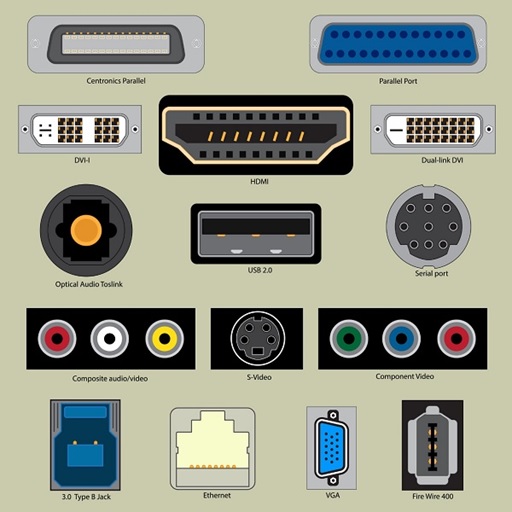
Understanding these ports is crucial for anyone looking to optimize their digital workspace, troubleshoot connectivity issues, or secure their network. As hardware evolves and software becomes more complex, the landscape of computer ports continues to shift toward higher speeds, smaller form factors, and more robust security protocols.
The Evolution and Function of Physical Hardware Ports
Physical ports are the tangible connection points on a computer’s chassis. They are designed to facilitate the transfer of data or power between the motherboard and peripheral devices. Over the last three decades, these ports have undergone a radical transformation, moving from bulky, slow, specialized connectors to sleek, high-speed universal standards.
Universal Serial Bus (USB): The Standard of Modern Connectivity
The USB port is arguably the most significant advancement in peripheral connectivity. Introduced in the mid-1990s, its goal was to replace a hodgepodge of serial and parallel ports with a single, “universal” interface. Today, USB ports are ubiquitous.
We categorize USB ports by both their physical shape (Type) and their data transfer capability (Version). USB Type-A remains the classic rectangular connector, while USB Type-C has become the modern industry standard due to its reversible design and high power delivery capabilities. From a performance standpoint, the jump from USB 2.0 (480 Mbps) to USB 3.2 (up to 20 Gbps) and now USB4 (up to 80 Gbps) has revolutionized how we use external storage and high-resolution webcams.
Video and Display Ports: From VGA to Thunderbolt 4
Visual output requires high bandwidth to transmit millions of pixels per second. For years, the VGA (Video Graphics Array) port was the analog standard, identifiable by its blue color and 15 pins. However, as displays moved to high definition, digital ports took over.
HDMI (High-Definition Multimedia Interface) is currently the most common port for televisions and monitors, carrying both high-definition video and multi-channel audio. DisplayPort, often favored by PC gamers and creative professionals, offers higher refresh rates and the ability to “daisy-chain” multiple monitors from a single output. At the cutting edge is Thunderbolt 4, which utilizes the USB-C shape but provides enough bandwidth to power two 4K displays and transfer data at 40 Gbps simultaneously.
Networking and Audio Ports: Staying Connected and Content
Despite the rise of Wi-Fi, the Ethernet port (RJ45) remains the gold standard for stability and speed. It is essential for servers, gaming rigs, and office workstations where latency must be kept to a minimum. On the audio side, the 3.5mm jack—an analog survivor in a digital world—continues to provide a direct, lag-free connection for headphones and speakers, though it is increasingly being phased out in mobile devices in favor of USB-C or wireless solutions.
Specialized and Legacy Ports: Powering Niche and Older Hardware
While universal standards like USB-C aim to do everything, specialized ports still exist to serve specific professional needs. Simultaneously, legacy ports persist in industrial and enterprise environments where “if it isn’t broken, don’t fix it” is the prevailing philosophy.
High-Performance Data Ports (Thunderbolt and eSATA)
Thunderbolt technology, developed by Intel in collaboration with Apple, represents the pinnacle of physical port performance. It combines data, video, and power into one cable. For video editors working with 8K footage or data scientists handling massive datasets, Thunderbolt is indispensable because it connects directly to the computer’s PCIe lanes, mimicking the speed of internal components.
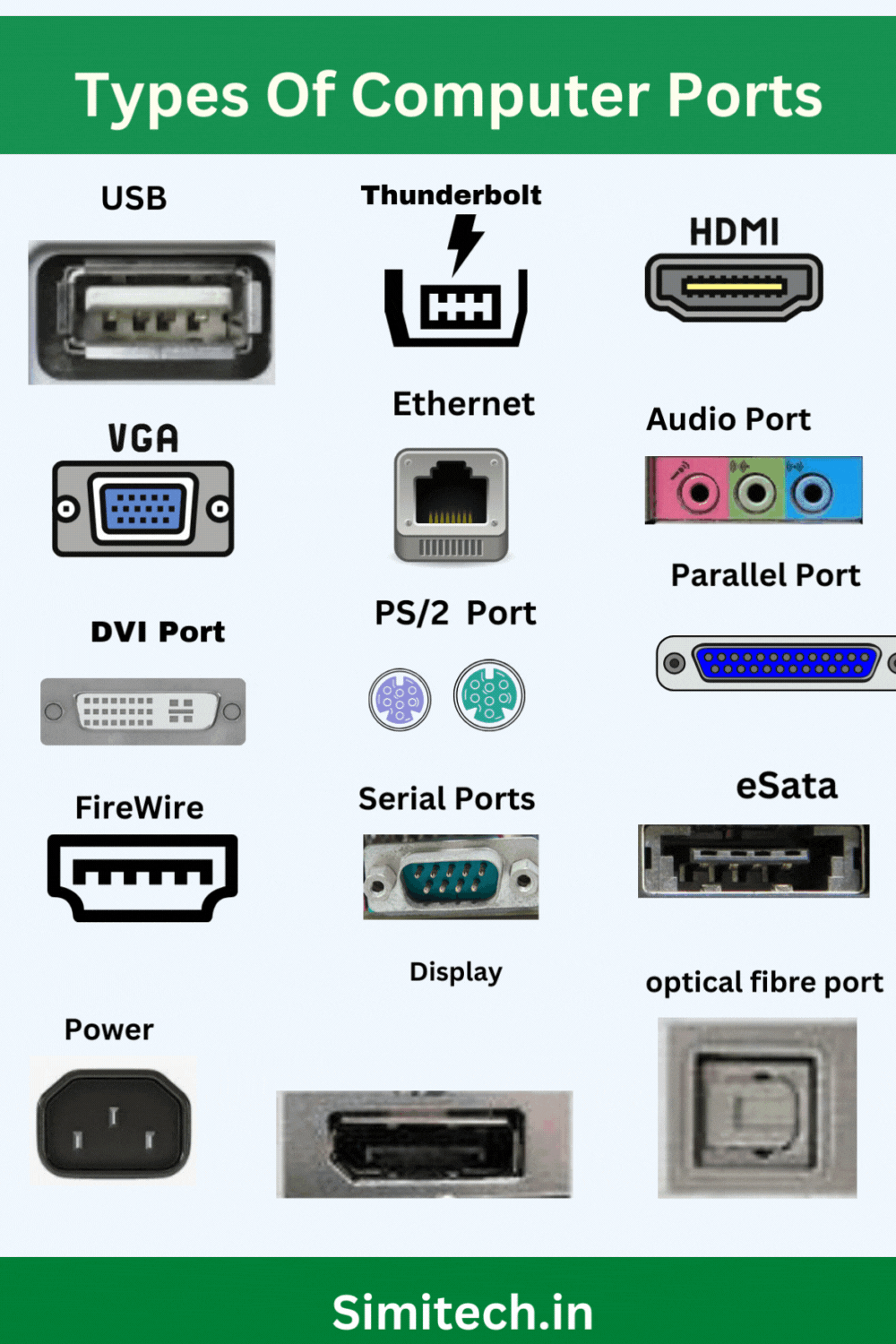
Conversely, eSATA (External Serial Advanced Technology Attachment) was once a popular choice for high-speed external hard drives. While it has largely been eclipsed by USB 3.0 and Thunderbolt, you will still find eSATA ports on older workstations and specialized server hardware where direct drive communication is required without the overhead of the USB protocol.
Legacy Ports: Parallel, Serial, and PS/2
In specific sectors like manufacturing, medical imaging, and point-of-sale systems, legacy ports are still in active use. The Parallel port (often used for old printers) and the Serial port (RS-232) are robust and simple, making them ideal for controlling industrial machinery. The PS/2 port, once the standard for keyboards and mice, is still occasionally found on modern enthusiast motherboards because it offers a dedicated interrupt path to the CPU, which some competitive gamers believe reduces input lag compared to USB.
Logical Ports: The Gateway to Network Communication
Beyond the physical sockets we can touch, computers utilize “logical ports.” These are software-defined endpoints used by the Operating System to manage multiple simultaneous network connections over a single physical network interface (like Wi-Fi or Ethernet).
How Virtual Ports Work in Networking
If an IP address is like the street address of a large apartment building, a logical port is the specific apartment number. When data arrives at your computer’s IP address, the operating system looks at the port number to determine which application should receive that data. Logical ports range from 0 to 65,535.
These ports allow your computer to do many things at once. You can browse the web on one port, download a file on another, and stream music on a third, all without the data streams getting crossed. This multiplexing is handled by protocols like TCP (Transmission Control Protocol) and UDP (User Datagram Protocol).
Common Network Port Numbers and Their Roles
Certain port numbers are standardized globally to ensure that different devices can communicate seamlessly. These are known as “Well-Known Ports” (0–1023).
-
Port 80 (HTTP): The foundation of the World Wide Web, used for unencrypted web traffic.
-
Port 443 (HTTPS): The secure version of web traffic, utilizing SSL/TLS encryption for online banking and shopping.
-
Port 25 (SMTP): Used for sending emails.
-
Port 22 (SSH): Used for secure remote login to other computers, vital for system administrators.
Understanding these ports is also a cornerstone of digital security. Firewalls work by “opening” or “closing” these logical ports to block unauthorized access while allowing legitimate traffic to pass through.
Future Trends in Computer Connectivity: Wireless and Beyond
The trajectory of computer ports is moving toward two distinct goals: extreme simplification through universal physical connectors and the eventual elimination of physical ports through wireless technology.
The Shift Toward USB-C Unification
The industry is currently in the middle of a “Great Unification.” Regulations, such as those passed by the European Union, are forcing manufacturers to adopt USB-C as the standard charging and data port for all portable electronics. This move reduces e-waste and simplifies the user experience, as one cable can theoretically charge a laptop, connect a phone to a car, and output video to a monitor. As the USB4 and Thunderbolt standards continue to merge, the distinction between different “types” of ports will fade, leaving users with a versatile, high-speed interface that handles every conceivable task.

The Rise of Wireless “Ports” and Data Transfer
We are rapidly approaching an era where physical ports may become optional for the average consumer. Technologies like Wi-Fi 7 and Bluetooth 5.4 offer speeds and stability that rival older wired connections. Cloud computing and wireless docking stations allow laptops to connect to peripherals without a single physical tether.
However, for the tech professional, the physical port will remain a necessity. The laws of physics dictate that a wired connection will almost always offer lower latency, higher security, and more consistent throughput than a wireless one. While the “portless” smartphone may be on the horizon, the “portless” workstation is unlikely to arrive anytime soon, as the demand for raw data speed continues to outpace the capabilities of the airwaves.
In summary, computer ports—whether the physical USB-C socket on your laptop or the logical Port 443 protecting your web traffic—are the unsung heroes of the digital age. They define how we interact with our machines and how our machines interact with the world. Staying informed about these interfaces ensures that you can navigate the ever-changing landscape of technology with confidence and efficiency.
aViewFromTheCave is a participant in the Amazon Services LLC Associates Program, an affiliate advertising program designed to provide a means for sites to earn advertising fees by advertising and linking to Amazon.com. Amazon, the Amazon logo, AmazonSupply, and the AmazonSupply logo are trademarks of Amazon.com, Inc. or its affiliates. As an Amazon Associate we earn affiliate commissions from qualifying purchases.