
In the modern landscape of digital communication, emojis have transcended their origins as simple pictographs to become a fundamental component of our global lexicon. With every iteration of Apple’s mobile operating system, users eagerly anticipate the arrival of new symbols that allow for more nuanced, inclusive, and creative expression. The release of iOS 18.4.1 represents a significant milestone in this journey. While minor point-releases often focus on security patches and stability, the “point-four” cycle is historically when Apple integrates the latest Unicode standards into the iPhone ecosystem.

The update to iOS 18.4.1 brings a curated selection of characters based on the Unicode 16.0 recommendations. These additions are not merely aesthetic; they reflect shifting cultural priorities, the need for more specific representation, and the ongoing technological refinement of Apple’s graphical interface. In this deep dive, we explore the technical foundations of these new emojis, the specific symbols making their debut, and how they integrate with the broader Apple Intelligence ecosystem.
The Unicode 16.0 Standard: The Foundation of iOS 18.4.1’s Emoji Library
To understand why new emojis appear on our iPhones, one must first understand the technical governance behind digital symbols. The Unicode Consortium is the non-profit organization responsible for maintaining the Unicode Standard, ensuring that text—and by extension, emojis—is displayed consistently across all devices, operating systems, and languages.
How the Unicode Consortium Decides Our Digital Vocabulary
The process of introducing a new emoji into iOS 18.4.1 begins years before the software update hits your device. The Unicode Emoji Subcommittee reviews thousands of proposals from the public and member organizations. Each proposal is evaluated based on several criteria: “Is the symbol frequently requested?” “Does it represent something that cannot already be expressed with existing emojis?” and “Is it distinct enough to be recognizable at small resolutions?”
Once a character is approved as part of a Unicode release—in this case, Unicode 16.0—it is assigned a unique code point. This ensures that when an iPhone user sends a new emoji to an Android user, the receiving device knows exactly which concept to render, even if the artistic style differs between platforms.
From Approval to Implementation: The Apple Design Process
While Unicode provides the “definition,” Apple’s design team provides the “art.” For iOS 18.4.1, Apple’s illustrators have worked to ensure that the new symbols align with the sophisticated, semi-realistic aesthetic that has defined the iOS look for years. This involves high-resolution rendering that takes advantage of the Super Retina XDR displays found on the latest iPhone 16 and Pro models.
The technical challenge for Apple lies in maintaining a balance between detail and legibility. Because emojis are often viewed within small text bubbles, the shading, gradients, and line work must be optimized for immediate recognition. In iOS 18.4.1, we see a continued trend toward hyper-specific detailing, particularly in the textures of new food items and the physiological accuracy of new human-centric symbols.
Spotlight on the New Additions: A Breakdown of the Latest Characters
The iOS 18.4.1 update introduces several standout emojis that bridge the gap between humor and utility. These additions are designed to fill specific “lexical gaps” in our digital conversations, providing users with tools to express complex emotions or specific objects with a single tap.
The “Face with Bags Under Eyes”: A Relatable Modern Icon
Perhaps the most anticipated addition in iOS 18.4.1 is the “Face with Bags Under Eyes.” In an era where burnout and “always-on” digital culture are frequently discussed, this emoji provides a visual shorthand for exhaustion that goes beyond the traditional “Sleeping Face” or “Tired Face.”
From a design perspective, Apple has utilized subtle purple and grey hues beneath the eyes to convey a sense of genuine fatigue. This emoji is expected to become a staple in professional and personal chats alike, serving as a relatable response to long workdays, late-night gaming sessions, or the general fatigue of the modern news cycle.
Nature and Objects: From Harp to Leafless Trees
The botanical and musical categories also receive notable upgrades in this version. The “Leafless Tree” is a particularly poignant addition; while it serves a seasonal purpose for winter-themed messaging, it was also proposed to represent broader environmental themes, such as the impact of drought or climate change.
On the more whimsical side, the inclusion of a “Harp” allows for better representation in the musical instrument category, which has seen steady growth over the last few years. Additionally, a “Root Vegetable” (resembling a beet or turnip) and a “Shovel” have been added, providing more utility for those discussing gardening, cooking, or even metaphorical “digging.”
Inclusive and Technical Symbols: The Fingerprint and More
Digital security and identity are central themes in the current tech landscape, and iOS 18.4.1 reflects this with the new “Fingerprint” emoji. While seemingly simple, this symbol is highly versatile. It can be used to represent biometric security (like Touch ID), forensic investigations, or the concept of a “unique mark” in a creative context.
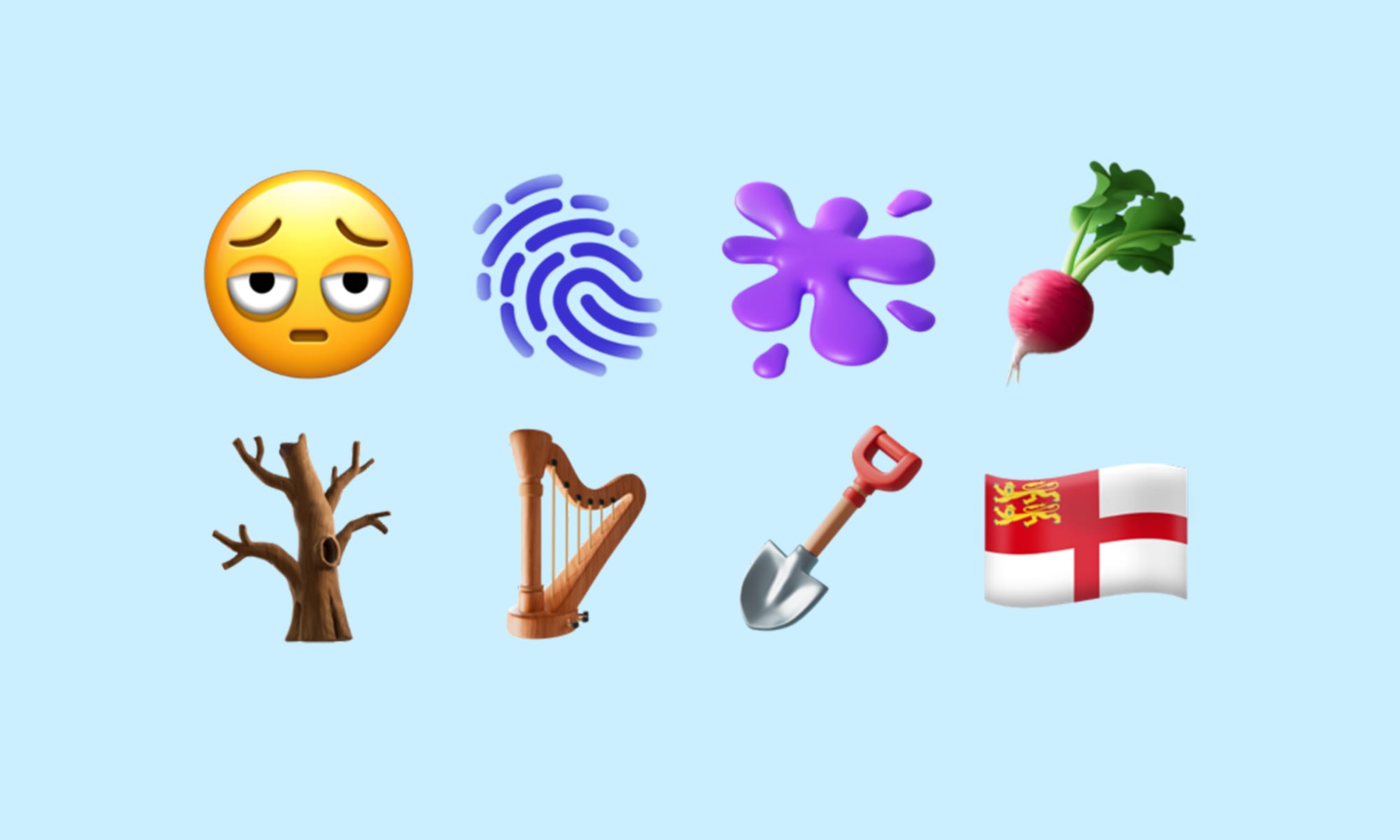
Furthermore, the “Splat” emoji—a vibrant, abstract shape—offers a playful way to indicate a mess, a paint spill, or an impact. These symbols demonstrate Apple’s commitment to providing a diverse toolkit that serves both literal and figurative communication.
The Intersection of Software and Aesthetics: Why Emoji Updates Matter in iOS 18
Emojis in iOS 18.4.1 are no longer just static images; they are deeply integrated into the operating system’s architecture. As Apple moves further into the era of “Apple Intelligence,” the way we interact with these symbols is undergoing a fundamental shift.
Integration with Apple Intelligence and Genmoji
One of the headline features of the iOS 18 cycle is “Genmoji.” While the 18.4.1 update includes the standard Unicode-approved emojis, it also optimizes the system to work alongside AI-generated characters. Standard emojis act as the “anchor” for the Genmoji system. When a user prompts the AI to create a custom character, the system uses the design language of the official Unicode emojis—including the new ones in 18.4.1—as a reference point.
This synergy ensures that if you create a Genmoji of “a cat playing a harp,” the harp element matches the artistic style of the newly released Harp emoji. This level of OS-level integration ensures a cohesive visual experience across the entire user interface, whether you are using a standard glyph or an AI-generated one.
The Role of Emojis in Enhancing Digital Security and UI
Beyond communication, emojis are increasingly used within the iOS UI for organizational purposes. In iOS 18.4.1, users can use the new fingerprint or shovel icons to label folders in the Files app or categories in Reminders. This functional use of emojis turns them into “icons-as-data,” helping users navigate their devices more intuitively.
Furthermore, Apple’s focus on digital security is subtly reinforced through these updates. By ensuring that all emojis are rendered through secure, system-level frameworks, Apple prevents potential vulnerabilities that could arise from third-party font injections. Every emoji you see in iOS 18.4.1 is a verified, sandboxed asset, maintaining the integrity of the operating system.
How to Access and Use the New Emojis on Your iPhone
Transitioning to the new emoji set is a seamless process, but it does require adherence to Apple’s software update protocols. Because emojis require system-level font support, they cannot simply be “downloaded” like an app; they must be baked into the OS.
Updating Your Device to iOS 18.4.1
To access the new characters, users must navigate to Settings > General > Software Update. Given that iOS 18.4.1 also includes vital security patches, the update is recommended for all compatible devices. Once the installation is complete, the new emojis will automatically populate the emoji keyboard.
It is important to note that while you can see and send these emojis immediately after updating, recipients who are still running older versions of iOS (like iOS 17 or early versions of 18) may see a “tofu” symbol—a small box with a question mark—instead of the new character. This is because their device’s font library does not yet contain the code points for the new Unicode 16.0 set.
Tips for Finding Emojis Faster with Predictive Text
With the library of emojis now numbering in the thousands, finding the new “Face with Bags Under Eyes” or the “Fingerprint” can be a challenge. iOS 18.4.1 enhances the “Search Emoji” function within the keyboard. By typing keywords like “tired,” “exhausted,” or “biometric” into the search bar, the predictive engine will prioritize the new 18.4.1 additions.
Additionally, the iOS predictive text bar (located above the keyboard) will now suggest these new symbols based on the context of your sentence. If you type “I’m so sleepy,” the new bags-under-eyes emoji will likely appear as a suggestion, making it easier than ever to integrate these new icons into your daily digital conversations.
The Future of Visual Communication in the Apple Ecosystem
As we look beyond iOS 18.4.1, it is clear that Apple views emojis as more than just fun additions; they are a vital part of the “Human Interface Guidelines” that define the user experience. The transition from static icons to AI-assisted Genmoji suggests a future where the distinction between “standard” and “custom” visual assets becomes increasingly blurred.
Beyond Static Images: The Shift Toward Animated and AI-Generated Assets
While the Unicode 16.0 additions in 18.4.1 are static, Apple’s hardware is increasingly capable of animating these assets. We see this in the way emojis react in Messages with “Screen Effects” or how they are mirrored in Memoji. The technical infrastructure being laid down in this update paves the way for a more dynamic messaging experience where emojis can adapt to the tone of the conversation using Apple Intelligence.
In conclusion, the new emojis in iOS 18.4.1 are a testament to the intersection of art and technology. By strictly adhering to Unicode standards while pushing the boundaries of on-device AI and high-resolution design, Apple continues to lead the way in how we express our humanity in a digital world. Whether you are using the new “Splat” to describe a kitchen mishap or the “Leafless Tree” to discuss the environment, these symbols enrich our digital vocabulary, one pixel at a time.
aViewFromTheCave is a participant in the Amazon Services LLC Associates Program, an affiliate advertising program designed to provide a means for sites to earn advertising fees by advertising and linking to Amazon.com. Amazon, the Amazon logo, AmazonSupply, and the AmazonSupply logo are trademarks of Amazon.com, Inc. or its affiliates. As an Amazon Associate we earn affiliate commissions from qualifying purchases.