
In the ecosystem of digital interaction, the profile picture serves as the primary visual anchor for any user identity on Facebook. While it may appear to be a simple image upload, the technical architecture behind how Facebook processes, stores, and displays these assets is complex. For developers, digital creators, and tech-savvy users, understanding the precise dimensions, aspect ratios, and compression algorithms used by Meta is essential to ensuring visual clarity across a fragmented device landscape.
The challenge lies in the fact that Facebook does not display a single static image. Instead, it serves different resolutions based on the device, screen density, and the specific UI component where the image appears. This article provides an exhaustive technical analysis of Facebook profile picture specifications and optimization strategies to maintain high-fidelity results.

1. Core Technical Specifications and Dimensions
To achieve the best results, one must look beyond the “minimum” requirements and focus on the “optimal” upload standards. Facebook’s platform requirements have evolved significantly as display technology has shifted toward high-DPI (Dots Per Inch) and Retina displays.
Standard Display Resolutions
As of the current architectural update, Facebook displays profile pictures at varying sizes depending on the interface:
-
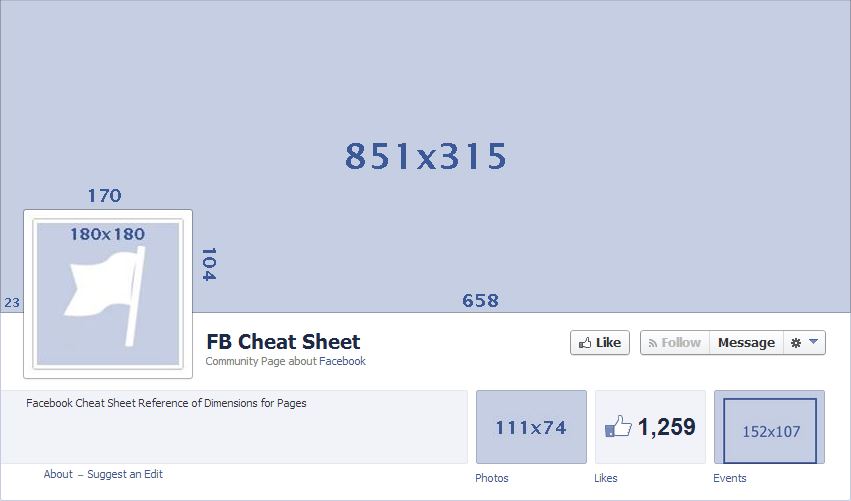
Desktop Computers: The profile image is rendered at 170×170 pixels.
-
Smartphones: On most modern mobile devices, the image is rendered at 128×128 pixels.
-
Feature Phones: On lower-end mobile devices, the image scales down to 360×360 pixels or smaller depending on the browser capability.
The Recommended Upload Size
While the display sizes mentioned above are relatively small, uploading an image at those exact dimensions will result in significant quality loss on high-resolution screens. The technical recommendation is to upload an image that is at least 720×720 pixels, or ideally 2048×2048 pixels if you want to ensure the “Full View” light-box remains crisp. By providing a higher resolution source file, you allow Facebook’s scaling algorithm to downsample the image rather than upscaling it, which prevents blurriness.
Aspect Ratio and Geometry
The required aspect ratio for a Facebook profile picture is a strict 1:1 (square). Regardless of the original dimensions of your photo, Facebook’s interface will prompt you to crop the image into a square during the upload process. From a technical standpoint, preparing your asset in a 1:1 ratio before the upload process prevents the platform’s built-in editor from applying additional lossy compression during the manual cropping phase.
2. Cross-Platform Rendering and The Circular Mask
One of the most significant shifts in Facebook’s UI/UX history was the transition from square profile images to circular displays. This change introduced a technical hurdle: the “Safe Zone” requirement.
Understanding the Circular Crop
While you upload a square image, Facebook applies a CSS border-radius: 50% or a similar masking layer to display the image as a circle across the News Feed, Timeline, and Messenger. This means that any visual information located in the four corners of your square upload will be clipped and invisible to the end-user.
Mapping the Safe Zone
To ensure that critical elements (such as a person’s face or a technical logo) are not cut off, you must center the subject within the “Safe Zone.” Technically, this means keeping all essential content within the inner 80% of the image. If you are designing an asset in a tool like Figma or Adobe Photoshop, you should overlay a circular guide to verify that no important data points intersect with the corners.
Impact on Messenger and Notification UI
The profile picture is further miniaturized in the Messenger interface and the notification tray. In these instances, the image may be rendered as small as 32×32 pixels or 40×40 pixels. When an image is scaled down to this degree, high-frequency details (fine lines or small text) are lost due to aliasing. From a technical optimization perspective, it is better to use images with high contrast and centered focal points to ensure recognizability at these micro-resolutions.
3. Image Compression and File Format Optimization
Facebook uses aggressive lossy compression algorithms (similar to WebP and high-level JPEG encoding) to minimize load times for its billions of users. To combat the “fuzziness” often seen after an upload, specific technical steps regarding file formats must be taken.
Choosing Between JPEG and PNG
For most photographic profile pictures, a high-quality JPEG is sufficient. However, if your profile picture contains text, sharp edges, or logos, Facebook’s JPEG compression will often create “artifacts”—noisy pixels around the edges of the shapes.
To bypass the harshest parts of the compression engine, use PNG-24. While the file size is larger, PNG is a lossless format that preserves edge clarity. Facebook will still convert this to a compressed format on their servers, but starting with a higher-bitrate PNG usually results in a cleaner final render.
The sRGB Color Profile
A common technical error is uploading images in the ProPhoto RGB or Adobe RGB color spaces. Most web browsers and the Facebook app are optimized for the sRGB color space. If you upload an image in Adobe RGB, the colors may appear desaturated or “washed out” once processed by the platform. Always ensure your export settings are set to “Convert to sRGB” to maintain color accuracy across various mobile and desktop panels.
File Size Limits
While Facebook supports files up to several megabytes, the platform’s ingest engine performs best with files under 100KB for the 170×170 render. However, for the initial upload, aiming for a file size between 1MB and 5MB is the “sweet spot.” This provides enough data for the platform to create multiple versions (thumbnails, medium, and high-res) without triggering an error in the upload buffer.
4. Advanced Technical Integration: Profile Pictures and Cover Photos
The profile picture does not exist in a vacuum; it is technically integrated with the Cover Photo and the overall Profile UI. Understanding the spatial relationship between these two assets is vital for a seamless digital identity.
Spatial Positioning on Desktop
On the desktop version of a Facebook profile, the profile picture is positioned as an overlay on the cover photo. It is typically located on the left side of the layout (though this shifts with UI updates). The profile picture has a white border added via CSS, which effectively “pushes” the image 5-10 pixels away from the background cover photo. If you are trying to create a “integrated” look where the profile picture matches the background, you must account for this offset and the border-radius masking.
Mobile Stack Architecture
On mobile, the profile picture is centered and overlaps a significant portion of the lower-middle section of the cover photo. Because mobile screens have varying widths (from an iPhone SE to a Galaxy Ultra), the amount of overlap changes dynamically. Technically, this makes “seamless” background integration nearly impossible across all devices. The best practice is to treat the profile picture as a standalone object with high contrast against the cover photo to ensure visual separation.
The Evolution of Video Profiles
It is worth noting that Facebook previously allowed “Profile Videos” (7-second loops). However, the platform has largely deprecated this feature in favor of static images to improve page load performance and reduce data consumption on mobile networks. Technically, if you still see moving profiles, they are often legacy assets or part of specific beta testing for “Avatars,” which are rendered as SVG or specialized animation files within the Facebook app environment.
5. Technical Maintenance and Security of Profile Assets
A profile picture is more than just a visual; it is a piece of data subject to privacy settings and technical security measures.
Metadata and EXIF Data
When you upload an image to Facebook, the platform’s processing engine automatically strips the EXIF metadata. This includes information like GPS coordinates, camera model, and shutter speed. This is a privacy feature designed to protect users from inadvertent location sharing. If you are a photographer looking to keep your copyright info attached to the file, be aware that Facebook’s server-side processing will remove this information.
Resolution Scaling for the Future
With the rise of 4K and 8K monitors, the standard 170px display will eventually look outdated. To “future-proof” a Facebook presence, technical experts suggest maintaining a local repository of your profile assets in high-resolution vector formats (like AI or SVG) or high-resolution rasters (4000px+). While you cannot upload an SVG to Facebook, having the source allows you to re-export at higher resolutions as Meta updates its UI requirements.

Content Delivery Networks (CDNs)
Finally, it is interesting to note how Facebook serves these images. Once uploaded, your profile picture is distributed across Meta’s global CDN. This means that if a user in Europe views your profile, they are pulling a cached version of your 170×170 image from a local server in or near Europe. This technical distribution is why sometimes, after updating a profile picture, some users may see the “old” image for a few minutes—it takes time for the CDN cache to invalidate and refresh with the new asset across all global nodes.
By adhering to these technical specifications—focusing on a 1:1 aspect ratio, utilizing the sRGB color space, centering content within the circular safe zone, and opting for high-resolution PNG files—users and developers can ensure that their Facebook profile picture remains sharp, professional, and technically optimized for any device in the world.
aViewFromTheCave is a participant in the Amazon Services LLC Associates Program, an affiliate advertising program designed to provide a means for sites to earn advertising fees by advertising and linking to Amazon.com. Amazon, the Amazon logo, AmazonSupply, and the AmazonSupply logo are trademarks of Amazon.com, Inc. or its affiliates. As an Amazon Associate we earn affiliate commissions from qualifying purchases.