
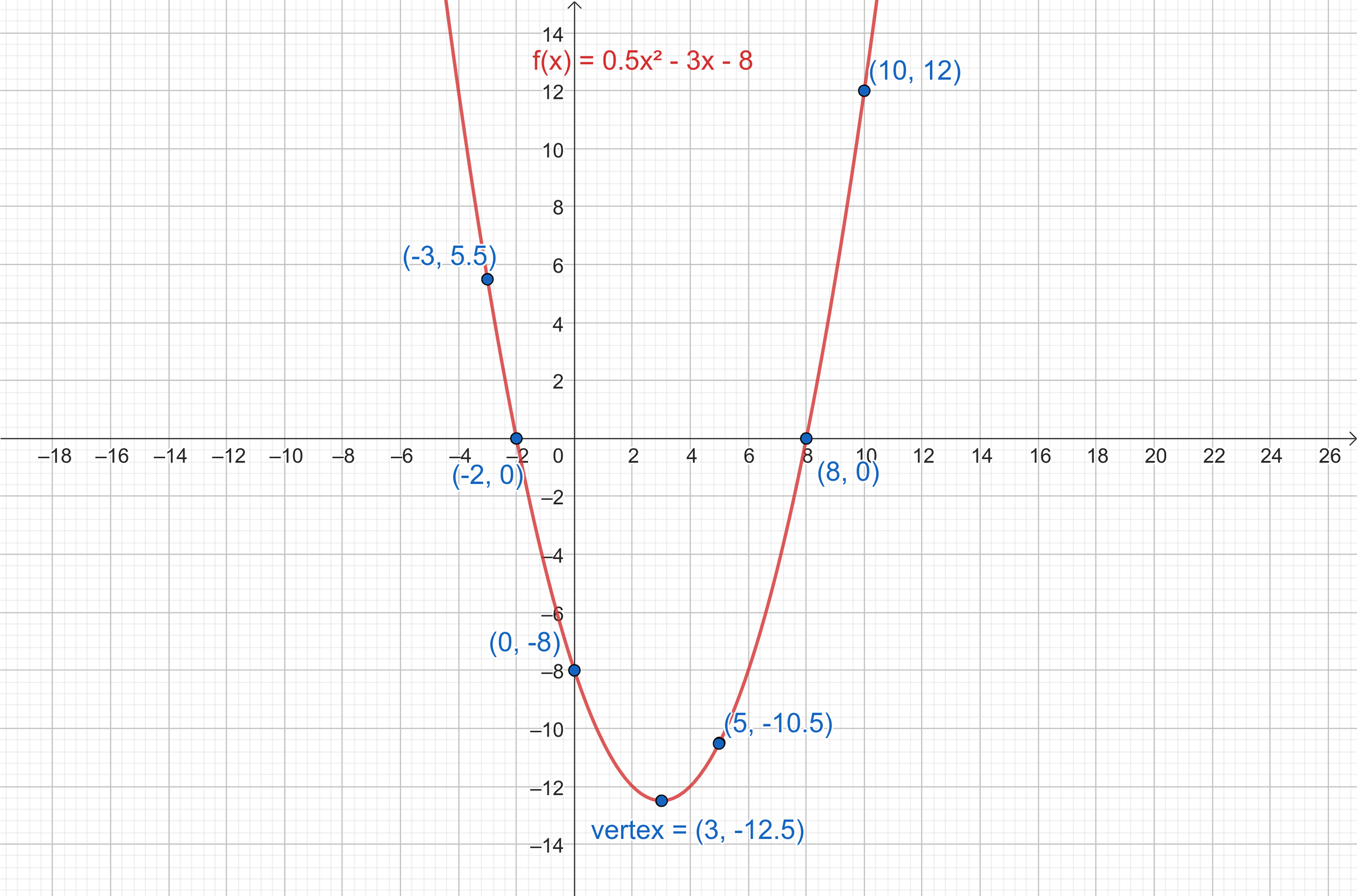
The ability to sketch the graph of a function is a cornerstone skill, fundamental not only to mathematics but also to a vast array of scientific, engineering, and economic disciplines. From visualizing data trends and understanding physical phenomena to optimizing processes and modeling financial markets, graphs provide intuitive insights that raw equations often obscure. Historically, this was a painstaking manual process, reliant on plotting numerous points and understanding the underlying mathematical principles. However, in the 21st century, technology has revolutionized this practice, transforming it from a laborious chore into a dynamic, interactive, and profoundly insightful exploration. This article delves into how modern tech tools empower users to sketch graphs of functions with unprecedented ease, accuracy, and depth of understanding, placing the power of visual mathematics directly at your fingertips.
The Evolving Landscape of Graphing: From Manual to Digital
The journey of function graphing mirrors the broader evolution of computation – a shift from artisanal, hand-crafted precision to automated, intelligent assistance. Understanding this progression highlights why embracing technology isn’t just a convenience, but a necessity for modern problem-solving.
The Foundations of Manual Graphing
Before the advent of powerful calculators and software, sketching a function’s graph was an exercise in systematic analysis. Students would meticulously determine intercepts, asymptotes, critical points, and intervals of increase or decrease using calculus. They would then plot a sufficient number of points to discern the curve’s shape, connecting them smoothly to represent the function. This method, while foundational for conceptual understanding, was often time-consuming, prone to error, and limited in its ability to quickly explore variations or complex functions. The sheer effort involved could sometimes overshadow the insights the graph was meant to provide.
The Dawn of Digital Assistance
The first significant technological leap came with programmable calculators. Devices like the TI-83 and Casio FX series introduced dedicated graphing capabilities, allowing users to input a function and see a digital representation on a small screen. These early tools were revolutionary, freeing students and professionals from the tedious plotting of individual points and enabling rapid visualization. While primitive by today’s standards – often with low resolution and limited interactive features – they laid the groundwork for the more sophisticated graphing environments we now take for granted. They instilled the idea that technology could serve as a powerful visualization aid, accelerating understanding and exploration.
Modern Software & Web-Based Tools
Today, the digital graphing landscape is vastly more powerful and accessible. We’ve moved beyond dedicated hardware calculators to a rich ecosystem of software and web applications. These tools leverage high-resolution displays, cloud computing, and advanced algorithms to offer real-time plotting, interactive manipulation, and a wealth of analytical features. From free online calculators that run in a browser to professional-grade mathematical software suites, the ability to sketch, analyze, and customize function graphs has never been more pervasive or intuitive. This shift has democratized access to complex mathematical visualization, making it available to anyone with an internet connection or a standard computing device.
Essential Digital Tools for Function Graphing
The modern toolkit for sketching function graphs is diverse, catering to different needs, skill levels, and computational demands. Selecting the right tool can significantly enhance efficiency and the depth of insight gained.
Interactive Online Graphing Calculators (Desmos, GeoGebra)
For most users, especially students and educators, online graphing calculators like Desmos and GeoGebra are invaluable first stops. These web-based applications are incredibly user-friendly, offering an intuitive interface where functions can be typed directly, and their graphs appear instantly.
-
Real-time Plotting: As you type, the graph updates dynamically, providing immediate visual feedback.
-
Sliders for Parameters: A standout feature is the ability to add sliders for variables (e.g.,
y = ax + b), allowing users to interactively change coefficients and instantly observe their impact on the graph’s shape, position, or scale. This is exceptionally powerful for understanding function transformations. -
Easy Exploration: Zooming, panning, and identifying key points (intercepts, extrema, intersections) are effortless.
-
Collaboration & Sharing: Graphs can be easily saved, shared via links, or embedded in web pages, fostering collaborative learning and instruction.
-
Versatility: Beyond basic functions, they support inequalities, implicit functions, polar coordinates, parametric equations, and even 3D graphing (in GeoGebra).
These tools are excellent for learning, teaching, and quick explorations, making complex concepts visually tangible.
Dedicated Software for Advanced Analysis (Mathematica, MATLAB, Maple)
For professionals, researchers, and advanced students in fields like engineering, physics, and computational finance, general-purpose mathematical software packages offer unparalleled power. Mathematica, MATLAB, and Maple are comprehensive environments that go far beyond simple graphing.
-
Symbolic Manipulation: They can perform symbolic derivatives, integrals, limits, and solve equations, which can then be directly graphed.
-
Complex Function Types: Capable of plotting highly complex functions, vector fields, implicit plots, parametric plots, and advanced 3D visualizations with great precision.
-
Integration with Computation: Graphs are often generated as part of a larger computational workflow, where data analysis, numerical methods, and simulations are integrated.
-
Customization: Extensive options for customizing plot appearance, labels, colors, and styles for publication-quality graphics.
-
Programming Capabilities: Users can write scripts and programs within these environments to generate dynamic graphs, animations, and perform iterative analyses, making them essential tools for research and development. While they have a steeper learning curve, their capabilities are unmatched for sophisticated mathematical and scientific work.
Programming Libraries for Custom Visualization (Python with Matplotlib/SymPy)
For those with programming skills, especially in data science, machine learning, or scientific computing, using programming languages like Python with specialized libraries offers the ultimate flexibility and control.
-
Python (Matplotlib, NumPy, SymPy):
-
Matplotlib: The de facto standard for creating static, animated, and interactive visualizations in Python. It allows for highly customized plots of any function or dataset, offering fine-grained control over every aspect of the graph.
-
NumPy: Essential for numerical operations, allowing efficient computation of function values over arrays of points, which are then passed to Matplotlib.
-
SymPy: A Python library for symbolic mathematics. It can be used to define functions symbolically, perform calculus operations, and then use Matplotlib to plot the resulting expressions.
-
-
Ultimate Customization: Programmatic graphing allows for virtually unlimited customization, enabling users to create highly specific visual representations, overlay multiple plots, and integrate graphs seamlessly into larger applications or data pipelines.
-
Automation: Graphs can be generated automatically from data, updated dynamically, and embedded into reports or dashboards, making it ideal for repetitive tasks or large-scale data visualization projects.
-
Reproducibility: Code-based graphing ensures that visualizations are fully reproducible, a critical aspect in scientific research and data analysis. This approach empowers users to design, develop, and deploy unique visualization solutions tailored to their precise requirements.
A Step-by-Step Guide: Leveraging Technology for Effective Graph Sketching
Modern graphing tools streamline the process of sketching functions, but a thoughtful approach still yields the best results. Here’s how to leverage technology effectively.
Understanding Your Function
Before diving into a graphing tool, a brief mental (or manual) analysis of your function is beneficial. Consider its domain (where it’s defined), potential asymptotes, and general behavior (e.g., linear, quadratic, exponential). Tech tools can verify these initial insights: for example, you can quickly graph a rational function to confirm the location of vertical asymptotes where the denominator is zero. Similarly, by typing in various expressions, you can quickly build an intuition for how different components of a function contribute to its overall shape. Technology can act as a powerful hypothesis tester, confirming or challenging your initial analytical predictions.
Inputting and Visualizing
The mechanics of inputting a function vary slightly by tool but are generally straightforward.
-
Online Calculators (Desmos/GeoGebra): Simply type
y = x^2orf(x) = sin(x)into the input bar. The graph appears instantly. Use standard mathematical notation. -
Dedicated Software (Mathematica/MATLAB): These often have specific plotting commands, e.g.,
Plot[x^2, {x, -5, 5}]in Mathematica orfplot(@(x) x.^2, [-5 5])in MATLAB. Refer to their documentation for precise syntax. -
Programming Libraries (Python/Matplotlib): Define your function and a range of
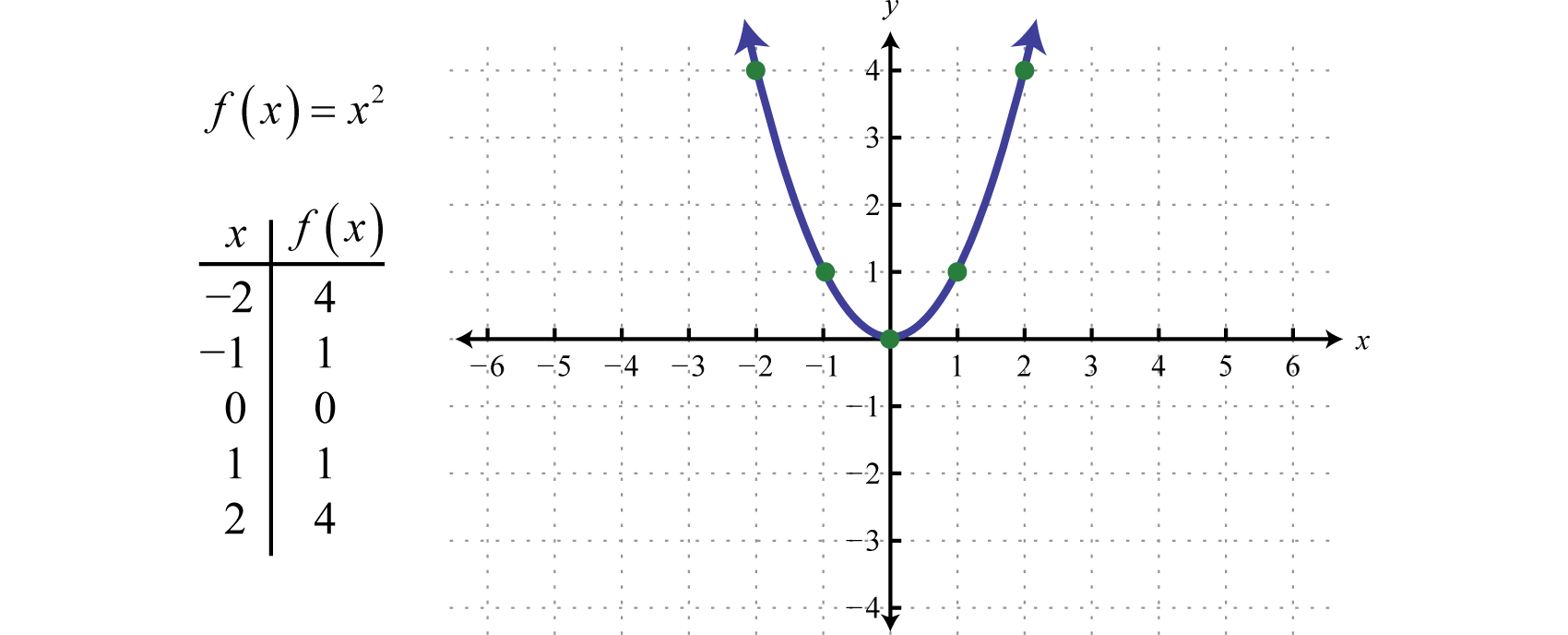
xvalues, then useplt.plot(x_values, y_values). For example:import numpy as np import matplotlib.pyplot as plt x = np.linspace(-5, 5, 400) # 400 points between -5 and 5 y = x**2 plt.plot(x, y) plt.show()
Once the graph appears, utilize the tool’s interactive features (zoom, pan) to get a clear view of the function’s behavior across different intervals.
Interpreting and Refining the Graph
Technology excels at helping you interpret and refine your understanding of the graph.
-
Identify Key Features: Hover over the graph in Desmos to reveal intercepts, extrema, and points of intersection with other functions. In more advanced software, you can command the tool to find these points numerically.
-
Adjust View Window: Change the x and y axes ranges to focus on specific parts of the graph or to get a broader perspective. Sometimes, key features are obscured by an unoptimized view window.
-
Parameter Exploration: Use sliders to dynamically change coefficients and observe how the graph transforms. This is an incredibly insightful way to understand the role of each variable in the function’s definition. For instance, in
y = A sin(Bx + C) + D, sliders for A, B, C, and D immediately reveal their impact on amplitude, frequency, phase shift, and vertical shift, respectively. -
Overlaying Functions: Graph multiple functions on the same axes to compare their behaviors, find intersection points, or visualize relationships (e.g., a function and its derivative).
Annotating and Exporting
A well-sketched graph often requires clear annotations for effective communication.
-
Labels and Titles: Add axis labels, a title for the graph, and a legend if multiple functions are plotted. Most tools provide options for this.
-
Specific Points: Mark points of interest such as roots, local maxima/minima, or points of inflection directly on the graph.
-
Text Annotations: Add specific text comments directly on the graph to highlight particular features or explain observed phenomena.
-
Exporting: Export your graph in various formats (PNG, JPG, SVG, PDF) suitable for inclusion in reports, presentations, or web pages. Vector formats (SVG, PDF) are often preferred for their scalability without loss of quality.
Beyond Basic Sketching: Advanced Applications and Insights
Technology allows us to push beyond merely drawing a function’s curve, unlocking deeper mathematical and conceptual understanding.
Exploring Families of Functions
One of the most powerful features of interactive graphing tools is the ability to explore how changes in parameters affect a function’s graph. By using sliders for coefficients, you can animate transformations, illustrating concepts like shifts, stretches, compressions, and reflections dynamically. This interactive exploration solidifies understanding of function families (e.g., quadratics, exponentials, trigonometric functions) and their characteristic behaviors far more effectively than static diagrams.
Visualizing Derivatives and Integrals
Many advanced tools can not only graph a function but also its derivative(s) and integral(s) on the same coordinate plane. This provides a direct visual link between a function’s slope and its derivative, or the area under its curve and its integral. For instance, you can observe that where a function has a local maximum or minimum, its derivative’s graph crosses the x-axis. Where a function is increasing, its derivative is positive. This immediate visual correlation is immensely helpful for students learning calculus and for professionals analyzing rates of change and accumulation.
Dynamic and Interactive Visualizations
The ability to create animated graphs and interactive elements opens up new pedagogical possibilities. Concepts like limits, continuity, optimization, or the approximation of integrals can be illustrated through animations where parameters or points move along the curve. For example, visualizing a secant line approaching a tangent line as the interval shrinks graphically explains the concept of a derivative in motion. Such dynamic visualizations engage learners and make abstract mathematical ideas concrete.
Graphing Data and Functions Together
In practical applications, functions are often used to model real-world data. Technology allows you to plot actual data points alongside a proposed function model (e.g., a regression line or curve). This capability is crucial in statistics, data science, and engineering for assessing the goodness of fit, identifying trends, and making predictions. You can visually compare how well an exponential function fits population growth data or how a sinusoidal function models oscillatory behavior, making the abstract connection between mathematics and the real world tangible.
Best Practices and Future Trends in Graphing Technology
While technology vastly simplifies graphing, intelligent application and an eye towards future developments ensure continued effectiveness.
Choosing the Right Tool for the Job
The choice of tool should align with your specific needs. For quick, interactive learning and teaching, online calculators like Desmos or GeoGebra are ideal. For academic research, heavy-duty computation, and highly customized plots, Mathematica, MATLAB, or Python with Matplotlib are indispensable. For basic data visualization or spreadsheet-based functions, even tools like Microsoft Excel or Google Sheets offer decent graphing capabilities. The key is to select a tool that matches the complexity of your task and your personal comfort level, avoiding overkill for simple tasks and under-equipping for complex ones.
Data Integrity and Interpretation
Even with powerful graphing tools, critical thinking remains paramount. A graph is only as good as the function or data it represents. Always verify your inputs, understand the domain and range, and interpret the visual output within its mathematical context. Misinterpreting scales, overlooking asymptotes, or failing to recognize limitations of a function’s model can lead to erroneous conclusions, regardless of how beautifully the graph is rendered. Technology is an aid to understanding, not a replacement for it.
The Rise of AI in Graphing and Analysis
The future of function graphing will likely see increasing integration of Artificial Intelligence. Imagine AI tools that can automatically identify key features of a function, suggest optimal viewing windows, infer the underlying function from a set of points, or even explain the implications of a graph’s shape in natural language. AI could enhance the interpretative aspect of graphing, making it even more insightful for non-experts. Automated graph generation from natural language descriptions or adaptive tutorials based on user interaction could also become commonplace, further democratizing advanced mathematical visualization.
Collaborative Graphing and Online Resources
The web-based nature of many modern graphing tools naturally fosters collaboration. Sharing graphs, discussing transformations in real-time, and building upon each other’s work is becoming increasingly seamless. Online communities and extensive documentation for tools like Desmos, GeoGebra, and Matplotlib provide vast repositories of examples, tutorials, and support, enabling users to continuously learn and expand their graphing capabilities.
In conclusion, the era of painstaking manual function sketching has largely given way to a dynamic, interactive, and technologically empowered process. Modern tools make graphing more accessible, efficient, and insightful than ever before, transforming it from a computational burden into a powerful avenue for exploration and understanding. By embracing these technologies and applying them thoughtfully, anyone can unlock the profound visual insights that functions and their graphs offer across virtually every domain of human inquiry.
aViewFromTheCave is a participant in the Amazon Services LLC Associates Program, an affiliate advertising program designed to provide a means for sites to earn advertising fees by advertising and linking to Amazon.com. Amazon, the Amazon logo, AmazonSupply, and the AmazonSupply logo are trademarks of Amazon.com, Inc. or its affiliates. As an Amazon Associate we earn affiliate commissions from qualifying purchases.