
In today’s dynamic business environment, mastering essential software tools is no longer a luxury but a necessity. For many businesses, large and small, QuickBooks stands out as the industry-standard accounting software, streamlining everything from invoicing to payroll. The perception that acquiring such a critical skill requires significant financial outlay is often a deterrent. However, the digital age offers an abundance of high-quality, free resources for aspiring QuickBooks users. This guide delves into how you can effectively learn QuickBooks without spending a dime, focusing on the technological aspects of software acquisition and skill development.
Understanding QuickBooks: A Core Business Application
Before diving into the “how-to,” it’s crucial to appreciate QuickBooks not just as an accounting tool, but as a sophisticated software application central to operational efficiency. Developed by Intuit, QuickBooks is designed to simplify financial management for businesses, offering features that range from basic bookkeeping to advanced financial reporting and tax preparation. Its prevalence across industries makes proficiency in QuickBooks a highly sought-after technical skill, opening doors for bookkeepers, accountants, and business owners alike.
The Ecosystem of QuickBooks Products
QuickBooks isn’t a monolithic entity; it encompasses a suite of products tailored for various business sizes and operational needs. Understanding these distinctions is the first step in your learning journey, as different versions might have slightly varied interfaces and feature sets.
-
QuickBooks Desktop: The traditional, locally installed software, often favored by larger businesses or those with complex inventory and industry-specific needs. It comes in various editions like Pro, Premier, and Enterprise.
-
QuickBooks Online (QBO): A cloud-based subscription service offering unparalleled accessibility from any device with internet access. QBO has rapidly become the most popular version due to its flexibility, real-time data synchronization, and integration capabilities with other cloud applications.
-
QuickBooks Self-Employed: A simplified version specifically designed for freelancers, independent contractors, and sole proprietors, focusing on income/expense tracking and tax estimations.
While many free learning resources might cover general concepts applicable across all versions, a significant portion will gravitate towards QuickBooks Online due to its widespread adoption and ease of access. When engaging with free tutorials, always verify which specific version of QuickBooks is being demonstrated to ensure relevance to your learning goals.
Why Learning QuickBooks is a Technical Advantage
Beyond financial management, learning QuickBooks hones several technical skills. It involves understanding software navigation, data entry protocols, report generation customization, and often, integration with other business applications like CRM systems or e-commerce platforms. This isn’t merely about punching numbers; it’s about mastering a digital tool to optimize workflows and provide critical data insights, thereby enhancing your overall technical literacy and value in the professional landscape.
Navigating Free Learning Pathways for QuickBooks
The internet is a treasure trove of educational content, and QuickBooks is no exception. A strategic approach to utilizing these free resources can build a robust understanding of the software. The key is to seek out reputable sources and combine different learning methods to solidify your knowledge.
Official Intuit Resources and Trial Versions
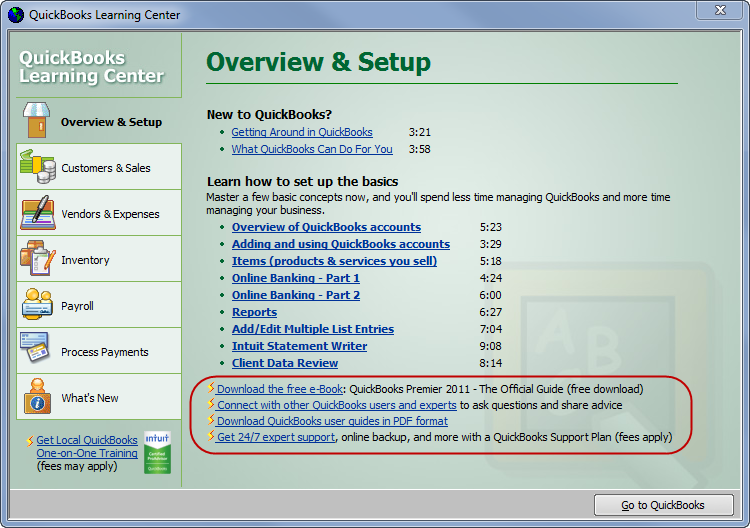
Intuit, the creator of QuickBooks, provides an excellent starting point for free learning. Their official website often hosts a wealth of tutorials, webinars, and knowledge base articles. These resources are invaluable as they come directly from the source, ensuring accuracy and up-to-date information.
-
Intuit’s QuickBooks Learn & Support Center: This section of the QuickBooks website offers comprehensive guides, video tutorials, and articles covering a vast array of topics, from basic setup to advanced features. It’s categorized by product version, making it easy to find relevant content.
-
Free Trial Versions: Many QuickBooks products, particularly QuickBooks Online, offer free trial periods (typically 30 days). This is arguably the most effective “free” learning tool. A trial allows you to get hands-on experience with the actual software, experiment with features, and follow along with tutorials in a live environment without any financial commitment. Utilize this period wisely, dedicating specific time slots to practice and explore.
YouTube and Online Video Tutorials
YouTube has emerged as an indispensable platform for visual learners. A quick search for “learn QuickBooks free” will yield thousands of results, ranging from beginner introductions to in-depth guides on specific functionalities.
-
Dedicated Channels: Many accounting professionals, educators, and tech reviewers maintain YouTube channels solely focused on QuickBooks tutorials. Look for channels with high subscriber counts, consistent uploads, and positive user comments, as these often indicate reliable content.
-
Structured Playlists: The most effective YouTube learning comes from structured playlists that progress logically from basic to advanced topics. This mimics a course structure, helping you build foundational knowledge before tackling more complex tasks.
-
Interactive Demonstrations: Video tutorials excel at demonstrating screen navigation, button clicks, and workflow processes that are difficult to convey through text alone. Pay close attention to the visual cues and try to replicate the steps in your trial version of QuickBooks.
MOOCs and Educational Platforms (Freemium Models)
While many Massive Open Online Courses (MOOCs) charge for certificates, the core course content is often available for free in an “audit” mode. Platforms like Coursera, edX, and Udemy frequently host QuickBooks courses.
-
Audit Options: Look for courses that allow you to audit or enroll for free. This grants access to lectures, video content, and sometimes practice exercises, even if you don’t receive graded assignments or a certificate.
-
Udemy Free Courses: Udemy occasionally offers completely free courses as promotional content. Keep an eye out for these, or leverage their frequent sales if you decide a paid course is worthwhile after exhausting free options.
-
Public Libraries: Many public library systems offer free access to online learning platforms like LinkedIn Learning (formerly Lynda.com) or Gale Courses with your library card. These platforms host professional-grade QuickBooks courses that would otherwise be behind a paywall.
Mastering QuickBooks Functionality Through Practice
Theoretical knowledge, no matter how comprehensive, pales in comparison to hands-on experience. Learning software, particularly one as intricate as QuickBooks, demands active engagement and repetition. Practice transforms abstract concepts into tangible skills, solidifying your understanding and building confidence.

Setting Up a Practice Company File
The most effective way to practice QuickBooks is within a dedicated “practice company” file. If you’re using a free trial of QuickBooks Online, you can typically create a sample company or set up a new one from scratch, using dummy data. For QuickBooks Desktop, you might be able to create multiple company files.
-
Simulate Real-World Scenarios: Don’t just click randomly. Create fictitious invoices, record imaginary expenses, reconcile a mock bank statement, and run sample reports. The more you simulate real business transactions, the better prepared you’ll be for actual accounting tasks.
-
Explore Every Menu and Feature: Deliberately navigate through all menus, sub-menus, and settings. Click on icons you don’t recognize to see what they do. This exploratory learning helps you understand the software’s architecture and discover hidden functionalities.
-
Troubleshoot and Correct Errors: Make mistakes intentionally. Enter wrong amounts, miscategorize transactions, and then figure out how to correct them. This process is invaluable for developing problem-solving skills, which are crucial when working with financial data.
Utilizing Sample Data Files
Many free QuickBooks tutorials provide sample data files or step-by-step exercises using hypothetical scenarios. These are excellent for guided practice.
-
Follow Along with Tutorials: As you watch a video tutorial or read a step-by-step guide, pause frequently and perform the exact actions in your practice company file. This active learning approach reinforces the concepts immediately.
-
Replicate End-of-Period Tasks: Practice month-end and year-end procedures, such as reconciling accounts, generating profit and loss statements, and running balance sheets. These routine tasks are fundamental to proper bookkeeping.
-
Experiment with Customization: Learn how to customize forms (invoices, sales receipts), reports, and user settings. Understanding customization options allows you to tailor the software to specific business needs, a valuable technical skill.
Leveraging Digital Resources and Communities for Support
Even with the best tutorials and ample practice, questions will inevitably arise. The technological landscape offers robust online communities and resources where you can find answers, troubleshoot issues, and deepen your understanding of QuickBooks.
Official Forums and Community Boards
Intuit hosts official community forums where users can ask questions, share knowledge, and get assistance from other users and sometimes Intuit representatives.
-
Search Existing Threads: Before posting a new question, always search the forum. Chances are, someone else has already encountered a similar issue, and a solution might already exist.
-
Engage Respectfully: When posting, be clear, concise, and provide relevant details (e.g., QuickBooks version, specific steps taken, error messages). This increases the likelihood of receiving a helpful response.
-
Learn from Others’ Problems: Even if you don’t have an immediate question, browsing common issues and their solutions in the forums can provide valuable insights and prepare you for potential challenges.
Social Media Groups and Professional Networks
Beyond official forums, various independent online groups gather QuickBooks users and experts.
-
Facebook Groups: Many Facebook groups are dedicated to QuickBooks users, bookkeepers, and small business owners. These can be excellent for quick questions, sharing tips, and networking.
-
LinkedIn Groups: Professional networking sites like LinkedIn host groups where you can connect with QuickBooks professionals. These platforms often facilitate more in-depth discussions and professional advice.
-
Reddit Communities: Subreddits like r/QuickBooks or r/Bookkeeping can offer a more informal, peer-to-peer support environment.
Remember that while these communities are valuable, the advice given by non-certified individuals should always be taken with a grain of salt, especially concerning complex accounting or tax implications. Cross-reference information with official Intuit resources when in doubt.
Ensuring Data Integrity and Digital Security in QuickBooks
As a critical business application handling sensitive financial data, understanding and implementing digital security best practices within QuickBooks is paramount. This isn’t just an IT department concern; every user plays a role in safeguarding financial information. Learning QuickBooks effectively includes learning how to use it securely.
User Permissions and Access Control
QuickBooks, especially multi-user versions like QuickBooks Online Advanced or Desktop Enterprise, offers granular control over user permissions. This is a fundamental security feature that prevents unauthorized access and data manipulation.
-
Principle of Least Privilege: When setting up users, grant them only the minimum necessary access required for their role. For example, a sales representative likely doesn’t need access to payroll functions or the ability to modify historical transactions.
-
Regular Review: Periodically review user access levels to ensure they are still appropriate. This is particularly important when employee roles change or staff leave the company.
-
Strong Passwords and Multi-Factor Authentication (MFA): Enforce strong, unique passwords for all QuickBooks users. Crucially, activate Multi-Factor Authentication (MFA) wherever available (QuickBooks Online heavily promotes its use). MFA adds an extra layer of security, making it significantly harder for unauthorized individuals to access your account even if they somehow obtain a password.
Data Backup and Recovery Strategies
While cloud-based QuickBooks Online generally handles backups automatically, understanding how it works and what data you are responsible for is key. For QuickBooks Desktop users, manual backup protocols are critical.
-
Automated Backups for QBO: Familiarize yourself with how QuickBooks Online backs up your data. While you typically don’t perform manual backups, understanding the recovery options (e.g., audit log, version history for certain elements) is important.
-
Desktop Backup Schedules: For QuickBooks Desktop, establish and adhere to a rigorous backup schedule. Store backups in multiple secure locations, including off-site or cloud storage. Test your backup files periodically to ensure they are restorable.
-
Data Integrity Checks: QuickBooks Desktop includes utility tools to verify and rebuild data. Learning how to use these tools can help prevent data corruption and ensure the accuracy of your financial records.

Awareness of Phishing and Scams
As a widely used financial software, QuickBooks users are often targets for phishing attempts and other scams designed to steal login credentials or financial information.
-
Verify Senders: Always scrutinize the sender of emails purporting to be from Intuit or QuickBooks. Look for inconsistencies in email addresses, grammatical errors, and suspicious links.
-
Never Share Credentials: Intuit will never ask for your password via email or phone. Be highly skeptical of any request for login information.
-
Secure Browsing: Ensure you are always accessing QuickBooks through secure, encrypted connections (look for “https://” in the URL and a padlock icon). Keep your web browser and operating system updated to patch security vulnerabilities.
By diligently applying these technological security measures, you not only protect your business’s sensitive financial information but also demonstrate a comprehensive understanding of responsible software usage, transforming you into a more capable and trustworthy QuickBooks professional. Learning QuickBooks free is entirely achievable, but leveraging these free resources wisely and securely is the ultimate key to success.
aViewFromTheCave is a participant in the Amazon Services LLC Associates Program, an affiliate advertising program designed to provide a means for sites to earn advertising fees by advertising and linking to Amazon.com. Amazon, the Amazon logo, AmazonSupply, and the AmazonSupply logo are trademarks of Amazon.com, Inc. or its affiliates. As an Amazon Associate we earn affiliate commissions from qualifying purchases.