
In the ever-evolving landscape of digital entertainment, streaming services have become indispensable. Users often find themselves juggling multiple subscriptions, each offering exclusive content. Paramount+ and Amazon Prime Video are two such prominent platforms, each with its unique library of movies, series, and live events. The concept of “linking” these services often arises from a desire for convenience, consolidated billing, and a streamlined viewing experience. This guide will demystify the process, explaining precisely how Paramount+ can be integrated into your Amazon Prime Video ecosystem, primarily through Amazon Prime Video Channels. This method offers a unified gateway to your entertainment, simplifying access and subscription management for many users.
Understanding Paramount+ and Amazon Prime Video Channels
Before diving into the mechanics of integration, it’s crucial to grasp the fundamental nature of both Paramount+ and Amazon Prime Video Channels. This understanding will clarify what “linking” truly entails in this context and help set appropriate expectations.
What is Paramount+?
Paramount+ is a premier streaming service owned by Paramount Global. It offers a vast library of content from CBS, Showtime, MTV, Nickelodeon, Comedy Central, BET, and the Paramount film studio. Its offerings range from original series and blockbuster movies to live sports (including NFL on CBS and UEFA Champions League) and news programming. Paramount+ operates as a standalone subscription service, accessible via its dedicated website and apps on various devices, offering different subscription tiers with varying features, such as ad-supported and ad-free options.
What are Amazon Prime Video Channels?
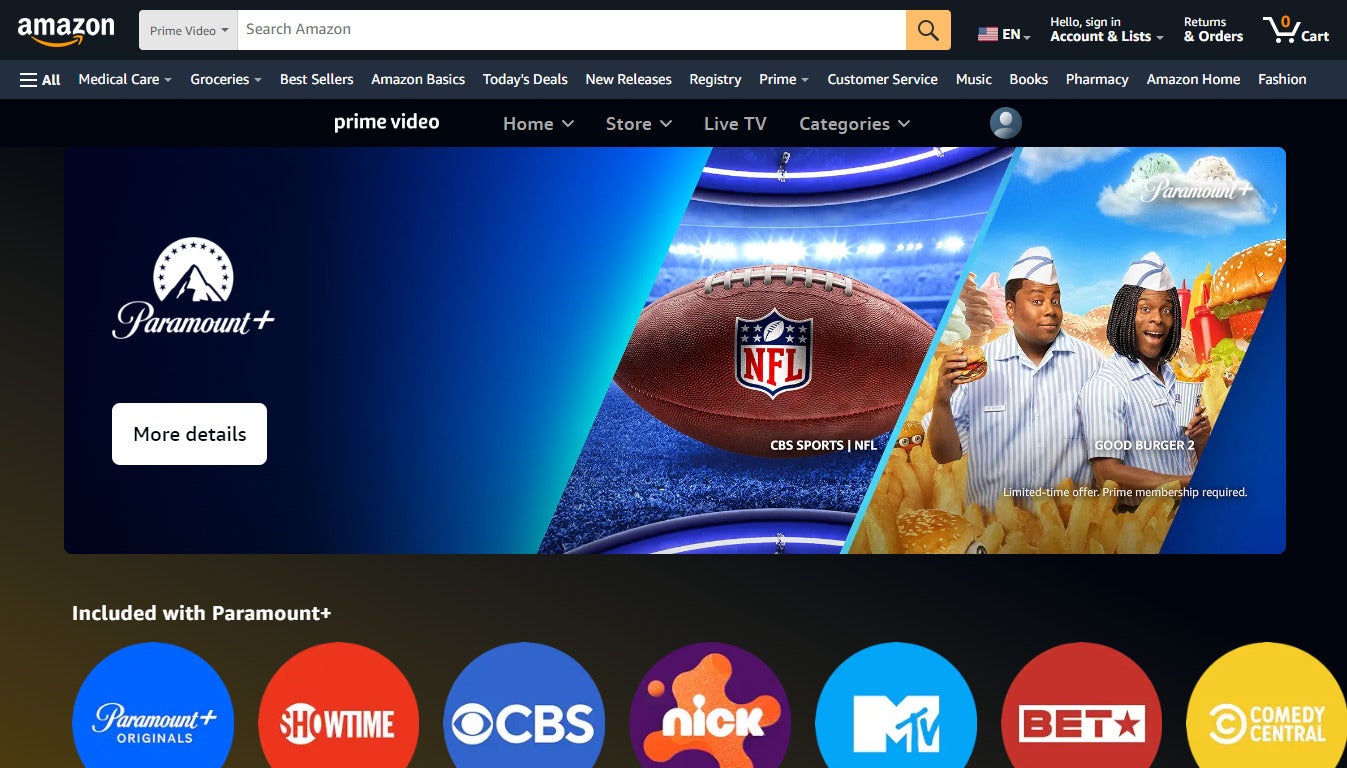
Amazon Prime Video Channels are an add-on subscription service available exclusively to Amazon Prime members. They allow users to subscribe to third-party streaming services directly through Amazon. Instead of managing separate accounts and billing for each service, Prime Video Channels consolidate everything under your Amazon account. This means you pay Amazon directly for these additional channels, and you access their content within the Prime Video app or website, alongside your Prime Video included content. Examples of popular channels include Paramount+, Showtime, Starz, Max, and AMC+. It’s an aggregation model designed for user convenience and centralized billing.
Why Subscribe to Paramount+ via Prime Video Channels?
The primary motivations for opting to subscribe to Paramount+ through Amazon Prime Video Channels revolve around simplifying the streaming experience.
-
Consolidated Billing: All your add-on channel subscriptions, including Paramount+, are billed directly through your Amazon account, making financial tracking easier.
-
Single App Access: You can access Paramount+ content directly within the Amazon Prime Video app, eliminating the need to switch between multiple applications. This is particularly convenient if Prime Video is your primary streaming hub.
-
Streamlined Management: Managing your subscriptions, including starting trials, canceling, or re-subscribing, can be done from a single Amazon interface, be it the website or the Prime Video app.
-
Device Compatibility: By subscribing via Amazon, Paramount+ content becomes available on any device that supports the Prime Video app, which is a vast array of smart TVs, streaming sticks, game consoles, and mobile devices.
Step-by-Step Guide to Adding Paramount+ to Your Prime Video Account
Integrating Paramount+ as an Amazon Prime Video Channel is a straightforward process, primarily executed through Amazon’s platform. Follow these steps to begin enjoying Paramount+ content within your Prime Video environment.
Prerequisites for Subscription
Before you begin, ensure you meet the following essential requirements:
-
Active Amazon Prime Membership: Subscribing to Prime Video Channels, including Paramount+, necessitates an active Amazon Prime membership.
-
Internet Connection: A stable internet connection is required to complete the subscription process and stream content.
-
Compatible Device: Access to the Amazon website or the Prime Video app on a compatible device (computer, smartphone, tablet, smart TV, streaming device).
Accessing Prime Video Channels
You can initiate the process through either the Amazon website or the Prime Video application.
Via Amazon Website:
-
Open your web browser and navigate to Amazon.com.
-
Log in to your Amazon account if you haven’t already.
-
In the search bar, type “Prime Video Channels” or directly navigate to the “Prime Video” section, then look for “Channels” or “Store.”
Via Prime Video App:
-
Open the Amazon Prime Video app on your preferred device.
-
Ensure you are logged in to your Prime account.
-
Navigate to the “Channels” or “Store” section within the app interface. The exact location may vary slightly depending on your device and app version.
Locating and Subscribing to Paramount+
Once you’ve reached the Channels section, the next steps involve finding Paramount+ and completing the subscription.
-
Browse Channels: Scroll through the list of available channels or use the search function to find “Paramount+.”
-
Select Paramount+: Click or tap on the Paramount+ channel listing. This will take you to a dedicated page detailing the service, its content, and pricing.
-
Start a Free Trial/Subscribe: Most channels, including Paramount+, offer a free trial period (e.g., 7 days). Look for options like “Start your free trial” or “Subscribe & Watch.”
-
Confirm Purchase: You will be prompted to confirm your subscription details, including the billing cycle and price after any free trial concludes. Amazon will typically use your default payment method on file. Review the details carefully and confirm your purchase.
-
Authorization: You may need to enter your Amazon password or confirm your purchase via a one-time password for security reasons.
Confirming Your Subscription and Accessing Content
Upon successful subscription, you can immediately begin enjoying Paramount+ content:
-
Subscription Confirmation: You should receive an email confirmation from Amazon regarding your new channel subscription.
-
Accessing Content: Return to the Prime Video app or website. Paramount+ content will now be integrated into your library. You can typically find it under the “Channels” section, or individual Paramount+ titles will appear in search results and recommendations with the Paramount+ logo. Look for a dedicated Paramount+ brand page within Prime Video.
Managing Your Paramount+ Subscription Through Amazon
One of the significant advantages of subscribing via Amazon Prime Video Channels is the centralized management of your subscriptions. This section details how to oversee your Paramount+ channel.
How to View and Manage Your Channels
All your Prime Video Channel subscriptions can be managed from a single location within your Amazon account.
-
Go to Your Amazon Account: On the Amazon website, navigate to “Accounts & Lists” and then “Your Account.”
-
Digital Content and Devices: Under the “Digital content and devices” section, click on “Memberships & Subscriptions.”
-
Prime Video Channels: Here, you will see a list of all your active Amazon Prime Video Channel subscriptions. Locate “Paramount+.”
-
Management Options: From this page, you can view the subscription start date, the next billing date, and access options to cancel or modify your subscription.
Cancelling Your Paramount+ Channel Subscription
Cancelling a Prime Video Channel is designed to be straightforward:
-
Access Memberships & Subscriptions: Follow the steps above to reach the “Memberships & Subscriptions” page.
-
Locate Paramount+: Find your Paramount+ subscription in the list.
-
Cancel Channel: Click the “Cancel Channel” or “Cancel Subscription” option next to Paramount+.
-
Confirmation: Amazon will typically ask for a reason for cancellation and may offer an option to pause the subscription. Confirm your cancellation. You will retain access to the content until the end of your current billing period.
Understanding Billing Cycles and Charges
When you subscribe to Paramount+ through Amazon, all billing is handled by Amazon. Your payment method on file will be charged on a recurring basis (usually monthly or annually) corresponding to the start date of your subscription or the end of your free trial. Amazon will send email notifications regarding upcoming charges or changes to your subscription. This consolidated billing simplifies expense tracking, as all your channel subscriptions appear as Amazon charges on your bank statement.
Key Considerations and Troubleshooting
While convenient, subscribing to Paramount+ via Prime Video Channels comes with specific technical nuances and potential points of confusion that users should be aware of.
Differences Between Direct Paramount+ Subscription and Prime Video Channel
This is perhaps the most critical distinction. If you already have a direct subscription to Paramount+ (purchased through its website or standalone app), you cannot simply “link” it to Amazon Prime Video. These are two entirely separate subscriptions.
-
Direct Subscription: Requires the Paramount+ app, separate login credentials, and is billed directly by Paramount Global.
-
Prime Video Channel: Accessed via the Prime Video app, uses your Amazon login, and is billed by Amazon.
To switch from a direct subscription to a Prime Video Channel, you would need to cancel your direct Paramount+ subscription first, ensure it’s fully terminated, and then subscribe to Paramount+ through Amazon Prime Video Channels. Running both simultaneously would result in duplicate charges.
Device Compatibility and App Access
When subscribed via Amazon, Paramount+ content is delivered exclusively through the Amazon Prime Video app or website.
-
Prime Video App: This is your primary access point. The content will appear seamlessly alongside other Prime Video offerings.
-
Paramount+ Standalone App: You will not be able to use your Amazon Prime Video Channel subscription to log into the standalone Paramount+ app. The credentials are not interchangeable, as your subscription is managed by Amazon, not Paramount Global directly for that specific instance.
Common Issues and Solutions
-
Subscription Not Showing Up: After subscribing, it might take a few minutes for the channel to fully activate across all your Prime Video devices. Try restarting the Prime Video app or your streaming device. If it still doesn’t appear, verify your subscription status on Amazon’s “Memberships & Subscriptions” page.
-
Payment Issues: Ensure your default payment method on Amazon is up-to-date and valid. Amazon will notify you via email if there’s a payment failure.
-
Content Access Problems: If specific Paramount+ content isn’t loading, check your internet connection. If the issue persists, try clearing the cache of your Prime Video app or reinstalling it.
-
Accidental Double Subscription: If you inadvertently subscribed directly to Paramount+ and also via Prime Video Channels, immediately cancel the one you don’t intend to keep. Contact customer support for both services if a refund is necessary for overlapping periods.
Advantages and Disadvantages of Each Subscription Method
Prime Video Channel Method:
-
Pros: Consolidated billing, single app access, simplified management, wide device compatibility through Prime Video.
-
Cons: Cannot use the standalone Paramount+ app, potentially limited access to certain Paramount+ app-specific features (e.g., user profiles or specific live feeds if they differ), no transferability of existing direct subscriptions.
Direct Paramount+ Subscription Method:
-
Pros: Full access to all features of the native Paramount+ app, direct relationship with Paramount+ customer support, not tied to an Amazon Prime membership.
-
Cons: Separate billing, requires switching between apps, more fragmented management if you have many streaming services.
Choosing between these methods depends on your personal streaming habits, preference for app consolidation, and whether you already have an existing subscription.
The Future of Streaming Integration
The ability to “link” or bundle streaming services, as exemplified by Amazon Prime Video Channels, is more than just a convenience; it represents a significant technological and strategic trend in the streaming industry.
The Trend Towards Bundling and Centralization
Consumers are experiencing “subscription fatigue” from managing too many individual services. Platforms like Amazon, Apple TV Channels, and even cable companies offering integrated streaming packages are responding to this by acting as aggregators. This trend signifies a shift towards making content discovery and consumption as frictionless as possible for the end-user, often leveraging existing technological infrastructure and user bases.
User Experience and Convenience
From a user experience perspective, centralizing access is a powerful draw. A single interface, unified search, and consistent navigation across multiple content libraries significantly enhance the viewing experience. This reduces the cognitive load of remembering different logins and navigating disparate apps, making entertainment more accessible and enjoyable.
Technological Implications for Streaming Platforms
For content providers, partnering with aggregators like Amazon involves complex API integrations, content licensing agreements, and data sharing protocols. It requires robust technical infrastructure to ensure seamless content delivery, authentication, and billing across platforms. These partnerships represent a strategic balance between maintaining direct customer relationships and expanding reach through third-party ecosystems, highlighting the increasing interdependence within the digital entertainment space.
Conclusion
Linking Paramount+ to Amazon Prime Video, specifically by subscribing to Paramount+ as a Prime Video Channel, offers a powerful solution for streamlining your digital entertainment. This technical integration consolidates billing and access, making it easier to manage your subscriptions and enjoy content from a single platform. While it’s crucial to understand that this method differs from merging two existing accounts, the benefits of unified access and simplified management for new subscribers are considerable. By following the steps outlined and being mindful of the key considerations, you can successfully integrate Paramount+ into your Amazon Prime Video experience, paving the way for a more convenient and enjoyable streaming journey in the interconnected world of digital media.
aViewFromTheCave is a participant in the Amazon Services LLC Associates Program, an affiliate advertising program designed to provide a means for sites to earn advertising fees by advertising and linking to Amazon.com. Amazon, the Amazon logo, AmazonSupply, and the AmazonSupply logo are trademarks of Amazon.com, Inc. or its affiliates. As an Amazon Associate we earn affiliate commissions from qualifying purchases.