
In an increasingly digitized world, the promise of instant gratification often clashes with the reality of automated customer service. For many modern travelers, navigating the complexities of online booking platforms like Expedia is largely seamless. Yet, when issues arise—be it a sudden itinerary change, a payment discrepancy, or a technical glitch—the desire to speak with a live human representative becomes an urgent imperative. Expedia, like many industry giants, has invested heavily in self-service digital solutions, making the path to human interaction feel more like a digital labyrinth than a direct route. This article will equip you with the strategic insights and technical know-how to effectively bypass the automated gatekeepers and connect with a human agent, transforming a potentially frustrating experience into a streamlined resolution.

Understanding Expedia’s Customer Service Architecture
Before attempting to breach the digital walls, it’s crucial to understand the underlying technology and strategy that shapes Expedia’s customer service. Their approach is meticulously designed to optimize efficiency and handle a vast volume of queries, prioritizing self-service and automated solutions before escalating to human intervention.
The Self-Service First Approach: AI and FAQs
At the forefront of Expedia’s support infrastructure are its extensive self-service tools: comprehensive FAQ sections, knowledge bases, and AI-powered chatbots. This “self-service first” model is not arbitrary; it’s a strategic deployment of technology aimed at several key objectives. Firstly, it provides immediate answers to common questions, empowering users to resolve simple issues independently and instantaneously. This vastly reduces the volume of repetitive inquiries that would otherwise overwhelm human agents. Secondly, it’s a significant cost-saving measure for the company, as automated systems are far less expensive to maintain and scale than a large human workforce.
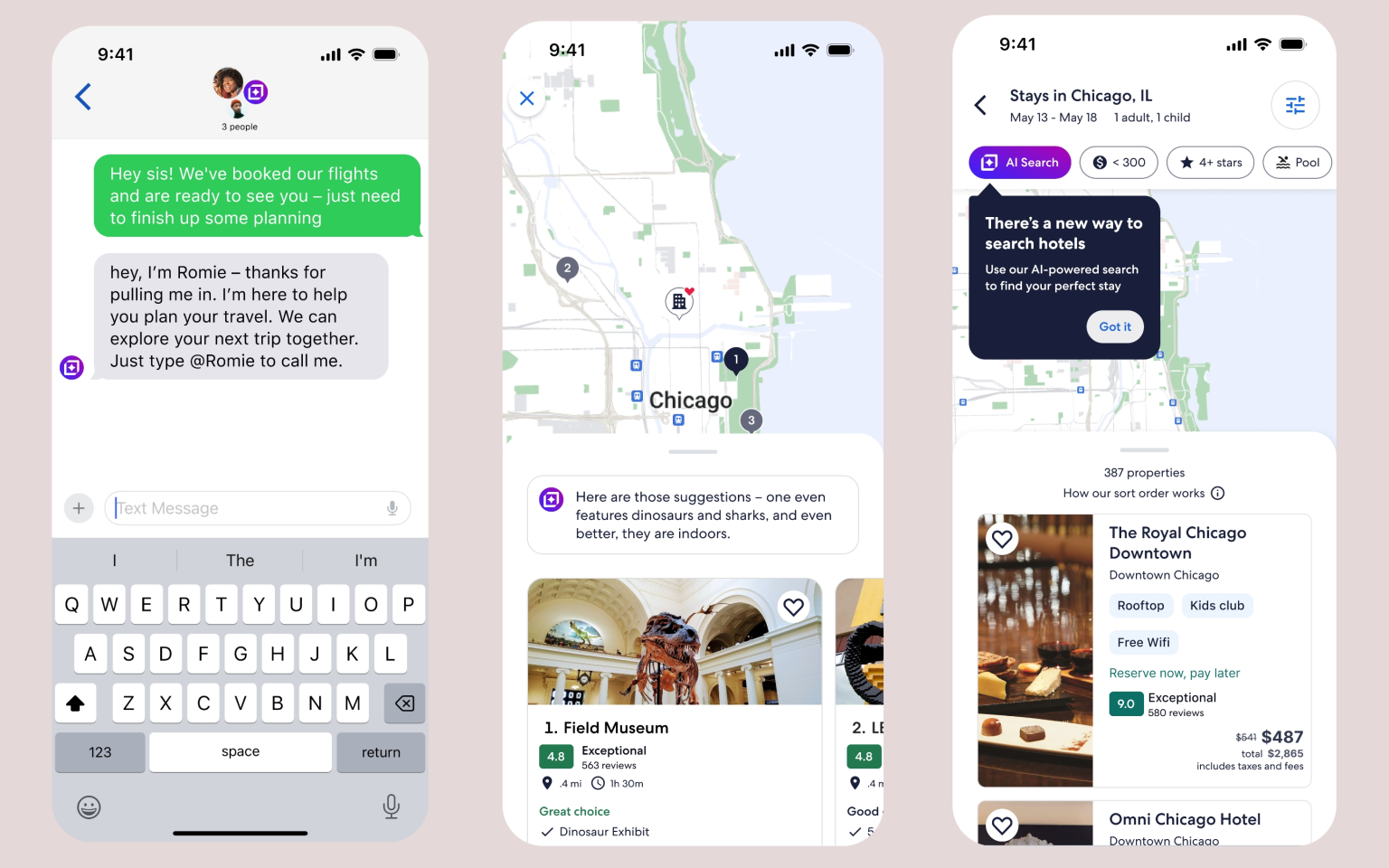
Expedia’s AI chatbots are engineered to interpret natural language, guide users through troubleshooting steps, and direct them to relevant articles or forms. While sophisticated, these digital assistants operate within predefined parameters. They excel at identifying keywords, fetching data, and executing routine tasks like retrieving booking details or initiating cancellation requests. However, their limitations become apparent with unique, nuanced, or emotionally charged issues that require empathy, creative problem-solving, or a deeper understanding of specific circumstances. Knowing these limitations is the first step in understanding when to push past the automation.
The App vs. Website Experience: Digital Gateways
Expedia offers its services through both a dedicated mobile application and a comprehensive website, each serving as a digital gateway to your travel arrangements and, by extension, customer support. While the core functionalities are similar, the user experience and the pathways to support can differ subtly. The mobile app often prioritizes quick access to current itineraries and features like push notifications for real-time updates, sometimes presenting contact options more prominently within the context of a specific booking. The website, with its larger screen real estate, typically allows for more detailed navigation through help articles and a broader display of contact methods.
Regardless of your chosen platform, the digital experience is highly personalized once you are logged in. Expedia leverages your account data—past bookings, payment methods, personal preferences—to tailor your self-service journey. Therefore, ensuring you are always logged into your account and have your booking details (confirmation numbers, dates, traveler names) readily accessible digitally is paramount. This information is the digital key that unlocks relevant support options and, crucially, helps human agents identify your specific situation quickly, reducing verification steps and expediting resolution.
The Role of Virtual Agents and Automated Phone Trees
When initial self-service attempts fall short, users often turn to more direct contact methods, typically involving a phone call or a virtual chat. Here, too, technology plays a gatekeeping role. Expedia’s phone lines are equipped with automated Interactive Voice Response (IVR) systems, or phone trees, designed to filter and categorize callers. These systems use voice recognition or touch-tone inputs to direct you to the most appropriate department, attempting to resolve issues without human intervention. Similarly, virtual chat agents, while seemingly more interactive than an FAQ, often follow scripts and use decision trees to guide the conversation.
The design objective of these systems is to efficiently route users and, if possible, resolve queries at the lowest possible cost. They prompt users with a series of questions, seeking to narrow down the problem to a predefined category. For instance, a booking cancellation might be handled entirely by the IVR, while a complex billing dispute would be routed to a specialized team. Understanding this structure allows you to strategically navigate it. Using specific keywords or carefully selecting menu options that indicate a complex or unresolved issue is key to bypassing initial layers of automation and signalling the need for human assistance.
Strategic Approaches to Expedite Human Connection
With an understanding of Expedia’s tech-driven support architecture, the next step is to employ targeted strategies to connect with a human agent. These approaches focus on leveraging the existing digital pathways in a way that signals the need for direct intervention.
Leveraging Specific Digital Pathways and Contact Options
Expedia’s website and app are replete with various links and buttons that, on the surface, all point to “help.” However, discerning the most effective pathways is crucial. Rather than clicking on generic “Help” or “FAQ” links when you know your issue is complex, look for more specific options like “Contact Us,” “Customer Service,” or “Manage My Booking.” Within these sections, search for explicit prompts such as “Chat with an Agent” or “Call Us.” These are often embedded deeper within the digital layers, after several attempts at self-resolution.
Pay close attention to options that specifically address “technical support,” “billing discrepancies,” or “urgent travel changes,” as these are more likely to lead to specialized teams equipped to handle non-standard issues. Some platforms also offer a “virtual assistant” or “chat bot” option; engaging with these can sometimes lead to an explicit option to “speak to a human” after a few interactions, especially if the bot fails to understand your query. It’s a digital dance: exhaust the bot’s capabilities, then request escalation.
Crafting Your Query for AI and Humans Alike
When interacting with any automated system, whether it’s a chatbot or a search bar within the help center, your choice of words matters immensely. AI thrives on clear, direct language and specific keywords. Instead of vague statements like “I have a problem with my flight,” try “I need to change my flight date” or “My payment for booking [booking reference] failed.”
More importantly, when your goal is to reach a human, use keywords that explicitly signal this intent. Phrases like “speak to a representative,” “human agent,” “escalate,” “I need to talk to someone,” or “my issue is unresolved by virtual assistant” can often trigger a prompt for live support. Be concise but comprehensive in your initial query, providing all relevant digital booking details (booking reference, dates, names, nature of the problem) upfront. This prepares the system for escalation and provides a human agent with all necessary information should you successfully connect.
Timing Your Contact and Channel Selection
The timing of your attempt to connect with customer service can significantly impact your wait time. Just like physical queues, digital support queues fluctuate throughout the day and week. Generally, off-peak hours (late evenings, early mornings, or mid-week days that aren’t Mondays or Fridays) tend to have shorter wait times for phone or chat support. Avoid common peak travel booking times or periods following major travel disruptions.
Consider the nature of your issue and the urgency when selecting a channel. For immediate, time-sensitive problems (e.g., a flight departing soon, a payment issue preventing booking), phone support, despite its potential wait times, might be the most direct route. For less urgent, but still complex issues, a chat feature might offer the benefit of multitasking while you wait, and provides a digital transcript of your conversation. Some issues, particularly technical glitches or display errors, might even have specific email addresses for support, which, while slower, can be effective for detailed documentation.
Beyond the Official Channels: Alternative Tech-Driven Avenues
When traditional digital pathways prove stubbornly resistant, a savvy tech user can explore alternative, often publicly visible, channels to amplify their query and solicit a response.
Social Media and Public Forums: Digital Amplification
In the age of digital reputation, many large corporations, including Expedia, maintain active social media presences with dedicated teams monitoring public discourse. Platforms like Twitter (now X), Facebook, and Instagram can be surprisingly effective for garnering attention, especially if your query is met with silence or inadequate resolution through official channels.
When using social media, be strategic. Tag Expedia’s official accounts (e.g., @Expedia, @ExpediaHelp) and succinctly state your problem without revealing sensitive personal information publicly. A tweet like, “@Expedia I have been trying to reach a human agent for booking [reference number] regarding a critical flight change for 2 hours with no success. Can you help direct me?” can often prompt a rapid response from their social media support team, who may then direct you to a private messaging channel or provide a direct contact number. The public nature of these platforms creates an incentive for companies to respond promptly to maintain their brand image.
Escalation Tactics for Persistent Tech Issues
If your digital efforts continue to hit a wall, it’s time to document your journey meticulously. Take screenshots of chat conversations, note down call times and the names of any automated systems or virtual agents you interacted with, and keep records of all booking details and previous attempts to contact support. This digital paper trail is invaluable for formal escalation.
Many large companies have dedicated customer relations or complaints departments, accessible via specific forms on their website or email addresses that are often harder to find. Searching for “Expedia complaints department” or “Expedia corporate contact” might yield more direct avenues. If the issue involves a significant financial impact due to a technical error or unresolved service failure, your credit card company might also offer dispute resolution services, which often prompts the merchant (Expedia) to engage more directly.
Utilizing General Online Resources and Communities
The collective wisdom of the internet can be a powerful tool. Online communities, travel forums, and platforms like Reddit often have threads dedicated to “how to contact Expedia” or “Expedia customer service tips.” Here, fellow travelers and tech-savvy users share their experiences, direct phone numbers they’ve successfully used, or specific keywords that have worked to bypass automation.
While these resources can be incredibly helpful, always exercise caution and verify information from unofficial sources. Direct phone numbers can change, and advice might not always be current or accurate. However, these communities can provide an excellent starting point for discovering less obvious contact methods or validating your own troubleshooting attempts.
The Digital Traveler’s Toolkit: Preparedness for Support Needs
Prevention and preparedness are key in the digital age. A well-equipped digital traveler can significantly reduce the likelihood of needing urgent human intervention and, when it is necessary, expedite the process.
Proactive Account Management and Digital Record Keeping
Your Expedia account is your central hub for all travel arrangements. Keep your profile information—email address, phone number, payment methods—up-to-date. This ensures that any important communications reach you and that the customer service team has accurate data to work with.
Beyond account management, adopt a rigorous approach to digital record-keeping. Immediately save digital copies (PDFs, screenshots) of all booking confirmations, changes, and communications from Expedia. Create a dedicated email folder for travel-related correspondence. This organized digital archive ensures that if a dispute or complex issue arises, you have all the necessary proof points at your fingertips, saving precious time when interacting with support.
Understanding Common Technical Glitches and Their Fixes
Many situations that initially prompt a user to seek human support are, in fact, common technical glitches that can be resolved with basic troubleshooting. Before dialing or chatting, consider these fundamental tech checks:
-
Payment Processing Errors: Double-check your payment method details, card expiry, and available funds. Sometimes, trying a different card or payment method (e.g., PayPal) can resolve the issue.
-
Display Issues/Website Errors: Clear your browser’s cache and cookies, try a different web browser, or access the Expedia platform from a different device (e.g., your phone app instead of your desktop).
-
Login Problems: Ensure you have the correct username and password. If not, use the “forgot password” feature.
-
Internet Connectivity: Verify your internet connection is stable.
Addressing these common digital hiccups yourself can often bypass the need for customer service altogether, allowing you to proceed with your booking or manage your itinerary seamlessly.
Leveraging the Expedia App’s Built-in Features
The Expedia app is more than just a booking portal; it’s a dynamic travel companion with built-in features designed to manage your trip and provide real-time information. Utilize features like itinerary management, which allows you to view and sometimes modify bookings directly. Many apps now incorporate messaging tools or push notifications for updates on flight changes, gate assignments, or hotel confirmations. By actively using these digital features, you can proactively resolve minor issues or stay informed without needing to engage with customer support, reserving human interaction for truly complex problems.
The Future of Digital Customer Support: What to Expect
The landscape of digital customer support is continually evolving, driven by advancements in AI, data analytics, and user experience design. For platforms like Expedia, the goal remains a delicate balance: maximizing efficiency through automation while preserving the option for empathetic human intervention when it matters most.
Advancements in AI and Personalized Digital Assistance
Expect future iterations of Expedia’s support systems to feature even more sophisticated AI. These intelligent systems will leverage vast amounts of data to provide highly personalized assistance, predicting your needs based on your travel history, preferences, and even current global events. AI will become better at understanding nuanced queries, offering more comprehensive solutions, and seamlessly guiding you through self-service options. This could mean a more intuitive chatbot that can handle complex itinerary changes or proactively suggest solutions to potential issues before you even become aware of them.
Seamless Omnichannel Experiences
The frustration of repeating your problem to multiple representatives or across different channels is a common pain point. The future of digital customer support aims for a seamless omnichannel experience. This means that whether you start a conversation on the app’s chat, escalate to a phone call, or send a message via social media, the system will retain the context of your previous interactions. You won’t have to start from scratch, and human agents will have immediate access to your entire support history, leading to faster and more efficient resolutions. This integration of various digital channels will be powered by robust backend technology.
Balancing Automation with the Human Touch
Despite the rapid progress in AI and automation, the fundamental need for human connection, empathy, and creative problem-solving will persist. Tech companies are increasingly recognizing that while AI can handle routine tasks, complex, emotionally charged, or unique situations inherently require human intelligence. The ongoing challenge for Expedia and similar platforms will be to find the optimal balance—to automate where it makes sense for efficiency and user convenience, while always providing a clear and accessible pathway to a human agent for issues that demand a personal touch. The digital labyrinth may become more intelligent, but the exit to human interaction will hopefully become more clearly marked and efficiently managed.

Conclusion
Connecting with a human on Expedia, while sometimes a test of patience, is an achievable goal for the digitally savvy traveler. By understanding Expedia’s tech-first customer service architecture, employing strategic approaches to navigate its digital pathways, and leveraging alternative tech-driven avenues, you can significantly improve your chances of reaching a live representative. Embrace the self-service tools for routine queries, but be prepared with precise language, documented information, and an understanding of the system’s limitations when a human touch is indispensable. As digital customer support continues to evolve, your ability to strategically interact with these technologies will remain your most powerful tool in ensuring a smooth and stress-free travel experience.
aViewFromTheCave is a participant in the Amazon Services LLC Associates Program, an affiliate advertising program designed to provide a means for sites to earn advertising fees by advertising and linking to Amazon.com. Amazon, the Amazon logo, AmazonSupply, and the AmazonSupply logo are trademarks of Amazon.com, Inc. or its affiliates. As an Amazon Associate we earn affiliate commissions from qualifying purchases.