
In an increasingly digital world, the ability to manage transactions seamlessly and securely online has become not just a convenience, but a necessity. Among the various platforms facilitating this, PayPal stands out as a pioneering and widely adopted digital payment solution. Often referred to as a digital wallet, PayPal enables individuals and businesses to send and receive money, make online purchases, and manage funds across borders with relative ease. This guide delves into the technical intricacies of creating a PayPal account, ensuring users can navigate the setup process efficiently and securely, fully leveraging the platform’s robust technological framework.
Understanding PayPal: A Technological Overview
Before embarking on the signup journey, it’s crucial to grasp the technological underpinnings of PayPal. At its core, PayPal is a sophisticated financial technology (fintech) platform designed to simplify and secure digital transactions. It acts as an intermediary between users and their financial institutions, offering a layer of protection and convenience that traditional banking methods often lack in online environments.
What is PayPal and How Does it Work?
PayPal functions as an online payment processing system that facilitates electronic funds transfers. When a user links their bank account, debit card, or credit card to their PayPal account, PayPal’s system securely stores this information. During a transaction, instead of directly exposing sensitive financial details to a merchant or recipient, users simply authorize PayPal to process the payment. PayPal then communicates with the linked financial institution to execute the transfer. This “middleman” approach is a fundamental security feature, minimizing the risk of data breaches and fraud by masking actual banking information from the transaction counterparties.
The technology behind PayPal involves complex encryption protocols, secure servers, and advanced fraud detection algorithms. Transactions are processed through a proprietary network that ensures data integrity and confidentiality. For instance, when you send money, PayPal’s system validates the transaction parameters, checks for suspicious activity, and then executes the transfer, typically notifying both parties instantaneously. This entire process, from initiation to confirmation, is engineered for speed and reliability, underpinned by a resilient technological infrastructure designed for high availability and scalability.
Key Features and Technological Advantages
PayPal’s technological prowess is evident in its array of features designed to enhance user experience and security.
-
Encrypted Transactions: All data exchanged between your device and PayPal’s servers is heavily encrypted using industry-standard protocols, safeguarding personal and financial information.
-
Two-Factor Authentication (2FA): A critical security feature, 2FA adds an extra layer of protection by requiring a second form of verification (e.g., a code sent to your phone) in addition to your password during login.
-
Mobile Application: The PayPal mobile app transforms a smartphone into a powerful financial management tool. It offers features like fingerprint/face ID login, QR code payments, instant notifications, and on-the-go access to transaction history, all optimized for mobile device interfaces and security.
-
Seller Protection and Buyer Protection: These programs leverage sophisticated algorithms to monitor transactions for fraud, providing a technological safety net for users engaged in buying and selling.
-
Integration Capabilities: PayPal offers extensive APIs (Application Programming Interfaces) allowing its payment processing capabilities to be seamlessly integrated into e-commerce platforms, websites, and custom applications, making it a versatile tool for businesses.
-
Multi-currency Support: The platform automatically handles currency conversions for international transactions, using real-time exchange rates and transparent fees, showcasing its global technological reach.
System Requirements and Compatibility
To ensure a smooth signup and usage experience, users should be aware of PayPal’s technical requirements.
-
Internet Connection: A stable and reliable internet connection (broadband or mobile data) is essential for accessing PayPal’s services, as all operations are cloud-based.
-
Web Browser: PayPal supports most modern web browsers (Chrome, Firefox, Safari, Edge, Opera) and requires JavaScript to be enabled for full functionality. Keeping your browser updated is crucial for security and performance.
-
Mobile Device (Optional but Recommended): For using the PayPal app, a smartphone or tablet running a recent version of iOS or Android is necessary. The app is regularly updated to support newer operating systems and device security features.
-
Email Address: A valid and accessible email address is fundamental, as it serves as your primary PayPal identifier and is used for account verification, notifications, and password recovery.
The Step-by-Step Account Creation Process
Creating a PayPal account is a straightforward technical process, but requires careful attention to detail, particularly concerning security and verification. The process is designed to be intuitive, guiding users through each stage to ensure all necessary information is captured securely.
Choosing Your Account Type: Personal vs. Business
The first technical decision involves selecting the appropriate account type. PayPal offers two primary categories, each tailored to different user needs and functionality sets.
-
Personal Account: Ideal for individuals who wish to shop online, send money to friends and family, or receive occasional payments. This account type features simpler setup and fewer requirements, focusing on consumer-centric functionality.
-
Business Account: Designed for merchants, freelancers, and companies that need to accept payments from customers, issue invoices, or manage larger transaction volumes. Business accounts come with advanced features like multi-user access, reporting tools, and integration options for e-commerce platforms, necessitating more comprehensive verification.
The choice dictates the dashboard interface, available features, and the level of identity verification required. It’s possible to upgrade a personal account to a business account later, though it involves additional verification steps.
Navigating the Registration Page
The registration process begins by visiting the official PayPal website or downloading the mobile app.
-
Initiate Signup: Click the “Sign Up” or “Open a Free Account” button.
-
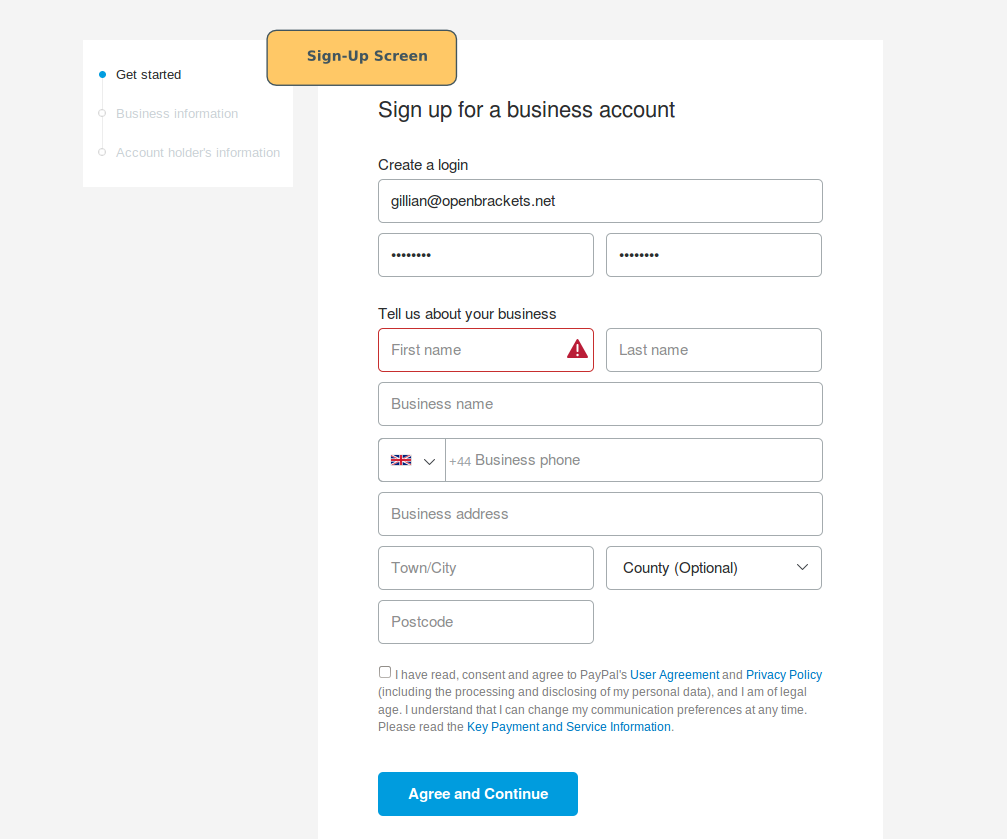
Select Account Type: Choose between “Personal Account” or “Business Account” as discussed above.
-
Enter Contact Information: Provide your mobile number. PayPal uses this for verification via a one-time password (OTP), a key security measure against automated signups.
-
Verify Mobile Number: Enter the OTP received on your mobile device into the designated field. This confirms that you own the provided number.
-
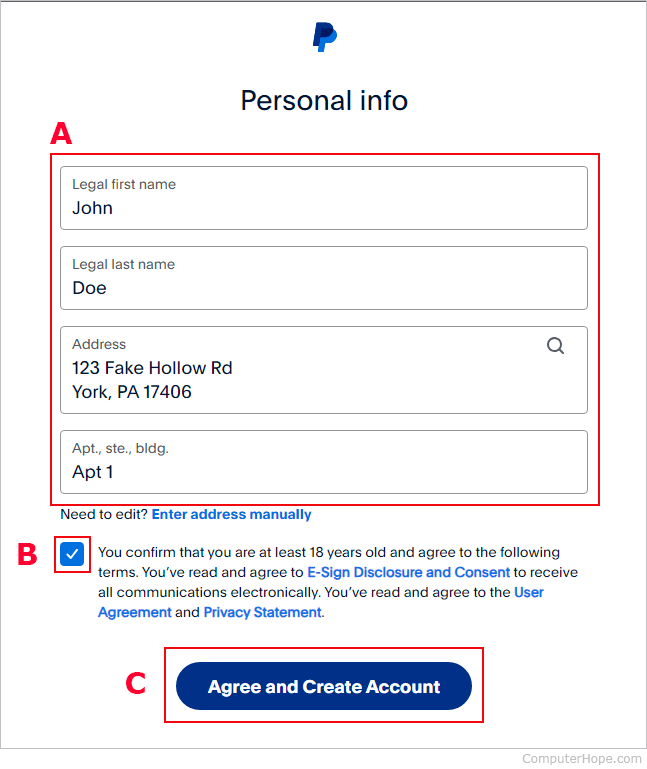
Create Your Profile: Fill in personal details such as your full legal name, email address, and a strong password. The password strength indicator is a technical aid, prompting users to create secure credentials. PayPal’s system will also check if the email address is already registered.
-
Provide Address Details: Enter your residential address. This is a crucial step for identity verification and compliance with financial regulations.
The user interface (UI) and user experience (UX) are designed to be clean and self-explanatory, minimizing potential technical hurdles during data entry. Input fields often include real-time validation to catch errors before submission.
Verifying Your Identity and Linking Financial Instruments
After the initial profile creation, the next critical step is to verify your identity and link a funding source. These steps are paramount for security, fraud prevention, and compliance with KYC (Know Your Customer) regulations.
-
Confirm Email Address: PayPal sends a confirmation link to the email address provided. Clicking this link verifies ownership and activates the account for full functionality.
-
Link a Bank Account or Debit/Credit Card:
-
Bank Account: You can link a bank account either by logging into your online banking portal through PayPal’s secure interface (which uses encrypted connections) or by manually entering your bank’s routing and account numbers. PayPal typically performs two small “micro-deposits” (e.g., $0.05 and $0.15) to your bank account, which you then verify on PayPal, confirming account ownership. This is a robust technical verification method.
-
Debit/Credit Card: Enter your card number, expiration date, and CVV. PayPal may perform a temporary authorization charge (e.g., $1.00) which is later refunded, to verify the card’s validity.
-
Linking a funding source is essential for most transaction types, allowing you to add funds to your PayPal balance or draw directly from your bank or card for payments.
Setting Up Security Measures
Upon successful registration, it’s highly recommended to configure additional security settings immediately.
-
Enable Two-Factor Authentication (2FA): This is a non-negotiable step for enhanced account security. Navigate to your account settings, find the security section, and activate 2FA, typically via an authenticator app or SMS.
-
Create Security Questions: Set up a few security questions and answers. These act as a fallback mechanism for identity verification if you lose access to your primary verification methods.
-
Review Account Activity: Regularly check your transaction history and login activity logs for any unauthorized access attempts or suspicious transactions. PayPal’s system provides these logs as part of its transparency features.
Optimizing Your PayPal Account for Secure Usage
Beyond the initial setup, proactive management of your PayPal account’s technical and security features is vital for maintaining a secure and efficient digital wallet. This involves regular review and adjustment of settings to match your usage patterns and current threat landscape.
Enhancing Digital Security
PayPal provides a suite of tools and best practices to fortify your account’s digital defenses.
-
Strong, Unique Passwords: Never reuse passwords across different online services. Utilize a password manager to generate and store complex, unique passwords for PayPal and other sensitive accounts. This mitigates the risk of credential stuffing attacks.
-
Phishing Awareness: Be vigilant against phishing attempts. PayPal will never ask for your password or sensitive financial details via unsolicited emails or texts. Always verify the sender’s email address and hover over links before clicking. Look for the padlock icon and “https://” in the URL bar to confirm a secure connection.
-
Security Key/Authenticator App: While SMS-based 2FA is good, using an authenticator app (like Google Authenticator or Authy) provides a more secure form of 2FA, as it’s not susceptible to SIM-swap fraud.
-
Regular Software Updates: Keep your operating system, web browser, and PayPal mobile app updated. Software updates often include critical security patches that protect against newly discovered vulnerabilities.
Managing Your Profile and Preferences
PayPal’s dashboard offers extensive customization options to tailor the platform to your needs and enhance your control over data.
-
Notification Settings: Configure email and push notifications for transactions, login alerts, and security updates. Receiving immediate alerts for suspicious activity is a crucial defense mechanism.
-
Linked Devices: Periodically review the list of devices logged into your PayPal account. Remove any unfamiliar or old devices to prevent unauthorized access.
-
Privacy Controls: Understand and adjust your privacy settings, particularly regarding data sharing and marketing communications. This ensures your personal information is managed according to your preferences within PayPal’s technological ecosystem.
Leveraging PayPal’s Mobile Application
The PayPal mobile app is a powerful extension of the web platform, offering unique technical advantages.
-
Biometric Login: Utilize fingerprint or facial recognition for quick and secure access, removing the need to type passwords repeatedly. This is a significant convenience and security enhancement.
-
QR Code Payments: The app allows for seamless in-store payments by scanning QR codes, a contactless technology that simplifies transactions.
-
Instant Notifications: Receive real-time alerts for all account activities directly on your device, enabling immediate detection of any unauthorized use.
-
Mobile-Specific Security: The app often includes additional security layers specific to mobile operating systems, such as app PINs or encryption of locally stored data.
Troubleshooting Common Signup Issues and Technical Support
Even with a well-designed technical process, users might encounter issues during signup or account usage. Understanding common problems and how to access technical support is vital.
Addressing Verification Delays
Verification steps, particularly linking bank accounts or identity checks for business accounts, can sometimes experience delays.
-
Micro-Deposit Verification: If micro-deposits don’t appear in your bank account within a few business days, double-check the bank account numbers entered. Errors in routing or account numbers are common technical input mistakes.
-
Identity Document Uploads: For business accounts, ensuring clear, legible scans or photos of required documents (ID, business registration) is crucial. Blurred images or incomplete information will lead to delays. PayPal’s system uses OCR (Optical Character Recognition) and other technologies to process these documents.
-
Contact Support: If delays persist without clear explanation, contacting PayPal’s customer service with your specific issue and any reference numbers can help expedite the process.
Resolving Login and Access Problems
Trouble logging in is a common technical frustration.
-
Password Reset: If you forget your password, use the “Forgot Password” link. PayPal will guide you through a secure reset process, typically involving email verification and possibly security questions or 2FA.
-
Browser Cache and Cookies: Sometimes, cached data or corrupted cookies in your web browser can interfere with PayPal’s login process. Clearing your browser’s cache and cookies can resolve these technical glitches.
-
Account Lockouts: Multiple failed login attempts can temporarily lock your account for security reasons. Wait for the specified lockout period or follow PayPal’s recovery steps.

Contacting PayPal’s Technical Support
When self-troubleshooting doesn’t resolve an issue, PayPal’s technical support channels are available.
-
Help Center: PayPal’s online Help Center is a comprehensive resource, offering articles and FAQs on a wide range of topics, including signup and technical issues. Utilizing the search function effectively can often provide immediate answers.
-
Community Forum: The PayPal community forum allows users to post questions and get assistance from other users and PayPal representatives.
-
Phone Support: For urgent or complex issues, phone support provides direct interaction with a support agent who can guide you through technical troubleshooting steps. Be prepared to verify your identity thoroughly.
-
Message Center: Within your PayPal account, a secure Message Center allows you to communicate with support agents, ensuring sensitive information is exchanged securely within the platform.
Signing up for a PayPal account is a fundamental step towards embracing digital finance. By understanding the technological framework, meticulously following the setup instructions, and proactively managing security settings, users can create a robust and secure digital wallet that serves their financial needs in the modern online landscape.
aViewFromTheCave is a participant in the Amazon Services LLC Associates Program, an affiliate advertising program designed to provide a means for sites to earn advertising fees by advertising and linking to Amazon.com. Amazon, the Amazon logo, AmazonSupply, and the AmazonSupply logo are trademarks of Amazon.com, Inc. or its affiliates. As an Amazon Associate we earn affiliate commissions from qualifying purchases.