
In an increasingly digitized world, the ability to manage finances and conduct transactions online is not just a convenience but a necessity. PayPal stands as a vanguard in this digital revolution, offering a robust platform that facilitates secure and efficient money transfers, online purchases, and business payments across the globe. For anyone looking to tap into the vast ecosystem of online commerce, understanding how to set up a PayPal account is the foundational first step. This guide will meticulously walk you through the technical process, shedding light on the underlying mechanisms and security protocols that make PayPal an indispensable digital tool.

The Technological Foundation of PayPal
At its core, PayPal is a financial technology (fintech) company that operates an online payments system allowing individuals and businesses to send and receive money electronically. It acts as an intermediary between transacting parties, safeguarding sensitive financial information and streamlining the complex process of cross-border and domestic digital payments.
What is PayPal and How Does It Work?
PayPal’s operational model is built on a sophisticated architecture that encrypts and transmits financial data securely. When you send money via PayPal, the platform doesn’t directly transfer funds from your bank account to the recipient’s. Instead, it processes the payment using its own infrastructure, acting as a trusted third party. Your linked bank account or card details are never directly shared with the merchant or recipient, mitigating the risk of data breaches. This system leverages advanced encryption standards (like SSL/TLS) and proprietary fraud prevention algorithms to protect every transaction, creating a secure tunnel for digital currency.
The process involves associating your PayPal account with existing financial instruments like bank accounts, credit cards, or debit cards. Once linked and verified, these instruments become the funding sources for your PayPal wallet. When you make a payment, PayPal debits the selected funding source and credits the recipient’s PayPal account, often instantaneously, translating real-world currency into digital value that can be held within the PayPal ecosystem or withdrawn to an external bank account.
Why PayPal Remains a Digital Payment Staple
PayPal’s enduring popularity stems from a blend of user-centric design, expansive reach, and rigorous security. From a technological standpoint, its intuitive user interface (UI) and user experience (UX) design make digital transactions accessible even to those less familiar with online banking. The platform supports over 200 countries and 25 currencies, offering unparalleled global connectivity. This wide acceptance means users can conduct international transactions with relative ease, avoiding the complexities and high fees often associated with traditional wire transfers.
Moreover, PayPal’s robust Buyer Protection and Seller Protection policies, while primarily financial in outcome, are underpinned by advanced technological monitoring and dispute resolution systems. These systems continuously analyze transaction patterns, flag suspicious activities, and provide tools for users to resolve conflicts, adding an extra layer of trust to online dealings. The convenience of storing multiple payment methods in one secure digital wallet, coupled with features like one-touch payments, significantly streamlines the checkout process for online shopping, making it a preferred option for millions.
Personal vs. Business Accounts: Choosing Your Digital Toolkit
PayPal offers two primary account types, each tailored with distinct features and functionalities to serve specific user needs:
-
Personal Accounts: Designed for individual users, personal accounts are ideal for sending money to friends and family, making online purchases, and receiving occasional payments. The setup is straightforward, focusing on ease of use for everyday digital transactions. Features include simplified payment tools, direct access to funds, and the ability to track personal spending.
-
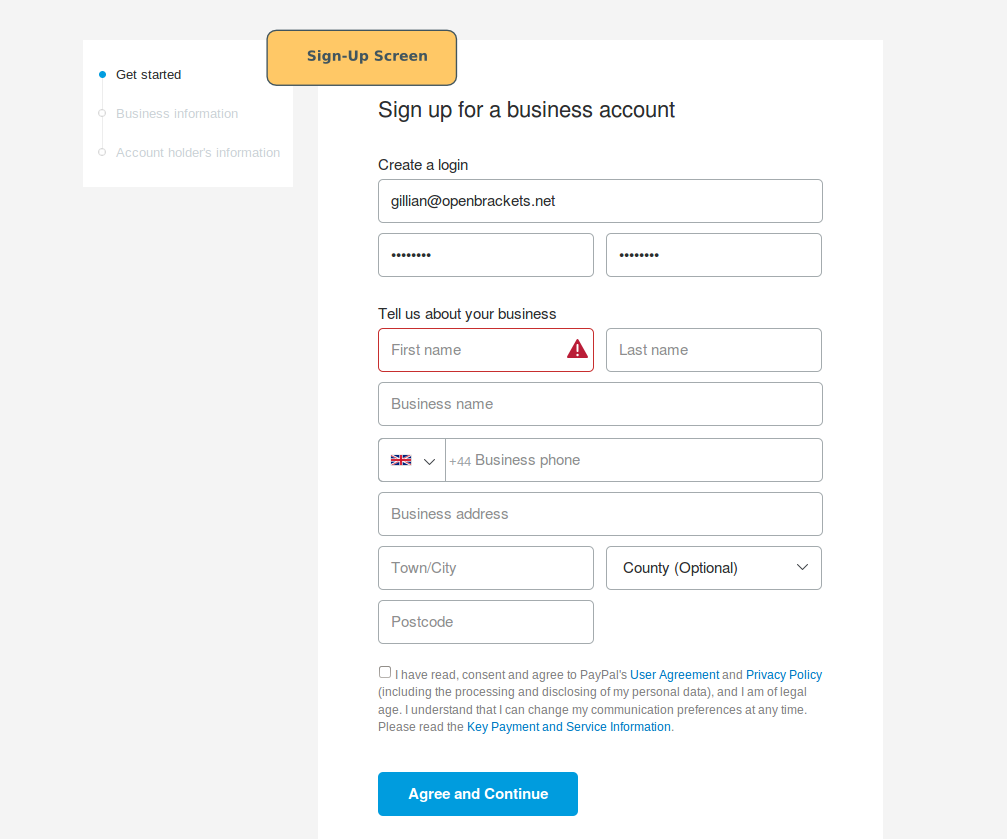
Business Accounts: Tailored for entrepreneurs, small businesses, and corporations, business accounts come with a more extensive suite of tools. These include features like invoicing, accepting payments on websites (via API integrations or hosted solutions), managing multiple users, generating sales reports, and accessing advanced fraud protection services. The setup typically requires more detailed business information and verification to ensure compliance with financial regulations and to unlock higher transaction limits and specialized services.
Choosing the right account type from the outset ensures that you have the appropriate technological infrastructure to support your digital financial activities, whether personal or commercial.
Navigating the Setup Process for a Personal Account
Setting up a PayPal personal account is a relatively simple and secure process that can be completed in a few steps. It primarily involves providing personal identifiers and linking a funding source.
Initializing Your Registration: First Steps on the Digital Frontier
To begin, navigate to the official PayPal website (paypal.com) or download the PayPal mobile app from your device’s app store. Look for the “Sign Up” or “Get Started” button, usually prominently displayed. Upon clicking, you’ll be prompted to choose between a “Personal Account” or “Business Account.” For most individual users, selecting “Personal Account” is the correct path.
The initial registration screen will ask for basic details: your country/region, your mobile phone number, and a strong password. The mobile number is critical for security, as it will often be used for two-factor authentication (2FA) and account recovery. Ensure you have access to this number during the setup process.
Establishing Your Digital Identity: Personal Details and Security
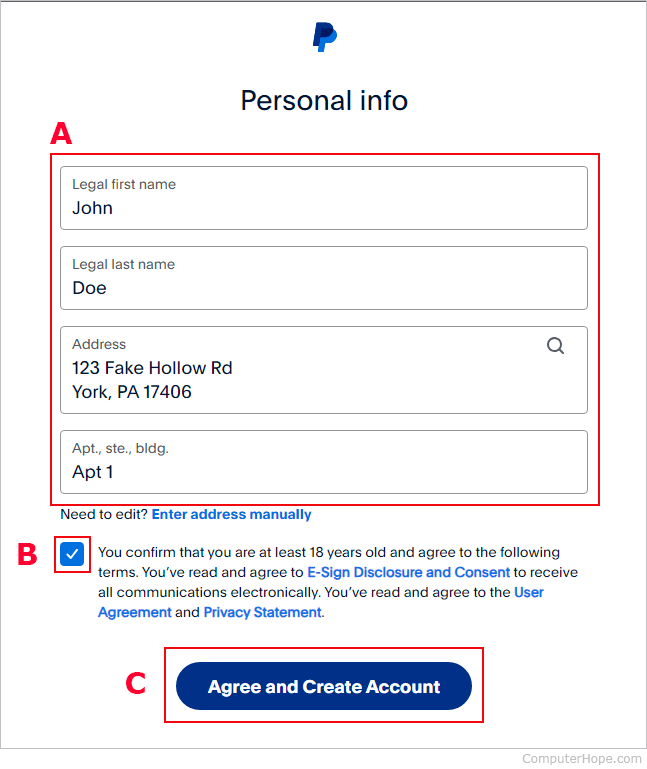
After providing your phone number, PayPal will send a verification code via SMS. Enter this code to proceed. The next step involves inputting more comprehensive personal information:
-
Your legal first and last name
-
Your email address (this will serve as your primary PayPal identifier)
-
Your date of birth
-
Your home address
It is crucial to provide accurate information, as this data is used for identity verification, compliance with financial regulations (Know Your Customer – KYC), and to enhance the security of your account. Creating a strong, unique password is paramount at this stage. A strong password typically combines uppercase and lowercase letters, numbers, and symbols, making it difficult for unauthorized users to guess or crack. PayPal’s system will guide you on password strength.
Integrating Your Financial Instruments: Linking Bank Accounts and Cards
This is a critical step where you connect your PayPal account to your existing financial world. You’ll be given options to link either a debit/credit card or a bank account.
-
Linking a Debit/Credit Card: You’ll need to enter your card number, expiration date, and the 3-digit security code (CVV/CVC) found on the back of the card. PayPal might then perform a small, temporary authorization charge (e.g., $1.95 USD) to verify the card. A unique 4-digit code will appear on your card statement next to the PayPal charge. You’ll need to enter this code back into your PayPal account to confirm ownership of the card. Once confirmed, the temporary charge is typically refunded. This process verifies that you are the legitimate cardholder, preventing fraudulent linking.
-
Linking a Bank Account: You can link your bank account either instantly using your online banking login credentials (PayPal uses secure, encrypted connections to your bank) or manually by providing your bank’s routing number and your account number. For manual linking, PayPal will send two small deposits (e.g., $0.05 and $0.12) to your bank account within 2-3 business days. You’ll then need to log back into PayPal and enter the exact amounts of these micro-deposits to verify your bank account. This verification step confirms account ownership and establishes a secure link for transfers.
These verification methods are sophisticated technological safeguards designed to protect your financial assets and prevent unauthorized access to your accounts.
Finalizing Activation: Email Verification and Account Confirmation
The final step in setting up your account involves verifying your email address. PayPal will send an activation link to the email address you registered with. You must click this link to confirm your email and fully activate your account. This step is essential because your email address is not only a key identifier for your PayPal account but also a crucial channel for security alerts and transaction notifications. Once your email is verified, your PayPal account is fully active, and you can begin sending and receiving money, shopping online, and exploring its full range of features.
Enhancing Your PayPal Experience: Features and Security Post-Setup
Once your PayPal account is successfully set up, the real utility of this digital wallet begins to unfold. Understanding its features and how to secure them is paramount.
Mastering Your PayPal Dashboard: An Overview of the User Interface
Upon logging in, you’ll be greeted by your PayPal dashboard, which serves as your command center. The UI is designed for intuitive navigation, typically featuring sections like:
-
Summary: A quick overview of your balance, recent activity, and notifications.
-
Wallet: Where you manage your linked bank accounts and cards, set preferred payment methods, and view your PayPal balance.
-
Send & Request: Dedicated sections for initiating payments or requesting money from others.
-
Activity: A detailed log of all your transactions, which can be filtered and searched.
-
Resolution Center: A built-in tool for managing disputes, reporting unauthorized transactions, and resolving payment issues.
-
Settings (Gear Icon): Where you can update personal information, manage security settings, and set up various preferences.
Familiarizing yourself with this interface will allow you to efficiently manage your digital finances and leverage PayPal’s capabilities.
Understanding Transaction Mechanics: Sending, Receiving, and Requesting Funds
PayPal’s core functionality revolves around its transaction mechanics.
-
Sending Money: To send money, you typically need the recipient’s email address or mobile phone number linked to their PayPal account. You specify the amount and currency, choose your funding source (PayPal balance, linked bank, or card), and can add a note. The system then processes the transfer, often instantly. For personal payments (friends and family), there are usually no fees if funded by your PayPal balance or a linked bank account. For goods and services, a small fee is typically deducted from the recipient’s end, and this type of payment often includes buyer/seller protection.
-
Receiving Money: When someone sends you money, it appears in your PayPal balance. You’ll receive an email notification. Funds can then be used to make purchases, sent to others, or withdrawn to your linked bank account.
-
Requesting Money: This feature allows you to send a payment request to someone via their email. You specify the amount, and they receive a notification to pay you. This is particularly useful for splitting bills or reminding someone of an outstanding payment.
These processes are underpinned by PayPal’s secure transaction engine, which validates accounts, encrypts data, and records every movement of funds, providing a transparent and auditable trail.
Fortifying Your Account Security: Activating Advanced Protections
PayPal offers several layers of security beyond your password. Activating these significantly reduces your risk of unauthorized access.
-
Two-Factor Authentication (2FA): This is arguably the most critical security feature. When enabled, PayPal requires not only your password but also a second verification code (usually sent to your mobile phone or generated by an authenticator app) to log in or complete sensitive transactions. This means even if someone gets your password, they cannot access your account without your phone.
-
Security Questions: While not as robust as 2FA, setting up unique security questions can add another layer of verification, especially for account recovery.
-
Device Management: PayPal allows you to view and manage the devices logged into your account. You can remove unrecognized devices, enhancing security.
-
Phishing Prevention: While not a direct account setting, PayPal actively educates users on identifying phishing attempts. Never click suspicious links or enter your credentials on non-PayPal websites. Always log in directly through paypal.com.
Regularly reviewing and updating your security settings is a crucial best practice in maintaining a secure digital financial presence.
Exploring Advanced Features: PayPal.Me, Recurring Payments, and Crypto Integration
Beyond basic transactions, PayPal has evolved its platform to include a variety of advanced technological features:
-
PayPal.Me: This allows you to create a personalized, shareable link (e.g., paypal.me/yourname) that others can use to send you money instantly, without needing your email address. It streamlines payment requests and makes receiving funds more convenient.
-
Recurring Payments/Subscriptions: If you authorize a merchant for recurring payments, PayPal securely stores this authorization, enabling automated debits based on your subscription terms. You can manage and cancel these directly from your PayPal account settings.
-
Cryptocurrency Integration: In select regions, PayPal has integrated functionality allowing users to buy, hold, and sell certain cryptocurrencies directly within their PayPal account. This feature leverages blockchain technology, bringing digital assets into the mainstream financial ecosystem through a familiar platform.
-
Invoicing Tools: For business accounts, integrated invoicing tools simplify billing clients, tracking payments, and managing receivables, offering a comprehensive solution for revenue management.
These features showcase PayPal’s continuous innovation in financial technology, aiming to provide a comprehensive and future-proof platform for digital transactions.
Best Practices for Secure and Efficient PayPal Usage
While PayPal provides robust security features, the ultimate responsibility for account security rests with the user. Adhering to best practices ensures a safe and efficient experience.
Safeguarding Your Credentials: Password Hygiene and Phishing Awareness
Your password is the first line of defense. Always use a strong, unique password for your PayPal account that you don’t use anywhere else. Consider using a reputable password manager to generate and store complex passwords. Be vigilant against phishing attempts—fraudulent emails or messages designed to trick you into revealing your login credentials. PayPal will never ask for your password or sensitive financial details via email. Always check the sender’s email address and hover over links before clicking to verify their legitimacy. When in doubt, directly type paypal.com into your browser.
Monitoring Account Activity: Leveraging Notifications and Transaction History
Regularly review your transaction history in the “Activity” section of your PayPal dashboard. Enable email and push notifications for all transactions. This allows you to quickly identify and report any unauthorized activity. The sooner a suspicious transaction is detected, the easier it is for PayPal’s fraud department to investigate and potentially recover funds. Consistent monitoring acts as an early warning system for potential security breaches.
Utilizing PayPal’s Resolution Center: Tech Support for Disputes and Unauthorized Transactions
Should you encounter a problem, such as an item not received, an item significantly not as described, or an unauthorized transaction, PayPal’s Resolution Center is your first point of contact. This built-in technological tool guides you through the process of opening a dispute, communicating with the other party, and, if necessary, escalating the issue to PayPal for investigation. The platform’s dispute resolution system is designed to facilitate fair outcomes based on evidence provided by both parties, backed by their buyer and seller protection policies.
Keeping Software and Devices Updated: A Critical Security Layer
Ensure that the web browser you use to access PayPal, your operating system, and the PayPal mobile app itself are always updated to the latest versions. Software updates often include critical security patches that fix vulnerabilities, protecting you from new threats. Using outdated software can expose your device and, by extension, your PayPal account to exploits. Similarly, ensure your devices are protected with reputable antivirus software and firewalls, adding another layer of defense against malware that could compromise your login information.
In conclusion, setting up a PayPal account is a straightforward process that unlocks a world of digital financial possibilities. By understanding its technological underpinnings, diligently following the setup steps, and adhering to best practices for security and usage, you can leverage PayPal as a powerful and reliable tool for managing your money in the digital age.
aViewFromTheCave is a participant in the Amazon Services LLC Associates Program, an affiliate advertising program designed to provide a means for sites to earn advertising fees by advertising and linking to Amazon.com. Amazon, the Amazon logo, AmazonSupply, and the AmazonSupply logo are trademarks of Amazon.com, Inc. or its affiliates. As an Amazon Associate we earn affiliate commissions from qualifying purchases.