
In today’s dynamic digital finance landscape, individuals and businesses frequently utilize a variety of platforms to manage their money. PayPal and Cash App stand out as two of the most popular and versatile tools for sending, receiving, and managing funds. PayPal, a global giant, is often preferred for its extensive reach in e-commerce and international transactions, while Cash App excels in peer-to-peer (P2P) payments, investing, and simplifying local financial interactions. Given their distinct strengths, a common need arises: how to transfer money between PayPal and Cash App.

Despite their widespread use, a direct transfer mechanism between PayPal and Cash App does not exist. This lack of direct interoperability can be a source of confusion and frustration for users seeking to consolidate funds or move money for specific purposes. However, a well-established and secure method exists, leveraging a common financial intermediary: your bank account. This guide will meticulously walk you through the process, providing insights into the “why” behind this necessity, detailing the step-by-step transfer, and offering strategic advice for optimizing your digital financial management while prioritizing security and cost-efficiency. By understanding the nuances of each platform and the critical role of your bank account, you can confidently and effectively navigate inter-platform fund transfers, ensuring your money is precisely where you need it, when you need it.
Understanding the Interoperability Challenge: Why Direct Transfers Are Not an Option
The inability to directly transfer funds between PayPal and Cash App often surprises users, especially given the prevalence of digital payment solutions. This situation stems from a combination of distinct business models, security protocols, and strategic decisions made by each company to maintain their respective financial ecosystems. Understanding these underlying factors is crucial for grasping why the intermediary bank account method is not just a workaround, but a fundamental design element in digital finance.
The Distinct Ecosystems of PayPal and Cash App
PayPal, founded in 1998, has evolved into a global payment giant, deeply integrated into e-commerce platforms, offering business solutions, international transfers, and credit services. Its primary focus has historically been on facilitating secure online transactions between buyers and sellers, often bridging traditional banking with digital payment methods across international borders. Cash App, launched by Block, Inc. (formerly Square) in 2013, emerged with a different strategic vision, initially targeting simplified P2P payments in the U.S. It rapidly expanded to include debit cards, direct deposits, Bitcoin trading, and stock investing, cultivating a younger, mobile-first user base and fostering a distinct financial ecosystem.
These differing origins and growth trajectories have led to the development of separate, largely independent technological infrastructures and user experiences. Each platform aims to be a primary financial hub for its users, encouraging them to keep funds within its system for various services. Direct integration with a competitor, while potentially convenient for users, often goes against the strategic interests of these companies, which benefit from network effects and user loyalty tied to their unique offerings.
Security Protocols and Regulatory Compliance
Financial transactions, especially those involving digital platforms, are subject to stringent security protocols and regulatory compliance standards. Both PayPal and Cash App invest heavily in robust security measures to protect user data and funds, combating fraud and ensuring adherence to Anti-Money Laundering (AML) and Know Your Customer (KYC) regulations. When funds are transferred directly between two independent financial platforms, it introduces complexities in tracking, auditing, and securing the transaction. Each platform’s security architecture is designed to manage funds within its own system and when interacting with established banking networks.
Creating direct bridges between competing platforms would necessitate significant technical integration, mutual agreement on security standards, and potentially new regulatory frameworks to ensure seamless and compliant transfers. The overhead and complexity involved in establishing and maintaining such direct links, particularly given the competitive landscape, make it a less attractive option compared to relying on existing, universally accepted financial infrastructure like the traditional banking system.
The Role of Traditional Banking in Digital Finance
Despite the rise of digital wallets and fintech innovations, traditional bank accounts remain the bedrock of the global financial system. Both PayPal and Cash App are designed to integrate seamlessly with users’ bank accounts. Banks provide the essential bridge between various digital payment services, acting as a neutral, regulated, and universally accepted clearinghouse for funds. When you withdraw money from PayPal, it’s sent to your linked bank account. When you add money to Cash App, it’s drawn from your linked bank account or debit card. This reliance on the banking system simplifies compliance, reduces the need for complex inter-platform agreements, and provides a familiar, secure pathway for users to manage their funds across different digital applications. Consequently, your linked bank account becomes the most reliable and secure intermediary for transferring funds between PayPal and Cash App, leveraging the established infrastructure that underpins both digital services.
The Proven Method: Leveraging Your Linked Bank Account
Since direct transfers between PayPal and Cash App are not supported, the most reliable, secure, and universally accepted method involves using your bank account as an intermediary. This process ensures that funds move through established financial channels, providing transparency and security. By carefully following these steps, you can efficiently transfer money from your PayPal balance to your Cash App balance.
Step 1: Ensuring Your Bank Account is Linked to Both Platforms
The foundation of this transfer method is having the same bank account linked and verified on both your PayPal and Cash App accounts. This common link acts as the essential bridge for your funds.
-
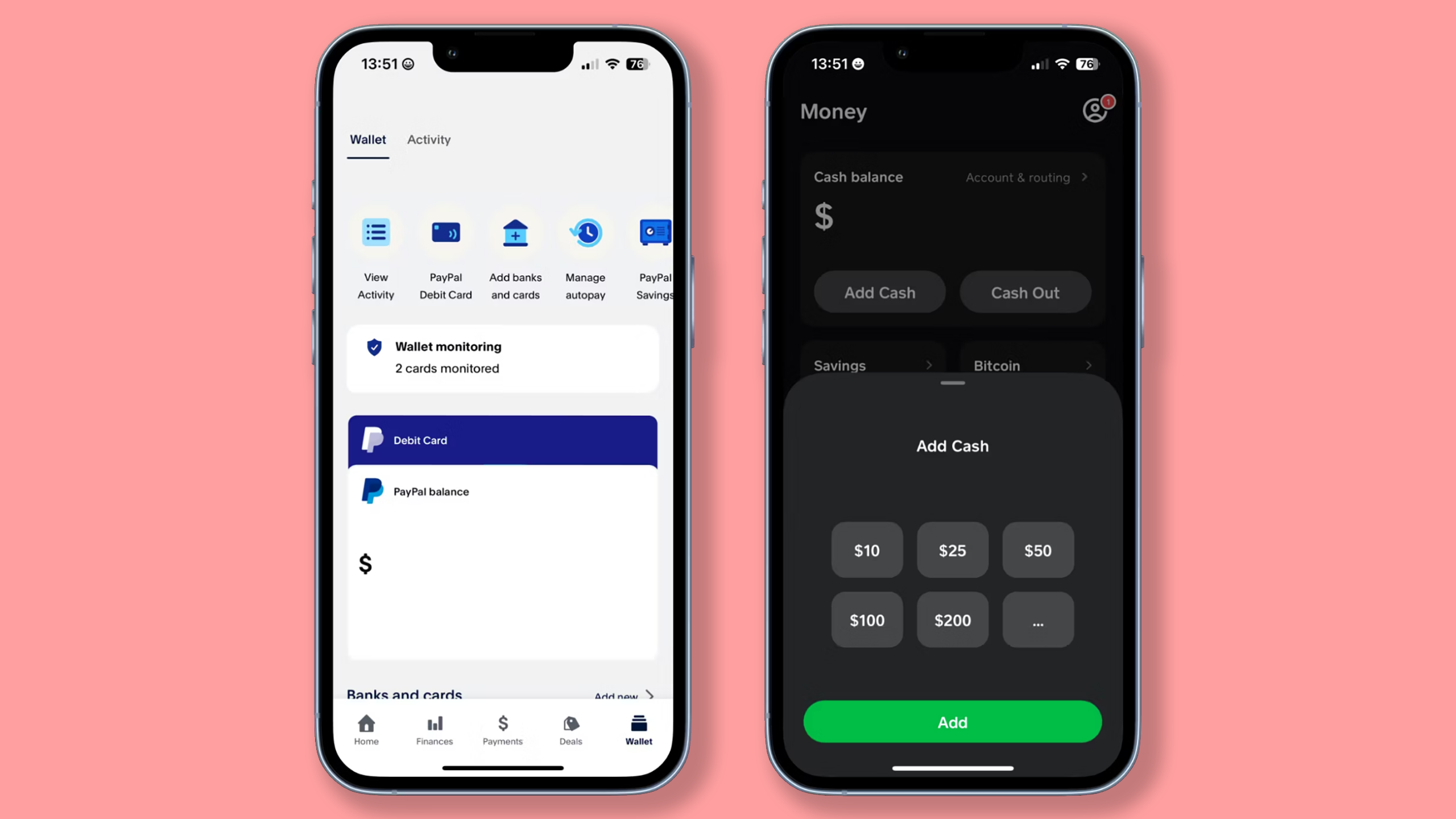
Linking to PayPal: Log into your PayPal account. Navigate to the “Wallet” or “Banks and Cards” section. Select “Link a bank account.” You’ll typically be prompted to either log into your online banking portal for instant verification or manually enter your bank’s routing and account numbers. If choosing the manual option, PayPal will usually send two small deposits (micro-deposits) to your bank account within 1-3 business days. You’ll then need to confirm the amounts on PayPal to verify the account. Ensure your bank account is fully linked and confirmed before proceeding.
-
Linking to Cash App: Open your Cash App. Tap the profile icon (usually top-right). Scroll down and select “Linked Banks.” Choose “Link Bank” and follow the prompts. Similar to PayPal, you’ll likely use Plaid to instantly link your bank account by logging into your bank’s online portal. If manual linking is available, Cash App will also use micro-deposits for verification. Confirm that the exact same bank account linked to PayPal is also securely linked and verified within your Cash App.
Using the same bank account is critical. If you use different bank accounts, the process becomes less direct and potentially involves more steps, essentially doubling your work.
Step 2: Initiating a Withdrawal from PayPal to Your Bank Account
Once your bank account is successfully linked and verified on PayPal, the next step is to withdraw the desired funds from your PayPal balance to that linked bank account.
-
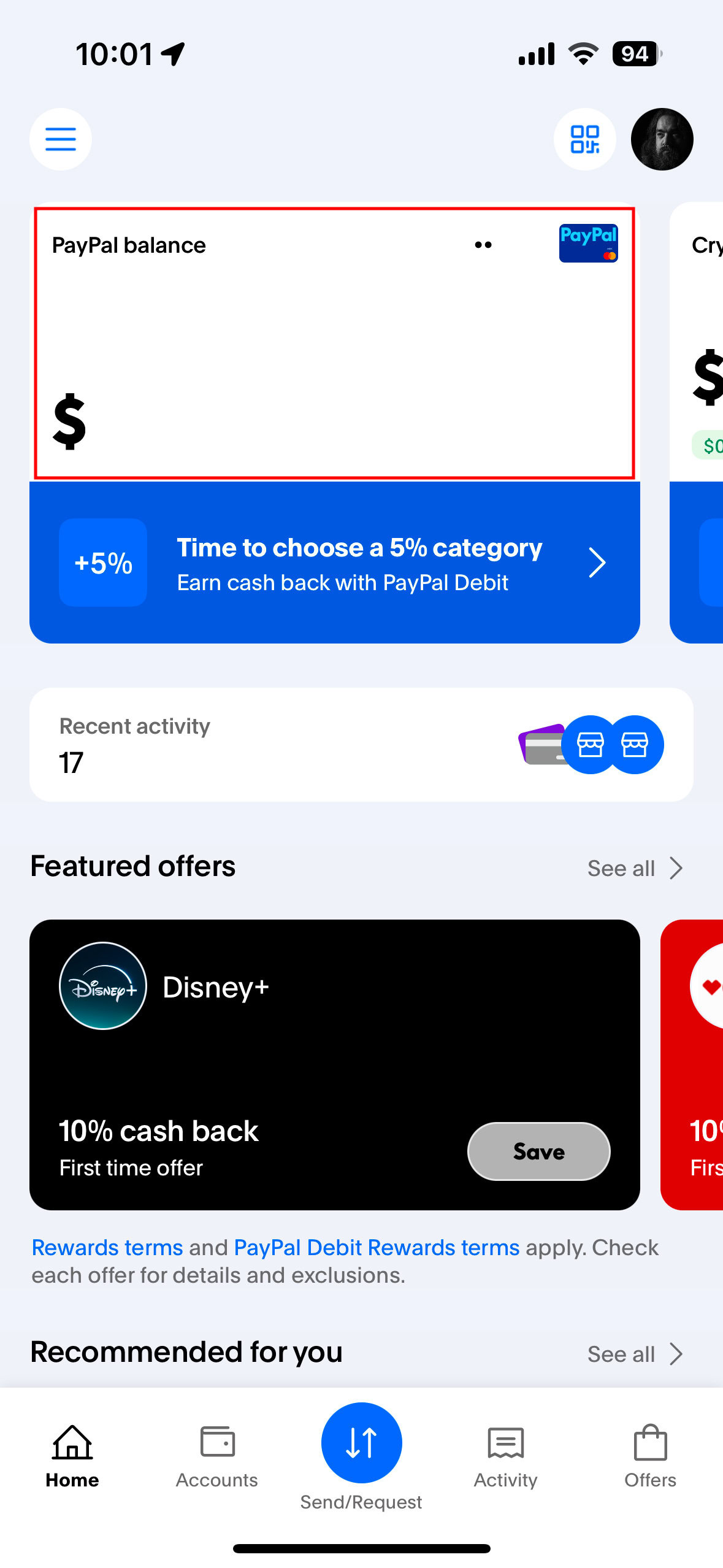
Access Withdrawal Option: Log into your PayPal account. On your summary page or within your wallet, locate your PayPal balance. You should see an option to “Transfer Money” or “Withdraw Funds.”
-
Select Withdrawal Destination: Choose your linked bank account as the destination for the transfer. Ensure it’s the correct bank account that you also have linked to Cash App.
-
Enter Amount: Specify the exact amount you wish to transfer. Double-check the amount to avoid errors.
-
Review and Confirm: PayPal will typically display a summary of the transfer, including the amount, destination bank, estimated arrival time, and any associated fees (for standard transfers to a bank account, it’s usually free). Review all details carefully before confirming the withdrawal.
Important Note on Timelines: Standard bank transfers from PayPal are generally free but can take 1-3 business days (excluding weekends and holidays) to process and appear in your bank account. PayPal may offer an “Instant Transfer” option to a linked debit card for a fee (usually 1.75%, minimum $0.25, maximum $25). While faster, this option incurs a cost, which is a key financial consideration. For most users, the free standard transfer to a bank account is the preferred choice for this specific purpose, given the subsequent step.
Step 3: Depositing Funds from Your Bank Account into Cash App
After the funds have successfully arrived in your linked bank account (typically within 1-3 business days for a standard PayPal withdrawal), the final step is to transfer them from your bank account into your Cash App balance.
-
Open Cash App: Launch the Cash App on your mobile device.
-
Navigate to Banking Tab: Tap on the “Banking” tab (usually represented by a house icon or dollar sign icon at the bottom of the screen).
-
Select “Add Cash”: Locate and tap the “Add Cash” button.
-
Enter Amount: Input the desired amount you wish to add to your Cash App balance. This amount should be equal to or less than the funds you just transferred into your bank account from PayPal.
-
Confirm Source and Transfer: Cash App will display the amount and confirm that the funds will be drawn from your linked bank account. Confirm the transaction.
Important Note on Timelines and Fees for Cash App Deposits: When adding cash from a linked bank account, Cash App typically offers two options: a standard deposit, which is free but may take 1-3 business days to reflect in your Cash App balance, or an instant deposit, which might incur a small fee but makes the funds available immediately. Given that the funds are already in your bank account, you have the flexibility to choose based on urgency and your willingness to pay a fee for instant access.
By meticulously following these three steps, your funds will have seamlessly traveled from your PayPal balance, through your secure bank account, and into your Cash App balance, completing the inter-platform transfer.
Navigating Fees, Timelines, and Transaction Limits
Effectively managing your finances across digital platforms requires a keen understanding of the costs, processing times, and restrictions associated with each transaction. While the bank account intermediary method is reliable, optimizing it means being aware of the specific fee structures and limits imposed by both PayPal and Cash App. Overlooking these details can lead to unexpected delays or charges, impacting your financial efficiency.
PayPal Withdrawal Options: Speed vs. Cost
PayPal offers distinct options for withdrawing funds, each with different implications for speed and cost. Your choice here directly impacts how quickly your money becomes available in your bank account before you can move it to Cash App.
-
Standard Transfer to Bank Account:
-
Cost: Generally free for transfers to a linked bank account. This is the most cost-effective method for moving funds out of PayPal.
-
Timeline: Funds typically arrive in your bank account within 1-3 business days. This excludes weekends and bank holidays, meaning a transfer initiated on Friday might not clear until Tuesday or Wednesday of the following week.
-
Recommendation: For transferring funds to Cash App via a bank account, the standard transfer is usually the recommended choice due to its zero cost, assuming you’re not in an immediate rush.
-
-
Instant Transfer to Linked Debit Card:
-
Cost: A fee of 1.75% of the transferred amount applies, with a minimum fee of $0.25 and a maximum of $25.
-
Timeline: Funds are usually available in your linked debit card’s associated bank account instantly, often within minutes.
-
Recommendation: While faster, this option adds a transaction cost. Consider this only if time is extremely critical and you’re willing to pay the fee. Bear in mind that funds arriving on your debit card still need to be accessible via your linked bank account for the Cash App deposit, or you would use the debit card directly to “Add Cash” to Cash App (which may also have fees depending on Cash App’s policy for debit card deposits, usually free for standard but instant might carry a fee).
-
Understanding these options allows you to make an informed decision based on your urgency and budget when withdrawing funds from PayPal.
Cash App Deposit Methods: Instant Access vs. Free Transfers
Once funds are in your linked bank account, depositing them into Cash App also presents choices regarding speed and cost.
-
Standard Deposit from Linked Bank Account:
-
Cost: Free. This is the most economical way to move money from your bank account to your Cash App balance.
-
Timeline: Funds usually take 1-3 business days to appear in your Cash App balance.
-
Recommendation: Similar to PayPal’s standard withdrawal, this free option is ideal if you can wait a few days for the funds to become available in Cash App.
-
-
Instant Deposit from Linked Bank Account (if available and not referring to debit card):
-
Cost: Cash App may charge a small fee (often 0.5% to 1.75%) for instant deposits from a linked bank account, though this varies and often applies to “Cash Out” rather than “Add Cash.” Note: Cash App typically charges for instant Cash Outs to a bank account, not usually for adding cash instantly from a bank account directly, but verification and user history can affect options.
-
Timeline: Funds are typically available in your Cash App balance instantly.
-
Recommendation: Verify the fee directly within the Cash App interface before confirming an instant deposit. This option is beneficial when you need immediate access to funds in your Cash App.
-
-
Adding Cash via Linked Debit Card:
-
Cost: Often free for standard deposits. Some banks might charge small fees for certain debit card transactions, but Cash App itself typically doesn’t for standard add cash. Instant transfers from a debit card to Cash App might also be free or incur a fee, depending on the specific card and transaction.
-
Timeline: Standard deposits are often instant, but can take 1-3 business days. Instant options are usually immediate.
-
Recommendation: If you opted for PayPal’s instant withdrawal to your debit card, this method becomes relevant for adding funds to Cash App. Always check for any fees before confirming.
-
Understanding Account Limits and Verification Requirements
Both PayPal and Cash App implement daily, weekly, and monthly transaction limits to comply with financial regulations and minimize fraud. These limits can affect the amount you can withdraw from PayPal and deposit into Cash App.
-
New/Unverified Accounts: New accounts or those that haven’t completed full identity verification typically have lower limits. For instance, PayPal might limit unverified withdrawals, and Cash App might have lower send/receive limits until you verify your identity with your full name, date of birth, and the last four digits of your Social Security Number.
-
Raising Limits: To increase your transaction limits on both platforms, you usually need to complete a comprehensive identity verification process. This often involves providing personal information, linking and verifying a bank account, and sometimes providing proof of address or a government-issued ID.
-
Monitoring Limits: It’s prudent to be aware of your current limits on both platforms, especially if you plan to transfer large sums. If a transfer is declined due to limits, you may need to verify your account further or split the transfer into smaller amounts over several days.
By paying close attention to these fee structures, timelines, and account limitations, you can ensure your inter-platform transfers are executed smoothly, cost-effectively, and without unexpected hitches, making your digital financial management more efficient and predictable.
Strategic Financial Management Across Digital Platforms
Integrating PayPal and Cash App into your financial strategy, while navigating their specific transfer mechanisms, empowers you with significant flexibility in managing your money. Beyond simply moving funds, understanding how to leverage these tools effectively, coupled with sound security practices, is key to optimizing your digital finance ecosystem. This approach extends beyond mere transactions, encompassing overall financial agility and robust asset protection.
Advantages of Utilizing Multiple Financial Tools
Having access to and strategically utilizing both PayPal and Cash App offers distinct advantages for various financial needs:
-
Diversified Payment Options: PayPal is invaluable for online shopping, international transactions, and managing larger business payments due to its extensive global acceptance and buyer/seller protection policies. Cash App, on the other hand, excels in rapid, localized peer-to-peer payments, splitting bills with friends, and offers unique features like Bitcoin and stock investing for a specific user base.
-
Segmented Finances: You can use each platform to segment your financial activities. For instance, PayPal might be your go-to for online income and business expenses, while Cash App is reserved for personal spending, allowances, or micro-investing. This segmentation can simplify budgeting and tracking different income or expense streams.
-
Access to Different Features: Need to send money abroad? PayPal is likely your choice. Want to quickly invest a small sum in stocks or Bitcoin? Cash App offers a direct pathway. By understanding each platform’s strengths, you can choose the most appropriate tool for each financial task, maximizing efficiency and potentially minimizing costs associated with specific services.
-
Emergency Fund Access: Having funds spread across multiple, easily accessible digital platforms, all linked to a central bank account, can provide greater flexibility in an emergency, ensuring you can quickly access or move money as needed.
Optimizing Your Digital Finance Ecosystem
To truly optimize your use of these financial tools, consider the following strategies:
-
Understand Fee Structures: Regularly review the fee schedules for both platforms, particularly for withdrawals, deposits, and any instant transfer options. Fees can change, and being informed helps you choose the most cost-effective method for each transfer.
-
Monitor Exchange Rates (if applicable): While not directly relevant for USD to USD transfers between PayPal and Cash App, if your PayPal funds originated in a foreign currency, be mindful of PayPal’s currency conversion fees and exchange rates when withdrawing to your bank account.
-
Leverage Direct Deposit (where feasible): For recurring income, consider directing some funds to Cash App’s direct deposit feature if you frequently use it for daily expenses, or keep a portion in PayPal if it’s your primary business account. This reduces the need for frequent manual transfers.
-
Automate Where Possible: While the PayPal-to-Cash App transfer isn’t directly automatable, you can automate aspects like recurring payments from your Cash App balance or scheduled transfers to your bank account if you frequently move funds out of PayPal.
Best Practices for Security and Fund Monitoring
Security is paramount when dealing with digital finances. Adhering to best practices protects your funds and personal information across all platforms:
-
Enable Two-Factor Authentication (2FA): Always activate 2FA on both your PayPal and Cash App accounts. This adds an extra layer of security, requiring a code from your phone or another device in addition to your password.
-
Use Strong, Unique Passwords: Create complex, unique passwords for each account. Avoid reusing passwords across different services. Consider using a reputable password manager.
-
Be Wary of Phishing and Scams: Never click on suspicious links or respond to unsolicited messages asking for your login credentials. Both PayPal and Cash App will communicate with you through official channels. Always log in directly to your accounts to check messages or transaction details.
-
Regularly Monitor Transaction History: Periodically review your transaction history on both PayPal, Cash App, and your linked bank account. Promptly report any unauthorized or suspicious activity to the respective platform’s support team.
-
Keep Software Updated: Ensure your mobile operating system, Cash App, and any web browsers used for PayPal are always updated to the latest versions. Updates often include critical security patches.
-
Public Wi-Fi Caution: Avoid accessing your financial accounts or making transfers on unsecured public Wi-Fi networks, which can be vulnerable to eavesdropping. Use a secure private network or a VPN if possible.
By adopting these strategic approaches to managing your multiple financial tools and diligently practicing security, you not only ensure efficient money movement but also safeguard your digital assets in an increasingly complex financial world.
Conclusion
Navigating the digital financial landscape requires a clear understanding of how different platforms interact. While a direct transfer from PayPal to Cash App is not an option, the proven method of utilizing your bank account as a secure intermediary offers a reliable and efficient solution. By following the detailed steps outlined – linking your bank account to both platforms, withdrawing funds from PayPal, and then depositing them into Cash App – you can seamlessly manage your money across these popular services.
Beyond the mechanics of the transfer, true financial agility comes from strategically optimizing your approach. This involves a keen awareness of each platform’s fee structures, processing times, and transaction limits, allowing you to make cost-effective and timely decisions. Furthermore, prioritizing robust security measures, such as two-factor authentication and vigilant monitoring, is paramount to protecting your digital assets. By embracing these insights and best practices, you can confidently and effectively leverage PayPal and Cash App to meet your diverse personal and business financial needs, ultimately gaining greater control over your money in the digital age.
aViewFromTheCave is a participant in the Amazon Services LLC Associates Program, an affiliate advertising program designed to provide a means for sites to earn advertising fees by advertising and linking to Amazon.com. Amazon, the Amazon logo, AmazonSupply, and the AmazonSupply logo are trademarks of Amazon.com, Inc. or its affiliates. As an Amazon Associate we earn affiliate commissions from qualifying purchases.