
The landscape of personal and business finance has undergone a profound transformation, with digital solutions now at the forefront of managing our monetary affairs. Among the most critical financial responsibilities for individuals and businesses is the payment of taxes to the Internal Revenue Service (IRS). Gone are the days when mailing a check was the sole or primary method; today, the IRS offers a robust suite of online payment options designed for convenience, security, and efficiency. Embracing these digital methods not only simplifies the tax payment process but also integrates seamlessly into a broader strategy of modern financial management. This guide will navigate the various pathways available for paying your IRS taxes online, empowering you with the knowledge to make informed decisions and ensure your financial obligations are met accurately and on time.
Understanding Your Online Tax Payment Options
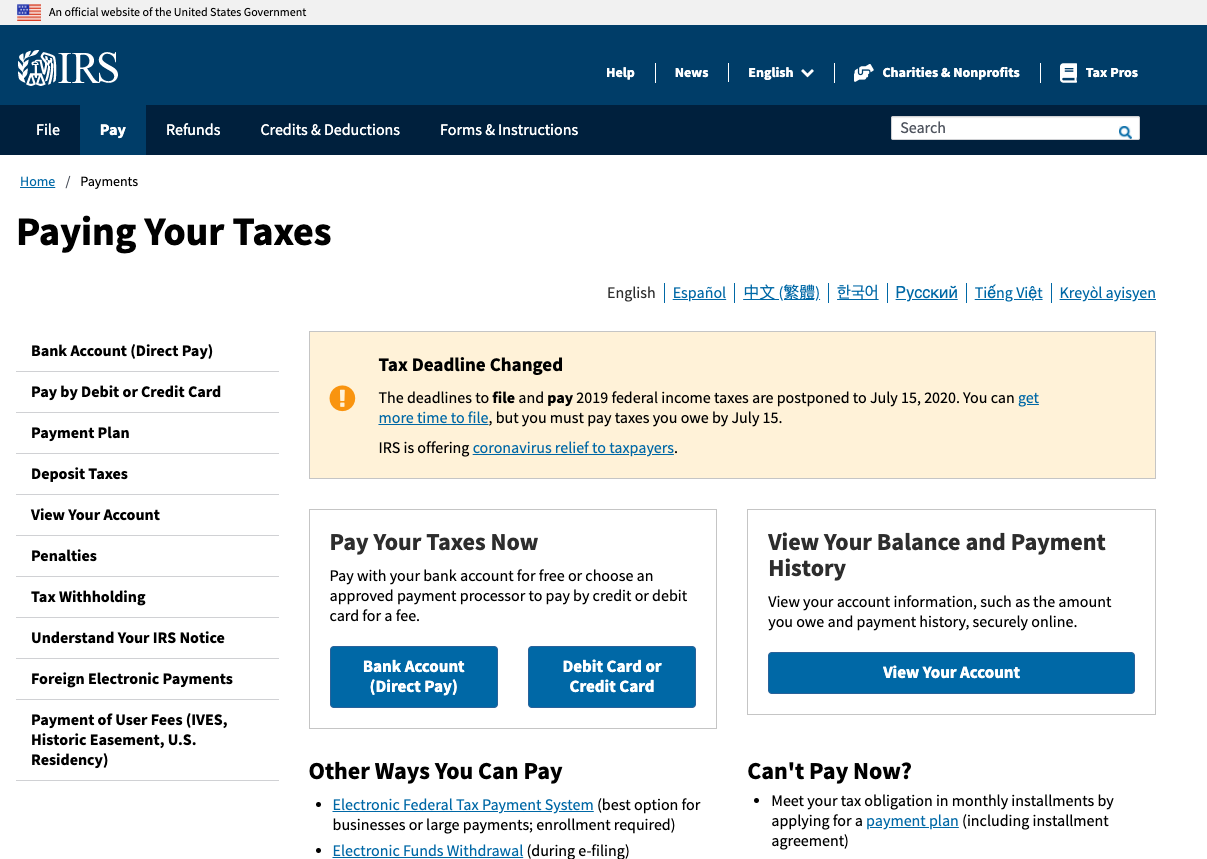
The IRS has diversified its online payment offerings to cater to a wide range of taxpayers, from individuals making a one-time payment to businesses managing recurring estimated taxes. Each option comes with its unique features, benefits, and ideal use cases, making it crucial to understand which one aligns best with your specific financial situation.
Direct Pay (IRS.gov)
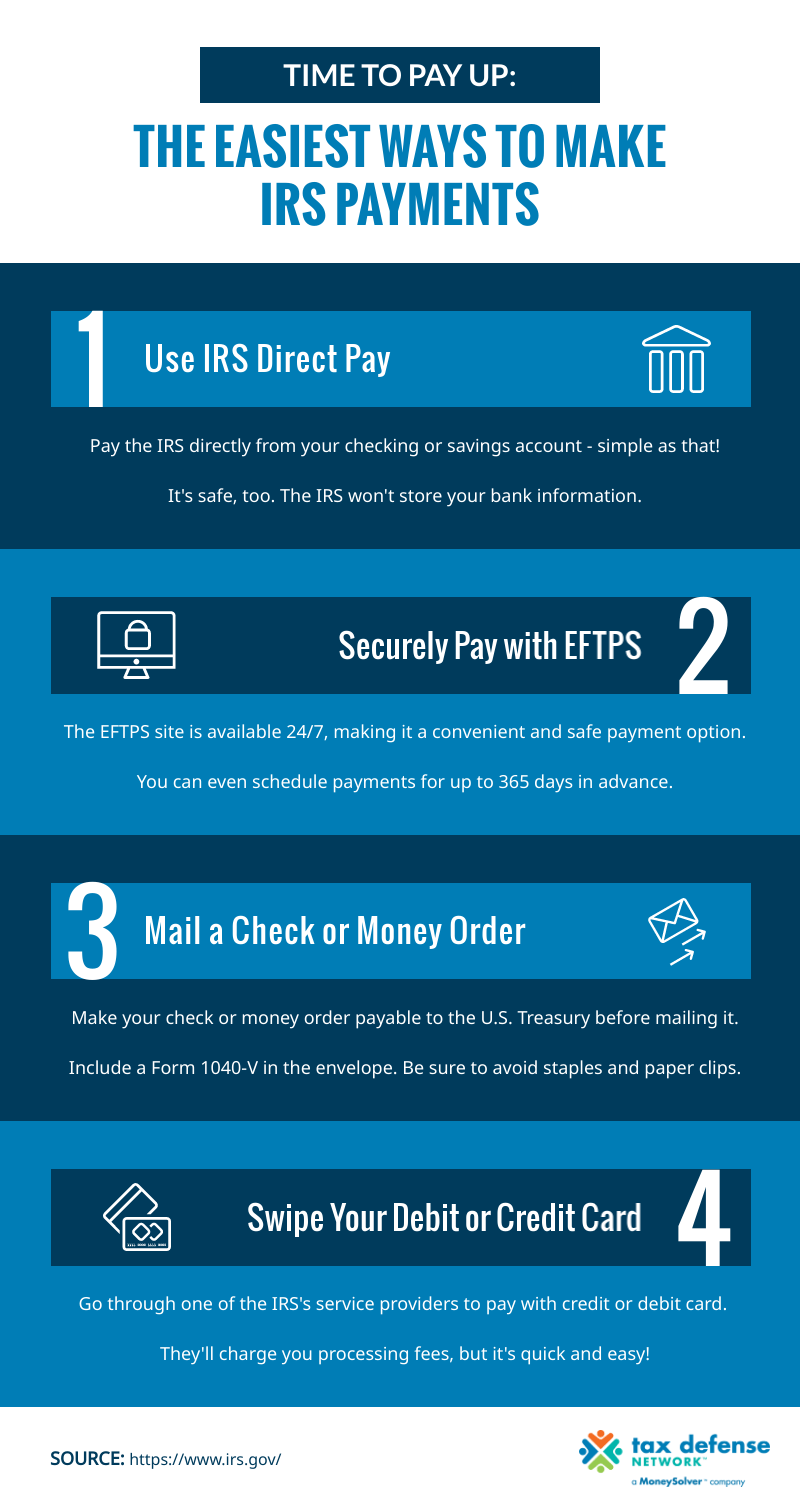
IRS Direct Pay is arguably the simplest and most straightforward online payment method for many individual taxpayers. It allows you to pay your tax bill directly from your checking or savings account with no associated fees. This service is ideal for individuals, or businesses with specific types of payments, who simply need to make a one-time payment for current or prior year taxes, estimated taxes, or an extension payment.
The benefits of Direct Pay are numerous: it’s free, secure, and you receive an immediate confirmation number upon successful payment. It eliminates the need for checks, envelopes, and stamps, streamlining the payment process significantly. However, it’s important to note that Direct Pay is a direct debit from your bank account; it does not support credit card payments or payments from foreign bank accounts.
Electronic Federal Tax Payment System (EFTPS)
EFTPS is a more comprehensive system primarily designed for businesses and individuals who make estimated tax payments. While it can be used for any type of federal tax payment, its robust scheduling features make it particularly valuable for those with recurring tax liabilities. Unlike Direct Pay, EFTPS requires a registration process, which involves validating your identity and receiving a Personal Identification Number (PIN) via postal mail, often taking 5-7 business days.
Once registered, EFTPS allows you to schedule payments up to 365 days in advance, providing unparalleled control over your cash flow and ensuring timely payments. This is a critical financial tool for businesses managing quarterly estimated taxes or for individuals with significant income from sources not subject to withholding. EFTPS is also free to use and provides detailed payment history, aiding in meticulous record-keeping.
Debit Card, Credit Card, or Digital Wallet
For taxpayers who prefer the flexibility and potential benefits offered by debit cards, credit cards, or digital wallets (like PayPal or Click to Pay), the IRS partners with several authorized third-party payment processors. While these methods offer immediate payment processing and the convenience of using your preferred payment instrument, they come with a processing fee charged by the third party, typically a percentage for credit/debit cards or a flat fee for digital wallets.
This option can be particularly appealing for individuals looking to earn credit card rewards (e.g., cashback, travel miles) on a significant tax payment, or for those who need a short-term deferral of payment due to immediate cash flow constraints (paying via credit card offers a grace period before the bill is due). However, the fees should be carefully weighed against any potential rewards or financial flexibility gained. It’s a strategic financial decision to determine if the convenience and benefits outweigh the additional cost.
Electronic Funds Withdrawal (EFW) during e-filing
When you prepare and e-file your federal tax return using tax software (such as TurboTax, H&R Block, TaxAct) or through a tax professional, you’re often given the option to pay any taxes owed via Electronic Funds Withdrawal (EFW). This method allows you to authorize the IRS to directly debit your bank account for the amount due on a specified date (usually the tax filing deadline).
EFW is incredibly convenient as it integrates the payment process directly into the filing workflow. It ensures that your payment is linked explicitly to your filed return, minimizing the chances of misapplication. This is a popular choice for many taxpayers who prefer a seamless, end-to-end digital experience for both filing and paying their annual taxes.
Preparing for a Smooth Online Tax Payment
Efficient online tax payment is not just about choosing the right method; it also requires diligent preparation. Taking the necessary steps beforehand can prevent last-minute stress, ensure accuracy, and help you avoid unnecessary penalties, all crucial aspects of sound personal and business financial management.
Gather Essential Information
Before initiating any online tax payment, ensure you have all the required information at hand. This typically includes:
-
Your Social Security Number (SSN) or Employer Identification Number (EIN): Crucial for identifying your tax account.
-
Your Bank Account Information: Account number and routing number for direct debit options (Direct Pay, EFTPS, EFW).
-
The Exact Tax Amount Due: Double-check your calculations or your tax software’s output to ensure accuracy.
-
The Tax Year or Period: Specify which tax period the payment applies to (e.g., 2023 annual tax, 2024 first quarter estimated tax).
Having these details ready will make the payment process swift and error-free, preventing pauses or restarts that could lead to mistakes.
Verify Your Tax Liability
It is paramount to verify the exact amount of tax you owe. Incorrect payment amounts can lead to issues, whether it’s an underpayment penalty or an overpayment that you’ll need to wait to be refunded. Utilize your tax return, tax software calculations, or official IRS notices to confirm your tax liability before entering any figures into the payment system. This step is a cornerstone of responsible financial practice, ensuring you meet your obligations precisely.
Understand Payment Deadlines
Missing a tax deadline can result in penalties and interest charges, directly impacting your financial health. Be acutely aware of the standard tax deadlines (e.g., April 15th for individual income tax, quarterly deadlines for estimated taxes) and any specific due dates for extensions. Online payments, while instant in confirmation, still need to be initiated before the deadline. It’s a wise financial strategy to schedule or make payments a few days in advance to account for any unforeseen technical glitches or processing delays.
Account for Payment Processing Times
While online payment confirmations are often immediate, the actual debit from your bank account might take a few business days. For systems like EFTPS, registration itself takes time. Plan accordingly, especially if you’re close to a deadline. For instance, if you’re enrolling in EFTPS for the first time, allow ample time (at least two weeks) before your payment due date to ensure you receive your PIN and can set up your payment. This foresight prevents late payments and their associated financial penalties.
Step-by-Step Guide to Making Your Online Payment
With your information gathered and deadlines understood, let’s walk through the practical steps of making your online tax payment using the most common methods.
Using IRS Direct Pay
-
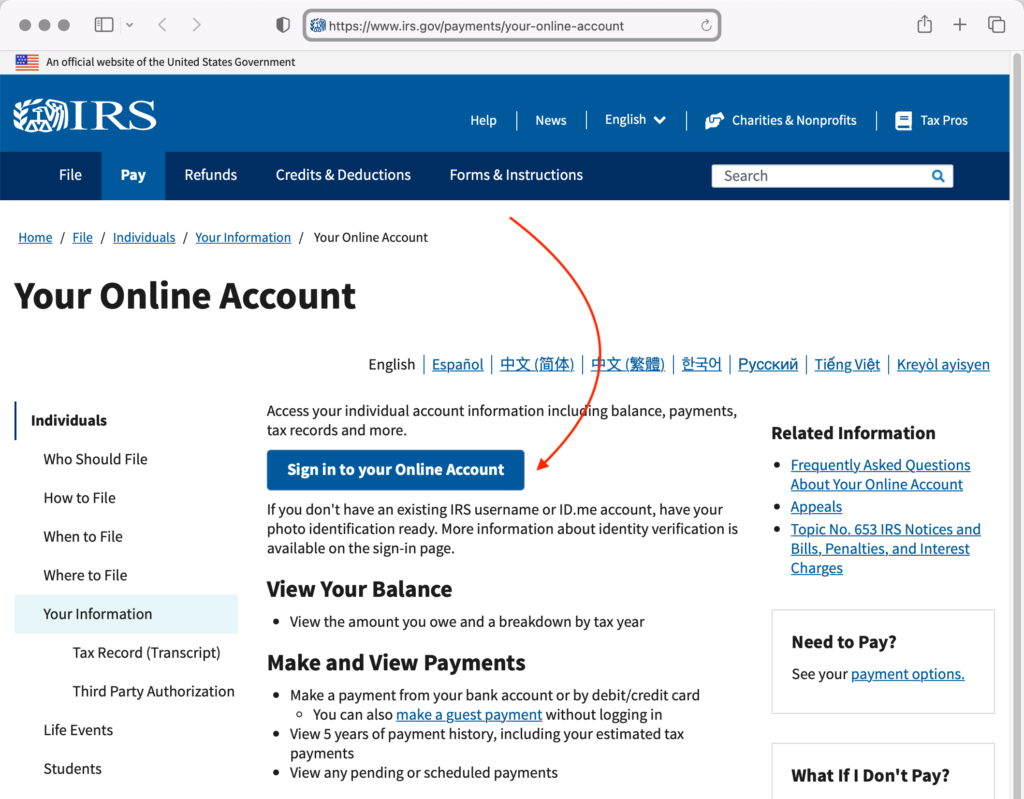
Navigate to the IRS Direct Pay Page: Go to IRS.gov/payments and select “Direct Pay.”
-
Select Payment Reason: Choose why you are making the payment (e.g., “Tax Return or Notice,” “Estimated Tax,” “Extension”).
-
Select Tax Year: Specify the tax year the payment applies to.
-
Verify Your Identity: Enter your SSN/EIN, date of birth, and filing status for the selected tax year.
-
Enter Payment Information: Input the exact payment amount, your bank routing number, and your bank account number.
-
Review and Authorize: Carefully review all details. Once confirmed, authorize the payment.
-
Save Confirmation: Record the confirmation number displayed on the screen for your records.
Navigating EFTPS
-
Log In to EFTPS: Go to EFTPS.gov and log in using your EIN/SSN, PIN, and password.
-
Initiate a Payment: Select “Make a Payment.”
-
Choose Tax Form and Period: Specify the type of tax (e.g., 1040ES for estimated tax, 941 for employer tax) and the tax period.
-
Enter Payment Amount and Date: Input the amount you wish to pay and select the desired payment date. You can schedule payments up to 365 days in advance.
-
Review and Submit: Verify all details before submitting.
-
Print Confirmation: Print or save your EFTPS confirmation number. You can also view payment history within your account.
Via an Authorized Processor (Debit/Credit/Digital Wallet)
-
Choose a Processor: Visit the IRS.gov/payments page and select “Pay with Debit Card, Credit Card or Digital Wallet.” The IRS lists authorized processors; choose one that offers your preferred payment method and compare their fees.
-
Access Processor’s Website: You will be redirected to the chosen processor’s secure website.
-
Enter Tax Information: Provide your SSN/EIN, the tax amount, and the tax year/period.
-
Enter Payment Details: Input your debit/credit card information or log in to your digital wallet.
-
Review Fees and Authorize: The processor will display their fees. Review the total amount (tax + fee) before authorizing.
-
Retain Confirmation: The processor will provide a confirmation number. Keep it for your records.
During E-File
When using tax software or a professional, the option for EFW typically appears at the final steps of filing:
-
Select EFW: During the e-filing process, when asked how you wish to pay, choose “Electronic Funds Withdrawal” or “Direct Debit.”
-
Enter Bank Details: Provide your bank routing and account numbers.
-
Specify Payment Date: Choose the date you want the payment to be debited (can be on or before the tax deadline).
-
Authorize and File: Confirm your details and authorize the debit as part of submitting your tax return. The confirmation for your return will also serve as confirmation for your payment authorization.
Security, Confirmation, and What Ifs
Navigating financial transactions online, especially those involving the IRS, requires an understanding of security measures, confirmation protocols, and contingency plans for unexpected issues. These elements are critical for protecting your financial information and ensuring your tax payments are handled correctly.
Ensuring Payment Security
The IRS and its authorized processors employ robust security measures to protect your financial data. When paying online, always ensure you are on the official IRS.gov website or a legitimate authorized payment processor’s site (check for “https://” in the URL and a padlock icon). Be vigilant against phishing scams, which often mimic official communications to trick you into revealing sensitive information. Never click on suspicious links in emails or texts claiming to be from the IRS. Your security is paramount in managing your money online.
Confirming Your Payment
Every online payment method provides a confirmation number or an acknowledgment. This number is your proof of payment and is invaluable for your financial records.
-
IRS Direct Pay: You receive an immediate confirmation number on the screen.
-
EFTPS: You get an EFTPS confirmation number after scheduling/making a payment. You can also view your payment history within your account.
-
Third-Party Processors: They provide a confirmation number, often via email.
-
EFW: Your tax software/professional will provide confirmation of your filed return and payment authorization.
The IRS also offers a “Check Your Payment Status” tool on its website for payments made via Direct Pay or EFW. Regularly checking this and keeping your confirmation numbers are essential practices for sound financial oversight.
Dealing with Payment Issues or Errors
Despite best efforts, errors can occur.
-
Incorrect Amount/Date: For Direct Pay, you may be able to modify or cancel a payment if done at least 7 days before the scheduled payment date. For EFTPS, payments can typically be canceled or changed up to two business days before the scheduled date. With third-party processors, contact them directly for corrections.
-
Failed Payment: If a payment fails (e.g., insufficient funds), the IRS will notify you, and penalties may apply. You’ll need to initiate a new payment.
-
Disputes: If you believe there’s an error on the IRS’s part, keep all your records and contact the IRS directly using the phone number provided on their official notices.
What if You Can’t Pay the Full Amount?
A common financial challenge is being unable to pay your taxes in full by the deadline. It’s crucial not to ignore this. The IRS offers several options for taxpayers facing financial hardship:
-
Short-Term Payment Plan: Up to 180 days to pay, but interest and penalties still apply.
-
Installment Agreement: Allows you to make monthly payments for up to 72 months. You must generally be current on all filing requirements.
-
Offer in Compromise (OIC): Allows certain taxpayers to resolve their tax liability with the IRS for a lower amount than they originally owed, typically when they face significant financial difficulty.
Even if you can’t pay, always file your tax return on time to avoid the failure-to-file penalty, which is generally much steeper than the failure-to-pay penalty. Paying as much as you can by the deadline will also reduce the total interest and penalties. These are vital considerations in managing personal and business financial stress related to tax obligations.
The Financial Advantages of Digital Tax Payments
Beyond mere convenience, embracing online tax payment methods offers significant financial advantages that contribute to more robust and disciplined financial management for both individuals and businesses.
Efficiency and Time Savings
The most immediate benefit of digital tax payments is the profound increase in efficiency. Online methods eliminate the need for printing forms, writing checks, stuffing envelopes, and making trips to the post office. This saves valuable time, which can be reallocated to other productive tasks or personal pursuits. For businesses, this translates into operational efficiencies and reduced administrative overhead. For individuals, it frees up time and mental energy, making the often-dreaded task of tax payment less burdensome.
Accuracy and Reduced Errors
Manual processes are inherently prone to human error—miswriting an account number, entering an incorrect amount, or misdating a check. Online payment systems, especially those integrated with tax preparation software, significantly reduce these risks. By pulling information directly from your digital tax return or using validated input fields, these systems help ensure that your payments are accurate and correctly applied to your tax account. This precision minimizes the chances of facing penalties due to clerical mistakes, safeguarding your financial standing.
Record Keeping and Accessibility
Digital payment methods create an immediate, verifiable digital trail. Every online payment results in a confirmation number, and platforms like EFTPS maintain a comprehensive payment history accessible at any time. This ease of record-keeping is invaluable for future financial planning, auditing, or simply verifying past transactions. You have instant access to proof of payment, eliminating the need to search through physical files or worry about lost paper records. This digital archive simplifies financial reconciliation and tax compliance year after year.
Financial Planning and Budgeting
By providing clear, scheduled payment options (especially with EFTPS) and immediate confirmations, online tax payment tools integrate seamlessly into broader financial planning and budgeting strategies. You can schedule payments in advance to align with your cash flow, ensuring funds are available when needed. The ability to see immediate confirmation helps in closing out your tax obligations confidently, allowing you to move forward with other financial decisions without lingering uncertainty. For businesses, this foresight is critical for cash flow management and maintaining liquidity throughout the year.
In conclusion, the shift towards paying IRS taxes online is more than just a technological upgrade; it’s a strategic enhancement to personal and business financial management. By understanding and utilizing the various online payment options—from IRS Direct Pay and EFTPS to debit/credit card payments and electronic funds withdrawal during e-filing—taxpayers can achieve greater efficiency, accuracy, and security. Preparing diligently, understanding the practical steps, and being aware of security protocols and contingency plans are all crucial for a seamless experience. Ultimately, embracing these digital financial tools empowers you with greater control over your tax obligations, contributing to a more organized, compliant, and less stressful financial life.
aViewFromTheCave is a participant in the Amazon Services LLC Associates Program, an affiliate advertising program designed to provide a means for sites to earn advertising fees by advertising and linking to Amazon.com. Amazon, the Amazon logo, AmazonSupply, and the AmazonSupply logo are trademarks of Amazon.com, Inc. or its affiliates. As an Amazon Associate we earn affiliate commissions from qualifying purchases.