
In an era defined by endless digital choices and seamless connectivity, SiriusXM stands out as a unique broadcasting phenomenon, delivering a diverse array of audio entertainment directly to your vehicle. Far more than just a radio service, it represents a sophisticated blend of satellite technology, advanced digital processing, and user-centric software design. For many drivers, the question isn’t if they want SiriusXM, but how to integrate this rich audio experience into their daily commute or long-haul journeys. This guide delves deep into the technological pathways and practical steps involved in bringing SiriusXM to your car, focusing strictly on the gadgets, software, and systems that make it all possible.

Understanding the Core Technology of SiriusXM
Before diving into installation specifics, it’s crucial to grasp the technological bedrock upon which SiriusXM operates. It’s a complex ecosystem of ground-based transmitters, orbiting satellites, and in-car receivers, all working in concert to deliver crystal-clear audio across vast geographical areas.
Satellite Radio: The Underlying Infrastructure
At its heart, SiriusXM utilizes geostationary satellites orbiting Earth to broadcast digital radio signals. These satellites receive programming from ground-based studios, then re-transmit these signals across North America. This satellite-based distribution is a key differentiator from traditional terrestrial (AM/FM) radio, which relies on local towers and line-of-sight signals. The primary advantage of satellite transmission is its expansive coverage, allowing for consistent reception across states, provinces, and even remote areas where traditional radio signals fade. The digital nature of the broadcast also means higher fidelity audio, less interference, and the ability to transmit more channels within the same frequency spectrum compared to analog broadcasts.
Key Hardware Components: Receivers and Antennas
To decode these satellite signals, specialized hardware is required in your vehicle. The two most critical components are the antenna and the receiver. The antenna, typically a small, magnetic unit designed to be mounted on the exterior of your car (often the roof), is responsible for capturing the satellite signals. Its placement is vital for optimal signal acquisition. The receiver, on the other hand, is the brains of the operation. This gadget processes the raw digital signals picked up by the antenna, decodes them into audio, and makes the various channels available to the user. Modern receivers often integrate seamlessly with a car’s infotainment system, displaying channel information, artist names, and song titles on the vehicle’s screen.
Software and Digital Signal Processing (DSP)
While hardware captures and decodes, software orchestrates the user experience and refines the audio. Within the receiver, sophisticated digital signal processing (DSP) algorithms are at work, ensuring clear audio, managing channel switching, and often implementing features like signal buffering to prevent dropouts in challenging environments (e.g., tunnels, dense urban areas). The user interface (UI) you interact with, whether on a dedicated SiriusXM gadget or your car’s built-in display, is driven by embedded software. This software not only allows for channel selection but also manages subscription authentication, displays programming guides, and enables features like song skipping or pausing live radio on some advanced units. The continuous evolution of this software, through firmware updates, enhances functionality and user experience over time.
Advantages of Digital Satellite Broadcasts
The technological framework of SiriusXM offers several distinct advantages over older broadcasting methods. Firstly, the digital nature minimizes static and interference, delivering consistent, high-quality audio. Secondly, the sheer number of channels available (hundreds) far surpasses what local AM/FM radio can offer, providing unparalleled content diversity from music across genres to talk, news, sports, and exclusive programming. Thirdly, the nationwide coverage eliminates the need to constantly re-tune as you drive, providing a seamless listening experience on long trips. Lastly, modern SiriusXM systems often integrate advanced metadata, displaying comprehensive information about the content, which significantly enhances user engagement compared to basic radio displays.
Primary Avenues for In-Car Integration
Getting SiriusXM into your car isn’t a one-size-fits-all endeavor. The method you choose largely depends on your vehicle’s existing technology, your budget, and your desire for seamless integration versus aftermarket flexibility.
Factory-Installed Systems: Seamless OEM Integration
The most effortless way to experience SiriusXM is through a factory-installed system. Many new vehicles come equipped with a built-in SiriusXM tuner and antenna as part of their standard infotainment package or as an optional upgrade. These systems are designed by the original equipment manufacturer (OEM) to integrate flawlessly with the car’s existing controls, display screens, and audio system. This means no visible wires, no extra gadgets cluttering the dashboard, and full control via steering wheel buttons or touchscreen interfaces. Often, new car purchases include a complimentary trial subscription, making activation as simple as calling SiriusXM to continue the service. The benefit here is unparalleled convenience and aesthetic appeal, as the technology is baked directly into the vehicle’s design from day one.
Aftermarket Solutions: Expanding Compatibility and Features
For vehicles that don’t have factory-installed SiriusXM, a vast ecosystem of aftermarket solutions exists, offering flexibility and broader compatibility. These gadgets range from standalone satellite radio tuners with their own displays to specialized adapters that allow you to add SiriusXM capabilities to your existing car stereo.
-
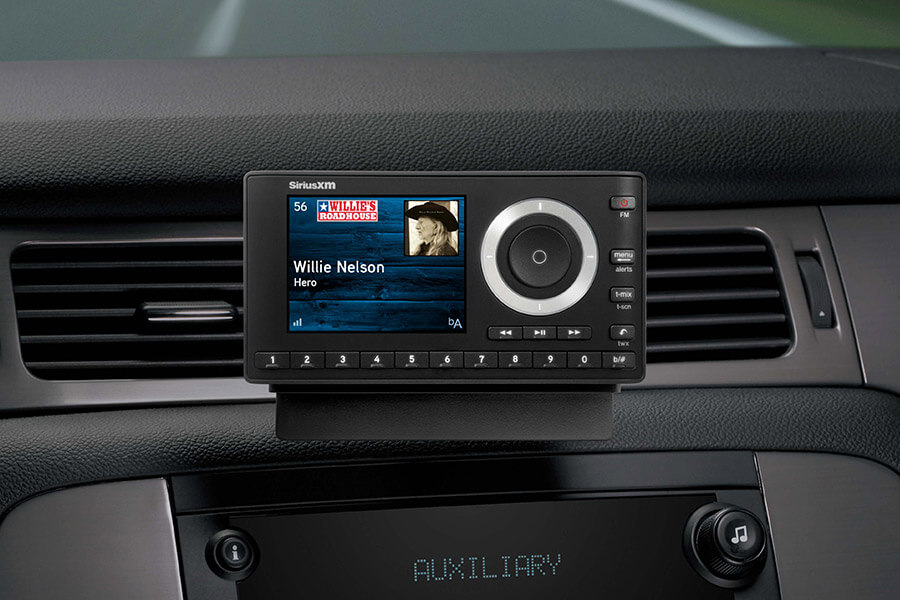
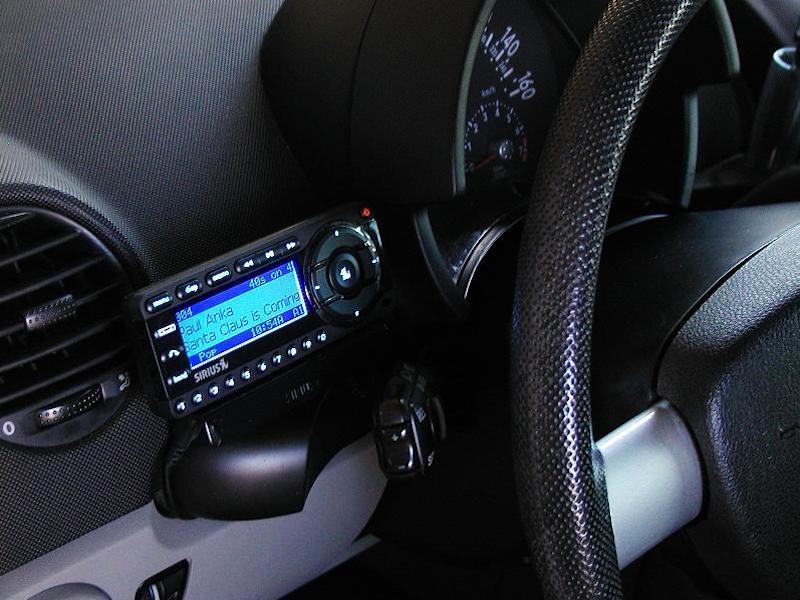
Stand-alone Receivers: These are dedicated SiriusXM units that come with their own screen and controls. They typically include a magnetic antenna and connect to your car’s audio system via an auxiliary input, an FM transmitter, or a cassette adapter (for older cars). Brands like SiriusXM’s own Onyx series are popular examples. They offer a complete, self-contained solution, making them ideal for older vehicles or those without advanced infotainment systems.
-
Vehicle-Specific Adapters: For cars with modern but non-SiriusXM-ready head units, specific adapters can be purchased. These modules often connect directly to the back of your car’s stereo via a data port (e.g., a CD changer port or a dedicated auxiliary input), allowing you to control SiriusXM channels directly from your car’s existing radio controls and display. These solutions offer a cleaner integration than stand-alone receivers but require more technical installation.
-
Universal Tuners/Add-ons: Some aftermarket head units (e.g., Pioneer, Kenwood, Alpine) are “SiriusXM Ready,” meaning they can accept an optional SiriusXM Connect Vehicle Tuner. This small gadget plugs into the back of the compatible head unit and provides full SiriusXM functionality, controlled entirely through the aftermarket stereo’s interface. This offers a very clean integration for those upgrading their entire car stereo system.
Leveraging Mobile Apps and Connected Car Platforms
Beyond dedicated hardware, technology has enabled another avenue for accessing SiriusXM: your smartphone. The SiriusXM app, available on iOS and Android, allows subscribers to stream the full lineup of channels, as well as on-demand content, directly through their mobile device.
-
Smartphone Integration: You can simply connect your phone to your car’s audio system via Bluetooth or a USB cable. This transforms your smartphone into the SiriusXM receiver, streaming audio through your car’s speakers. This method is particularly convenient for those with unlimited data plans or who frequently move between different vehicles. It leverages existing in-car connectivity technologies without the need for additional satellite radio hardware.
-
Connected Car Platforms (Apple CarPlay & Android Auto): For vehicles equipped with Apple CarPlay or Android Auto, the SiriusXM app integrates seamlessly into the car’s infotainment system. Once your smartphone is connected, the SiriusXM app appears on the car’s display, allowing you to browse channels, select content, and control playback directly from the vehicle’s touchscreen or voice commands. This offers a highly integrated and user-friendly experience, combining the power of the app with the convenience of an OEM interface. It represents a significant technological leap in how digital services are consumed in vehicles.
Step-by-Step Guide to Aftermarket Installation and Setup
For those opting for an aftermarket solution, the installation process, while manageable for many DIY enthusiasts, does involve careful consideration of hardware, wiring, and setup.
Selecting the Right Gadgets: Kits, Tuners, and Adapters
The first step is choosing the right SiriusXM gadget. This largely depends on your car’s existing audio setup and your desired level of integration.
-
Standalone Kits: If your car has a basic radio with an auxiliary input (AUX) or a working FM tuner, a standalone satellite radio kit (like the SiriusXM Onyx EZR) is a straightforward option. These kits include the receiver unit, antenna, power adapter, and various audio output options.
-
SiriusXM Connect Vehicle Tuners: If you have an “SiriusXM Ready” aftermarket head unit, you’ll need a compact SiriusXM Connect Vehicle Tuner (often model SXV300 or similar). This small module plugs into a dedicated port on the back of the stereo.
-
Vehicle-Specific Integration Kits: For a factory radio without a “SiriusXM Ready” input but with a CD changer port or similar auxiliary data input, explore vehicle-specific integration modules from brands like iSimple, USA Spec, or PAC. These sophisticated gadgets allow for a factory-like integration, often displaying channel info on the OEM radio.
Always check compatibility charts for your specific car make, model, and year before purchasing.
Antenna Placement and Signal Acquisition Best Practices
The antenna is critical for signal reception. Its placement directly impacts the quality and consistency of your SiriusXM experience.
-
Optimal Placement: The ideal location for the magnetic satellite antenna is on the exterior of your car’s roof, with an unobstructed view of the sky. The rear third of the roof is often preferred, as it minimizes signal blockage from the windshield or A-pillars.
-
Cable Routing: Route the antenna cable carefully. For magnetic antennas, run the cable along the edge of the rear window, under weather stripping, and into the car’s cabin (e.g., through the trunk or a rear door jamb). Avoid pinching the cable or exposing it to sharp edges. Inside the car, tuck the cable neatly under trim panels, carpet, or along the dash to keep it out of sight and secure.
-
Signal Strength Test: After placing the antenna and connecting it to the receiver, power up the system and check the signal strength indicator (most receivers have one). Experiment with slight antenna adjustments if reception is poor. Factors like large buildings, tunnels, and dense foliage can temporarily block signals.
Wiring and Powering Your Satellite Radio Receiver
Powering the receiver and integrating it with your car’s audio system requires a few connections.
-
Power: Standalone receivers typically come with a 12V power adapter that plugs into your car’s cigarette lighter or accessory port. For a cleaner look, hardwiring to a fused 12V power source (e.g., behind the dash) can be done, though this requires more advanced electrical knowledge. Ensure the chosen power source is switched, meaning it turns off with the ignition to prevent battery drain.
-
Audio Output:
-
AUX Input: The cleanest audio quality comes from connecting the receiver directly to your car’s auxiliary input (3.5mm jack).
-
FM Transmitter: If no AUX input is available, many standalone units have a built-in FM transmitter. You tune your car’s radio to an unused FM frequency, and the SiriusXM audio is broadcast wirelessly to it. While convenient, this can suffer from interference and lower audio quality compared to a wired connection.
-
Cassette Adapter: For very old cars, a cassette adapter connected to the receiver’s audio output can be used, playing through the car’s cassette deck.
-
Vehicle-Specific Adapters: These integrate directly with the car’s existing audio wiring, often muting other audio sources when SiriusXM is active.
-
Activating Your Service and Managing Your Subscription
Once the hardware is installed and powered, the final step is activating your SiriusXM subscription.
-
Locate Your Radio ID: Every SiriusXM receiver has a unique Radio ID (or ESN). This ID is typically found by tuning to Channel 0 (or a specific preview channel) on your receiver. It may also be printed on the bottom or back of the unit.
-
Activation: Visit the SiriusXM website or call their customer service. You’ll need your Radio ID and personal information to set up an account and choose a subscription plan. Some plans offer a combination of in-car and streaming access.
-
Refreshing Your Signal: After activation, it may take a few minutes for the signal to refresh and all channels to become available. If channels remain locked, ensure your antenna has a clear view of the sky and try refreshing your signal from the SiriusXM website.
-
Digital Security and Account Management: Remember to use strong, unique passwords for your SiriusXM online account. This account allows you to manage your subscription, update payment information, and potentially refresh your signal remotely, making digital security paramount in protecting your service access.
Enhancing and Troubleshooting Your SiriusXM Experience
Even with proper installation, optimizing your experience and knowing how to troubleshoot common issues can significantly improve your enjoyment.
Optimizing Audio Quality and Sound Integration
While digital, the final audio quality still depends on your car’s sound system.
-
Wired Connections are Best: Always prioritize an AUX input connection over an FM transmitter for superior sound quality and minimal interference.
-
Adjusting Volume Levels: Ensure the SiriusXM receiver’s output volume is matched with other audio sources (e.g., CD, radio) in your car to avoid jarring volume shifts. Many receivers have an output level adjustment.
-
EQ Settings: Experiment with your car stereo’s equalizer (bass, treble, mid-range) to tailor the sound to your preference and compensate for the acoustics of your vehicle. Some SiriusXM receivers also offer built-in EQ presets.
-
Ground Loop Isolators: If you experience a persistent hum or buzzing when using an AUX connection, a ground loop isolator (a small, inexpensive gadget) can often resolve the issue by breaking the unwanted electrical connection.
Addressing Common Signal and Connectivity Issues
Despite its robustness, SiriusXM can encounter signal challenges.
-
“No Signal” or “Acquiring Signal”: This is usually antenna-related. Ensure the antenna has a clear line of sight to the sky. Move away from covered parking, dense tree cover, or tall buildings. Check the antenna cable for damage or loose connections.
-
“Check Antenna”: This error message indicates a problem with the antenna connection to the receiver. Disconnect and re-connect the antenna cable firmly. Inspect the cable for visible damage.
-
“Channel Unavailable” or “Subscription Updated”: If you’ve recently activated or changed your subscription, or if you’ve been listening in an area with poor reception for a while, your receiver might need a signal refresh. Visit the SiriusXM website or call customer service to send a refresh signal to your radio.
-
Power Issues: If the receiver isn’t turning on, check its power connection. Ensure the 12V adapter is fully seated in the power port or that the hardwired connection is secure.
Exploring Advanced Features: On-Demand and Personalization
Modern SiriusXM technology extends beyond linear radio.
-
SiriusXM with 360L: This advanced platform, found in newer factory-installed systems and some connected car apps, combines satellite and streaming content. It offers thousands of hours of On Demand content, personalized recommendations, and the ability to restart shows from the beginning, essentially integrating a DVR-like experience for audio.
-
Favorites and Presets: Utilize the preset functions on your receiver or car stereo to quickly access your favorite channels. Many systems allow for multiple pages of presets.
-
Alerts: Some receivers offer “Artist Alerts” or “Song Alerts,” notifying you when a specific artist or song is playing on another channel. This uses metadata technology to scan programming in real-time.
-
Pandora Stations Powered by SiriusXM: In 360L-equipped vehicles, you can create personalized ad-free Pandora stations based on your listening habits directly through the SiriusXM interface, leveraging AI tools for content curation.
The Evolving Tech Landscape of In-Car Audio
The world of in-car entertainment is rapidly changing, and SiriusXM is adapting its technology to remain a frontrunner.
The Convergence of Satellite and Streaming Technologies
The future of SiriusXM in cars is increasingly about hybridization. The introduction of platforms like SiriusXM with 360L signals a clear move towards integrating the robustness of satellite broadcasting with the flexibility and on-demand capabilities of internet streaming. This convergence means drivers will have access to an ever-expanding library of content, not just what’s currently being broadcast live. It represents a shift from a purely broadcast model to a more personalized, on-demand digital media platform within the vehicle, leveraging the best of both worlds – reliable nationwide satellite coverage and the vastness of internet-delivered content.
Future Integrations with AI and Smart Vehicle Systems
As vehicles become more sophisticated, incorporating advanced AI tools and becoming integral parts of the Internet of Things (IoT), SiriusXM’s technology will continue to evolve. Expect deeper integration with vehicle smart systems, allowing for voice-activated controls that are even more intuitive and context-aware. AI could power more refined personalized recommendations, predicting your listening preferences based on time of day, route, or even mood. Furthermore, connectivity standards like 5G will enable faster content delivery and more seamless updates for in-car software, enhancing the overall user experience and expanding the possibilities for interactive content.
Digital Security and Account Management in the Connected Car Era
With increased connectivity comes a heightened need for robust digital security. As more services are integrated into a car’s infotainment system, protecting user data and ensuring secure access to subscriptions like SiriusXM becomes paramount. Future developments will likely include more advanced authentication methods for in-car services, better encryption for data transmitted between the vehicle and cloud services, and transparent privacy controls for users. Managing your SiriusXM account will continue to be a crucial aspect of the service, evolving with more sophisticated online portals and potentially in-car account management interfaces that prioritize user security and data protection.
Conclusion
Getting SiriusXM in your car is a journey through various technological options, each offering a unique blend of convenience, integration, and features. From the foundational satellite infrastructure to the intricate hardware and sophisticated software that power the experience, it’s a testament to modern engineering. Whether you opt for a factory-installed system, an aftermarket gadget, or leverage the power of smartphone apps and connected car platforms, understanding the underlying technology empowers you to make informed decisions and optimize your in-car audio environment. As the automotive landscape continues its rapid evolution towards even greater connectivity and intelligence, SiriusXM is poised to remain a vital component of the personalized, tech-driven driving experience, continually innovating to bring the world of audio entertainment directly to your dashboard.
aViewFromTheCave is a participant in the Amazon Services LLC Associates Program, an affiliate advertising program designed to provide a means for sites to earn advertising fees by advertising and linking to Amazon.com. Amazon, the Amazon logo, AmazonSupply, and the AmazonSupply logo are trademarks of Amazon.com, Inc. or its affiliates. As an Amazon Associate we earn affiliate commissions from qualifying purchases.