
In an increasingly connected world, digital subscriptions have become a cornerstone of our entertainment, shopping, and convenience ecosystems. Among these, Amazon Prime stands out as a multifaceted service offering a potent blend of benefits, from expedited shipping to an expansive library of video content. As the cost of multiple subscriptions adds up, the question of how to efficiently and legitimately share these benefits among family members or housemates becomes paramount. Sharing your Amazon Prime account isn’t just a matter of convenience; it’s a strategic move to maximize value, ensure accessibility for your loved ones, and streamline household digital expenditures. This guide delves deep into the technical mechanisms and best practices for sharing your Amazon Prime benefits, focusing on official methods, potential pitfalls, and security considerations within the technology landscape.

Understanding Amazon Prime’s Sharing Ecosystem: Amazon Household
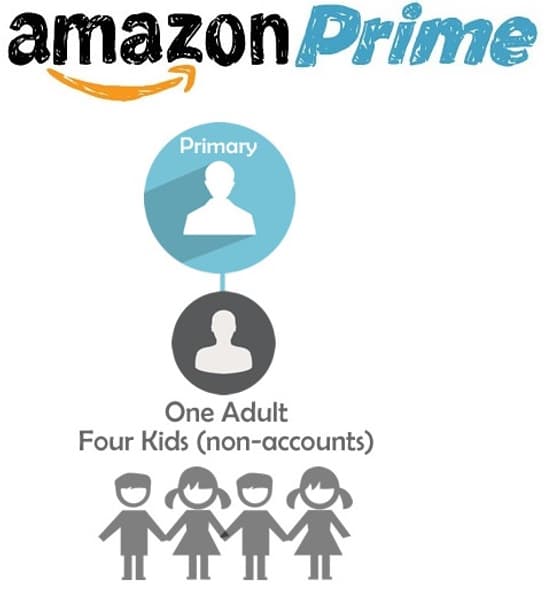
At the heart of Amazon Prime’s official sharing capabilities lies a robust feature known as Amazon Household. Designed with families and cohabitants in mind, Amazon Household provides a sanctioned, secure framework for sharing select Prime benefits without fully compromising individual account privacy or security. It allows up to two adults (18 years or older), four teenagers (13-17 years old), and four children (under 13) to link their Amazon accounts and share certain digital content and Prime benefits. This system represents Amazon’s deliberate technical solution to cater to multi-user environments while maintaining control over account access and subscription integrity.
What Prime Benefits Can Be Shared via Amazon Household?
The scope of shared benefits through Amazon Household is quite comprehensive, though it’s important to understand the specifics to manage expectations. The primary shared benefits include:
-
Prime Delivery: The most iconic Prime benefit, allowing all adult members within the household to enjoy unlimited fast, free shipping on eligible items. This extends to same-day, one-day, and two-day delivery options where available.
-
Prime Video: Access to Amazon’s vast library of movies and TV shows is a major draw. All adult and teen members can stream content, often with the ability to create individual user profiles to track watch history and preferences, much like other streaming services. Child profiles offer parental controls for age-appropriate content.
-
Prime Reading: A rotating selection of thousands of books, magazines, and comics is available to all adult members.
-
Amazon First Reads: Early access to download one new Kindle book per month from a curated selection, also shared among adults.
-
Amazon Photos: Unlimited full-resolution photo storage, plus 5 GB for videos and other files, is a personal benefit, but the ability to create a Family Vault can be shared among members for collaborative storage.
-
Twitch Prime/Prime Gaming: Often linked to specific Amazon accounts, but sometimes aspects can be accessed through shared general Prime benefits, though specific gaming loot usually requires linking individual accounts.
-
Exclusive Prime Deals and Early Access: All household members can take advantage of Prime-exclusive discounts and early access to Lightning Deals.
What Prime Benefits Are Typically Not Shared?
While extensive, Amazon Household does have limitations, primarily concerning benefits tied directly to individual accounts or payment methods:
-
Prime Music Unlimited: This premium music streaming service, which is an add-on to Prime, is typically associated with the individual Prime account that subscribed to it. Family plans for Music Unlimited are separate subscriptions.
-
Kindle Unlimited: Similar to Music Unlimited, Kindle Unlimited is a distinct subscription service and is not included as a shareable Prime benefit.
-
Specific Digital Subscriptions: Any digital subscriptions purchased individually (e.g., through Amazon Channels for specific streaming services like HBO, Showtime, or specific app subscriptions) are generally tied to the purchasing account and not automatically shared.
-
Payment Methods: Crucially, while adults in a Household agree to share payment methods for Amazon purchases, individual purchasing power and payment information remain distinct. There isn’t a single shared “wallet” where everyone can access each other’s funds directly without explicit authorization for each purchase. Each adult retains their own payment settings unless explicitly agreed to share the use of them, which is a key technical and security consideration.
-
Audible Premium Plus: While Prime members get some benefits from Audible, the full Audible Premium Plus subscription is not shareable through Amazon Household.
Understanding these technical distinctions is crucial for managing expectations and ensuring a smooth sharing experience within the Amazon ecosystem.
Step-by-Step Technical Guide to Setting Up Amazon Household
Setting up an Amazon Household is a straightforward process, primarily managed through the Amazon website. This section provides a technical walkthrough for establishing and managing your shared Prime environment.
1. Initiating the Invitation (Primary Account Holder)
As the primary Prime account holder, you will initiate the process:
-
Navigate to Amazon Household: Log in to your Amazon account on a web browser. Go to “Account & Lists” dropdown (top right) and select “Amazon Household” under the “Shopping programs and rentals” section. Alternatively, you can directly access the Amazon Household page.
-
Add an Adult: On the Amazon Household page, click “Add Adult.” You will be prompted to enter the name and email address of the adult you wish to invite.
-
Agreement and Invitation: Review the sharing agreement details, which outline what benefits will be shared and confirm that you are allowing the invited adult to use your payment methods for Amazon purchases (though they won’t automatically have access to your payment details). Click “Continue” or “Create Household” to send the invitation.
-
Security Verification: For security, Amazon may ask you to re-enter your Amazon password.
2. Accepting the Invitation (Invited Adult)
The invited adult will receive an email from Amazon with instructions to join the Household:
-
Open the Invitation Email: The invited adult should open the email from Amazon and click on the “Get Started” or “Accept Invitation” link.
-
Log In or Create Account: They will be directed to Amazon’s website. If they already have an Amazon account, they should log in with their credentials. If not, they will need to create a new Amazon account.
-
Confirm Information: They will be asked to confirm their identity and agree to share payment methods with the inviting adult. This step is critical; without this mutual agreement, the Household cannot be formed.
-
Complete Enrollment: Once confirmed, their account will be linked to the Amazon Household, and they will immediately gain access to the shared Prime benefits.
3. Managing Teen and Child Profiles
Amazon Household also allows for granular control over profiles for younger family members:
-
Adding a Teen: From the Amazon Household page, select “Add a Teen.” You’ll need their name, birth date, and email address. Teen accounts (ages 13-17) get a unique login, can shop independently on Amazon with specific purchase approval required from an adult member, and can stream Prime Video.
-
Adding a Child: Select “Add a Child” for those under 13. These profiles are primarily for Fire Tablets and Kindle Kids Edition devices, offering a curated content experience with robust parental controls through Amazon FreeTime (now Amazon Kids+). Children do not have an Amazon login for general shopping but can access shared Prime Video content within their profiles.
4. Managing Your Household
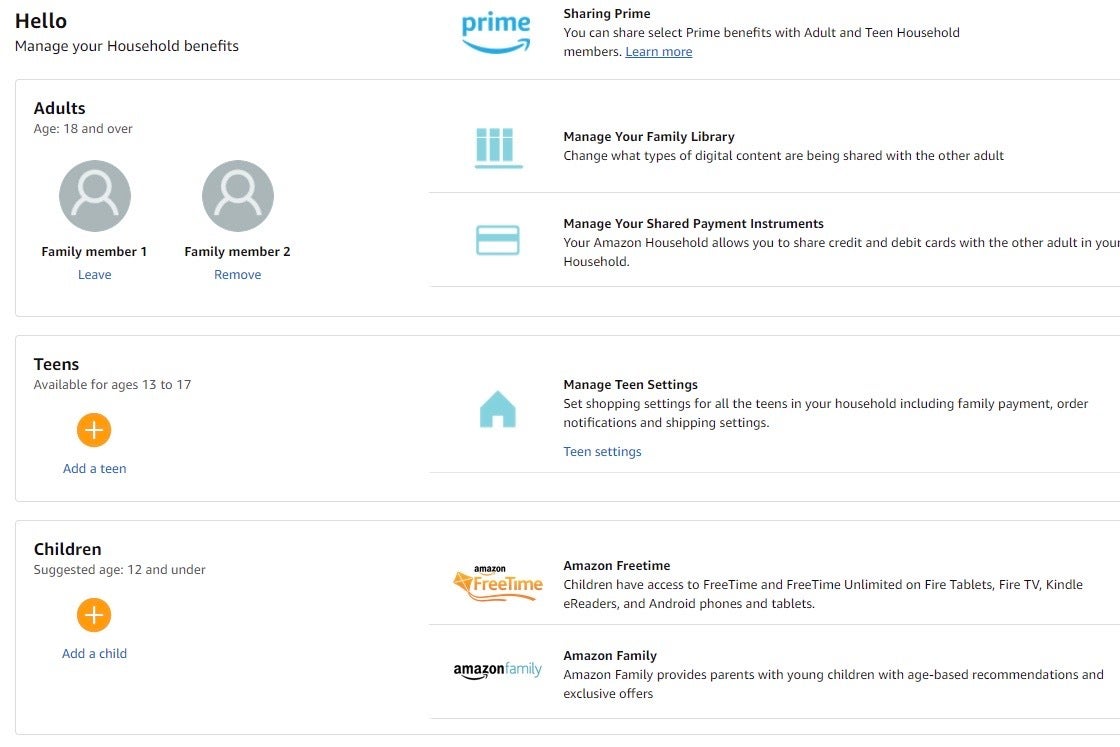
The primary account holder can manage the Household members:
-
Remove a Member: From the Amazon Household page, select “Manage Your Household.” You will see a list of all members. To remove an adult, teen, or child, simply click “Remove” next to their name. Be aware that once an adult is removed, they cannot be added back to any Amazon Household for 180 days. This technical constraint prevents frequent switching between households to exploit benefits.
-
Update Information: You can also modify details for teen and child profiles.
Beyond Amazon Household: Other Sharing Avenues and Their Tech Implications
While Amazon Household is the official and recommended method, other approaches exist, each with its own technical implications and associated risks.
Sharing Prime Video Profiles
For Prime Video specifically, Amazon allows for the creation of multiple user profiles within a single Prime Video account. This is a common feature across many streaming services.
-
Mechanism: Any adult within the Amazon Household (or even if you’re not using Household and just sharing a single account) can set up separate profiles for different family members or housemates. Each profile maintains its own watch history, recommendations, and watchlists.
-
Benefits: This offers a personalized viewing experience without sharing an entire Amazon account. It’s especially useful for families where different members have distinct tastes in content.
-
Limitations: This only shares Prime Video access. It does not extend any other Prime benefits like shipping or shopping discounts. Furthermore, there are technical limits on simultaneous streams. Amazon Prime Video generally allows up to three simultaneous streams within the same account, but only two simultaneous streams of the same title. Exceeding these limits will result in an error message.
Account Password Sharing: Risks and Disadvantages
One informal, yet prevalent, method of “sharing” any digital subscription is simply sharing your account username and password. While seemingly convenient, this approach carries significant technical and security risks, particularly for an account as central as Amazon Prime.
-
Security Vulnerabilities: Handing over your primary Amazon account credentials gives the other person full access to your entire Amazon profile. This includes access to your saved payment methods, order history, addresses, and potentially other linked services. If the person’s device is compromised, or if they are careless with your credentials, your entire account could be at risk.
-
Lack of Control and Accountability: With shared credentials, there’s no way to track who made a purchase, changed a setting, or accessed sensitive information. This lack of individual accountability can lead to disputes or unwanted transactions.
-
Device Limits and Simultaneous Use: While some services are lenient, many (including Amazon Prime Video for certain features) have device limits or restrict the number of simultaneous active sessions. Sharing credentials broadly can lead to “too many devices” errors or force users off the service.
-
Terms of Service Violations: Most service providers, including Amazon, explicitly prohibit sharing account credentials with individuals outside of a defined household or family unit. Violating these terms could lead to account suspension or termination.
-
Data Privacy Concerns: Your purchasing habits, search history, and viewing patterns are all tied to your main account. Sharing credentials means others can see this data, potentially eroding your personal data privacy.
From a technological standpoint, account password sharing is a rudimentary, insecure, and ultimately unsustainable method for sharing digital services. Amazon Household was specifically designed to mitigate these risks by providing a structured, controlled sharing environment.
Technical Considerations and Best Practices for Shared Accounts
To ensure a smooth and secure experience when sharing your Amazon Prime account, several technical considerations and best practices should be observed.
Device Management and Stream Limits
Amazon Prime Video, as a key component of the Prime offering, operates with specific technical constraints regarding device usage:
-
Simultaneous Streams: As mentioned, a single Prime Video account generally permits up to three simultaneous streams from different devices. However, a critical nuance is that only two devices can stream the same title concurrently. This is a technical limitation to prevent widespread unauthorized distribution.
-
Device Registration: Amazon tracks devices that access Prime Video. While there isn’t a strict “device limit” for registered devices, having too many devices associated with an account can sometimes lead to issues or raise security flags. It’s good practice to periodically review and de-register old or unused devices from your Amazon account settings.
Geographical Restrictions and Content Availability
Amazon’s global presence means that content and even specific Prime benefits can vary significantly by region:
-
Prime Video Library: The Prime Video catalog is geographically licensed. What’s available in the US may not be available in the UK, Germany, or India, and vice-versa. If members of your Household are in different countries, their access to Prime Video content will be dictated by their current geographic location (IP address) and the Amazon store they are linked to.
-
Prime Benefits: While core benefits like free shipping are global, specific features (e.g., local same-day delivery options, specific Prime-exclusive deals) are region-dependent. Ensure all Household members reside in the same country for seamless benefit sharing.
Data Privacy and Security Best Practices
Even with the official Amazon Household feature, maintaining digital security is paramount:
-
Strong, Unique Passwords: Each adult in the Household should maintain their own strong, unique password for their individual Amazon account.
-
Two-Factor Authentication (2FA): Enable 2FA on all linked Amazon accounts. This adds an extra layer of security, requiring a code from a trusted device in addition to the password. This is perhaps the most critical technical security measure for any online account.
-
Review Shared Payment Methods: While Amazon Household technically allows adults to use shared payment methods, it’s essential to have clear communication and trust. Regularly review your order history and payment statements to ensure all transactions are legitimate.
-
Regular Account Audits: Periodically check your Amazon Household settings to ensure only authorized individuals are linked. Also, review your “Content and Devices” settings to identify and de-register any unfamiliar or old devices.
-
Educate Household Members: Ensure everyone understands the shared responsibility for account security and the appropriate use of shared benefits. For teens, this includes setting clear guidelines for purchasing requests.
By leveraging Amazon Household and adhering to these technical best practices, you can create a secure, efficient, and equitable sharing environment for your Amazon Prime benefits, maximizing the value of your subscription while maintaining digital integrity.
Sharing your Amazon Prime account effectively is a testament to the platform’s design for user convenience and value. By understanding and utilizing the official Amazon Household feature, you can extend the myriad benefits of Prime to your family and housemates in a secure, organized, and legitimate manner. This approach not only optimizes your digital subscriptions but also fosters a shared digital experience, proving that technology, when applied thoughtfully, can genuinely enhance our daily lives.
aViewFromTheCave is a participant in the Amazon Services LLC Associates Program, an affiliate advertising program designed to provide a means for sites to earn advertising fees by advertising and linking to Amazon.com. Amazon, the Amazon logo, AmazonSupply, and the AmazonSupply logo are trademarks of Amazon.com, Inc. or its affiliates. As an Amazon Associate we earn affiliate commissions from qualifying purchases.