
In the modern digital economy, the “Software as a Service” (SaaS) and subscription-based models have become the standard for consumer interaction. Amazon Prime stands as one of the most successful examples of this model, integrating logistics, streaming media, cloud storage, and digital storefronts into a single monthly or annual fee. However, as digital ecosystems expand, users often find themselves needing to audit their digital footprint. Whether it is a shift toward alternative platforms, a desire to minimize recurring digital costs, or a simple preference for a different user experience (UX), knowing how to efficiently navigate the technical hurdles of canceling a high-level subscription is an essential skill for any tech-literate consumer.

Navigating the Interface: The Step-by-Step Technical Guide
The process of canceling an Amazon Prime subscription is intentionally designed with several layers of friction, often referred to in UI/UX design circles as “dark patterns” or “the Iliad flow.” This design philosophy aims to ensure that a user is fully aware of the benefits they are losing before they finalize their exit. To navigate this effectively, one must understand the hierarchy of the Amazon dashboard.
Executing Cancellation via Desktop Browser
For most users, the desktop interface provides the most transparent view of account settings. The architecture of the Amazon website places subscription management under the “Accounts & Lists” umbrella.
-
Authentication and Access: Begin by logging into your account. Once authenticated, hover over the “Account & Lists” dropdown menu in the top-right corner of the navigation bar. Select “Prime Membership.”
-
The Membership Management Hub: This page serves as the central nervous system for your Prime status. On the right-hand side (or under a “Manage Membership” toggle on updated interfaces), you will find the “Update, cancel and more” link.
-
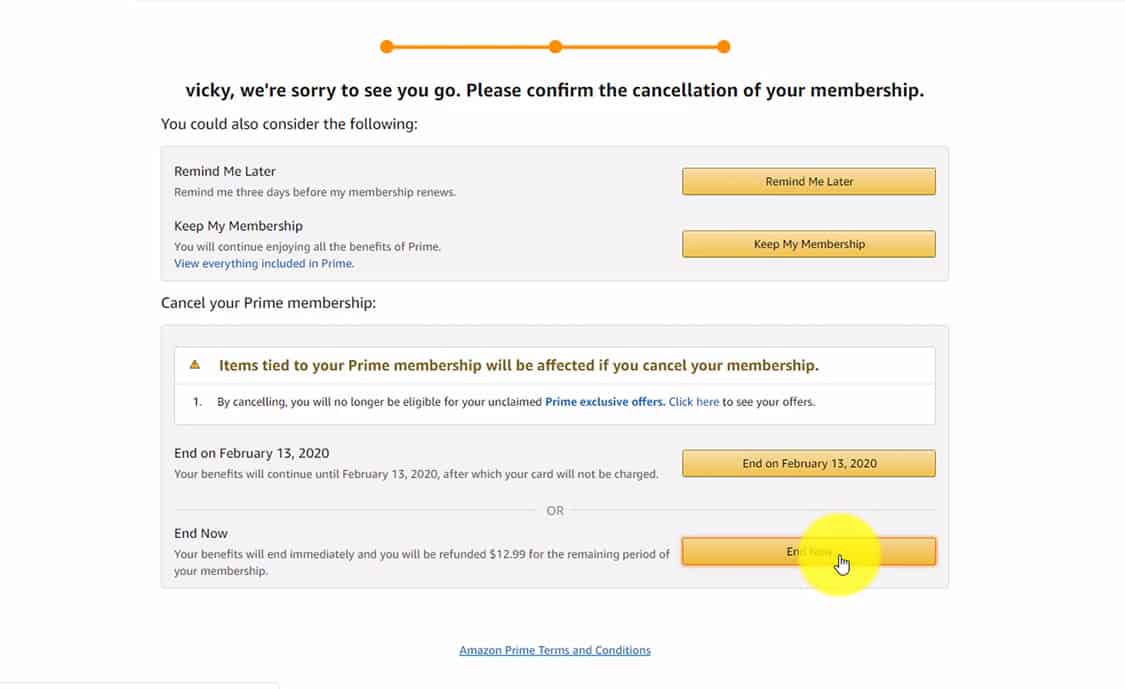
Initiating the Exit Flow: Upon clicking “End Membership,” the system will initiate a multi-stage confirmation process.
-
The Retention Layers: Amazon will typically present three distinct screens. The first highlights the benefits you have used (e.g., how many packages you received with Prime shipping). The second often offers a switch to a cheaper tier or a “remind me later” option. The third and final screen contains the definitive “End Now” button. It is critical to follow the process until you receive a specific confirmation message and a follow-up email, as closing the browser mid-flow will result in the subscription remaining active.
Cancellation via the Mobile App Ecosystem
Navigating the cancellation through the Amazon shopping app (available on iOS and Android) involves a slightly different UI pathing, optimized for mobile touchpoints.
-
Menu Navigation: Tap the three-line “hamburger” menu icon or the “User” icon at the bottom of the app interface.
-
Account Settings: Navigate to “Your Account” and scroll down to the “Account Settings” section. Select “Manage Prime Membership.”
-
Mobile Flow Execution: Much like the desktop version, the mobile app will lead you through a series of retention prompts. Due to the smaller screen real estate, the “End Membership” buttons are often placed at the bottom of long scrolling pages filled with benefit reminders. Ensure you scroll to the absolute bottom of each page to find the actionable button.
Technical Implications for Integrated Digital Services
Amazon Prime is not merely a shipping service; it is a sprawling digital ecosystem. When you initiate a cancellation, the technical “offboarding” affects several interconnected software services. Understanding these dependencies is vital to prevent data loss or service interruption.
Impact on Prime Video and Digital Rights Management (DRM)
Prime Video operates under a complex DRM framework. When a subscription ends, your access to the “included with Prime” library is immediately revoked or set to expire at the end of the current billing cycle. However, any digital media you have purchased outright (non-Prime titles) remains linked to your Amazon account. The technical distinction here lies in the “license to view” vs. “subscription access.” Your account remains active as a standard Amazon account, ensuring your library of purchased assets remains accessible via the Prime Video app, even without an active Prime membership.
Amazon Photos and Cloud Storage Protocols
Perhaps the most significant technical concern for power users is the status of Amazon Photos. Prime members receive unlimited full-resolution photo storage and 5GB of video storage. Upon cancellation, the storage limit for photos typically reverts to the standard 5GB shared across Amazon Drive.
If your photo library exceeds 5GB—which is common for long-term users—the system enters a “read-only” or “over-quota” state. While Amazon generally provides a grace period to download your data, failure to move these assets to an alternative cloud provider or local NAS (Network Attached Storage) can eventually lead to the automated deletion of files to bring the account back within the free tier limits. It is highly recommended to use the Amazon Photos desktop app to sync and back up your library locally before the membership expiration date.
Alexa and Smart Home Integration
For those with an integrated smart home ecosystem, the loss of Prime can subtly change the functionality of Echo devices. While Alexa’s core AI functions (timers, smart light control, weather) do not require Prime, the music streaming defaults will change. If your primary music source is Amazon Music Prime, Echo devices will revert to a free, ad-supported version of Amazon Music or require a connection to a third-party API like Spotify or Apple Music.
Data Security and Post-Cancellation Hygiene
In an era of increasing digital security threats, canceling a subscription is an opportune time to perform a “digital hygiene” check on your account. Even after the Prime membership is deactivated, Amazon retains your payment information and browsing history to facilitate future standard purchases.
Managing Stored Payment Instruments
If the reason for cancellation involves securing your financial data or reducing your digital footprint, you should navigate to the “Your Payments” section of the Amazon dashboard. Here, you can remove expired credit cards or delete “1-Click” payment methods. From a technical security standpoint, reducing the number of stored “tokens” (your saved credit cards) across various platforms minimizes the potential impact of a credential-stuffing attack or a platform-wide data breach.
Subscription Auditing and Third-Party API Access
Many users inadvertently sign up for “Prime Channels” (like Paramount+, Max, or specialty niche streamers) through the Amazon interface. It is a common technical misconception that canceling the primary Prime membership automatically cancels these third-party add-ons.
Technically, these are often handled as separate billing line items. When you cancel Prime, you must manually check the “Subscriptions & Subscriptions” (often found under the “Memberships & Subscriptions” tab) to ensure that third-party APIs are not still drawing funds from your registered payment method. If these are not canceled, they may continue to charge you, even if you can no longer access the Prime Video interface required to view them easily.
Optimizing the Digital Experience Beyond Prime
The decision to cancel Prime often reflects a broader trend toward “unbundling” digital services. As the tech landscape shifts, many users find that specialized tools offer a superior user experience compared to the “all-in-one” approach of a giant ecosystem.
Alternative Software and Media Solutions
For users who prioritized Prime for its media content, the transition often leads toward more robust, dedicated platforms.
-
Storage Alternatives: Platforms like Google Photos, iCloud, or self-hosted solutions like Plex and Nextcloud offer more granular control over data privacy and file organization than the integrated Amazon Photos experience.
-
Logistics and Shopping: Many tech-savvy consumers are moving toward browser extensions that aggregate the best prices across the web, reducing the reliance on a single storefront’s “Fast and Free” shipping hook, which often includes hidden costs in the form of membership fees.

The Role of Subscription Management Tools
As you move away from the Amazon ecosystem, managing the remaining digital subscriptions becomes a task of its own. Utilizing specialized software tools or “fintech” apps that monitor recurring API calls to your bank account can help maintain a lean digital profile. These tools provide a dashboard that visualizes your “burn rate” across all SaaS platforms, allowing you to avoid the “set it and forget it” trap that companies rely on for revenue.
In conclusion, canceling an Amazon Prime subscription is more than a simple administrative task; it is an exercise in navigating modern UI design, managing complex data dependencies, and asserting control over one’s digital and financial security. By understanding the technical architecture of the cancellation flow and the subsequent impact on your stored data and integrated services, you can ensure a seamless transition out of the Prime ecosystem while maintaining the integrity of your digital life. Be diligent in confirming the finality of the cancellation, back up your cloud assets, and take the opportunity to audit your remaining digital subscriptions for a more optimized tech experience.
aViewFromTheCave is a participant in the Amazon Services LLC Associates Program, an affiliate advertising program designed to provide a means for sites to earn advertising fees by advertising and linking to Amazon.com. Amazon, the Amazon logo, AmazonSupply, and the AmazonSupply logo are trademarks of Amazon.com, Inc. or its affiliates. As an Amazon Associate we earn affiliate commissions from qualifying purchases.