
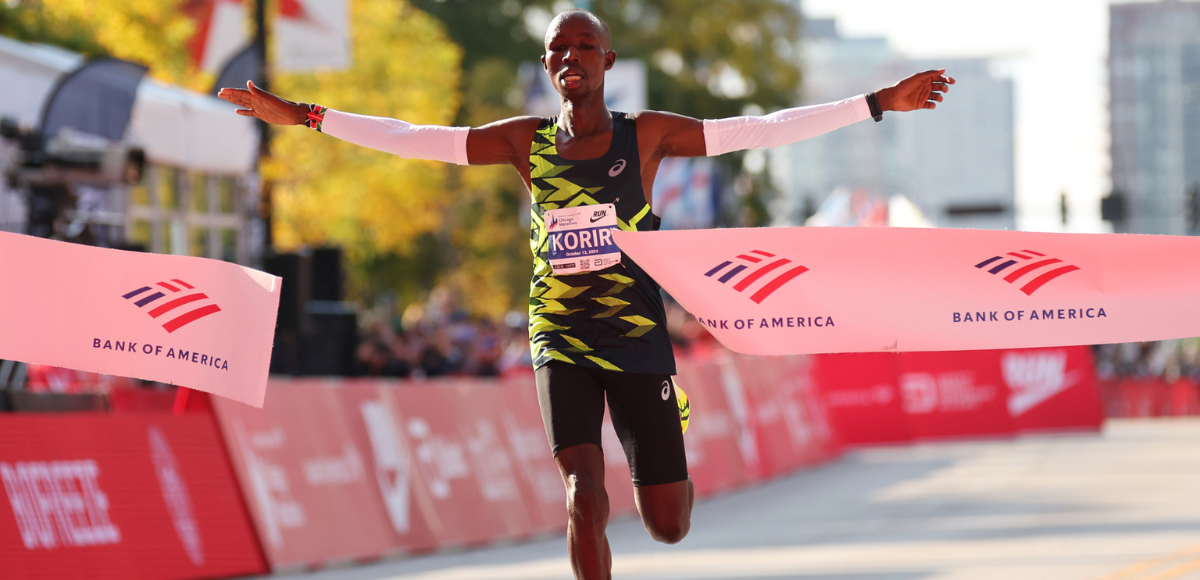
The Chicago Marathon stands as one of the world’s premier road races, drawing elite athletes and enthusiastic spectators alike. For those unable to experience the vibrant atmosphere in person, modern technology offers a multitude of ways to follow every stride, celebrate every victory, and feel connected to the heart of the race. This guide delves into the technological landscape that enables seamless, engaging, and comprehensive coverage of this iconic event, ensuring fans worldwide don’t miss a moment.
Leveraging Digital Platforms for Live Coverage
In an increasingly interconnected world, the traditional broadcast model has been significantly augmented by digital streaming, offering unparalleled accessibility. Understanding the primary digital avenues available is the first step to securing your virtual front-row seat.
Official Broadcast Partners and Streaming Services
The cornerstone of marathon viewing is typically found through its official broadcast partners. Historically, domestic rights for major U.S. marathons, including Chicago, have often been secured by networks like NBC Sports. This partnership extends beyond traditional television channels to their digital counterparts.
-
NBC Sports App and Website: For viewers within the United States, the NBC Sports app and website frequently serve as the primary digital hub for live streaming. Access usually requires authentication through a cable or satellite TV provider subscription that includes NBC Sports. These platforms often provide multiple streams, allowing viewers to choose between the main broadcast, specific runner tracking feeds, or even finish line cameras.
-
Peacock: NBCUniversal’s streaming service, Peacock, has increasingly become a go-to platform for live sports events, including marathons. Depending on the year and specific broadcasting agreements, a Peacock Premium subscription might be necessary to access the live stream. This offers a standalone option for cord-cutters who do not have a traditional TV subscription.
-
Local Affiliate Streaming: In some cases, local NBC affiliates (e.g., NBC 5 Chicago) may offer local streaming options for viewers within their designated market area. These streams are usually accessible via the local station’s website or app, often requiring geolocation verification.
-
International Broadcasters: For international audiences, the viewing landscape varies by region. Major sports networks in countries like Canada (e.g., CBC Sports), the UK (e.g., Eurosport), or Australia (e.g., ESPN Australia) might hold the rights. It is crucial for international viewers to check local listings and sports broadcasting guides for their specific region closer to the event date. Many of these international broadcasters also offer dedicated streaming apps or web platforms that require a subscription or TV provider login.
Navigating Geo-Restrictions and VPNs
A common challenge for international viewers, or even domestic viewers traveling abroad, is encountering geo-restrictions. These digital fences prevent content from being accessed outside specific geographical boundaries due to licensing agreements.
-
Understanding Geo-blocking: Broadcasters purchase rights for specific territories, meaning their live streams are legally restricted to those regions. Attempting to access a U.S.-only stream from Europe, for example, will likely result in an error message stating the content is unavailable in your region.
-
The Role of Virtual Private Networks (VPNs): A Virtual Private Network (VPN) can be a technological solution to bypass geo-restrictions. A VPN encrypts your internet connection and routes it through a server in a location of your choice. By connecting to a server in the United States, for instance, a viewer outside the U.S. can appear to be browsing from within the U.S., potentially gaining access to U.S.-only streaming services.
-
Choosing a Reliable VPN: Not all VPNs are created equal. For streaming live sports, a VPN needs to offer fast speeds, a wide array of server locations, and strong encryption. Reputable services like ExpressVPN, NordVPN, or Surfshark are often recommended. It’s important to test the VPN connection in advance and ensure compatibility with your chosen streaming platform.
-
Legal and Ethical Considerations: While VPNs are legal in most countries and are widely used for privacy and security, using them to circumvent licensing agreements might violate a streaming service’s terms of service. Users should be aware of these terms.
The Role of Mobile Apps for On-the-Go Viewing
The ubiquitous nature of smartphones and tablets has made mobile apps indispensable for live event coverage. Beyond just streaming the race, these apps offer a suite of features that enhance the viewing experience.
-
Official Marathon App: Many major marathons, including Chicago, release an official event app. While its primary function is often runner tracking (discussed below), it can also integrate live stream links, course maps, event schedules, and push notifications for key race updates.
-
Broadcaster Apps: As mentioned, apps from NBC Sports, Peacock, or international equivalents provide direct access to the live broadcast on mobile devices. These are designed for optimal mobile viewing, often offering picture-in-picture modes or streamlined interfaces.
-
Third-Party Sports Aggregator Apps: Some sports news apps or general streaming platforms might aggregate links to live coverage, though direct streaming through these apps is less common for premier events due to exclusive rights.
Optimizing Your Viewing Experience
Beyond simply accessing the stream, several technical considerations can significantly impact the quality and enjoyment of your Chicago Marathon viewing experience.
Device Compatibility and Setup
The beauty of modern streaming technology is its versatility across a range of devices.
-
Smart TVs: For the most immersive experience, a Smart TV is ideal. Most modern Smart TVs have built-in apps for major streaming services (Peacock, Hulu with Live TV, YouTube TV) or web browsers to access broadcaster websites. Ensure your TV’s operating system is updated for optimal performance.
-
Streaming Devices: Devices like Roku, Amazon Fire TV Stick, Apple TV, or Google Chromecast can transform any HDMI-enabled TV into a smart TV. These devices offer a vast selection of apps, making it easy to access the required streaming service. Setup is typically plug-and-play, connecting to your Wi-Fi network and allowing app downloads.
-
Laptops and Desktop Computers: These remain reliable choices for viewing, offering flexibility in screen size and the ability to connect to external monitors or TVs via HDMI. Ensure your browser is up-to-date (Chrome, Firefox, Edge, Safari are usually best) and that you’re not running too many resource-intensive programs simultaneously.
-
Tablets and Smartphones: For on-the-go or secondary screen viewing, tablets and smartphones are perfect. Use their native apps for the best experience. Consider accessories like kickstands or external battery packs for extended viewing.
Internet Bandwidth Requirements for Seamless Streaming
A robust internet connection is paramount for uninterrupted high-definition streaming. Nothing detracts from a live event like constant buffering.
-
Recommended Speeds: For standard definition (SD) streaming, 3-5 Mbps (megabits per second) is typically sufficient. However, for a high-definition (HD) stream (720p or 1080p), which is common for sports, you’ll ideally want at least 10-15 Mbps. For 4K Ultra HD (if available), speeds of 25 Mbps or higher are recommended.
-
Checking Your Speed: Websites like Speedtest.net or Fast.com can quickly measure your current internet speed. It’s advisable to perform this test during peak usage times in your household to get a realistic estimate.
-
Optimizing Your Connection:
-
Wired Connection: Whenever possible, connect your streaming device (Smart TV, laptop, streaming box) directly to your router via an Ethernet cable. This provides the most stable and fastest connection, bypassing Wi-Fi interference.
-
Wi-Fi Optimization: If Wi-Fi is your only option, ensure your router is centrally located and free from obstructions. Using a newer Wi-Fi standard (e.g., Wi-Fi 6) and a dual-band router (2.4 GHz and 5 GHz) can improve performance. The 5 GHz band generally offers faster speeds but has a shorter range.
-
Minimize Concurrent Usage: Ask other household members to temporarily pause heavy internet activities like large downloads, online gaming, or other simultaneous streaming during the marathon broadcast.
-
Restart Router: A simple router reboot can often resolve minor connectivity issues and improve performance.
-
Enhancing Audio-Visual Quality
Beyond just a stable stream, fine-tuning your display and audio setup can significantly elevate the experience.

-
Display Settings: Calibrate your TV or monitor for optimal picture quality. Adjust brightness, contrast, color saturation, and sharpness to your preference. Many TVs have specific “Sports” picture modes that enhance motion clarity and vibrancy.
-
Refresh Rate and Motion Smoothing: For fast-moving action like a marathon, higher refresh rates (e.g., 120Hz) on your display can reduce motion blur. Some TVs offer “motion smoothing” or “interpolation” features (often marketed as “TruMotion” or “Motionflow”) that create artificial frames to make motion appear smoother. While this can sometimes create a “soap opera effect,” for sports, it can be beneficial. Experiment to see what you prefer.
-
Audio Setup: While the primary focus is often visual, good audio enhances immersion.
-
Soundbars: A soundbar can significantly improve dialogue clarity and overall audio richness compared to built-in TV speakers.
-
Home Theater Systems: For the ultimate experience, a full surround sound system will bring the crowd noise and commentary to life.
-
Headphones: If you’re watching on a laptop or mobile device, quality headphones can provide a focused audio experience, especially useful in noisy environments.
-
Beyond Live: Catching Up and Interactive Features
The modern marathon viewing experience extends far beyond the live broadcast, incorporating interactive elements and on-demand access that enrich fan engagement.
On-Demand Replays and Highlights
Life happens, and not everyone can commit to watching an entire marathon live. Technology ensures you don’t miss out.
-
Broadcaster Archives: Most official broadcast partners (e.g., Peacock, NBC Sports) will make full replays of the marathon available on their platforms shortly after the live event concludes. These typically remain accessible for a period, often requiring the same subscription or authentication as the live stream.
-
Official Marathon YouTube Channels: The Chicago Marathon, like many major events, often maintains a YouTube channel where it posts official highlights, race recaps, interviews, and sometimes even shorter segments of the full race. These are usually free to access.
-
Sports News Websites: Major sports news outlets will publish highlight reels and detailed recaps on their websites, often including key moments and interviews with winners.
Runner Tracking Apps and GPS Integration
One of the most innovative and widely appreciated technological features for marathon fans is real-time runner tracking.
-
Official Marathon Tracking App: The Chicago Marathon typically offers a dedicated mobile app that allows spectators to track specific runners. Participants wear chips that register at various checkpoints along the course (e.g., 5K, 10K, half-marathon, 30K, finish line).
-
GPS and Predictive Technology: Modern tracking apps often integrate GPS data and predictive algorithms to estimate a runner’s location between checkpoints and their anticipated finish time. This is invaluable for supporters waiting at specific points on the course or cheering from afar.
-
Notifications and Alerts: Users can often set up notifications for when their tracked runner crosses a checkpoint or approaches the finish line, providing timely updates without constant app monitoring.
-
Sharing Features: Many apps allow users to easily share a runner’s progress with friends and family via social media or messaging platforms.
Social Media and Second-Screen Experiences
The live event experience is increasingly communal, even when viewed remotely, thanks to social media.
-
Official Hashtags: Following the official marathon hashtags (e.g., #ChicagoMarathon, #BankOfAmericaChicagoMarathon) on platforms like Twitter, Instagram, and Facebook provides a real-time feed of fan reactions, behind-the-scenes content, and official updates.
-
Athlete and Media Accounts: Many elite runners, sports journalists, and official event accounts post live updates, photos, and videos, offering diverse perspectives.
-
Interactive Polling and Q&A: Some broadcasters and event organizers leverage social media for interactive elements, such as polling viewers or hosting Q&A sessions with experts or athletes.
-
Second-Screen Engagement: Watching the marathon on a primary screen (TV, laptop) while simultaneously engaging with social media on a second device (smartphone, tablet) has become a popular way to consume live events, offering both the official broadcast and a stream of user-generated content and commentary.
Troubleshooting Common Streaming Issues
Despite advancements, technical glitches can occur. Being prepared to troubleshoot common streaming problems can save you frustration and ensure you don’t miss crucial race moments.
Resolving Buffering and Lag
The most common and annoying issue is buffering, where the video pauses repeatedly to load more data.
-
Check Internet Connection: As discussed, inadequate bandwidth is the prime culprit. Run a speed test. If speeds are low, restart your router/modem, use an Ethernet cable, or minimize other network activity.
-
Reduce Stream Quality: Most streaming apps and websites allow you to manually lower the video quality (e.g., from 1080p to 720p or 480p). This requires less bandwidth and can alleviate buffering.
-
Close Background Applications: On laptops, desktops, and even some smart TVs, background applications or browser tabs can consume resources, impacting streaming performance. Close anything unnecessary.
-
Clear Cache and Cookies: For browser-based streaming, accumulated cache and cookies can sometimes interfere. Clearing them can resolve issues.
-
Update Software: Ensure your streaming app, browser, and device’s operating system are all up-to-date. Updates often include performance enhancements and bug fixes.
Addressing Login and Subscription Challenges
Access issues, particularly with authentication, can be frustrating.
-
Verify Credentials: Double-check your username and password. It’s a simple step often overlooked.
-
Confirm Subscription Status: Ensure your subscription to Peacock Premium or your cable/satellite package is active and includes the necessary channels.
-
Reset Password: If unsure, use the “forgot password” option.
-
Contact Support: If the issue persists, contact the customer support for the specific streaming service or your TV provider. Have your account details ready.

Essential System Updates and Browser Optimizations
Maintaining your tech environment is crucial for reliable streaming.
-
Operating System Updates: Keep your device’s operating system (Windows, macOS, iOS, Android, Smart TV OS) updated. These updates often improve security, performance, and compatibility with apps.
-
Browser Updates: Always use the latest version of your web browser. Outdated browsers may lack support for newer streaming technologies or have security vulnerabilities.
-
Disable Browser Extensions: Some browser extensions (especially ad blockers or privacy tools) can interfere with video playback or website functionality. Temporarily disable them if you encounter issues.
-
Hardware Acceleration: In browser settings, ensure hardware acceleration is enabled. This allows your computer’s graphics processor to assist with video decoding, often improving performance.
By leveraging the diverse array of digital platforms, optimizing your technical setup, engaging with interactive features, and knowing how to troubleshoot common issues, watching the Chicago Marathon from anywhere in the world becomes a rich, immersive, and unforgettable experience. The evolution of broadcasting technology continues to bring the thrill of the race directly to fans, bridging geographical distances and fostering a global community of running enthusiasts.
aViewFromTheCave is a participant in the Amazon Services LLC Associates Program, an affiliate advertising program designed to provide a means for sites to earn advertising fees by advertising and linking to Amazon.com. Amazon, the Amazon logo, AmazonSupply, and the AmazonSupply logo are trademarks of Amazon.com, Inc. or its affiliates. As an Amazon Associate we earn affiliate commissions from qualifying purchases.