
In an increasingly digitized world, the convenience of online ticketing has transformed how we plan our entertainment. AMC Theatres, as a leading cinema chain, offers robust digital platforms that streamline the purchase of movie tickets, allowing patrons to secure their seats from the comfort of their homes or on the go. However, life is unpredictable, and sometimes plans change. Understanding how to navigate these digital systems to cancel or modify your AMC tickets isn’t just a matter of convenience; it’s a fundamental aspect of effective digital literacy and user empowerment within modern applications. This guide will walk you through the technical process of canceling your AMC tickets, ensuring you can manage your movie plans with confidence and efficiency. We’ll delve into the specific digital channels, policy technicalities, and proactive strategies that define the contemporary online ticketing experience.

Navigating AMC’s Digital Platforms for Cancellations
The primary interface for managing your AMC ticket purchases, including cancellations, resides within their dedicated digital ecosystem. Whether you’re a seasoned technophile or new to online transactions, understanding where and how to initiate a cancellation is crucial. AMC offers two main avenues for self-service cancellation: its official website and its mobile application, each designed to provide a user-friendly experience for ticket management.
The AMC Website: Your Primary Cancellation Hub
For many users, the AMC Theatres website serves as the go-to portal for ticket purchases and subsequent modifications. It’s a comprehensive digital platform offering a full suite of functionalities, from browsing showtimes to managing your AMC Stubs account. To cancel tickets via the website, the process typically involves a few structured steps:
-
Access Your Account: Begin by visiting the official AMC Theatres website (amctheatres.com) and logging into your AMC Stubs account. Most digital ticket purchases are linked to this account, making it the central repository for your order history. If you checked out as a guest, you might need to use the “Find Your Order” functionality, which typically requires the email address used for purchase and a confirmation number.
-
Locate Your Order: Once logged in, navigate to your “Order History” or “Tickets” section. This area provides a chronological list of your past and upcoming movie reservations. Identify the specific ticket purchase you wish to cancel. The system usually displays details such as the movie title, showtime, location, and the date of purchase.
-
Initiate Cancellation: Within the details of your selected order, you should find an option to “Cancel Tickets” or “Refund Order.” This button is typically prominently displayed, often next to other options like “Reschedule” or “View Ticket.” Clicking this button will trigger the cancellation workflow.
-
Confirmation and Policy Acknowledgment: The system will usually present you with a summary of your cancellation, including the amount to be refunded and the method of refund (e.g., original payment method, AMC Stubs Bonus Bucks). Crucially, this is often where the system reiterates the cancellation policy regarding deadlines. You will likely be asked to confirm your decision, signifying your acknowledgment of the terms.
-
Digital Confirmation: Upon successful cancellation, you should receive an on-screen confirmation message and an email notification detailing the cancellation and refund specifics. This digital receipt is important for your records.
It’s vital to ensure you are using a stable internet connection and an up-to-date web browser for optimal functionality. Browser compatibility and cached data issues can sometimes interfere with the smooth execution of digital transactions.
The AMC Mobile App: Convenience at Your Fingertips
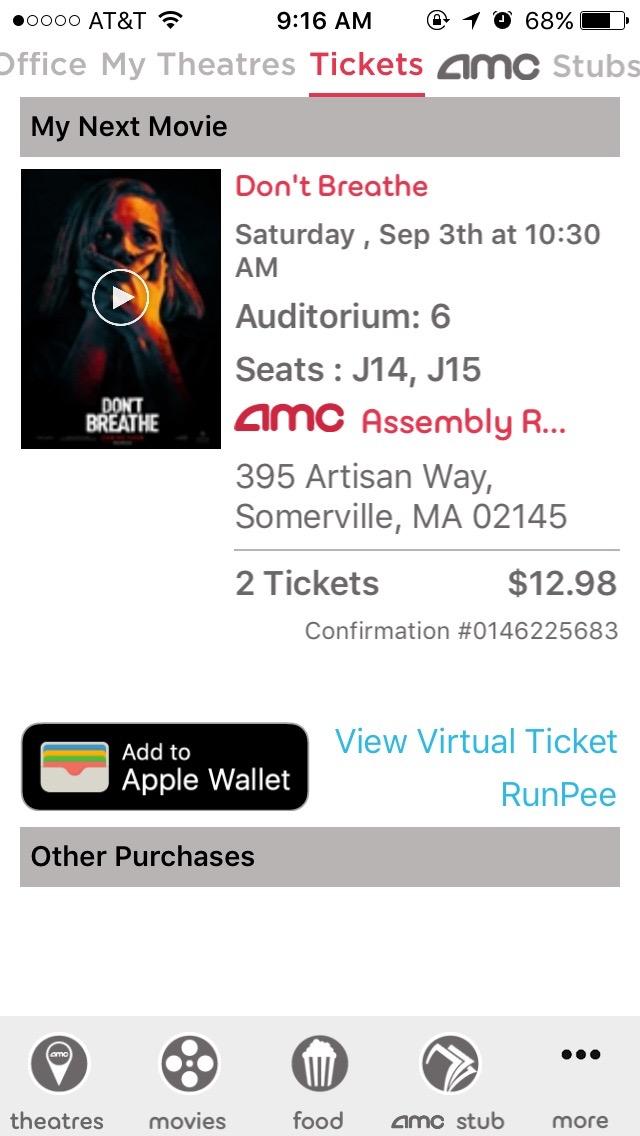
The AMC Theatres mobile application, available on iOS and Android devices, offers a streamlined and highly convenient method for managing your tickets on the go. Its interface is optimized for touchscreens, providing a quick way to perform tasks that might take slightly longer on a desktop.
-
Launch and Log In: Open the AMC Theatres app on your smartphone or tablet and log into your AMC Stubs account. The app typically offers biometric login options (fingerprint or face ID) for faster access.
-
Access Your Tickets: Navigate to the “Tickets” or “My AMC” section of the app. This area typically features an intuitive display of your upcoming showtimes, often with digital barcodes ready for scanning.
-
Select and Cancel: Tap on the specific movie ticket you wish to cancel. Similar to the website, the ticket detail screen will present options such as “Cancel Order” or “Refund.” The mobile interface might present these options through an icon (e.g., three dots for a menu) or a direct button.
-
Review and Confirm: The app will guide you through a confirmation screen, summarizing the cancellation and refund details. This mobile-optimized display ensures clarity even on smaller screens.
-
Instant Notification: Following a successful cancellation, the app will usually provide an immediate on-screen notification, and an email confirmation will be sent to your registered address. For users with push notifications enabled, a direct alert may also appear.
The app’s design prioritizes ease of use, making it an excellent tool for spontaneous changes or managing tickets when away from a computer. Both the website and app are integrated with the same backend system, ensuring consistency in your order history and cancellation outcomes.
Understanding Digital Ticketing and Account Management
At the heart of AMC’s cancellation process is your AMC Stubs account. This digital profile serves as your central repository for all interactions with the theatre chain, including ticket purchases, loyalty points, and personal preferences. When you purchase tickets digitally, they are invariably linked to this account (unless you check out as a guest, which complicates management). The account securely stores your payment methods, transaction history, and even preferences for future bookings. Effective digital account management means keeping your login credentials secure, regularly reviewing your order history, and understanding the integrated features that enhance your moviegoing experience.
The Technicalities of AMC’s Cancellation Policies
While the digital tools provide the “how-to,” the “when” and “under what conditions” are governed by AMC’s specific policies. These policies are digitally enforced by the ticketing system and are crucial to understand for a successful cancellation. They are embedded within the platform’s logic, determining eligibility and refund mechanisms.
Adhering to the Digital Window: Deadlines and Eligibility
AMC’s cancellation policy is primarily time-bound and electronically enforced. For most standard movie tickets, you can typically cancel your purchase for a full refund up to 60 minutes before the scheduled showtime. This 60-minute window is a critical digital threshold. The system will automatically deny any cancellation requests submitted within this final hour, displaying an error message or simply not offering the cancellation option.
-
System Enforcement: The digital platform (website and app) is programmed to calculate this deadline automatically. Once the clock passes the 60-minute mark, the “Cancel” button or option will either disappear or become inactive.
-
Exceptions: Certain ticket types or special events might have different, often stricter, cancellation policies. For instance, Fathom Events, private theatre rentals, or specific promotional offers might be non-refundable or have shorter cancellation windows. These exceptions are usually clearly stated during the purchase process and are digitally flagged within the order details. A-List memberships, which allow for three free movies a week, have different rules for “canceling” (more accurately, removing) a reservation, though actual refunds aren’t typically involved for an A-List “ticket” itself.
Understanding these digitally enforced deadlines is paramount. Attempting to cancel just minutes before a show will result in the system rejecting your request, regardless of your reasons.
Refund Mechanisms and Digital Transaction Reversals
When a cancellation is successful, the digital system initiates a refund process. The method and timeline for this refund are also digitally managed:
-
Original Payment Method: For tickets purchased with a credit card, debit card, or digital wallet (e.g., Apple Pay, Google Pay), the refund is typically processed back to the original payment method. The system sends a transaction reversal request to the payment gateway.
-
AMC Gift Cards/Bonus Bucks: If tickets were purchased using an AMC gift card or AMC Stubs Bonus Bucks, the refund amount would typically be credited back to the respective gift card balance or as new Bonus Bucks in your Stubs account.
-
Processing Time: While AMC’s system processes the refund immediately on their end, the actual appearance of funds in your bank or credit card statement can vary, typically taking 3-7 business days. This delay is due to the processing times of banks and credit card companies, which are external to AMC’s direct digital control. The digital transaction passes through multiple financial intermediaries before reaching your account.

It’s important to monitor your payment method’s statement for the refund and retain your cancellation confirmation email as proof of the transaction reversal.
Troubleshooting Common Digital Cancellation Glitches
Even with robust digital systems, technical issues can arise. Understanding how to troubleshoot common glitches can save you time and frustration:
-
“Order Not Found” or “Cancellation Unavailable”: This could be due to several factors:
-
Expired Deadline: The most common reason is that you’ve missed the 60-minute cancellation window.
-
Guest Checkout: If you purchased as a guest, ensure you’re using the “Find Your Order” option with the correct email and confirmation number.
-
Account Mismatch: You might be logged into a different AMC Stubs account than the one used for the purchase.
-
System Lag: Occasionally, especially during peak times, there might be a brief delay in the system updating. Try refreshing the page or restarting the app.
-
-
Error Messages: Generic error messages (e.g., “An unexpected error occurred”) often point to temporary server issues, network connectivity problems on your end, or browser/app cache corruption. Try clearing your browser’s cache and cookies, restarting the app, or switching internet connections.
-
Unresponsive Buttons: If the “Cancel” button appears but doesn’t react, it could be a JavaScript error on the website, an app bug, or an overloaded server. Again, refreshing, restarting, or trying a different device can often resolve this.
-
Payment Processing Delays: If a refund doesn’t appear within the expected timeframe, check your payment method’s detailed statement first. If it’s still missing after 7 business days, gather your digital confirmation and contact AMC customer support.
Proactive Digital Strategies for Flexible Moviegoing
Leveraging AMC’s digital infrastructure effectively goes beyond just knowing how to cancel; it involves adopting proactive strategies that maximize flexibility and address potential issues before they escalate.
Leveraging AMC Stubs for Enhanced Control
The AMC Stubs loyalty program is more than just a points system; it’s a tiered digital ecosystem that offers varying levels of control and flexibility over your movie tickets.
-
AMC Stubs Insider (Free Tier): Provides basic digital management, allowing cancellations within the standard policy.
-
AMC Stubs Premiere (Paid Tier): Often includes benefits like free exchanges for tickets (even within the 60-minute window in some cases, though not outright refunds), which can be a valuable digital feature for quick adjustments without losing your purchase value.
-
AMC Stubs A-List (Subscription Tier): This tier offers the ultimate in flexibility. While A-List reservations aren’t “canceled” for a refund (as no money changes hands for the ticket itself), members can “unreserve” their tickets at any time before showtime, freeing up a reservation slot for another movie. This digital feature is a core component of the A-List value proposition.
Understanding your Stubs tier can significantly impact your options for digital ticket adjustments.
Utilizing Digital Waivers and Customer Support Channels
When the self-service digital options fail, or if you encounter a situation outside the standard cancellation policy (e.g., a technical glitch preventing timely cancellation, an unforeseen emergency within the 60-minute window), AMC offers digital customer support channels.
-
Online Contact Forms: AMC’s website features “Contact Us” forms, allowing you to submit detailed inquiries about specific orders. Attaching screenshots of error messages or your order details can expedite the process.
-
Live Chat Support: Many modern digital platforms, including AMC’s, offer live chat support, providing real-time assistance for complex issues. This is often the quickest way to get help when self-service isn’t viable.
-
Social Media: While not official support channels, sometimes reaching out to AMC’s customer service via platforms like Twitter or Facebook can yield a response for urgent issues, as companies often monitor these for public engagement.
When contacting support, always have your digital ticket confirmation, order number, and relevant screenshots ready to provide context to the support agent.
The Benefits of Digital Ticketing Management Beyond Cancellation
The digital infrastructure for managing movie tickets offers numerous advantages beyond just cancellations:
-
Easy Rescheduling: Many platforms allow for easy exchanges to different showtimes or dates, often with a simple click.
-
Digital Sharing: You can often digitally send tickets to friends or family via email or text message directly from your account.
-
Multi-Order Management: Keeping track of multiple movie bookings for different groups or occasions becomes seamless within a single digital interface.
-
Security Features: Your AMC Stubs account typically includes security measures like multi-factor authentication, protecting your payment information and personal data.
The Evolution of Digital Ticketing and User Empowerment
The move from physical box office transactions to sophisticated online ticketing platforms represents a significant technological leap in the entertainment industry. This evolution has fundamentally reshaped the moviegoing experience, placing unprecedented control and flexibility into the hands of the consumer.
From Box Office to Browser: A Paradigm Shift
Historically, changing movie plans meant a physical trip back to the theatre or a phone call to a busy box office. The digital transformation has eliminated these friction points, allowing users to make adjustments instantaneously from any internet-connected device. This paradigm shift underscores the power of web and mobile application development in streamlining consumer services. It empowers individuals to manage their leisure activities with a level of autonomy that was once unimaginable.
Enhancing User Experience Through Intuitive Design
Modern digital ticketing platforms, like those employed by AMC, are designed with user experience (UX) at their core. The aim is to make complex operations, such as cancellation and refund processing, as intuitive and straightforward as possible. Clear navigation, prominent buttons, concise policy summaries, and immediate digital confirmations are all elements of good UX design that contribute to a positive user journey, even when plans go awry. This focus on design ensures that users, regardless of their technical proficiency, can effectively interact with the system to achieve their desired outcome.
In conclusion, mastering the digital process of canceling AMC Theatres tickets is an essential skill for the contemporary moviegoer. By understanding how to leverage AMC’s website and mobile app, familiarizing yourself with the digitally enforced cancellation policies, and employing proactive strategies, you can ensure your movie plans remain flexible and stress-free. The digital tools at your disposal are designed to empower you, offering a seamless experience from purchase to potential cancellation, reflecting the ongoing technological evolution of the entertainment industry.
aViewFromTheCave is a participant in the Amazon Services LLC Associates Program, an affiliate advertising program designed to provide a means for sites to earn advertising fees by advertising and linking to Amazon.com. Amazon, the Amazon logo, AmazonSupply, and the AmazonSupply logo are trademarks of Amazon.com, Inc. or its affiliates. As an Amazon Associate we earn affiliate commissions from qualifying purchases.