
The flickering lights of the silver screen have always held a special allure, but the experience of getting to the cinema has undergone a dramatic transformation. Gone are the days when buying movie tickets invariably meant standing in long queues, hoping your preferred seats weren’t taken, and potentially missing the beginning of the trailers. Today, thanks to a robust ecosystem of digital tools and platforms, purchasing movie tickets online has become the standard – a testament to how technology continues to redefine convenience and consumer experience. This guide will delve into the technical underpinnings, practical steps, and best practices for navigating the online movie ticketing landscape, ensuring you can secure your spot with just a few clicks or taps.

The Digital Evolution of Movie Ticketing
The shift from physical box office transactions to seamless online purchases is a prime example of how digital transformation has permeated every facet of our daily lives. This evolution is not merely about convenience; it’s about leveraging technology to create a more efficient, user-centric, and secure process for accessing entertainment.
From Box Office Queues to Click-and-Go
The traditional method of buying tickets was often fraught with inefficiencies. Peak showtimes meant extended wait times, limited seat selection upon arrival, and the risk of a sold-out screening. The advent of online ticketing addressed these pain points head-on. By allowing patrons to browse showtimes, view seat maps, and complete transactions from anywhere with an internet connection, the industry fundamentally changed the pre-movie experience. This technological leap empowered moviegoers with control, foresight, and flexibility, effectively making the “click-and-go” model the preferred choice for millions. It moved the decision-making process from a stressful, in-person sprint to a relaxed, pre-planned activity, often from the comfort of one’s home or on the go via a mobile device.
Key Technological Drivers
Several technological advancements converged to make online movie ticketing a widespread reality. At its core, the rise of high-speed internet was foundational, enabling rapid data transfer and real-time updates of seat availability. This was complemented by the development of sophisticated mobile applications (apps), which brought the entire ticketing experience directly to smartphones and tablets. These apps leverage device-specific functionalities like GPS for finding nearby cinemas and push notifications for reminders.
Equally crucial were advances in secure payment gateways. Protocols like SSL/TLS encryption, coupled with Payment Card Industry Data Security Standard (PCI DSS) compliance, ensured that sensitive financial information could be transmitted and processed safely. Furthermore, the evolution of user-friendly website interfaces (UI) and intuitive user experiences (UX) played a critical role. Designers and developers focused on creating interfaces that were easy to navigate, with clear calls to action, interactive seat maps, and streamlined checkout processes, making the technology accessible to a broad demographic regardless of their technical proficiency. This combination of robust backend infrastructure and front-end usability made the digital transition not just possible, but highly desirable.
Navigating the Online Ticketing Ecosystem
The online movie ticketing ecosystem is diverse, offering multiple avenues for purchase. Understanding the different types of platforms available is key to choosing the best option for your needs, whether you prioritize loyalty rewards, comparative shopping, or sheer convenience.
Primary Platforms: Cinema Chains vs. Aggregators
The digital landscape for movie tickets is primarily divided between two types of platforms: those operated directly by cinema chains and third-party aggregators. Each offers distinct advantages and disadvantages.
Cinema Chain Websites/Apps
Major cinema chains (e.g., AMC Theatres, Cinemark, Regal Cinemas, Vue, Odeon) invest heavily in their proprietary websites and mobile applications. These platforms offer a direct line to their specific offerings.
-
Pros:
-
Loyalty Programs Integration: Seamlessly earn and redeem points, access member-exclusive discounts, and pre-sales.
-
Direct Seat Selection: Often provide the most accurate and up-to-the-minute seat availability, sometimes even allowing access to premium seating options not available elsewhere.
-
Exclusive Offers: Early bird specials, bundle deals (ticket + concessions), or special event pre-booking directly from the source.
-
In-App Concessions Ordering: Many apps now allow you to order food and drinks directly from your phone for pickup or even delivery to your seat.
-
-
Cons:
-
Limited to One Chain: You can only buy tickets for that specific chain, requiring you to visit multiple sites/apps if you’re comparing options across different cinemas.
-
Specific UI/UX: Each app has its own design, which might not be universally intuitive.
-
Third-Party Aggregators
These platforms (e.g., Fandango, Atom Tickets, MovieTickets.com, My Cinepass in some regions) serve as a central hub, compiling showtimes and ticket availability from multiple cinemas.
-
Pros:
-
Comparative Shopping: Easily compare showtimes and prices across different theaters in your area, regardless of the chain.
-
Discovery: Excellent for finding independent theaters or niche screenings you might not otherwise know about.
-
Consolidated Experience: A single app or website can manage all your movie-going plans.
-
-
Cons:
-
Booking Fees: Many aggregators charge a small convenience fee per ticket, which can add up.
-
Less Direct Integration: While they display seat maps, the actual selection might sometimes be a passthrough to the cinema’s system, or updates might have a slight delay.
-
Loyalty Program Limitations: While some aggregators allow you to link loyalty accounts, the integration isn’t always as seamless as booking directly.
-
Essential Features and Functionalities
Regardless of the platform, several core features are crucial for a robust online ticketing experience. Users should look for:
-
Intuitive Search and Filter Options: Ability to filter by movie title, genre, showtime, cinema location, format (2D, 3D, IMAX, Dolby Cinema), and accessibility features.
-
Interactive Seat Maps: A visual representation of the cinema’s layout, allowing users to select specific seats with real-time availability updates. This is a critical UX element, simulating the in-person selection process digitally.
-
Trailer Viewing and Synopsis: Integrated movie information, including trailers, cast lists, ratings, and synopses, to aid in decision-making.
-
Multiple Payment Options: Support for various payment methods, including major credit/debit cards, digital wallets (Apple Pay, Google Pay), PayPal, and often gift cards or loyalty points.
-
Digital Ticket Delivery: The ability to receive tickets instantly via email, within the app, or added to a digital wallet (like Apple Wallet or Google Pay) in the form of QR codes or scannable barcodes.
-
Account Management: For registered users, features like viewing past purchases, managing payment methods, and tracking loyalty rewards.
A Step-by-Step Technical Walkthrough
Understanding the “how-to” goes beyond just knowing which button to click; it involves appreciating the underlying technological process that ensures your transaction is smooth and secure.
Choosing Your Platform (Website vs. App)
The first technical decision involves selecting your access point: a web browser on a desktop/laptop or a dedicated mobile app.
-
Mobile Apps: Offer unparalleled convenience on the go. They leverage your phone’s GPS for location-based cinema suggestions, can send push notifications for reminders, and often provide a more streamlined, touch-optimized interface. For frequent moviegoers, an app is usually the preferred choice due to its speed and integration with device features.
-
Websites: Ideal for users who prefer a larger screen for browsing, want to conduct more detailed research (e.g., watching multiple trailers, reading reviews), or are making a complex group booking. While responsive design ensures websites work on mobile, the dedicated app often offers a more fluid and integrated experience for tasks like digital ticket storage.
The Online Booking Process
Once you’ve chosen your platform, the booking process follows a generally consistent technical flow:
-
Selecting Movie & Showtimes: You’ll navigate through dynamic content feeds, often powered by recommendation algorithms, to find your desired movie. Clicking on a movie then loads available showtimes, typically updated in real-time from the cinema’s backend system.
-
Choosing Seats: This is where interactive UI truly shines. A graphical representation of the cinema hall floor plan is displayed, with available seats highlighted. As you select seats, the system temporarily “holds” them for you for a set period (to prevent double-booking) while your selection is processed, often using AJAX (Asynchronous JavaScript and XML) for real-time updates without page reloads.
-
Account Creation/Guest Checkout: Platforms usually offer both options. Creating an account leverages user data to personalize future experiences, store payment methods securely, and track loyalty points. Guest checkout, while quicker, means less personalization and no saved history. For security, account creation often involves email verification and password encryption.
-
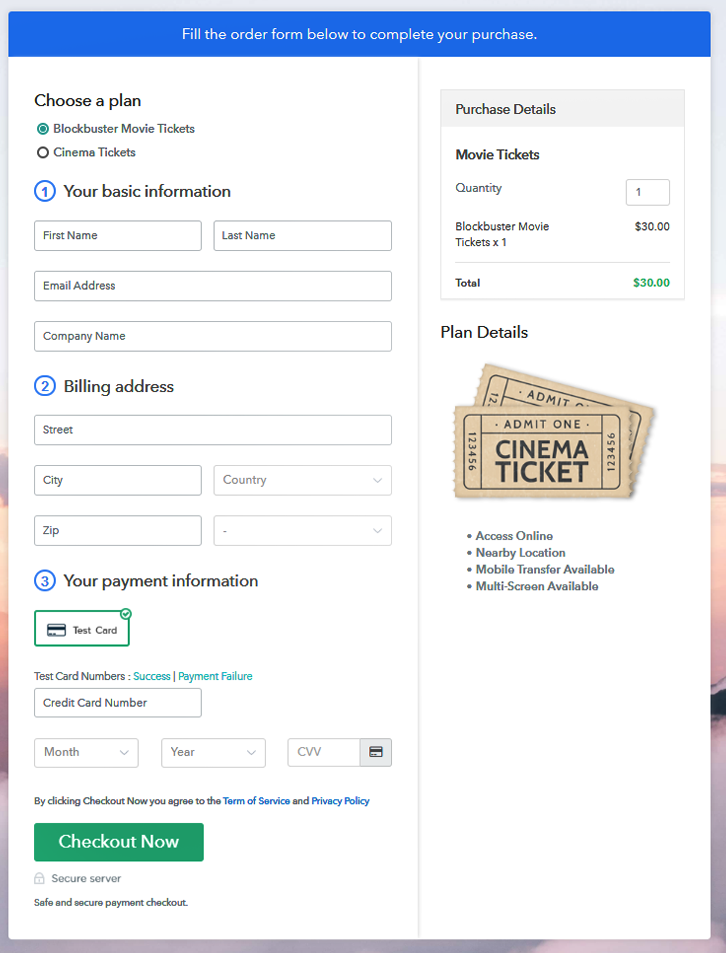
Secure Payment Gateways: This is the most critical technical step. When you proceed to payment, your browser or app initiates a secure connection (HTTPS, indicated by a padlock icon) with the payment gateway. Your payment information (credit card number, expiry date, CVV) is encrypted and transmitted directly to the payment processor, which then communicates with your bank. The platform itself typically does not store your full card details, but rather a tokenized version for future purchases, enhancing security. Technologies like 3D Secure (Verified by Visa, Mastercard SecureCode) add an extra layer of authentication.
-
Confirmation & Digital Ticket Retrieval: Upon successful payment, the system generates a unique booking ID and digital tickets. These are typically sent to your registered email address as a PDF attachment or a link to a mobile-optimized web page. Concurrently, if using an app, the tickets are often added directly to your in-app wallet or to a platform like Apple Wallet or Google Pay, leveraging their native API integrations.
Understanding Digital Tickets and Entry
Your digital ticket is usually a QR code or barcode. At the cinema, you’ll present this code to be scanned by an optical reader or a handheld device used by staff. The scanner reads the unique identifier, which then communicates with the cinema’s ticketing system to verify your purchase and grant entry. Ensure your phone screen brightness is adequate and the code is clearly visible. For printed tickets, the process is identical. Some cinemas even support ticket-less entry by simply scanning the credit card used for purchase or using facial recognition (though less common for public entry).
Enhancing Your Online Ticketing Experience with Tech
Beyond the basic purchase, technology offers numerous ways to optimize and secure your movie-going journey.
Leveraging Mobile Apps for Convenience
Mobile apps extend the utility of online ticketing far beyond the initial purchase.
-
Push Notifications: Receive timely reminders for your showtime, gate changes, or special offers.
-
Loyalty Program Tracking: Monitor your points, rewards, and status directly from the app, often with personalized offers based on your viewing history.
-
In-App Concessions Ordering: Many apps allow you to browse concession menus, place orders, and pay in advance, avoiding lines at the snack bar. You might receive a notification when your order is ready for pickup or even have it delivered to your seat.
-
Digital Wallet Integration: Store your tickets in Apple Wallet or Google Pay, allowing quick access even without an internet connection and consolidating all your digital passes in one place.
Digital Security Best Practices
While online ticketing is generally secure, user vigilance is paramount.
-
Strong, Unique Passwords: Use a complex password for your ticketing accounts, ideally different from other online services, to prevent credential stuffing attacks. Consider using a password manager.
-
Two-Factor Authentication (2FA): If available, enable 2FA. This adds an extra layer of security, requiring a second verification step (e.g., a code sent to your phone) beyond your password.
-
Recognizing Phishing Attempts: Be wary of emails or messages claiming to be from ticketing platforms asking for personal information or urgent password resets. Always check the sender’s email address and the URL of any links before clicking.
-
Ensuring Secure Payment Methods: Always verify that the website URL starts with “https://” and displays a padlock icon in your browser’s address bar before entering payment details. This indicates an encrypted connection.
-
Public Wi-Fi Caution: Avoid making purchases or entering sensitive information over unsecured public Wi-Fi networks, as these can be vulnerable to eavesdropping. Use a VPN if you must transact on public Wi-Fi.
Troubleshooting Common Tech Issues
Even with robust systems, minor glitches can occur. Knowing how to address them can save frustration.
-
Payment Failures: Double-check your card details, expiry date, and sufficient funds. Sometimes, a temporary communication error between your bank and the payment gateway occurs; try again after a few minutes or use an alternative payment method.
-
App Crashes/Freezes: Try force-closing and restarting the app. If the problem persists, clear the app’s cache (in your phone settings) or reinstall it.
-
Ticket Not Received: Check your spam or junk mail folder. If still missing, log into your account on the platform’s website/app to find your purchase history, or contact their customer support immediately, providing your booking reference if you have it.
-
Incorrect Seat Selection: Most platforms have strict no-refund/no-exchange policies, but some may allow changes within a certain window. Contact customer support as soon as you notice the error.

Conclusion
The journey from physical box offices to sophisticated digital ticketing platforms underscores the transformative power of technology in modern life. Buying movie tickets online is no longer just an alternative; it is the dominant, most efficient, and often most rewarding method for accessing cinematic entertainment. By understanding the underlying technological mechanisms, leveraging the advanced features of apps and websites, and adhering to digital security best practices, moviegoers can ensure a seamless, convenient, and secure experience from the moment they decide to see a film until they take their seat. As technology continues to evolve, we can anticipate even more integrated, personalized, and immersive ways to connect with the magic of the movies, solidifying the digital ticket as an indispensable component of the modern entertainment landscape.
aViewFromTheCave is a participant in the Amazon Services LLC Associates Program, an affiliate advertising program designed to provide a means for sites to earn advertising fees by advertising and linking to Amazon.com. Amazon, the Amazon logo, AmazonSupply, and the AmazonSupply logo are trademarks of Amazon.com, Inc. or its affiliates. As an Amazon Associate we earn affiliate commissions from qualifying purchases.