
In the contemporary financial landscape, the physical bank branch is no longer the primary touchpoint for the average consumer. Instead, the smartphone has become the central hub for managing wealth, overseeing expenses, and executing complex transactions. As digital banking matures, the Wells Fargo mobile app has evolved into a robust financial tool designed to provide users with immediate access to their most sensitive and necessary data. Among the most critical pieces of information any depositor needs is their bank account number. Whether you are setting up a direct deposit for a new career opportunity, linking a high-yield savings account to a brokerage firm, or establishing an automated bill-pay system, knowing exactly where to find your account and routing numbers within the app is a fundamental skill in modern personal finance management.
The Evolution of Digital Banking and Account Accessibility
The transition from traditional paper-based banking to a digital-first model has fundamentally changed how we interact with our money. In the past, finding an account number required locating a physical checkbook or waiting for a monthly statement to arrive in the mail. Today, the Wells Fargo mobile app serves as a real-time ledger that prioritizes both accessibility and security.
Why the Account Number Remains Essential
Despite the rise of peer-to-peer payment platforms like Zelle or Venmo, the traditional bank account number remains the bedrock of the global financial system. It is the unique identifier that ensures funds are routed correctly through the Automated Clearing House (ACH) network. For individuals focusing on building wealth, the account number is the “address” for their capital. When you move money into an Individual Retirement Account (IRA) or fund a side hustle’s business account, the precision of these digits is non-negotiable. Misplacing a single digit can result in delayed payments or, in some cases, the misrouting of significant sums of money.
Transitioning from Paper Statements to Mobile Apps
Many users are moving toward a paperless lifestyle to reduce clutter and enhance their digital security. Paper statements, while informative, can be a liability if stolen or improperly discarded. By moving these functions into the Wells Fargo app, users gain the ability to retrieve their account information on demand, anywhere in the world. This shift is not just about convenience; it is a strategic move toward better financial organization. Having your account details at your fingertips allows for more agile financial decision-making, such as quickly taking advantage of a limited-time investment opportunity or resolving a payment discrepancy on the fly.
Step-by-Step Guide: Accessing Your Details on the Wells Fargo App
Navigating a high-functioning banking app requires a basic understanding of user interface (UI) design focused on security. Wells Fargo hides sensitive information like account numbers behind several layers of authentication to protect users. Following these steps ensures you find the information quickly while maintaining the integrity of your account.
Navigating the Dashboard
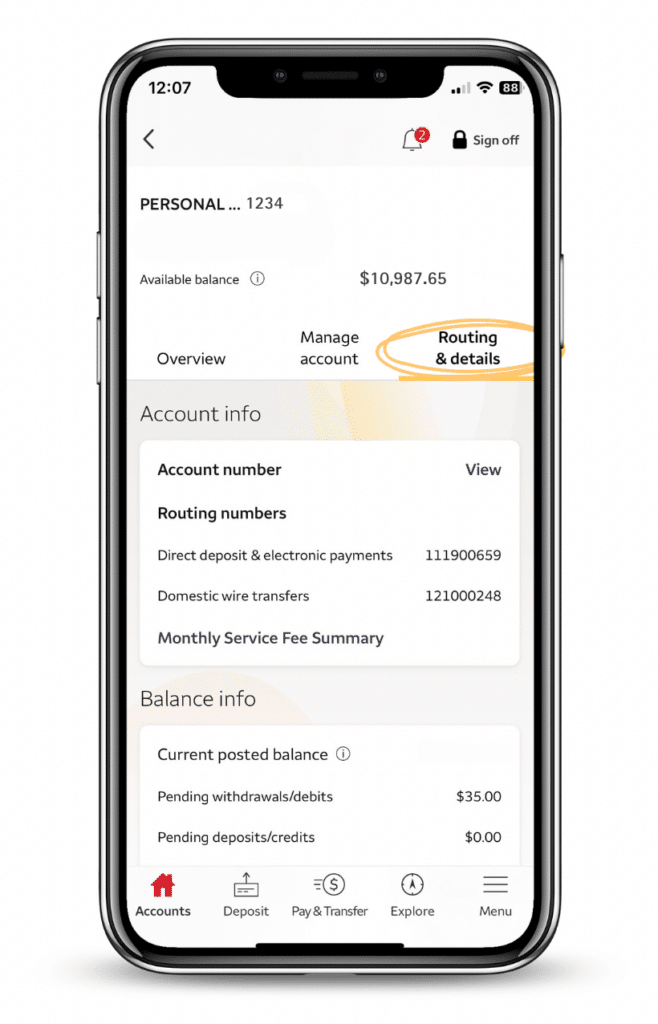
Upon opening the Wells Fargo app and completing the biometric or passcode authentication, you are greeted with the primary dashboard. This screen provides a bird’s-eye view of your financial health, displaying balances across checking, savings, and credit accounts. To find a specific account number:
-
Tap on the specific account (e.g., “Everyday Checking”) you wish to view.
-
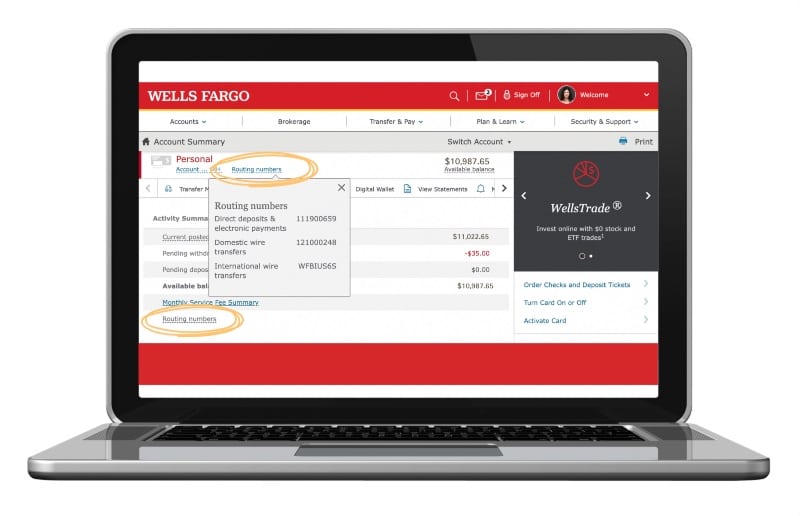
Once the account-specific screen opens, look for a tab or link titled “Routing & Account Numbers.”
-
On many versions of the app, this is located near the top of the screen, just below the current balance.
-
For security, the app may only show the last four digits initially. You will likely need to tap a “View” or “Show” icon (often represented by an eye symbol) to reveal the full string of numbers.
Locating the Routing Number vs. Account Number
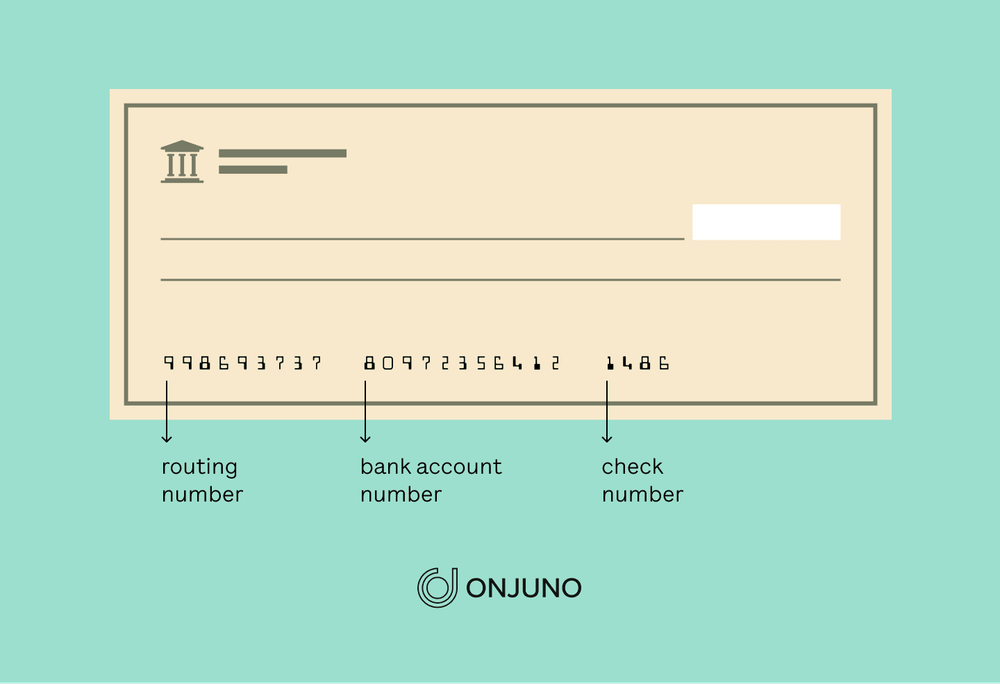
It is a common mistake in personal finance to confuse the routing number with the account number. The Wells Fargo app clearly delineates these two. The routing number is a nine-digit code that identifies the specific financial institution—in this case, Wells Fargo—and the region where the account was opened. The account number is your unique identifier within that institution. When setting up a direct deposit, you will almost always need both. The app typically displays the routing numbers for “Direct Deposit” and “Wires” separately, as these can sometimes differ depending on the type of transaction you are initiating.
Security Protocols and Protecting Your Financial Information
When you access your account number via a mobile device, you are handling highly sensitive data. In the realm of personal finance, your account number is as valuable as your Social Security number to a motivated fraudster. Therefore, understanding the security features of the Wells Fargo app is just as important as knowing how to navigate it.
The Importance of Biometric Security
Wells Fargo utilizes advanced biometric authentication, including Face ID and fingerprint scanning. From a financial security perspective, these are far superior to traditional passwords, which can be guessed or compromised through data breaches. It is highly recommended that users enable these features to ensure that even if a mobile device is lost or stolen, the “vault” containing the account numbers remains locked. Furthermore, the app is designed to time out after a short period of inactivity, adding another layer of protection for your financial data.
Avoiding Common Phishing Scams Related to Banking Data
A key aspect of digital financial literacy is recognizing that your bank will never ask you to provide your full account number via a text message or an unsolicited phone call. Fraudsters often pose as bank representatives claiming there is an “issue” with your account to trick you into revealing these details. By knowing how to find your account number securely within the official Wells Fargo app, you empower yourself to ignore these phishing attempts. If you ever need to verify your account details for a legitimate reason, always go directly to the source—the app—rather than following links sent via SMS or email.
Maximizing the Wells Fargo Mobile App for Financial Management
Beyond simply locating an account number, the Wells Fargo app serves as a comprehensive suite for financial planning and capital management. Understanding how to leverage these tools can lead to better budgeting, more consistent saving, and a clearer understanding of your net worth.
Integrating with Third-Party Budgeting Tools
For those who use external financial tools like Mint, YNAB (You Need A Budget), or Personal Capital, you will often be prompted to link your Wells Fargo account. While these apps often use secure API connections (like Plaid), there are times when you may need to manually enter your account and routing numbers to establish a connection. Doing so allows you to aggregate your data, giving you a holistic view of your spending patterns and investment growth. This high-level oversight is essential for anyone looking to optimize their cash flow and move toward financial independence.
Setting Up Transaction Alerts and Monitoring
Once you have located your account details and established your digital presence, the next step in proactive money management is setting up alerts. The Wells Fargo app allows users to customize notifications for every transaction, deposit, or low-balance event. This turns your phone into a real-time monitor for your wealth. If an unauthorized transaction occurs because your account number was compromised elsewhere, you will know instantly, allowing you to freeze the account and mitigate financial damage. This level of responsiveness is one of the greatest advantages of modern digital banking.
Troubleshooting and Customer Support for Mobile Banking
Despite the intuitive design of modern apps, users may occasionally encounter hurdles when trying to access their financial data. Technical glitches, app updates, or account restrictions can sometimes hide the information you are looking for.
If you find that the “Routing & Account Numbers” section is not appearing, first ensure that your app is updated to the latest version available in the App Store or Google Play Store. Developers frequently release patches to improve security and fix UI bugs. If the issue persists, the Wells Fargo app includes a “Contact Us” feature that allows for secure messaging or a direct line to customer service. From a financial management standpoint, it is always better to contact the bank directly through the secure app environment than to search for support numbers on third-party websites, which may lead to fraudulent “help desks.”
In conclusion, the ability to find and utilize your account number within the Wells Fargo app is more than just a technical skill; it is a component of modern financial proficiency. In an era where “time is money,” the efficiency provided by mobile banking allows you to manage your assets with precision and speed. By following secure protocols and understanding the layout of your digital banking tools, you can ensure that your financial foundation remains both accessible to you and impenetrable to others. As you continue to grow your wealth and manage your personal finances, let the digital tools at your disposal act as the bridge between your goals and their execution.
aViewFromTheCave is a participant in the Amazon Services LLC Associates Program, an affiliate advertising program designed to provide a means for sites to earn advertising fees by advertising and linking to Amazon.com. Amazon, the Amazon logo, AmazonSupply, and the AmazonSupply logo are trademarks of Amazon.com, Inc. or its affiliates. As an Amazon Associate we earn affiliate commissions from qualifying purchases.