
Tax season often brings a sense of trepidation to the average taxpayer. The complexity of the internal revenue code, the fear of an audit, and the stress of potentially missing out on a significant refund make it one of the most demanding periods of the financial year. However, the evolution of financial technology has streamlined this process significantly. TurboTax, the market leader in tax preparation software, has transformed the way millions of individuals and small business owners approach their annual filing. Using TurboTax effectively requires more than just clicking through prompts; it requires a strategic understanding of how the software categorizes income, identifies deductions, and secures your financial data.
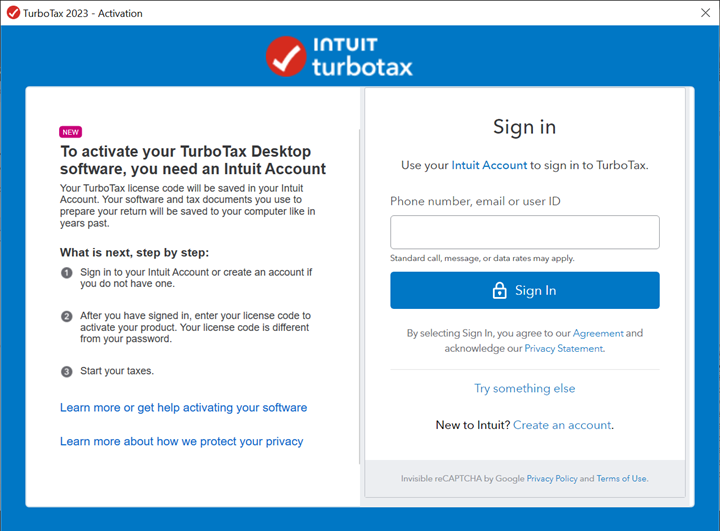
Navigating the TurboTax Ecosystem: Choosing the Right Version
The first step in using TurboTax is selecting the version that aligns with your specific financial situation. Unlike a “one size fits all” paper form, TurboTax is tiered based on the complexity of your income streams and your financial goals. Making the right choice at the onset ensures you don’t overpay for features you don’t need, or conversely, miss out on critical schedules for your investments.
Free Edition vs. Deluxe and Premier
For those with a simple tax situation—typically defined by W-2 income, standard deductions, and limited interest income—the Free Edition is the entry point. However, as your financial portfolio grows, so does the need for more robust software. The Deluxe version is designed for those seeking to maximize itemized deductions, such as mortgage interest or charitable donations.
If your wealth strategy includes a diverse portfolio of stocks, bonds, or cryptocurrency, the Premier version becomes essential. This tier is programmed to handle the nuances of capital gains and losses, providing automated imports from major brokerage firms. By using the Premier tier, you ensure that complex cost-basis calculations are handled accurately, reducing the risk of manual entry errors that could trigger a red flag with tax authorities.
Self-Employed and Business Solutions
For entrepreneurs, freelancers, and small business owners, the Self-Employed version is the gold standard. This version is tailored to handle Schedule C, allowing you to track business expenses, home office deductions, and vehicle mileage. In an era where side hustles and the gig economy are central to personal finance, this version provides the necessary tools to separate personal spending from professional overhead, ensuring that every legitimate business expense is leveraged to lower your overall tax liability.
The Step-by-Step Workflow: From Data Import to E-filing
Once you have selected the appropriate software tier, the process of using TurboTax follows a logical, interview-style progression. This design is intentional; it is meant to mimic a conversation with a professional tax preparer, breaking down a massive task into manageable modules.
Aggregating Your Financial Documents
Before you even open the application, your success depends on organization. Using TurboTax effectively starts with the “Digital Import” phase. One of the platform’s most powerful features is its ability to link directly with financial institutions. Instead of manually typing in every box from your W-2 or 1099-INT, you can often sign in to your payroll provider or bank through the TurboTax interface. This not only saves hours of labor but also eliminates the “fat-finger” errors that frequently lead to discrepancies.
The Guided Interview Process
The core of the TurboTax experience is the guided interview. The software will ask a series of questions about your life changes—did you get married, have a child, buy a home, or start a business? These questions are not merely administrative; they are the logic gates that determine which tax credits and deductions you qualify for. It is vital to answer these questions with total transparency. The software uses these answers to build your unique tax profile, ensuring that only relevant sections are presented to you, which streamlines the user experience and focuses your attention on the most impactful financial areas.
Maximizing Deductions and Credits
As you move through the “Deductions & Credits” tab, the software performs a real-time analysis of your tax liability. This is the stage where you refine your financial outcomes. TurboTax will walk you through common deductions like student loan interest, educator expenses, and energy-efficient home improvements. For those in higher tax brackets, the software helps navigate the phase-outs of certain credits, providing a clear picture of how your adjusted gross income (AGI) affects your final bottom line. The real-time refund (or balance due) tracker at the top of the screen provides immediate feedback on how each entry impacts your wealth.

Advanced Features for Complex Financial Portfolios
For the sophisticated investor or the property owner, using TurboTax involves navigating more complex financial landscapes. The software has integrated high-level fintech tools to handle the modern digital economy, particularly regarding alternative assets and passive income.
Handling Cryptocurrency and Stock Trades
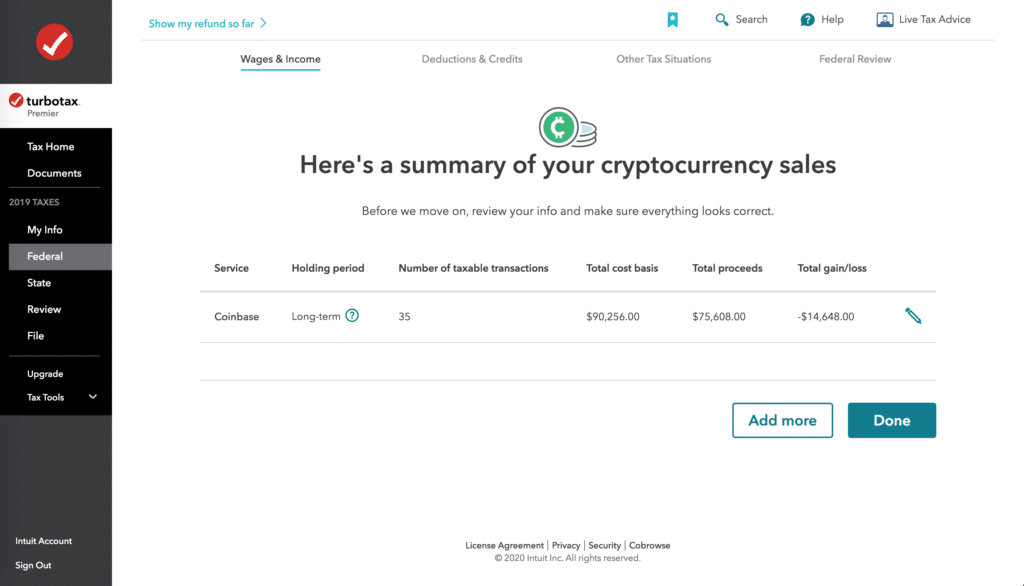
The rise of digital assets has added a layer of complexity to personal finance. TurboTax addresses this by allowing for the bulk import of thousands of transactions from crypto exchanges. When you use the software to process these trades, it automatically calculates the holding periods to distinguish between short-term and long-term capital gains, which are taxed at significantly different rates. This level of automation is a critical component of modern wealth management, ensuring that you remain compliant with evolving IRS regulations regarding virtual currencies.
Rental Property and Small Business Management
If you own real estate, TurboTax provides dedicated modules for rental income and expenses (Schedule E). This includes the ability to calculate depreciation—a powerful non-cash expense that can significantly reduce your taxable income. The software guides you through the process of determining the “basis” of your property and helps you track improvements versus repairs. For small business owners, the software provides a framework for managing 1099-NEC forms for contractors and assists in calculating the Qualified Business Income (QBI) deduction, which can offer a 20% reduction in taxable business income for eligible entities.
Quality Control: Error Checking and Audit Support
The final stages of using TurboTax are dedicated to risk mitigation. Even a perfectly prepared return can be subject to scrutiny, and the software includes several layers of defense to protect your financial standing.
The TurboTax Guarantee and Review Tools
Before you file, the software runs a comprehensive “Smart Check” or “CompleteCheck.” This is a programmatic scan of your entire return, looking for missing signatures, mathematical inconsistencies, or “outlier” data that might trigger an IRS audit. This feature is a cornerstone of the platform’s value proposition in the realm of personal finance software. By identifying these issues before the data is transmitted, you avoid the administrative headache of filing an amended return (Form 1040-X) later in the year.
Professional Human Review (TurboTax Live)
For those who want the convenience of software but the security of a human expert, the “Live” feature allows you to connect with a CPA or Enrolled Agent. You can share your screen and have a professional review your work line-by-line. This hybrid approach is particularly useful for those transitioning from a traditional accountant to a digital-first strategy. It provides a “safety net” for complex financial decisions, such as determining the tax implications of a large inheritance or a complex corporate buyout.
Finalizing Your Return: Payment, E-Filing, and Storage
The final phase of the TurboTax process is the execution. This is where your preparation turns into a finalized legal filing and where your financial planning for the next year begins.
Receiving Your Refund and Paying Taxes Due
TurboTax offers various methods for receiving your refund, with direct deposit being the most efficient for your liquidity. Conversely, if you owe money, the software allows you to schedule a payment directly from your bank account or via a credit card. From a personal finance perspective, this is a moment for reflection: if your refund is exceptionally large, it might be an indication that you are over-withholding, essentially giving the government an interest-free loan. TurboTax often provides tools to help you adjust your W-4 for the upcoming year to better optimize your monthly cash flow.
Record Keeping for Future Fiscal Health
Once your return is e-filed and accepted by the IRS and your state’s department of revenue, TurboTax provides a secure digital repository for your documents. It is a best practice in financial management to keep at least seven years of tax records. By using the software’s cloud storage or downloading a comprehensive PDF package that includes all worksheets and calculations, you create a robust audit trail. This documentation is not only vital for potential IRS inquiries but is also essential when applying for mortgages, business loans, or other major financial instruments where proof of income is a prerequisite.
Ultimately, using TurboTax is about more than just fulfilling a legal obligation; it is an exercise in financial literacy. By engaging with the software, you gain a deeper understanding of how your income, investments, and lifestyle choices interact with the tax code, allowing you to make more informed financial decisions throughout the rest of the year.
aViewFromTheCave is a participant in the Amazon Services LLC Associates Program, an affiliate advertising program designed to provide a means for sites to earn advertising fees by advertising and linking to Amazon.com. Amazon, the Amazon logo, AmazonSupply, and the AmazonSupply logo are trademarks of Amazon.com, Inc. or its affiliates. As an Amazon Associate we earn affiliate commissions from qualifying purchases.