
Managing your digital footprint has become an increasingly critical aspect of modern life. As financial technologies evolve, the array of apps and services we use for transactions, investments, and budgeting proliferates. Venmo, a popular peer-to-peer payment platform, is often a staple in many users’ digital wallets. However, there come times when a user might decide to streamline their digital life, consolidate services, or simply move on from an application. Deleting a Venmo account is a straightforward process, but it requires careful execution to ensure all digital assets are properly handled and personal data is managed responsibly. This guide provides a comprehensive technical walkthrough for securely closing your Venmo account, focusing on the procedural steps and underlying digital security considerations.
Navigating Your Digital Exit: Why Consider Deleting Venmo?
Before diving into the mechanics of account deletion, understanding the technical and security rationale behind such a decision is paramount. Deleting an unused or unwanted application like Venmo isn’t just about freeing up storage space; it’s a proactive step in managing your overall digital security posture and data privacy.
Data Privacy and Digital Footprint Management
Every online account, especially those handling financial transactions, contributes to your digital footprint. This footprint encompasses all the data you generate and share across the internet. An active, even if dormant, Venmo account stores personal identifiable information (PII), transaction history, linked bank accounts, and potentially more. While Venmo, like other reputable financial platforms, employs robust security measures, the sheer existence of an account creates a potential vector for data exposure. Deleting an account reduces the amount of personal data circulating online, minimizing the risk should a data breach occur on any platform or if your associated login credentials (e.g., email address) are compromised elsewhere. It’s a proactive measure to control who holds your data and for how long.
Security Posture for Inactive Accounts
Inactive accounts, paradoxically, can pose a greater security risk than actively monitored ones. Users often neglect to update passwords for dormant accounts or may reuse credentials that have been exposed in other breaches. An attacker targeting an inactive Venmo account might exploit weaker security practices, leading to unauthorized access, identity theft, or fraudulent transactions. By deleting the account, you eliminate this potential attack surface entirely. It removes a target that could otherwise be leveraged by malicious actors.
Streamlining Your App Ecosystem
From a purely technical perspective, managing a multitude of apps can lead to digital fatigue and inefficiencies. Each app requires updates, consumes device resources, and generates notifications. By consciously curating your app ecosystem, you can improve device performance, reduce mental overhead, and focus on the tools that genuinely serve your needs. Deleting Venmo, if it’s no longer actively used, contributes to a cleaner, more efficient digital environment, simplifying your overall digital security management by reducing the number of applications you need to monitor and secure.
Essential Technical Preparations Before Account Closure
The process of deleting a Venmo account is irreversible in terms of the specific account instance and its associated data. Therefore, several critical technical preparations must be undertaken to ensure a smooth transition and prevent any loss of funds or vital information.
Securing Your Funds
The most crucial step before initiating account deletion is to ensure that your Venmo balance is zero. Any remaining funds in your Venmo account must be transferred to a linked bank account. This typically involves navigating to the “Transfer to Bank” option within the Venmo app. Be aware of the standard transfer times (usually 1-3 business days for a standard transfer, with an instant transfer option often incurring a small fee). Do not proceed with deletion until the transfer is fully completed and verified in your bank account, as you will lose access to these funds once the account is closed.
Archiving Transaction Data
Venmo’s terms of service and financial regulations may mean that certain transaction data is retained by the company even after account deletion. However, from a user’s perspective, having a personal record of your transaction history is invaluable for tax purposes, budgeting, or dispute resolution. Venmo typically allows users to download their transaction history as a CSV file. Access this feature within your account settings on the Venmo website (usually under statements or transaction history). If this option isn’t readily available, consider taking screenshots of critical transactions or summarizing key data points. Ensure this archiving is completed before you lose access to your account.
Disconnecting Linked Payment Methods
Before closing your account, it is imperative to unlink all associated payment methods – bank accounts, debit cards, and credit cards. This is a vital digital security measure. Even though the account will be deleted, explicit disconnection adds an extra layer of protection, preventing any residual links or potential future issues. Navigate to the “Payment Methods” section within your Venmo settings and manually remove each linked card and bank account. Confirm that these methods show as “unlinked” before proceeding.
Notifying Peer-to-Peer Contacts
While not a direct technical step for account deletion, informing frequent contacts of your intention to delete your Venmo account is a practical measure. This prevents failed payment attempts or confusion among your network. Consider sending a brief message through another communication channel, informing them that you will no longer be available on Venmo and suggesting alternative payment methods if necessary.
The Step-by-Step Technical Process to Delete Your Venmo Account
Once all preparatory steps are complete, you can proceed with the actual deletion of your Venmo account. This process is typically initiated via the Venmo website rather than solely through the mobile app, as more robust account management features are often reserved for the web interface.
Accessing Account Settings

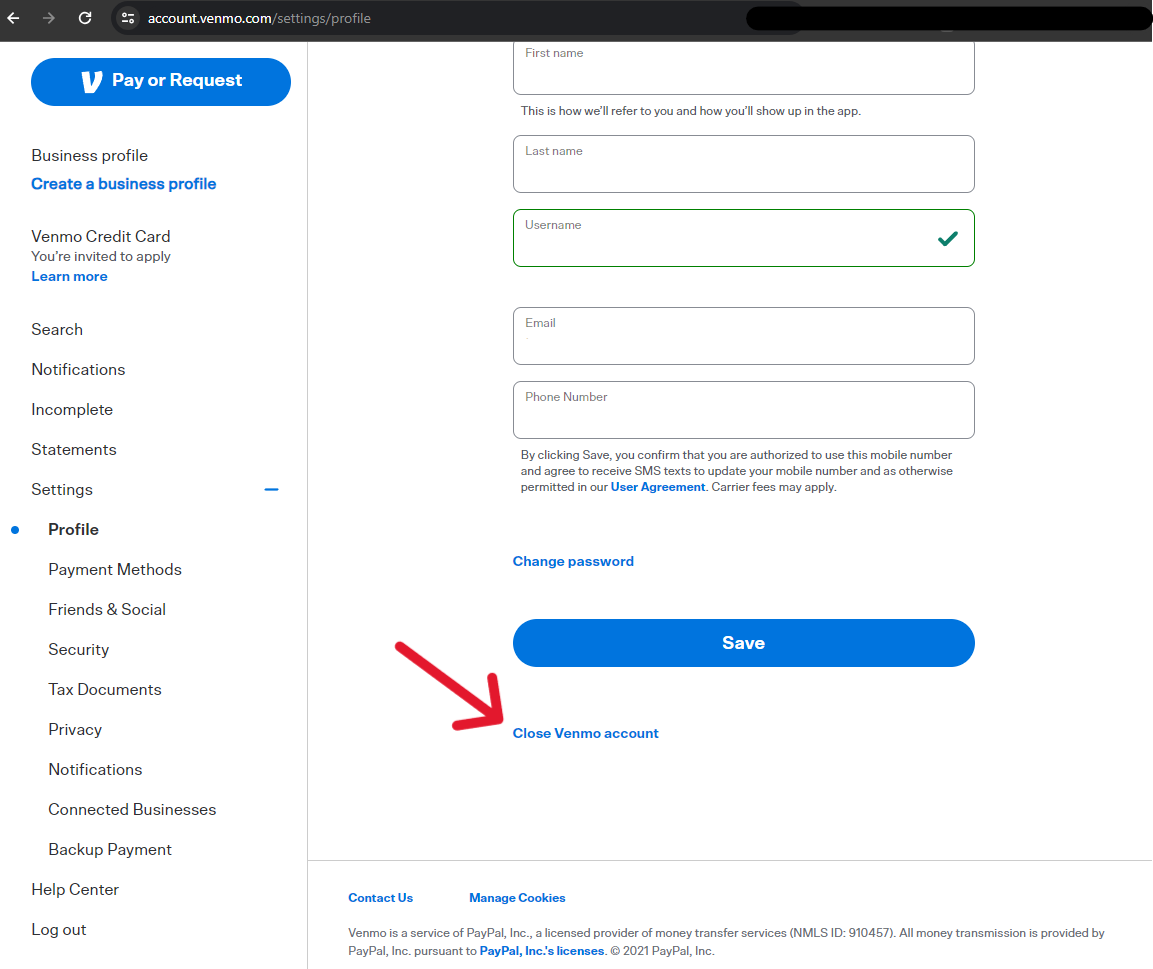
Begin by logging into your Venmo account through a web browser on a desktop or laptop computer. While some mobile apps offer limited account closure options, the full process is usually more reliably completed on the web. Once logged in, navigate to your account settings. This is typically found by clicking on your profile picture or name, then selecting “Settings” or “Account” from the dropdown menu.
Initiating Deletion
Within the settings menu, look for a section related to “Privacy,” “Security,” “Profile,” or “Account Management.” The exact label can vary, but you are searching for an option that references closing, deleting, or deactivating your account. Once located, click on the “Close my Venmo Account” or similar link. Venmo will likely present you with a series of prompts and warnings. These often include:
-
A confirmation that your balance is zero.
-
A reminder that the action is irreversible.
-
A request for a reason for deletion (this data helps Venmo improve its services but is usually optional for you to provide).
Carefully read these prompts. Do not rush through them.
Confirmation and Verification
To proceed, Venmo will typically require you to re-enter your password or complete a security verification step, such as entering a code sent to your registered phone number or email address. This ensures that the account holder, not an unauthorized third party, is initiating the deletion. After successful verification, you will confirm your decision to delete the account. You should receive a final confirmation message on screen and/or via email indicating that your account has been successfully closed.
Troubleshooting Common Issues
If you encounter issues during deletion, such as an inability to close the account due to a pending transaction or an uncleared balance, you will need to resolve these technical impediments first. Contact Venmo’s customer support immediately if you face persistent problems. They can provide specific guidance and potentially manually assist with account closure after verifying your identity. Do not attempt workarounds that might compromise your account security.
Post-Deletion Data Implications and Digital Security
Deleting your Venmo account is a significant step, but it’s essential to understand what “deletion” truly means in the context of digital services and data retention.
Understanding Data Retention Policies
While your active access to the Venmo service ceases upon deletion, it does not necessarily mean all your data is immediately wiped from Venmo’s servers. Financial institutions, including payment services like Venmo, are often legally obligated to retain certain transaction records and user data for specific periods to comply with anti-money laundering (AML) regulations, tax laws, and other financial regulations. Venmo’s privacy policy will outline their data retention practices. This retention is typically for a fixed period (e.g., 5-7 years) and is for regulatory compliance, not for ongoing use of your data. The data becomes inactive and inaccessible to you but may exist in Venmo’s archives.
Impact on Linked Services and Apps
If your Venmo account was linked to other third-party applications for purchases or subscriptions (e.g., certain e-commerce sites, food delivery services), deleting your Venmo account will sever these connections. It is your responsibility to update your payment methods in these external services to prevent disruptions or failed payments. Verify that Venmo is no longer listed as an active payment option in any linked apps.
Reinstatement Possibilities (or Lack Thereof)
Once a Venmo account is formally deleted, it is typically considered permanently closed and cannot be reopened or reinstated. If you decide to use Venmo again in the future, you will likely need to create an entirely new account, which involves setting up a new profile, linking new payment methods, and rebuilding your transaction history from scratch. This reinforces the importance of the preparatory steps and being certain about your decision to delete.
Best Practices for Digital Payment App Management
Beyond the immediate task of deleting Venmo, adopting broader best practices for managing all your digital payment applications is crucial for maintaining robust digital security and efficient financial management.
Regular Security Audits
Periodically review all the digital payment apps and financial services you use. Check for unused accounts, examine linked devices, and review security settings (e.g., connected third-party apps, two-factor authentication status). Deleting unused accounts like Venmo should be part of this regular audit process. This proactive approach ensures you are aware of your entire financial app ecosystem and can quickly identify and address potential vulnerabilities.
Strong Authentication Protocols
For all active financial apps, always utilize strong, unique passwords that are not reused across multiple services. Furthermore, enable two-factor authentication (2FA) wherever available. 2FA adds a critical layer of security by requiring a second form of verification (e.g., a code from your phone) in addition to your password, significantly reducing the risk of unauthorized access even if your password is compromised.

Informed Consent and Data Sharing
Before signing up for any new digital payment platform, take the time to read and understand its privacy policy and terms of service. Pay close attention to how your data is collected, stored, shared, and what options you have for data management and account deletion. Making informed decisions about which apps to integrate into your financial life is a cornerstone of responsible digital citizenship and personal data protection. By being mindful of these practices, you can navigate the complex landscape of digital payments with greater confidence and security.
aViewFromTheCave is a participant in the Amazon Services LLC Associates Program, an affiliate advertising program designed to provide a means for sites to earn advertising fees by advertising and linking to Amazon.com. Amazon, the Amazon logo, AmazonSupply, and the AmazonSupply logo are trademarks of Amazon.com, Inc. or its affiliates. As an Amazon Associate we earn affiliate commissions from qualifying purchases.