
The Foundation of Financial Fluidity: Why Link Your Debit Card?
In an increasingly digital economy, managing personal finances often involves leveraging powerful mobile applications. Cash App stands out as a prominent financial tool, facilitating peer-to-peer payments, investing, and even basic banking services. At the core of unlocking its full potential lies the essential step of linking a debit card. This seemingly simple action transforms Cash App from a mere messaging service into a robust financial instrument, providing a secure conduit between your traditional bank account and the expedited world of digital transactions. Understanding why this link is crucial illuminates its value in modern financial management.
Unlocking Core Cash App Financial Features
Without a linked debit card, Cash App’s functionality is severely limited. While you might be able to receive funds, sending money, making payments to businesses, or accessing your funds instantly becomes impossible or cumbersome. A linked debit card is the primary gateway for adding money to your Cash App balance, directly drawing funds for payments, and even facilitating immediate transfers to your bank account. This connectivity is vital for anyone who relies on quick, seamless financial interactions. It underpins the ability to pay friends back for dinner, send money to family in an emergency, or even manage small business transactions efficiently.
Streamlining Everyday Transactions and Budgeting
Linking a debit card streamlines your daily financial interactions. Instead of logging into your bank’s app or visiting an ATM, you can instantly initiate transfers or make payments directly from your Cash App. This immediacy not only saves time but also offers a clearer picture of your spending habits within a single application, which can be invaluable for personal budgeting. By centralizing certain categories of spending or transfers through Cash App, users can gain better control over their outflows, making it easier to track peer-to-peer transactions or specific online purchases. This level of integration supports a more agile and responsive approach to managing your everyday cash flow.
The Role of Debit Cards in Digital Wallets
Debit cards are the backbone of most digital wallet ecosystems. They represent a direct link to your primary checking account, providing a reliable and universally accepted method for funding various online platforms. For Cash App, the debit card functions as the primary source of funds for outgoing payments when your Cash App balance is insufficient, or when you prefer to draw directly from your bank. Unlike credit cards, which involve borrowing, debit cards tap into existing funds, promoting responsible spending habits. This integration underscores the debit card’s enduring importance in bridging the gap between traditional banking infrastructure and the innovative financial tools of the digital age.
A Secure Path to Connection: Step-by-Step Linking Process
Linking your debit card to Cash App is a straightforward process designed with user-friendliness and security in mind. However, understanding each step ensures a smooth connection and helps safeguard your financial information. Proper preparation and attention to detail are key to successfully integrating your primary payment method into this popular financial application.
Pre-Linking Financial Checklist
Before you begin the linking process, ensure you have a few things ready. First, you’ll need your physical debit card handy, as you’ll input the 16-digit card number, expiration date (MM/YY), and the 3-digit CVV (Card Verification Value) code from the back. Confirm that your debit card is active and associated with a valid checking account that has sufficient funds or is in good standing. Cash App generally supports major debit cards from Visa, MasterCard, American Express, and Discover. Prepaid cards or ATM-only cards are typically not accepted for linking, as they lack the necessary bank account association and network features for seamless transactions. Additionally, ensure your Cash App account is fully set up, including your name, email, or phone number, as this information contributes to the security verification process.
Navigating the Cash App Interface for Card Integration
The process begins within the Cash App itself:
-
Open Cash App: Launch the application on your smartphone.
-
Access Banking Tab: Look for the “Banking” tab, often represented by a house icon or a bank building icon at the bottom of the screen. Tap on it.
-
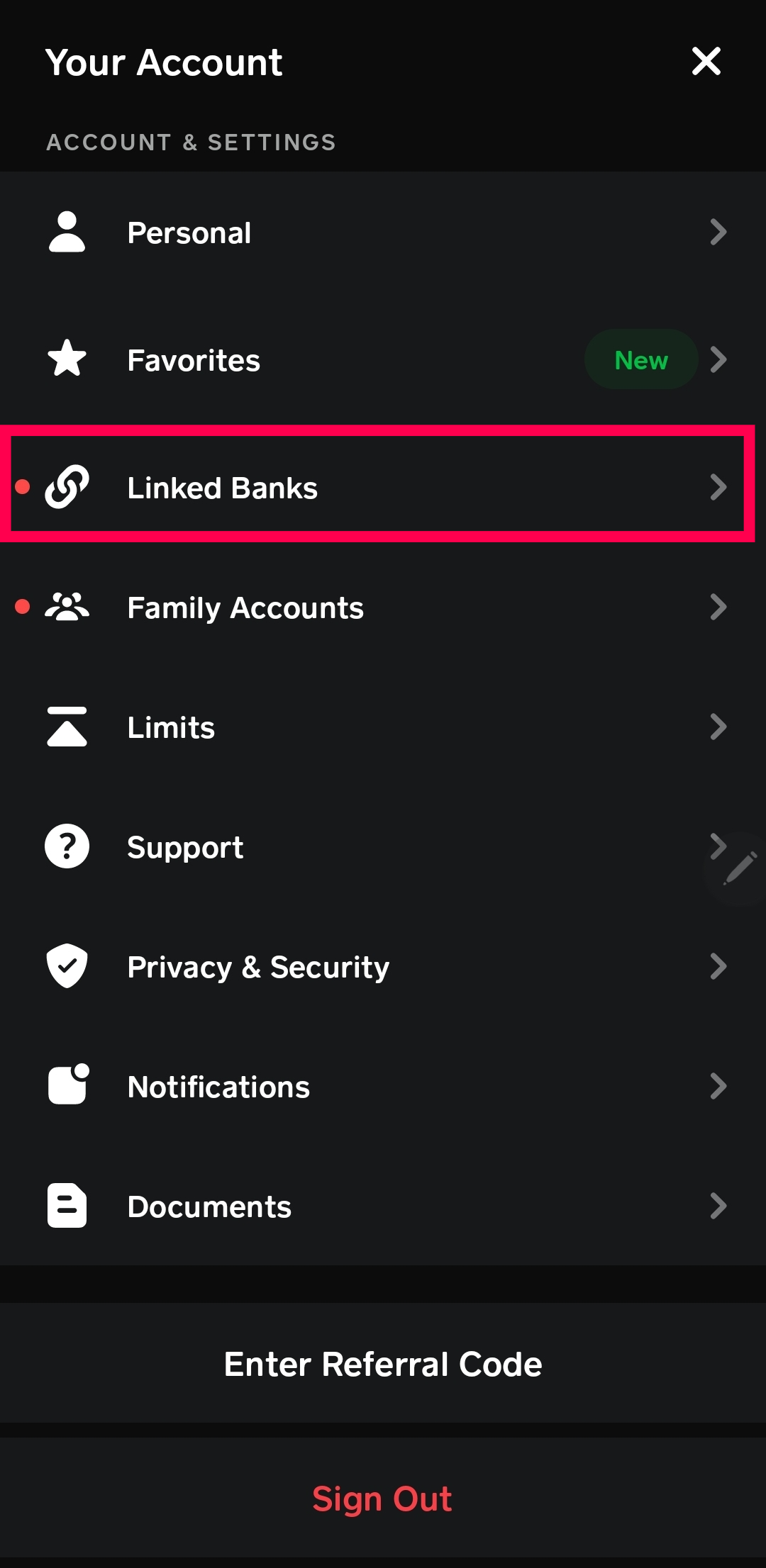
Link Bank Option: Within the Banking section, you will usually see an option like “Link Bank,” “Add Bank,” or “Link Debit Card.” Tap this option.
-
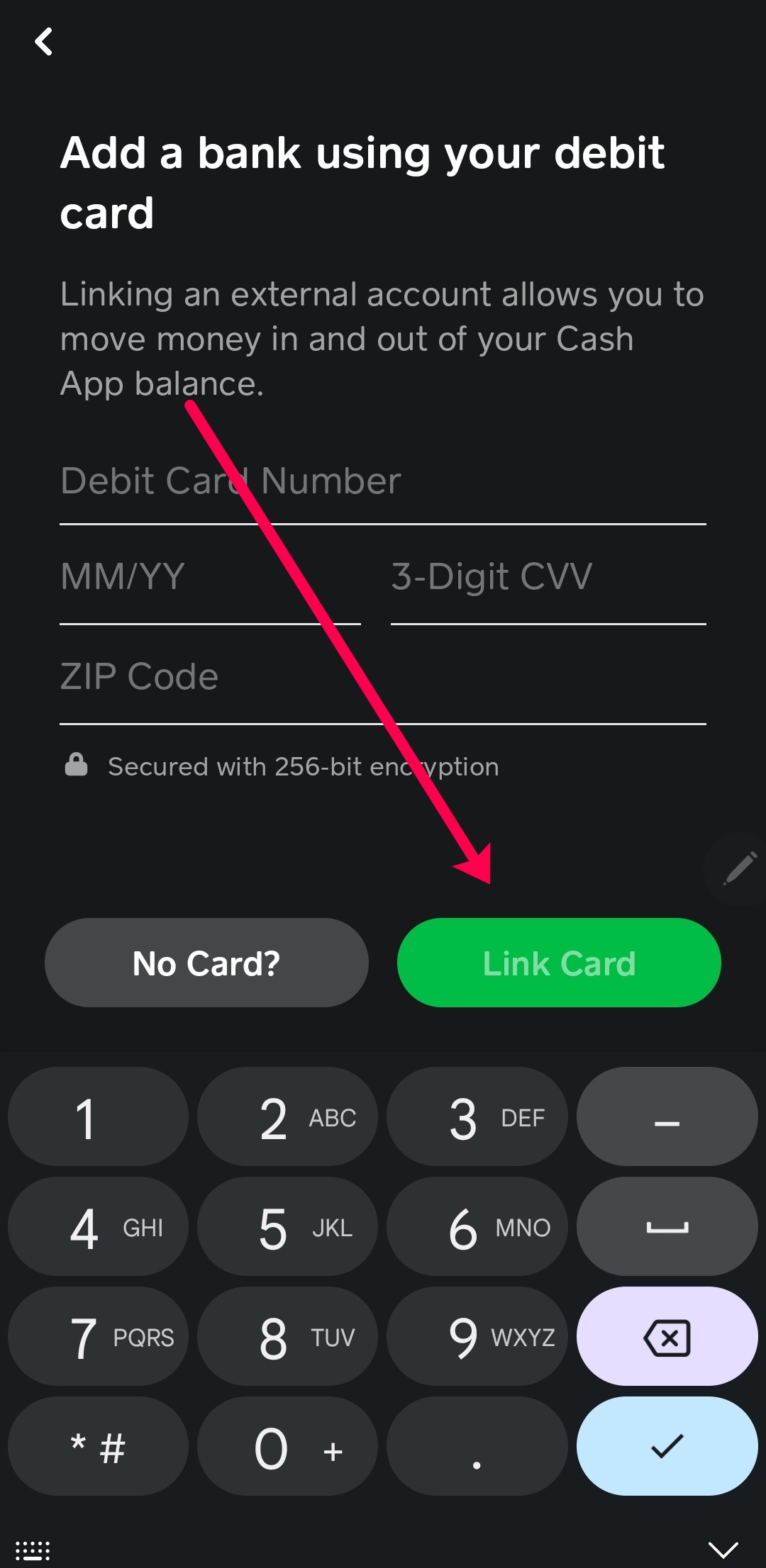
Enter Debit Card Details: You will be prompted to manually enter your debit card information. Carefully type in the 16-digit card number, the expiration date (month and year), and the 3-digit CVV code. Double-check for any typos, as incorrect information will lead to a failed link.
-
Confirm Information: After entering the details, tap “Link Card” or a similar confirmation button.
The Verification Process: Ensuring Financial Security
Upon entering your card details, Cash App typically initiates a quick verification process to confirm the card’s legitimacy and your ownership. This often involves:
-
Small Temporary Debits: Cash App may make one or two small, temporary charges (often less than $1) to your bank account. These are usually reversed within a few business days. The purpose is to verify that the account linked to the debit card is active and accessible.
-
Security Code Input (Less Common): In some cases, especially if there are initial issues, Cash App might ask you to confirm the exact amounts of these temporary debits. You would need to check your bank statement or online banking to find these micro-transactions and input the amounts into Cash App.
-
Instant Verification (Plaid Integration): Increasingly, financial apps like Cash App use third-party services like Plaid to instantly verify bank accounts. This involves securely logging into your online banking portal through Cash App’s interface. While this method links your bank account directly, a debit card link is often still the preferred or supplementary method for direct funding and immediate withdrawals.
Once these steps are completed and verification is successful, your debit card will be securely linked to your Cash App account, ready for transactions. You will usually receive an in-app confirmation message.
Beyond Basic Transfers: Leveraging Your Linked Card for Broader Financial Goals
Linking a debit card to Cash App extends far beyond simple peer-to-peer payments. It transforms the application into a versatile financial hub, enabling users to manage their money with greater flexibility and even explore avenues for growth. Understanding these expanded capabilities is key to maximizing the financial utility of your Cash App integration.
Instant Access to Funds and Faster Payments
One of the most significant advantages of a linked debit card is the ability to send and receive money almost instantly. Unlike traditional bank transfers that can take 1-3 business days, Cash App’s instant transfer feature, directly supported by your debit card, allows funds to move within seconds. This is invaluable for time-sensitive payments, splitting bills with friends, or quickly paying for services. When you need to add funds to your Cash App balance, your linked debit card provides the quickest way to do so, bypassing the delays associated with ACH transfers. Conversely, when cashing out your Cash App balance to your bank, the instant deposit option (often for a small fee) leverages the debit card network to ensure immediate availability of funds in your primary bank account, offering unparalleled financial agility.
Direct Deposit Integration and Its Benefits
Your linked debit card also plays a role in facilitating direct deposits to Cash App, effectively turning it into a limited-function bank account. While technically your funds are held by Cash App’s banking partners, users can receive a routing and account number that employers or benefit providers can use for direct deposit. This means paychecks, government benefits, or tax refunds can be routed directly to your Cash App balance. For individuals without traditional bank accounts, or those who prefer to manage a portion of their income through Cash App, this feature offers significant convenience. It eliminates the need for check cashing services and provides immediate access to funds within the app, which can then be spent using the Cash Card or transferred back to a linked debit card’s associated bank account.
Exploring Cash App’s Investing and Bitcoin Features
Beyond transfers and deposits, a linked debit card opens doors to Cash App’s nascent investing features. Users can buy and sell stocks and Bitcoin directly within the app. Your linked debit card or Cash App balance acts as the funding source for these investments. This democratizes access to financial markets, allowing even small-scale investors to participate without needing a separate brokerage account. While Cash App’s investing tools are simplified, they provide a convenient entry point for those looking to diversify their financial activities. It’s crucial, however, for users to understand the risks associated with investing and to conduct thorough research, as these are not traditional banking services and come with inherent volatility.
Managing Your Cash App Balance and Debit Card Limits
With your debit card linked, you gain greater control over your Cash App balance. You can easily add funds when needed or cash out to your bank account. However, it’s important to be aware of daily and weekly sending and receiving limits imposed by Cash App, which can vary based on your verification status. Initially, unverified accounts have lower limits. Completing identity verification (usually requiring your full name, date of birth, and the last four digits of your Social Security Number) typically increases these limits significantly. Understanding these limits is crucial for planning larger financial transactions and ensuring uninterrupted access to your funds. Furthermore, be mindful of any fees associated with instant deposits or certain types of transactions, which can impact your overall financial management strategy.
Safeguarding Your Funds: Security and Troubleshooting Financial Links
While linking a debit card to Cash App offers immense convenience, maintaining the security of your financial information and knowing how to troubleshoot potential issues are paramount. Protecting your account from unauthorized access and resolving linking obstacles are critical aspects of responsible digital finance management.
Protecting Your Account from Fraud and Unauthorized Access
Security is a shared responsibility. Cash App employs various measures, including encryption and fraud monitoring, but users must also take proactive steps. Always use a strong, unique password for your Cash App account and enable two-factor authentication (2FA) for an added layer of protection. This typically involves a code sent to your registered phone or email, preventing unauthorized access even if your password is compromised. Be wary of phishing attempts: never share your password, PIN, or sensitive debit card details via unverified emails, texts, or calls. Cash App support will never ask for your PIN or full card number. Regularly review your transaction history for any unfamiliar activity. If you notice suspicious transactions, immediately unlink your debit card and report the activity to Cash App support and your bank.
Common Linking Obstacles and Financial Solutions
Despite the straightforward process, users might occasionally encounter issues when linking a debit card.
-
Incorrect Card Information: The most common error is typing an incorrect card number, expiration date, or CVV. Double-check all digits carefully.
-
Unsupported Card Type: As mentioned, prepaid cards, EBT cards, or ATM-only cards are generally not supported. Ensure your card is a standard debit card from a major network (Visa, MasterCard, etc.) linked to a checking account.
-
Card Expired or Invalid: Verify that your debit card has not expired. If it has, you’ll need to obtain a new card from your bank.
-
Bank Restrictions or Fraud Flags: Occasionally, your bank might flag the Cash App linking attempt as suspicious activity, especially if you rarely use digital payment apps. Contact your bank directly to confirm the transaction or clear any potential fraud alerts.
-
Network Issues: Ensure you have a stable internet connection. Temporary server issues with Cash App or your bank can also cause linking failures; trying again after some time might resolve it.
-
Account Verification Pending: If your Cash App account isn’t fully verified, certain features, including linking specific cards, might be restricted. Complete the identity verification process if prompted.
When to Contact Support: Resolving Complex Financial Issues
If you’ve exhausted basic troubleshooting steps and are still unable to link your debit card, it’s time to reach out to professional support.
-
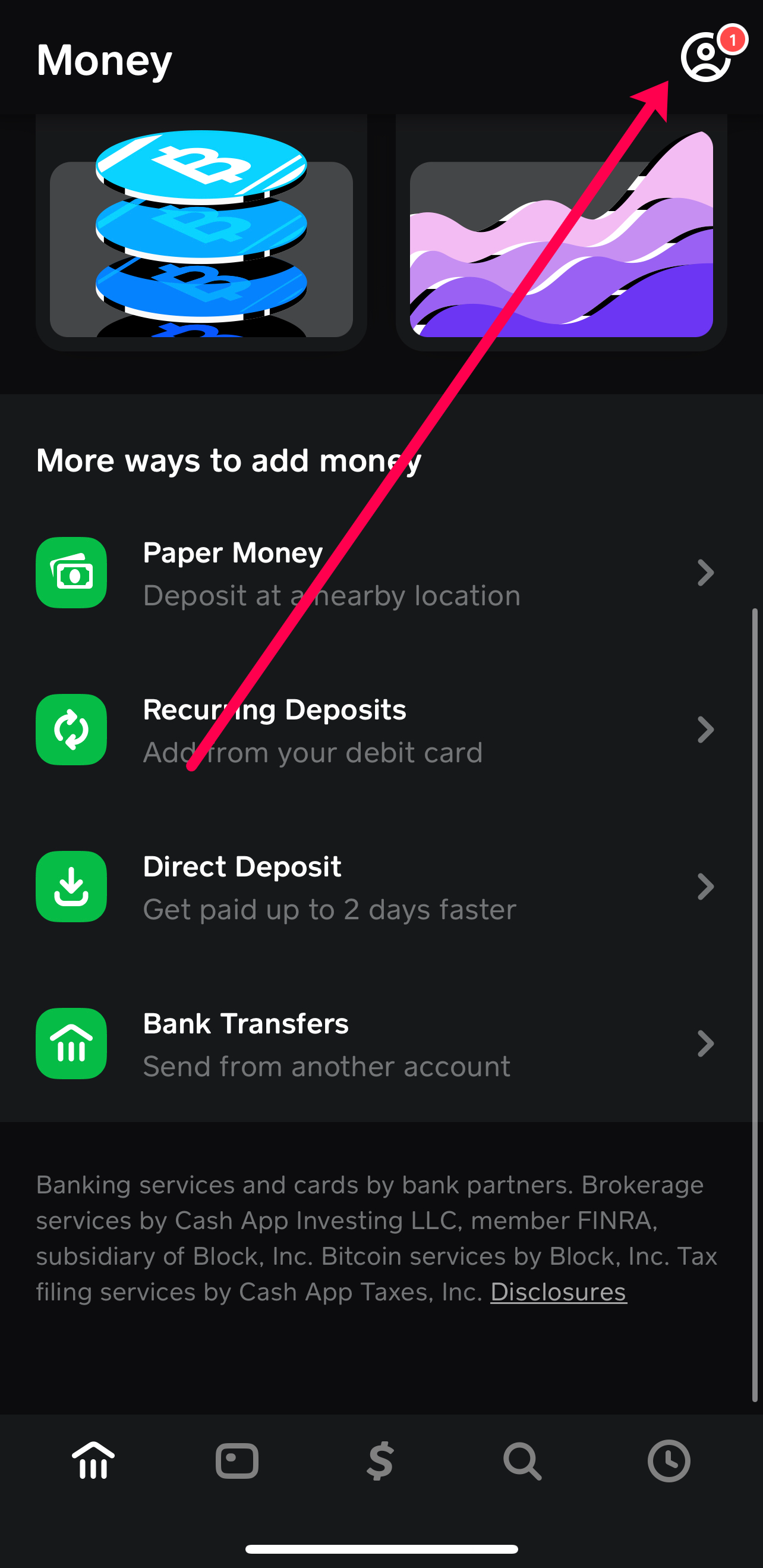
Cash App Support: Contact Cash App’s customer service directly through the app (Profile Icon > Support) or via their official website. Provide them with details of the error message you received, the steps you’ve taken, and your Cash App account information. They can investigate specific account or transaction-related issues.
-
Your Bank: If Cash App support indicates the issue might be on your bank’s side, or if your bank account has been locked or flagged, contact your bank’s customer service. They can check for any holds, restrictions, or fraud alerts on your debit card or checking account that might be preventing the link.
Remember that clear communication and providing accurate information to both Cash App and your bank will expedite the resolution process, allowing you to quickly restore full financial functionality within the app.
aViewFromTheCave is a participant in the Amazon Services LLC Associates Program, an affiliate advertising program designed to provide a means for sites to earn advertising fees by advertising and linking to Amazon.com. Amazon, the Amazon logo, AmazonSupply, and the AmazonSupply logo are trademarks of Amazon.com, Inc. or its affiliates. As an Amazon Associate we earn affiliate commissions from qualifying purchases.