
Cash App has become an indispensable tool for quick, peer-to-peer money transfers, making splitting bills, paying friends, or sending funds to family remarkably easy. However, encountering issues when attempting to send money can be frustrating, often leaving users wondering about the underlying cause. From technical glitches to security protocols, several factors can prevent a successful transaction. Understanding these common obstacles and knowing how to troubleshoot them is key to a smooth Cash App experience.
Understanding Cash App’s Core Functionality and Limitations
Before diving into specific problems, it’s essential to grasp the foundational aspects of how Cash App operates, especially concerning user accounts and transaction parameters. These built-in mechanisms are designed for security and compliance but can sometimes act as barriers if not properly understood.
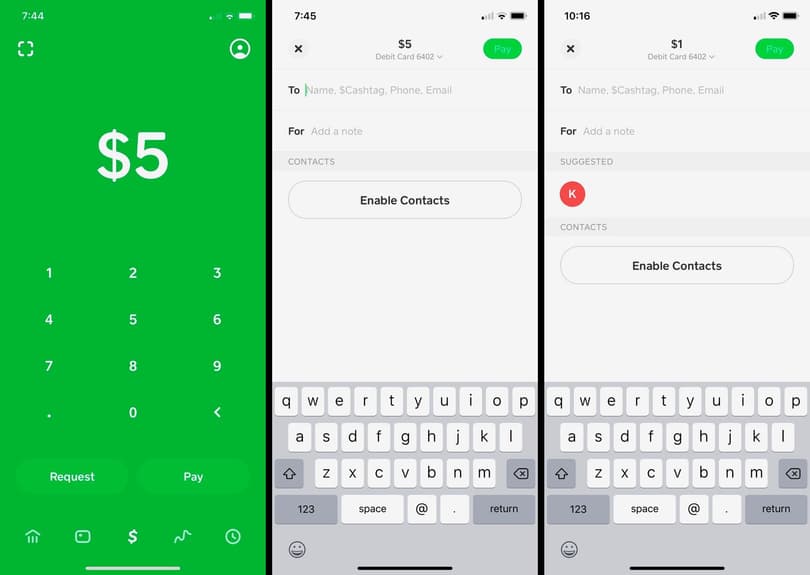
Account Verification and KYC Requirements
One of the most frequent reasons for an inability to send money, particularly larger sums, relates to account verification. Cash App, like all regulated financial tools, must adhere to Know Your Customer (KYC) regulations to prevent fraud, money laundering, and other illicit activities.
Unverified accounts typically have significantly lower sending and receiving limits. To increase these limits and unlock full functionality, Cash App requires users to verify their identity. This process usually involves providing:
-
Full Name and Date of Birth: Basic demographic information.
-
Last 4 Digits of Social Security Number (SSN): For identity verification purposes.
-
Physical Address: To confirm residency.
-
Identity Document (e.g., Driver’s License or State ID): For visual verification and matching with provided details.
If your account isn’t fully verified, you might hit a sending limit sooner than expected, or certain types of transactions may be blocked entirely. Attempting to send money without completing the necessary verification steps will invariably lead to a transaction failure.
Sending Limits and Transaction Caps
Even with a fully verified account, Cash App imposes daily, weekly, and monthly sending limits. These limits are dynamic and can vary based on your account’s history, verification status, and other internal risk assessments. For instance, an unverified account might only be able to send $250 per week, while a verified account could send up to $7,500 per week and an unlimited amount to receive.
If you suddenly find yourself unable to send money, check if your attempted transaction amount exceeds your current limits. The app usually provides a notification or error message indicating a limit has been reached. These limits reset periodically, so a temporary inability to send might simply be a matter of waiting for the next cycle.
Supported Funding Sources
Cash App primarily facilitates transfers using a linked bank account or a debit card. While you can hold a balance directly within Cash App, the initial funding or larger transfers often rely on these external sources.
Problems can arise if:
-
The linked debit card has expired or been cancelled.
-
The linked bank account has insufficient funds to cover the transaction.
-
There’s a temporary issue with the connection between Cash App and your bank (e.g., bank server maintenance).
-
You’re attempting to use an unsupported card type (e.g., some prepaid cards or credit cards may have restrictions).
Ensuring your linked funding sources are active, valid, and have adequate funds is a prerequisite for successful money transfers.
Common Technical Glitches and App-Related Issues
Beyond account-specific limitations, the technology itself can sometimes be the culprit. Software applications are complex, and even robust platforms like Cash App can experience hiccups.
Outdated App Version
Running an outdated version of the Cash App on your device is a common cause of unexpected errors. Developers frequently release updates to fix bugs, introduce new features, enhance security, and improve overall performance. An older version might have compatibility issues with newer server-side changes or contain bugs that have since been patched.
Always ensure your Cash App is updated to the latest version available in your device’s app store (Google Play Store for Android, Apple App Store for iOS). Automatic updates are often enabled by default, but it’s wise to check manually if you’re encountering persistent issues.
Network Connectivity Problems
Cash App relies heavily on a stable internet connection to process transactions in real-time. A weak, intermittent, or non-existent Wi-Fi or cellular data connection can lead to transactions failing or hanging indefinitely.
Symptoms of network issues include:
-
Slow loading times within the app.
-
Error messages indicating a connection problem.
-
Transactions that appear to be processing but never complete.
Try switching between Wi-Fi and cellular data, restarting your router, or moving to an area with better signal strength to rule out network-related interference.
Server-Side Outages and Maintenance
Occasionally, the issue might not be with your app or device, but with Cash App’s own servers. Like any major online service, Cash App undergoes routine maintenance or can experience unexpected outages. During these periods, certain functionalities, including sending money, might be temporarily unavailable or operate erratically.
While less frequent, these events can cause widespread disruption. Cash App usually communicates major outages via their official social media channels or through in-app notifications. Checking these sources can quickly confirm if the problem is on their end.
Cache and Data Corruption
Over time, apps accumulate cache data to speed up performance. While generally beneficial, this cached data can sometimes become corrupted, leading to various errors, including problems with sending money.
Clearing the app’s cache (and sometimes its data) can resolve these issues without deleting your account information.
-
For Android: Go to Settings > Apps > Cash App > Storage > Clear Cache (and optionally, Clear Data).
-
For iOS: There isn’t a direct “Clear Cache” option for individual apps. You might need to offload the app (which frees up storage but keeps documents and data) or delete and reinstall it. Reinstalling is a more thorough approach to ensure a fresh start.
Security Flags and Account Restrictions
Cash App employs sophisticated fraud detection systems and security measures to protect users and combat financial crime. Sometimes, these protective mechanisms can inadvertently trigger a temporary restriction on your ability to send money.
Suspicious Activity Detection
Cash App’s algorithms constantly monitor transactions for patterns indicative of fraud or unauthorized use. This could include:
-
Unusually large transactions.
-
Multiple rapid transactions in a short period.
-
Payments to a new or unknown recipient.
-
Accessing your account from a new or suspicious device/location.
If your account is flagged for suspicious activity, Cash App might temporarily block sending money until the activity can be verified. This is a security measure designed to protect your funds. You might receive an in-app notification or an email from Cash App requesting additional verification.
Identity Verification Failures
If Cash App detects inconsistencies in your identity information or suspects your account has been compromised, it may impose restrictions. This can happen if, for example, your linked bank account information doesn’t match the name on your Cash App profile, or if there’s an attempt to link a card associated with a previously flagged account. Re-verification or providing additional documentation might be required to lift these restrictions.
Linked Bank/Card Issues
The health of your linked financial instruments directly impacts your ability to send money.
-
Bank Account Blocked/Frozen: If your linked bank account is experiencing issues (e.g., frozen due to legal reasons, or flagged for suspicious activity by your bank), Cash App transactions relying on it will fail.
-
Debit Card Declined: Your debit card issuer might decline transactions for various reasons, such as daily spending limits, fraud prevention, or if the card itself is expired or invalid.
-
Expired Authorization: Sometimes, the authorization link between Cash App and your bank/card needs to be refreshed. Removing and re-linking the funding source can often resolve this.
Payment Disputes and Chargebacks
If you’ve recently been involved in a payment dispute or a chargeback on a previous Cash App transaction, your account might face temporary restrictions. Cash App takes these matters seriously, and pending investigations can impact account functionality. Resolving the dispute with Cash App support is necessary to restore full access.
Recipient-Side Problems
While less common, the inability to send money can sometimes stem from issues on the recipient’s end, rather than your own.
Incorrect Recipient Details
A simple yet common mistake is entering incorrect recipient details. If you send money to an invalid Cashtag, phone number, or email address that isn’t linked to an active Cash App account, the transaction will fail. Always double-check recipient information before confirming a payment.
Recipient’s Account Issues
Just as your account can have restrictions, so can the recipient’s. If the recipient’s Cash App account is unverified, has reached its receiving limits, or is flagged for suspicious activity, they might be unable to receive funds. In such cases, the money might bounce back to your account or remain pending until the recipient resolves their account issues.
Exceeded Recipient Limits
Similar to sending limits, Cash App also imposes limits on how much money an individual can receive within a certain timeframe. If your intended recipient has already hit their daily or weekly receiving limit, your transaction will not go through. They would need to wait until their limits reset, or potentially verify their account further to increase their limits.
Steps to Diagnose and Resolve Sending Problems
When you encounter a problem sending money, a systematic approach to troubleshooting can often identify and resolve the issue.
Basic Troubleshooting Checklist
-
Check Internet Connection: Ensure strong Wi-Fi or cellular data.
-
Update Cash App: Verify you’re running the latest version.
-
Restart Device: A simple reboot can often clear minor glitches.
-
Clear Cache (Android) / Reinstall (iOS): Address potential app data corruption.
-
Check Cash App Status Page: Look for server outages or maintenance.
-
Verify Linked Funds: Confirm your bank or debit card is active and has sufficient funds.
-
Confirm Recipient Details: Double-check Cashtag, phone, or email.
Reviewing Transaction History and Notifications
Always review your transaction history within the Cash App. Failed transactions often provide an error message or a reason for the failure. Additionally, check your in-app notifications and the email associated with your Cash App account. Cash App frequently sends communications regarding account verification, security flags, or issues with linked funding sources. These messages are often the quickest way to understand the root cause of the problem.
Contacting Cash App Support
If you’ve exhausted all troubleshooting steps and are still unable to send money, it’s time to contact Cash App support. You can reach them through the app (Profile Icon > Support > Start a Chat) or via their website. When contacting support, be prepared to provide:
-
Your Cashtag and relevant account information.
-
Details of the attempted transaction (date, amount, recipient).
-
Any error messages you received.
-
Steps you’ve already taken to troubleshoot.
Cash App’s support team can investigate account-specific issues, security flags, and provide guidance on resolving complex problems that are not immediately apparent to the user.
By systematically addressing these potential issues, you can often quickly identify why you can’t send money on Cash App and restore your ability to make seamless transactions.
aViewFromTheCave is a participant in the Amazon Services LLC Associates Program, an affiliate advertising program designed to provide a means for sites to earn advertising fees by advertising and linking to Amazon.com. Amazon, the Amazon logo, AmazonSupply, and the AmazonSupply logo are trademarks of Amazon.com, Inc. or its affiliates. As an Amazon Associate we earn affiliate commissions from qualifying purchases.