
In an increasingly digital world, managing personal finances effectively requires leveraging tools that offer convenience, speed, and security. Cash App has emerged as a prominent player in the fintech landscape, enabling millions to send, receive, and manage money with remarkable ease. For many, the initial step to harnessing its power is understanding how to efficiently fund their Cash App account. This guide delves into the various methods for putting money into your Cash App, exploring the financial implications, best practices, and strategic considerations for integrating this popular digital wallet into your personal finance ecosystem.

Understanding Cash App as a Financial Tool
Before diving into the mechanics of funding, it’s crucial to contextualize Cash App within the broader spectrum of personal finance tools. It’s more than just an app for sending money to friends; it functions as a versatile financial hub, complete with banking-like features, investment options, and a debit card.
The Role of Digital Wallets in Modern Personal Finance
Digital wallets like Cash App have revolutionized the way individuals interact with their money. They offer an alternative or supplementary platform to traditional banking, allowing for instant transactions, often without the typical fees associated with wire transfers or certain bank services. For consumers, this translates into greater control and flexibility over their funds, enabling quicker bill payments, peer-to-peer transactions, and even simplified budgeting. The shift towards a cashless society is powered in part by these tools, making immediate access to funds a necessity rather than a luxury.
Cash App’s Place in the Fintech Landscape
Cash App distinguishes itself through its user-friendly interface and integrated services. Beyond basic money transfers, it offers a Cash Card (a customizable debit card linked to your balance), direct deposit capabilities, and the option to buy and sell Bitcoin and stocks. This multi-faceted approach positions Cash App not just as a payment app, but as a holistic financial tool designed to serve various aspects of an individual’s financial life. Its accessibility, especially to those underserved by traditional banking, further solidifies its critical role in expanding financial inclusion.
Benefits of Using Cash App for Financial Transactions
The advantages of funding and utilizing Cash App are numerous. Instant transfers mean urgent payments can be made without delay. The Cash Card offers a convenient way to spend your balance anywhere Visa is accepted, effectively blurring the lines between a digital wallet and a traditional bank account. For budgeting, having a separate pool of funds in Cash App can help allocate money for specific purposes or manage discretionary spending. Furthermore, features like direct deposit simplify receiving income, while the ability to send money to others instantly makes splitting bills or repaying friends effortless.
Primary Methods for Funding Your Cash App Account
The foundation of using Cash App effectively lies in understanding the core methods for adding funds to your balance. These methods cater to different needs and preferences, offering both speed and flexibility.
Linking Your Bank Account: Direct Deposits and Transfers
One of the most common and secure ways to fund your Cash App is by linking an external bank account. This method establishes a direct connection between your traditional banking institution and your digital wallet, facilitating seamless transfers.
To link your bank account:
-
Navigate to the “Banking” tab (the house icon) on your Cash App home screen.
-
Select “Link Bank.”
-
Follow the prompts to connect your bank account using your bank’s login credentials. This process is typically secured by Plaid or a similar financial technology service, which encrypts your information.
Once linked, you can initiate transfers from your bank account to your Cash App balance. These transfers generally take 1-3 business days to clear, similar to an ACH transfer. While not instantaneous, this method is ideal for larger sums or planned deposits, offering a reliable pathway for consolidating funds. It also sets the stage for utilizing Cash App’s direct deposit feature for paychecks, which we will explore later.
Using a Debit Card for Instant Transfers
For those who need to fund their Cash App balance immediately, linking a debit card is the preferred method. Debit card transfers are typically instant, making them perfect for urgent payments or spur-of-the-moment spending.
To link a debit card:
-
Go to the “Banking” tab and select “Link Bank.”
-
Choose “Link Debit Card” instead of the full bank account option.
-
Enter your debit card number, expiration date, CVV, and ZIP code.
Once your debit card is linked, you can add funds instantly. Simply tap the “Add Cash” button on the main screen, enter the desired amount, and confirm the transaction. Most linked debit cards allow for instant deposits, with the funds appearing in your Cash App balance almost immediately. It’s important to note that while Cash App does not typically charge fees for standard debit card deposits, some issuing banks may impose their own charges, though this is rare for standard debit transactions. Credit cards, while linkable for sending money, cannot be used to add funds to your Cash App balance directly.
Receiving Money from Other Cash App Users
Perhaps the most intuitive way to put money into your Cash App is by receiving it from another Cash App user. This peer-to-peer (P2P) functionality is at the core of the app’s appeal, making it incredibly easy to split bills, get repaid by friends, or receive personal payments.
When someone sends you money via Cash App, the funds are automatically deposited into your Cash App balance. You’ll receive a notification, and the transaction will appear in your activity feed. There’s no action required on your part to “accept” the money once it’s sent; it’s instantly available in your balance.
You can also request money from other users. From the main screen, tap the “$ Request” button, enter the amount, select the contact you’re requesting from, and send the request. Once they approve, the funds will be transferred to your account. This feature streamlines financial interactions among friends, family, and even for small informal transactions.
Advanced Strategies and Alternative Funding Options
Beyond the standard methods, Cash App offers several other avenues for individuals to put money into their accounts, catering to diverse financial needs and income streams. These methods enhance Cash App’s utility as a comprehensive financial tool.
Depositing Physical Cash at Retailers
For users who primarily deal with physical cash, Cash App provides a convenient solution through its “Paper Money Deposit” feature. This allows you to convert physical cash into digital funds within your Cash App balance at participating retail locations.
To use this feature:
-
Go to the “Banking” tab and tap “Deposit Cash.”
-
The app will display nearby participating retailers (e.g., Walmart, Walgreens, CVS).
-
Select a retailer and generate a barcode within the app.
-
Present the barcode and your cash to the cashier. The cashier will scan the barcode and accept your cash.
-
The funds are usually added to your Cash App balance within minutes, though some deposits may take a bit longer.
This method typically has daily and weekly limits, and some retailers may charge a small fee for the service. It’s an invaluable option for individuals who receive wages in cash, rely on cash tips, or simply prefer managing their physical currency digitally without needing a traditional bank account for deposits.
Direct Deposit for Paychecks and Government Benefits
One of Cash App’s most powerful features for personal finance management is its direct deposit capability. By providing an account and routing number, users can have their paychecks, government benefits (like unemployment or tax refunds), or other recurring payments deposited directly into their Cash App balance.
To set up direct deposit:
-
Navigate to the “Banking” tab (the house icon).
-
Scroll down and tap “Direct Deposit.”
-
You will find your unique Cash App routing number and account number.
-
Provide these details to your employer’s payroll department or the agency issuing your benefits. They will typically require a voided check or a direct deposit authorization form, which Cash App can also generate for you.
Setting up direct deposit streamlines the process of receiving income, often making funds available up to two days earlier than traditional banks. This can significantly improve cash flow for individuals and simplifies budgeting by centralizing income within a single, easily accessible platform. It also provides a legitimate alternative for those who may not have a traditional bank account but need a reliable way to receive electronic payments.
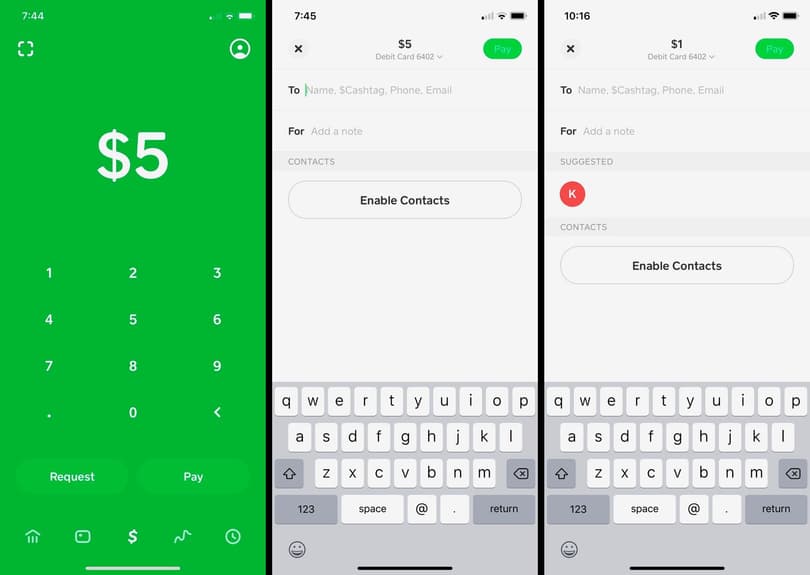
Receiving Payments for Goods or Services
While not a direct “deposit” in the traditional sense, using Cash App to receive payments for goods or services directly adds money to your balance. This is particularly relevant for freelancers, small business owners, or individuals engaging in casual sales (e.g., selling items online or at a local market).
By sharing your $Cashtag (your unique Cash App username), email, or phone number, clients or customers can easily send you payments. The funds arrive instantly in your Cash App balance, ready to be spent via the Cash Card, transferred to a linked bank account, or used within the app for other transactions. This method underscores Cash App’s utility as a tool for managing online income and facilitating micro-business transactions, blurring the lines between personal finance and entrepreneurial endeavors.
Managing Your Cash App Funds Responsibly
Successfully funding your Cash App is only half the battle; responsible management is key to leveraging its full potential as a financial tool. Understanding the nuances of limits, fees, and security protocols is paramount.
Monitoring Your Balance and Transaction History
Regularly checking your Cash App balance and reviewing your transaction history is a fundamental practice for sound financial management. The app’s intuitive interface makes this easy: your current balance is prominently displayed on the home screen, and a tap on the clock icon provides a detailed activity feed of all incoming and outgoing transactions.
This diligence helps in several ways:
-
Budgeting: It allows you to track spending against your budget and ensures you’re aware of your available funds.
-
Error Detection: Quickly identify any unauthorized transactions or discrepancies.
-
Financial Planning: Understand your spending patterns to make informed financial decisions.
Integrating this habit ensures that your Cash App balance remains an accurate reflection of your financial position, contributing to overall fiscal discipline.
Understanding Limits and Fees Associated with Deposits
While Cash App prides itself on transparency, users should be aware of various limits and potential fees that might apply to deposits and transactions.
-
Deposit Limits: All funding methods have associated limits. For instance, instant debit card deposits might have a daily limit, and retailer cash deposits will have their own daily/weekly caps. Direct deposits generally have higher limits but are still subject to overall Cash App account restrictions. These limits are in place for security reasons and to comply with financial regulations. Users can often increase their limits by verifying their identity within the app (providing full name, date of birth, and the last four digits of their SSN).
-
Fees: Most standard deposits (from linked bank accounts, debit cards, or P2P transfers) are free. However, some services, such as instant transfers out of Cash App to a bank account (if you choose instant over standard 1-3 business days), incur a small fee (typically 0.5% – 1.75%). Retailer cash deposits might have a small fee charged by the retailer, not Cash App itself. Always review the transaction details before confirming to understand any potential charges.
Understanding these parameters helps avoid unexpected surprises and allows for strategic planning of how and when to fund your account.
Best Practices for Financial Security with Cash App
Security is paramount when dealing with any financial tool, and Cash App is no exception. Adopting best practices helps protect your funds and personal information.
-
Strong Passwords/PINs: Use a unique, strong PIN or enable biometrics (fingerprint or face ID) for accessing the app and authorizing transactions.
-
Enable Security Lock: Utilize the “Security Lock” feature within Cash App settings, which requires your PIN or biometrics for every transaction.
-
Two-Factor Authentication (2FA): Where available, enable 2FA for your linked bank accounts and email accounts associated with Cash App.
-
Beware of Scams: Be vigilant against phishing attempts, fake customer support scams, or requests for money from unknown sources. Cash App will never ask for your PIN or full sign-in code outside of the app.
-
Public Wi-Fi: Exercise caution when accessing financial apps over unsecured public Wi-Fi networks.
-
Regular Monitoring: As mentioned, regularly review your transaction history for any unauthorized activity.
-
Identity Verification: Complete identity verification within the app. This not only increases your limits but also provides an added layer of security and makes account recovery easier if issues arise.
By adhering to these security measures, you can confidently and safely integrate Cash App into your financial routine.
Integrating Cash App into Your Overall Budgeting Strategy
For many, Cash App can serve as a powerful component of a broader budgeting strategy. Its distinct balance and transaction history can be leveraged to manage specific financial categories.
Consider these approaches:
-
Discretionary Spending Wallet: Use Cash App as a dedicated wallet for discretionary spending (e.g., entertainment, dining out, impulse buys). By transferring a fixed amount each month, you can easily track and limit spending in this category.
-
Emergency Fund Supplement: While not a primary emergency fund, a small, easily accessible portion could be kept in Cash App for minor, immediate emergencies.
-
Specific Goal Savings: For short-term savings goals (e.g., a concert ticket, a new gadget), direct funds into Cash App until the goal is met.
-
Expense Splitting: For shared expenses (rent, utilities with roommates), using Cash App simplifies collecting and distributing funds, making group budgeting more manageable.
By thoughtfully incorporating Cash App into your financial planning, you transform it from a mere payment app into an active tool for achieving your personal finance goals.
Troubleshooting Common Deposit Issues and FAQs
Even with clear instructions, users may occasionally encounter issues when attempting to fund their Cash App account. Knowing how to address these common problems can save time and frustration.
What to Do if a Deposit is Delayed or Fails
-
Check Transaction History: First, review your Cash App activity feed and your linked bank/card statement to confirm if the transaction was initiated or if there’s any error message.
-
Verify Information: Ensure all entered details (bank account numbers, debit card details) are correct. A simple typo can cause a failure.
-
Linked Account Status: Confirm that your linked bank account or debit card is active and has sufficient funds if you’re pulling money from it.
-
Limits: Ensure you haven’t exceeded any daily or weekly deposit limits for your account or the specific funding method.
-
Processing Times: Remember that bank transfers can take 1-3 business days. If it’s within this window, patience might be key. For direct deposits, processing times vary by employer/agency, but Cash App often makes them available earlier.
-
Retailer Deposits: If a cash deposit at a retailer fails, ensure the barcode was scanned correctly and the transaction was fully processed by the cashier. Keep your receipt.
If a deposit is significantly delayed beyond typical processing times or repeatedly fails without clear explanation, it’s time to seek further assistance.
Addressing Account Verification Challenges
Many deposit limits and certain features are unlocked after verifying your identity. If you’re having trouble verifying your account:
-
Accurate Information: Ensure the personal information you’re providing (full legal name, date of birth, last four digits of SSN) exactly matches official records.
-
Clarity of Documents: If Cash App requests additional documentation, ensure photos are clear and legible.
-
Internet Connection: A stable internet connection is vital during the verification process.
If verification continues to fail, there might be an underlying issue that requires direct support.

Contacting Cash App Support for Assistance
When self-troubleshooting doesn’t resolve an issue, contacting Cash App support is the next step.
-
In-App Support: The most direct way to get help is through the app itself. Tap the profile icon on your Cash App home screen, scroll down, and select “Support.” You can browse FAQs or initiate a chat with a support representative.
-
Website Support: Cash App’s website also has a comprehensive support section with articles and an option to contact support.
-
Social Media: While not a primary support channel, Cash App does have a presence on social media. Be wary of unofficial accounts pretending to be support.
When contacting support, be prepared to provide details of your issue, including dates, amounts, and any error messages received. Having your account details and relevant transaction IDs ready will expedite the process.
In conclusion, putting money into Cash App is a straightforward process with multiple flexible options designed to meet various financial needs. By understanding the different funding methods, managing your funds responsibly, and knowing how to troubleshoot common issues, you can effectively leverage Cash App as a powerful and convenient tool for your personal finance journey.
aViewFromTheCave is a participant in the Amazon Services LLC Associates Program, an affiliate advertising program designed to provide a means for sites to earn advertising fees by advertising and linking to Amazon.com. Amazon, the Amazon logo, AmazonSupply, and the AmazonSupply logo are trademarks of Amazon.com, Inc. or its affiliates. As an Amazon Associate we earn affiliate commissions from qualifying purchases.