
In the evolving landscape of personal finance, digital payment applications have become indispensable tools for managing money. Cash App, a prominent player in this arena, offers a streamlined approach to sending, receiving, and investing funds. However, to fully leverage its capabilities and integrate it seamlessly into your financial ecosystem, linking a bank account is a crucial first step. This fundamental connection transforms Cash App from a standalone digital wallet into a powerful extension of your primary banking relationship, facilitating smooth transitions of funds and expanding your financial flexibility.
The Essentials of Cash App and Bank Integration
Understanding the pivotal role of your bank account within the Cash App framework is key to appreciating its value as a financial tool. Without this link, Cash App’s utility for most personal finance activities is severely limited, primarily restricting users to funds already held within the app or received from other Cash App users.
Why Link Your Bank? The Financial Benefits
Linking your bank account to Cash App unlocks a spectrum of financial benefits, transforming the app into a more comprehensive personal finance instrument. Firstly, it provides a direct conduit for adding funds to your Cash App balance, allowing you to easily transfer money from your traditional bank account for immediate use. This is invaluable for funding peer-to-peer payments, making purchases, or engaging with Cash App’s investing features.
Secondly, and perhaps more critically, it enables you to “cash out” your Cash App balance directly to your bank account. This means any money you receive through the app – whether from friends, family, or even as payment for a side hustle – can be quickly and efficiently moved to your primary bank account, where it can be accessed, saved, or used for larger financial commitments. This bidirectional flow is essential for managing your liquidity and ensuring your funds are accessible where and when you need them.
Furthermore, a linked bank account can serve as a backup payment method if your Cash App balance is insufficient for a transaction, preventing payment failures and ensuring continuous service. It also facilitates direct deposit setup, allowing you to receive paychecks, government benefits, or other regular income directly into your Cash App account, a feature that can be particularly appealing for those seeking to consolidate their financial management or access funds faster.
Understanding Cash App’s Role in Personal Finance
Cash App acts as a versatile digital financial tool, designed to simplify everyday money management. Its primary functions include peer-to-peer money transfers, enabling users to send and receive money instantly. Beyond this, it offers a debit card (the Cash Card) for spending directly from your Cash App balance, and provides avenues for investing in stocks and Bitcoin, often with smaller amounts than traditional brokerage firms.
In the context of personal finance, Cash App can serve various roles:
-
Budgeting Aid: By using the Cash Card for specific spending categories, users can indirectly monitor their expenditure.
-
Emergency Fund Access: For those who receive money into Cash App, it can offer quick access to funds.
-
Income Management: Facilitating direct deposits allows for easy management of regular income within the app.
-
Investment Gateway: For beginners, it provides an accessible entry point into investing with small sums.
However, the full realization of these roles hinges on the seamless integration with your existing bank account, which acts as the ultimate hub for your financial life. Without this link, the app operates in a more isolated fashion, limiting its potential as a holistic financial tool.
Step-by-Step Guide to Linking Your Bank
The process of linking a bank account to Cash App is designed to be straightforward, leveraging secure, industry-standard verification methods to protect your financial information.
Initiating the Link: From Cash App Home Screen
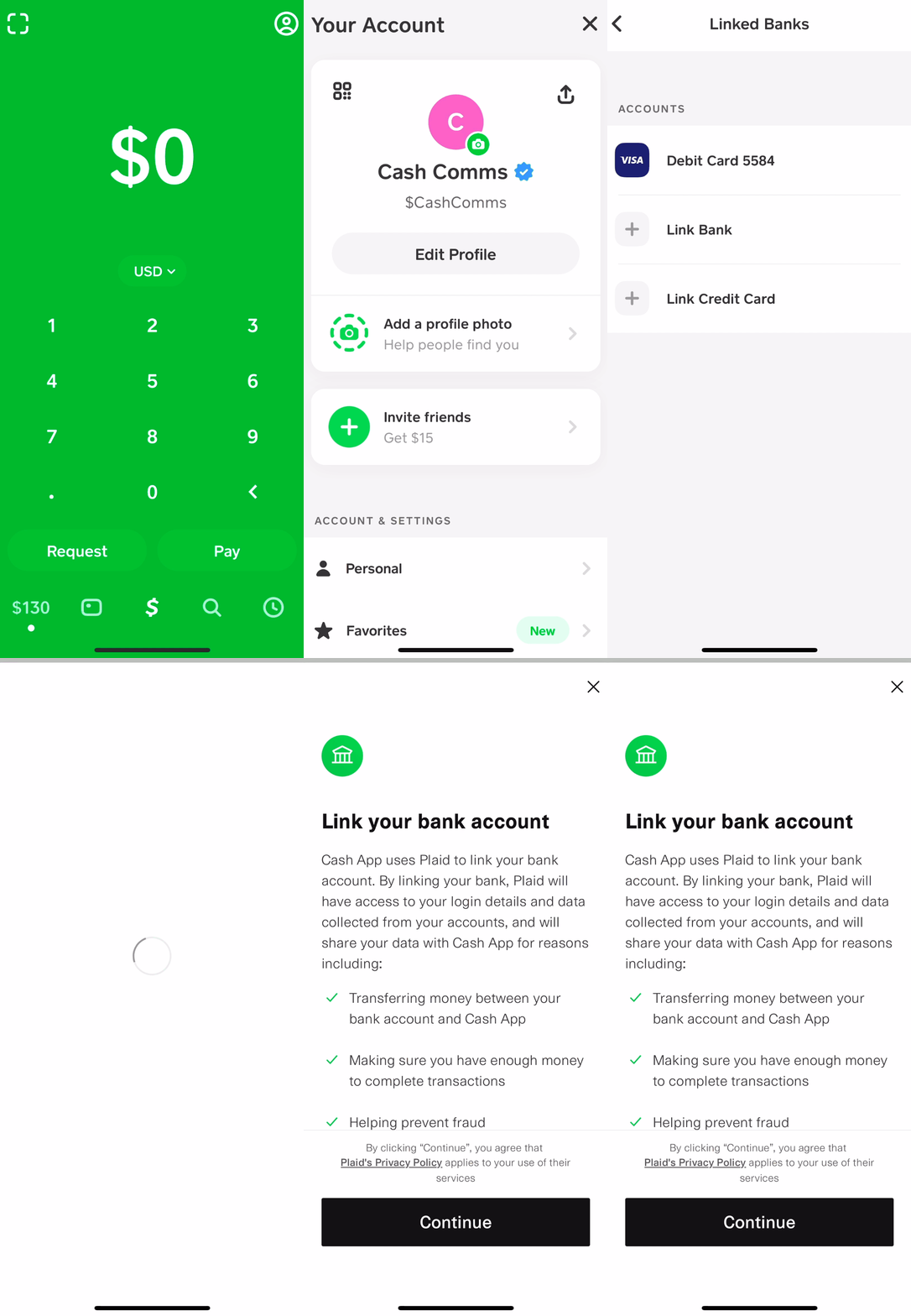
To begin, open the Cash App on your mobile device. From the main screen, which typically displays your balance, locate and tap on the profile icon. This icon is usually found in the top-right corner of the screen and resembles a person or a circle. Tapping it will take you to your personal profile and settings menu.
Within the profile menu, scroll down until you find the “Linked Banks” or “Link Bank” option. The exact wording may vary slightly depending on your app version, but it will clearly indicate the banking section. Select this option to proceed.
Cash App will then present you with the choice to link a bank account. You may also see options to link a debit card or credit card. For the purpose of linking your primary bank, select the “Link Bank” option.
Selecting Your Bank and Secure Verification
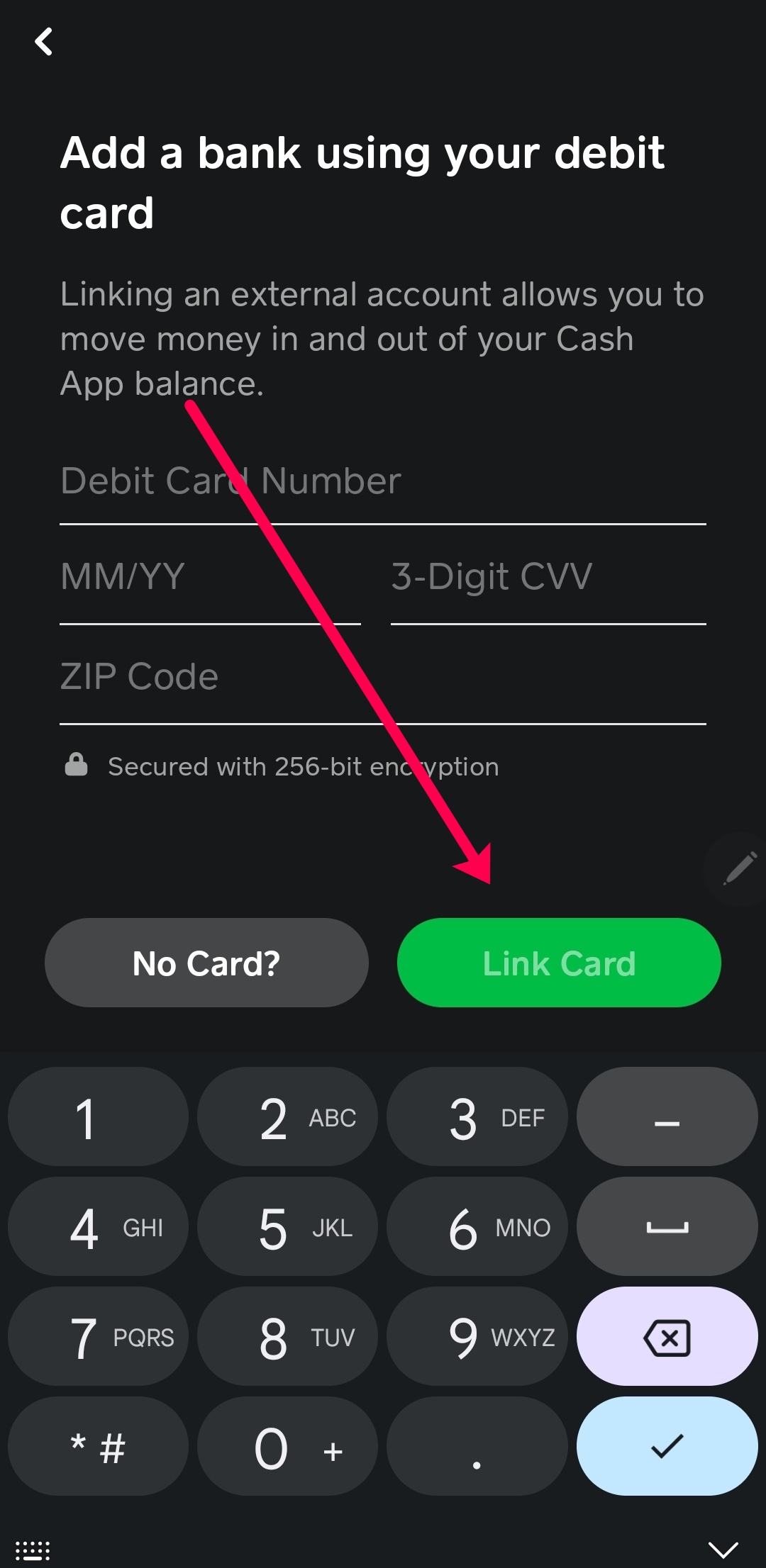
After initiating the link, Cash App will prompt you to enter your debit card number associated with the bank account you wish to link. It’s crucial to understand that Cash App uses your debit card primarily for initial verification and to establish the link to your bank account. The debit card information acts as a bridge. Enter the 16-digit debit card number, its expiration date, and the CVV code (the three-digit security code on the back of your card).
Following this, Cash App will typically use a secure third-party service, such as Plaid, to connect directly to your bank. Plaid is a widely recognized and trusted platform that securely connects your financial accounts to apps like Cash App. You will be prompted to select your bank from a list of popular institutions. If your bank is not immediately visible, you can use the search bar to find it.
Once you select your bank, you will be securely redirected to your bank’s online login portal within the Plaid interface. Here, you will be asked to enter your online banking username and password. This step is critical for verifying that you are the legitimate owner of the bank account. Plaid acts as an intermediary, encrypting your credentials and using them to connect to your bank, but Cash App itself does not store your bank login details. This method enhances security by ensuring your sensitive information is handled by a dedicated, secure service.
After successfully logging into your bank through Plaid, you may be asked to choose which specific account (e.g., checking or savings) you wish to link if you have multiple accounts with that bank. Select the appropriate account. Once confirmed, Cash App will receive a tokenized connection to your bank, signifying a successful link. You will then be redirected back to the Cash App, often with a confirmation message that your bank account is now linked.

Troubleshooting Common Linking Issues
While the linking process is generally smooth, users may occasionally encounter issues.
-
Incorrect Bank Credentials: The most common problem is entering an incorrect online banking username or password. Double-check these details carefully. If you’ve recently changed your bank login, ensure you’re using the most current credentials.
-
Unsupported Bank: While Cash App supports most major banks, some smaller or regional credit unions might not be directly compatible with the Plaid integration. In such cases, you might need to contact Cash App support for alternative linking methods, though these are less common.
-
Security Blocks: Your bank’s security protocols might flag the attempted connection as unusual activity. If this happens, you might receive a notification from your bank or need to approve the connection directly through your bank’s app or website before retrying the Cash App link.
-
Outdated App Version: Ensure your Cash App is updated to the latest version. Outdated apps can sometimes have bugs or compatibility issues.
-
Internet Connectivity: A stable internet connection is vital. Poor Wi-Fi or cellular data can disrupt the secure connection process.
If you consistently face issues, reviewing Cash App’s support articles or contacting their customer service directly can provide tailored assistance.
Managing Your Linked Bank Account
Once your bank account is successfully linked, Cash App becomes a powerful financial tool for seamless money transfers. Effectively managing this linked account involves understanding how to fund your Cash App, cash out your balance, and, if necessary, unlink the account.
Funding Your Cash App Balance
Linking your bank account primarily enables you to add money to your Cash App balance. From the Cash App home screen, tap the “Banking” or “Money” tab (represented by a house or dollar sign icon, respectively, depending on the app version). Here, you’ll see your Cash App balance and options like “Add Cash.”
Tap “Add Cash,” and you’ll be prompted to enter the desired amount you wish to transfer from your linked bank account. Input the amount, then confirm the transfer. The funds will typically be moved instantly from your bank account to your Cash App balance, ready for use in peer-to-peer payments, Cash Card purchases, or investments. This direct transfer capability is a cornerstone of Cash App’s utility, allowing you to top up your balance whenever needed without delay.
Cashing Out to Your Bank
Just as you can add cash, you can also transfer funds from your Cash App balance back to your linked bank account. This is a critical feature for anyone who receives money via Cash App – whether from friends, clients for freelance work, or other sources – and wishes to consolidate those funds into their primary bank.
On the “Banking” or “Money” tab, you’ll find an option labeled “Cash Out.” Tap this, enter the amount you wish to transfer, and then choose your linked bank account as the destination. Cash App typically offers two options for cashing out:
-
Standard Deposit: This is usually free and takes 1-3 business days for the funds to appear in your bank account.
-
Instant Deposit: This option incurs a small fee (typically 0.5% to 1.75% of the transaction amount) but transfers the funds to your bank account almost immediately.
Choose the option that best suits your needs, confirm the transaction, and the funds will be on their way.
Unlinking an Account
There may be situations where you need to unlink a bank account, such as if you close an old account, switch banks, or wish to link a different one. The process for unlinking is straightforward:
-
Navigate back to your profile icon on the Cash App home screen.
-
Go to the “Linked Banks” section.
-
You will see a list of your linked accounts. Select the bank account you wish to unlink.
-
An option to “Remove Bank” or “Replace Bank” will appear. Choose “Remove Bank.”
-
Confirm your decision.
Once unlinked, that particular bank account can no longer be used for adding cash to or cashing out from your Cash App, nor for backup payments. You can always link a different bank account or re-link the same one later if needed.
Security and Best Practices for Financial Safety
Maintaining the security of your linked bank account within Cash App is paramount to protecting your personal finances. While Cash App employs robust security measures, user vigilance plays a critical role.
Protecting Your Account and Information
Cash App utilizes encryption and fraud detection technology to safeguard your financial information. When you link your bank via Plaid, your bank login credentials are not stored by Cash App, adding an extra layer of security. However, several best practices can further enhance your financial safety:
-
Enable Security Locks: Always set up a PIN, Touch ID, or Face ID for your Cash App transactions. This prevents unauthorized access to your funds even if your phone is lost or stolen.
-
Two-Factor Authentication (2FA): Enable 2FA for your Cash App account. This requires a second form of verification (like a code sent to your phone) in addition to your password, significantly reducing the risk of unauthorized access.
-
Strong, Unique Passwords: Use a complex, unique password for your Cash App account and never reuse passwords across multiple services.
-
Beware of Phishing Scams: Be highly skeptical of unsolicited emails, texts, or calls claiming to be from Cash App. Cash App will never ask for your PIN, login code, or full debit card number via these channels. Always verify the sender and access your account directly through the official app.
-
Public Wi-Fi Caution: Avoid accessing your financial apps, including Cash App, on unsecured public Wi-Fi networks, as these can be vulnerable to data interception.
Monitoring Transactions and Account Activity
Regularly monitoring your Cash App and linked bank account activity is a proactive measure against fraud and errors.
-
Review Cash App Activity: Periodically check your “Activity” tab in Cash App to ensure all transactions are legitimate and recognizable. Immediately report any unauthorized transactions to Cash App support.
-
Bank Statements: Reconcile your bank statements with your Cash App transfers. Ensure that all deposits and withdrawals between the two accounts match your records.
-
Enable Notifications: Turn on notifications for all Cash App transactions. This provides real-time alerts for any activity, allowing you to quickly spot and address anything suspicious.
By understanding the linking process, managing your accounts effectively, and adhering to robust security practices, you can leverage Cash App as a powerful and secure tool for your personal financial management, integrating it seamlessly with your broader financial life.
aViewFromTheCave is a participant in the Amazon Services LLC Associates Program, an affiliate advertising program designed to provide a means for sites to earn advertising fees by advertising and linking to Amazon.com. Amazon, the Amazon logo, AmazonSupply, and the AmazonSupply logo are trademarks of Amazon.com, Inc. or its affiliates. As an Amazon Associate we earn affiliate commissions from qualifying purchases.