
In the rapidly evolving landscape of digital finance, applications like Cash App have become indispensable tools for managing money, sending payments, and even investing. At the heart of utilizing such a powerful platform lies the fundamental yet critical process of signing in. A seamless sign-in experience, underpinned by robust security protocols, is paramount for user convenience and safeguarding sensitive financial data. This comprehensive guide will dissect the technicalities of accessing your Cash App account, offering insights into its operational mechanics, troubleshooting common hurdles, and enhancing your digital security posture within the application ecosystem.
Understanding Cash App’s Core Functionality and Security Foundations
Before delving into the sign-in specifics, it’s crucial to grasp what Cash App offers from a technological perspective and why its security architecture is designed the way it is. This understanding forms the bedrock for a secure and efficient user experience.
What is Cash App and Why is it Popular?
Cash App, developed by Block, Inc., is a mobile-first financial services platform designed to simplify peer-to-peer (P2P) money transfers. Beyond its primary function of sending and receiving money with ease, it has evolved into a multifaceted fintech solution, integrating features like direct deposit, a debit card (Cash Card), Bitcoin trading, and stock investing. Its popularity stems from its intuitive user interface, speed of transactions, and accessibility, making complex financial operations digestible for everyday users. From a technological standpoint, Cash App leverages secure APIs and robust backend infrastructure to facilitate real-time transactions and data management, all encapsulated within a user-friendly mobile application. The app’s design prioritizes a minimalist approach, ensuring that even intricate financial operations feel straightforward, a key driver in its widespread adoption. This integration of diverse financial services into a single, cohesive app showcases a significant technological achievement in user experience and digital consolidation.
The Importance of Account Security
The nature of financial transactions within Cash App necessitates stringent security measures. Every interaction, from logging in to executing a payment, is protected by multiple layers of security protocols. Central to Cash App’s security framework are features like two-factor authentication (2FA), data encryption, and device-specific security. 2FA, for instance, adds an extra verification step beyond your password, typically involving a code sent to your registered phone number or email, significantly reducing the risk of unauthorized access. Data encryption ensures that all information exchanged between your device and Cash App’s servers is scrambled and unreadable to potential eavesdroppers. Furthermore, linking your account to a specific device provides an additional layer of security, as suspicious login attempts from unrecognized devices can be flagged. These technological safeguards are not merely conveniences; they are essential defenses against increasingly sophisticated cyber threats, ensuring the integrity and confidentiality of user accounts and financial data.
The Step-by-Step Sign-In Process
Accessing your Cash App account is a streamlined process, meticulously designed for both efficiency and security. Whether you’re a new user setting up for the first time or an existing user returning to the platform, the steps are logically structured.
Initial Setup and Account Creation (For New Users)
For those new to Cash App, the journey begins with downloading the application from your device’s official app store (App Store for iOS or Google Play Store for Android). Upon first launch, the app guides you through an intuitive account creation process. This typically involves:
-
Entering your phone number or email: This serves as your primary identifier and future login credential. It’s crucial to use a number or email you have continuous access to.
-
Verification: Cash App sends a unique verification code (usually a 6-digit number) to your entered phone number or email. This step confirms ownership and establishes a secure communication channel.
-
Entering the verification code: Inputting this code into the app verifies your identity and allows you to proceed.
-
Creating a unique Cashtag: This public identifier helps others find and send money to you.
-
Linking a bank account (optional but recommended): While not strictly part of the sign-in, linking a bank account is essential for full functionality (e.g., funding your balance, cashing out). This process involves securely connecting your bank account using credentials that are often encrypted and not stored directly by Cash App.
Standard Sign-In Procedure (For Existing Users)
For existing users, the process is even simpler. Once you have an established account, signing in primarily involves verifying your identity through your registered phone number or email:
-
Launch the Cash App: Open the application on your mobile device.
-
Enter your registered phone number or email: This is your primary login credential.
-
Receive a verification code: Cash App will instantly send a unique login code to your registered phone number via SMS or to your email inbox. This acts as a real-time, one-time password.
-
Enter the verification code: Input the received code into the designated field within the app. Upon successful verification, you will be granted access to your account dashboard. This method, often referred to as “passwordless” login, is a robust form of two-factor authentication that reduces the risk associated with forgotten or compromised passwords.
Leveraging Biometric Authentication for Enhanced Convenience
Modern smartphones come equipped with advanced biometric security features like Face ID (for Apple devices) and Fingerprint Scanners (for both iOS and Android). Cash App has seamlessly integrated these technologies to offer an even more convenient and secure sign-in experience.
Once you’ve successfully logged in using the standard method, you often have the option to enable biometric authentication within the app’s settings.
-
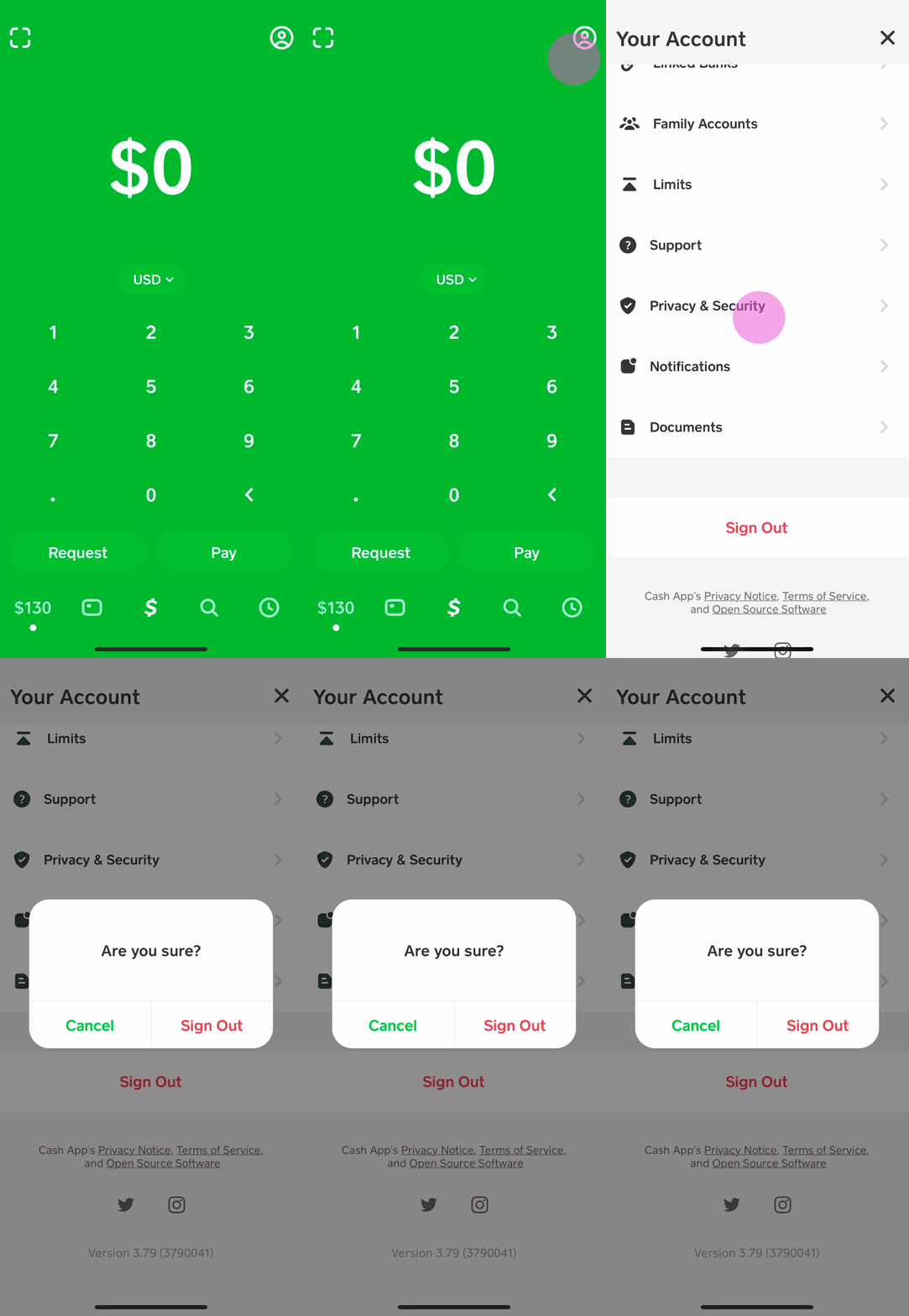
Enabling Biometrics: Navigate to the “Privacy & Security” section in your Cash App settings. Here, you’ll find options to enable Face ID or Fingerprint Lock.
-
How it Works: After enabling, instead of waiting for a verification code, you can simply use your device’s built-in biometric scanner to authenticate your identity. Your facial features or fingerprint become your “key,” providing swift access.
This method not only speeds up the login process but also enhances security, as biometric data is inherently unique to an individual and much harder to replicate than a traditional password or even a verification code. The underlying technology relies on secure enclave processors within your device, ensuring that your biometric data never leaves your phone and is not transmitted to Cash App’s servers.
Troubleshooting Common Sign-In Issues
Despite the streamlined process, users may occasionally encounter issues during sign-in. Understanding common problems and their technical solutions is key to quickly regaining access to your account.
Forgotten Passcode/PIN
Cash App uses a unique passcode or PIN for certain transactions and for an additional layer of security once you’re inside the app. If you forget this:
-
Initiate Passcode Reset: On the login screen or within the app’s security settings, look for an option like “Forgot PIN” or “Reset Passcode.”
-
Identity Verification: Cash App will typically require you to verify your identity. This might involve re-entering your registered phone number/email and receiving a new verification code, or answering security questions linked to your account.
-
Create New Passcode: Once your identity is confirmed, you’ll be prompted to set a new 4-digit PIN. It’s crucial to choose a unique, memorable number that isn’t easily guessable (e.g., avoid birth dates, sequential numbers). This process is designed to be self-service, leveraging the initial identity verification steps to ensure only the legitimate account holder can reset the passcode.
Verification Code Not Received

A common hurdle is not receiving the crucial verification code. This can stem from several technical or service-related issues:
-
Network Connectivity: Ensure your device has a strong cellular signal or Wi-Fi connection. Weak signals can delay or prevent SMS delivery.
-
Correct Contact Information: Double-check that the phone number or email address you entered is indeed the one registered with your Cash App account. A single typo can redirect the code elsewhere.
-
Spam/Junk Folders: For email verification codes, always check your spam or junk mail folders. Email filters can sometimes miscategorize legitimate emails.
-
Request New Code: After a reasonable waiting period (e.g., 60 seconds), the app usually provides an option to “Resend Code.” Try this once or twice.
-
Carrier/Provider Issues: Occasionally, there might be temporary issues with your mobile carrier or email provider delaying message delivery.
-
Do Not Disturb/Blocking: Ensure your phone isn’t set to “Do Not Disturb” or that you haven’t accidentally blocked messages from unknown senders (which Cash App verification numbers might appear as).
Account Lockout and Suspension
Cash App employs automated security systems to detect suspicious activity. If multiple incorrect login attempts are made, or if unusual transactions are detected, your account might be temporarily locked or even suspended to protect your funds.
-
Temporary Lockout: This usually resolves itself after a short period (e.g., 24 hours). Ensure you use the correct credentials afterward.
-
Account Suspension: This is more serious and often requires direct intervention.
-
Contact Support: The primary step is to contact Cash App support through their official channels (within the app’s “Support” section or via their website). Avoid unofficial contact methods to prevent phishing.
-
Provide Information: You will likely need to provide specific account details and possibly documentation to verify your identity and explain any flagged activity.
-
Follow Instructions: Adhere strictly to the instructions provided by the support team. They will guide you through the process of reactivating your account, which may involve additional verification steps or a review of past transactions. This robust system is a necessary evil, prioritizing the security of your funds over momentary inconvenience.
-
Enhancing Your Cash App Experience with Advanced Tech Features
Beyond the basic sign-in, Cash App offers several technological features that can enhance both convenience and security, allowing users to tailor their experience.
Setting Up Notifications and Alerts
Cash App provides robust notification settings, which are crucial for security and staying informed.
-
Transaction Alerts: Enable push notifications or SMS alerts for every transaction made from or to your account. This allows for immediate detection of unauthorized activity.
-
Login Alerts: Receive alerts when your account is accessed from a new device or an unusual location. This is a critical security feature that helps identify potential compromise early.
-
Activity Updates: Customize notifications for various activities, such as direct deposit confirmations, Bitcoin price changes, or stock performance alerts. Managing these settings from the “Notifications” section within the app allows you to stay on top of your financial activities proactively.
Managing Linked Devices
For security, it’s wise to review and manage the devices that have access to your Cash App account.
-
Review Active Devices: Within the “Privacy & Security” settings, there is often an option to view a list of devices currently logged into or linked to your account.
-
Log Out from Unknown Devices: If you see an unfamiliar device or a device you no longer own, immediately log it out. This revokes its access, preventing potential unauthorized use. This feature is particularly important if you ever lose your phone or use Cash App on a public or shared device. Regularly auditing your linked devices acts as an essential digital hygiene practice.
Exploring Cash App’s Integrated Services
Cash App’s evolution into a multifaceted fintech platform means that signing in grants you access to more than just P2P payments. From a technical perspective, these integrated services demonstrate the app’s sophisticated backend architecture.
-
Bitcoin Trading: Users can buy, sell, and send Bitcoin directly within the app. The underlying technology facilitates real-time market data integration and secure blockchain transactions.
-
Stock Investing: Cash App allows for fractional share trading, making stock market entry accessible. This involves complex API integrations with brokerage services, providing a simplified user interface over sophisticated financial instruments.
-
Cash Card Management: The Cash Card, a customizable debit card, can be managed entirely within the app – from ordering a new card to freezing it instantly if lost or stolen. These functionalities highlight Cash App’s commitment to consolidating diverse financial tools into a single, user-friendly digital environment. While the focus here is on the technical access, it’s worth noting that these features are seamlessly integrated for the user’s convenience.
Best Practices for Digital Security on Cash App
Beyond the inherent security features provided by Cash App, user vigilance and adherence to best practices are paramount in maintaining a secure account. Empowering yourself with knowledge of digital security enhances the protection of your financial data.
Strong, Unique Passcodes and PINs
While Cash App often uses verification codes for login, you will still encounter passcodes or PINs for transactions or app access.
-
Complexity: Always choose a strong, unique PIN that is not easily guessable (avoid birth dates, phone numbers, or simple sequences like 1234).
-
Uniqueness: Never reuse PINs or passcodes you use for other accounts. If one account is compromised, others remain safe.
-
Password Managers: Consider using a reputable password manager to generate and securely store complex PINs and other credentials, reducing the burden of memorization while maximizing security.
Recognizing Phishing Attempts and Scams
Cybercriminals frequently target Cash App users through sophisticated phishing and social engineering tactics.
-
Verify Senders: Be highly skeptical of unsolicited emails, SMS messages, or social media messages claiming to be from Cash App. Always check the sender’s email address or phone number for legitimacy; official communications will come from verified Cash App channels.
-
Beware of Links: Never click on suspicious links in emails or messages. These can lead to fake login pages designed to steal your credentials. If in doubt, always navigate directly to the official Cash App website or open the app on your device.
-
Never Share Codes or PINs: Cash App support will never ask for your login code, PIN, or full debit/credit card number. Any request for this information is a red flag.
-
Unrealistic Offers: Be wary of messages promising free money, lottery winnings, or deals that seem too good to be true, especially if they require you to send money first or share personal details.
Keeping Your App and Device Updated
Software updates are not just about new features; they are critically important for security.
-
App Updates: Regularly update your Cash App to the latest version. Developers frequently release patches for newly discovered vulnerabilities and enhance existing security features.
-
Operating System Updates: Keep your smartphone’s operating system (iOS or Android) updated. OS updates often include crucial security patches that protect your device from the latest threats, thereby safeguarding all apps installed on it, including Cash App.
-
Antivirus Software (Android): For Android users, consider installing reputable antivirus or anti-malware software to provide an additional layer of protection against malicious applications that could compromise your device and, by extension, your Cash App account.
By diligently following these best practices, you create a significantly more secure environment for your Cash App interactions, reducing your vulnerability to common digital threats and ensuring your financial technology tools remain a benefit, not a risk.

Conclusion
Signing into Cash App is more than just gaining access; it’s an entry point into a sophisticated financial technology ecosystem. By understanding the underlying security mechanisms, following the correct step-by-step procedures, and actively engaging in best digital security practices, users can ensure a consistently seamless, efficient, and, most importantly, secure experience. From initial account creation and leveraging biometric authentication to troubleshooting common issues and recognizing potential threats, an informed user is the first and most critical line of defense in the digital financial world. Embrace these insights to make your Cash App interactions not only convenient but also impeccably safe, empowering you to manage your finances with confidence and control.
aViewFromTheCave is a participant in the Amazon Services LLC Associates Program, an affiliate advertising program designed to provide a means for sites to earn advertising fees by advertising and linking to Amazon.com. Amazon, the Amazon logo, AmazonSupply, and the AmazonSupply logo are trademarks of Amazon.com, Inc. or its affiliates. As an Amazon Associate we earn affiliate commissions from qualifying purchases.