
In the realm of personal finance, investing, and business operations, percentages are an omnipresent mathematical concept. From calculating interest rates and discounts to understanding investment returns and profit margins, a solid grasp of percentages is indispensable. While manual calculations are always an option, a percentage calculator streamlines this process, reducing errors and saving valuable time. This financial tool, often available as a standalone device, a feature on standard calculators, or an online application, is designed to demystify percentage-based problems and empower users to make more informed financial decisions.
The Core Mechanics: Understanding What a Percentage Calculator Does
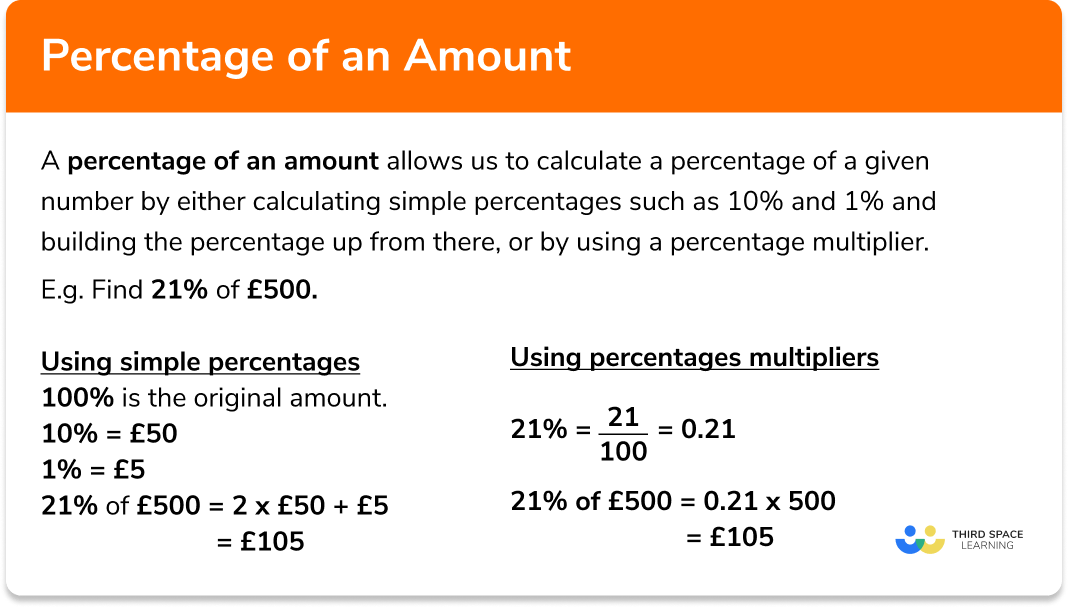
At its heart, a percentage calculator simplifies three fundamental types of percentage problems:
-
Finding X percent of Y: For example, what is 15% of $200?
-
Finding what percentage X is of Y: For example, what percentage is $30 of $200?
-
Calculating percentage increase or decrease: For example, what is the percentage change from $200 to $230?

Understanding these core functions is the first step to effectively leveraging this tool for various financial applications.
Finding a Reliable Percentage Calculator
Before diving into usage, ensure you have access to a reliable percentage calculator. Many modern smartphones have a built-in calculator app with percentage functionality. Dedicated financial calculators often include it, and numerous websites offer free, user-friendly percentage calculators. Look for one with a clear interface, distinct input fields, and the ability to handle various types of percentage problems.
The Basic Inputs: What You Need to Know
Most percentage calculators require you to input two primary values and then select the type of calculation you wish to perform.
-
For “X percent of Y”: You typically input the percentage (X) and the total value (Y). The calculator then provides the result.
- Example: To find 15% of $200, you would input “15” and “200,” then select the “X% of Y” function. The result would be $30.
-
For “What percentage X is of Y”: You input the part (X) and the total (Y).
- Example: To find what percentage $30 is of $200, you input “30” and “200,” then select the “X is what % of Y” function. The result would be 15%.
-
For “Percentage increase/decrease”: You input the original value and the new value.
- Example: To find the percentage increase from $200 to $230, you input “200” and “230,” then select the “percentage change” function. The result would be a 15% increase.
Familiarizing yourself with the specific layout and button functions of your chosen calculator is crucial for efficient use.
Practical Applications in Personal Finance
A percentage calculator is an indispensable tool for managing personal finances, helping individuals make astute decisions regarding spending, saving, and debt.
Budgeting and Expense Tracking
When creating or monitoring a budget, percentages help contextualize expenses. You can determine what percentage of your income goes towards housing, transportation, or groceries. This insight allows for better allocation of funds and identification of areas where spending can be reduced.
-
Scenario: Your monthly income is $4,000, and your rent is $1,200.
-
Calculation: Input $1,200 (part) and $4,000 (total) into the calculator’s “X is what % of Y” function.
-
Result: Your rent accounts for 30% of your income.
This information helps you assess if your housing costs are within a healthy budget threshold (e.g., often recommended to be no more than 30-35%).
Understanding Discounts and Sales
Shopping smart often involves calculating discounts. Whether it’s a “20% off” sale or an additional “10% off clearance items,” a percentage calculator quickly reveals the final price and actual savings.
-
Scenario: A jacket costs $150 and is on sale for 25% off.
-
Calculation: To find the discount amount, use “25% of $150.” This equals $37.50. Subtract this from the original price: $150 – $37.50 = $112.50. Alternatively, you can calculate the remaining percentage (100% – 25% = 75%) and find 75% of $150.
-
Result: The jacket will cost $112.50, saving you $37.50.
This immediate calculation prevents overspending and confirms advertised savings.
Calculating Tips and Service Charges
Dining out or using certain services often involves adding a tip. A percentage calculator ensures you tip appropriately without fumbling with mental math, especially when splitting bills.
-
Scenario: Your dinner bill is $75, and you want to leave a 18% tip.
-
Calculation: Use “18% of $75.”
-
Result: The tip amount is $13.50. Your total bill will be $75 + $13.50 = $88.50.
Loan Interest and Savings Growth
Understanding the impact of interest is fundamental to both debt management and savings growth. Whether it’s the interest on a loan or the growth of your savings account, percentages are key.
-
Scenario 1 (Loan Interest): You have a $10,000 loan with an annual interest rate of 5%. You want to know the annual interest charge.
-
Calculation: Use “5% of $10,000.”
-
Result: The annual interest is $500.
-
Scenario 2 (Savings Growth): You have $5,000 in a savings account that earns a 2% annual interest.
-
Calculation: Use “2% of $5,000.”
-
Result: Your savings will earn $100 in interest for the year.

While these examples are simplified, a percentage calculator provides a quick estimate for more complex scenarios, helping you visualize the financial implications.
Leveraging Percentages in Business and Investing
For entrepreneurs, business owners, and investors, a percentage calculator transitions from a helpful personal finance tool to an essential instrument for strategic decision-making and performance analysis.
Profit Margins and Markups
Businesses heavily rely on percentages to price products, analyze profitability, and manage inventory. Profit margins and markups are critical metrics.
-
Gross Profit Margin: Measures how much revenue is left after subtracting the cost of goods sold.
-
Scenario: A product sells for $100, and its production cost is $60.
-
Calculation: Gross profit is $100 – $60 = $40. To find the gross profit margin, calculate “what percentage $40 is of $100.”
-
Result: The gross profit margin is 40%.
-
-
Markup: The percentage added to the cost to determine the selling price.
-
Scenario: You buy an item for $50 and want a 30% markup.
-
Calculation: Find “30% of $50,” which is $15. Add this to the cost: $50 + $15 = $65.
-
Result: The selling price should be $65.
-
Sales Tax and Commissions
Managing sales tax and calculating commissions are routine tasks for many businesses and sales professionals.
-
Scenario 1 (Sales Tax): A product costs $75, and the sales tax rate is 8.5%.
-
Calculation: Find “8.5% of $75,” which is $6.38. Add this to the product cost: $75 + $6.38 = $81.38.
-
Result: The total cost including tax is $81.38.
-
Scenario 2 (Commission): A salesperson makes a 12% commission on sales totaling $5,000.
-
Calculation: Find “12% of $5,000.”
-
Result: The commission earned is $600.
Investment Returns and Portfolio Analysis
Investors frequently use percentages to evaluate the performance of their investments and overall portfolios.
-
Return on Investment (ROI): Measures the profitability of an investment.
-
Scenario: You invested $1,000, and it grew to $1,250.
-
Calculation: The profit is $1,250 – $1,000 = $250. To find the ROI, calculate “what percentage $250 is of $1,000.”
-
Result: The ROI is 25%.
-
-
Portfolio Allocation: Understanding the percentage breakdown of assets in a portfolio (e.g., 60% stocks, 40% bonds) helps in managing risk and diversification.
-
Scenario: Your total portfolio is $50,000, and you have $30,000 in stocks.
-
Calculation: Find “what percentage $30,000 is of $50,000.”
-
Result: Stocks represent 60% of your portfolio.
-
Business Growth Metrics
Tracking growth year-over-year or quarter-over-quarter relies heavily on percentage calculations.
-
Scenario: A company’s revenue was $1 million last year and grew to $1.2 million this year.
-
Calculation: Use the “percentage increase” function with $1,000,000 (original) and $1,200,000 (new).
-
Result: The revenue grew by 20%.
Advanced Tips for Maximizing Your Calculator’s Potential
Beyond the basic functions, some percentage calculators offer more sophisticated capabilities that can be incredibly useful for complex financial scenarios.
Reverse Percentage Calculations
Sometimes you know the final value after a percentage change and need to find the original value. For example, if an item is $80 after a 20% discount, what was its original price?
-
Many online percentage calculators offer a “find original value” function.
-
Manually, if an item is $80 after a 20% discount, it means $80 represents 80% (100% – 20%) of the original price.
-
To find the original price, divide the current price by the percentage it represents: $80 / 0.80 = $100.
-
This is crucial for understanding the original cost of a discounted item or the pre-tax price from a total.
Chained Percentage Changes
When multiple percentage changes occur sequentially (e.g., a price increases by 10%, then decreases by 5%), it’s important not to simply add or subtract the percentages. A percentage calculator can help with individual steps, but understanding the sequence is key.
-
Scenario: A stock priced at $100 increases by 10% and then decreases by 5%.
-
Step 1 (Increase): $100 + (10% of $100) = $100 + $10 = $110.
-
Step 2 (Decrease): $110 – (5% of $110) = $110 – $5.50 = $104.50.
-
Result: The final price is $104.50, not $100 + $10 – $5 = $105.
Common Pitfalls and How to Avoid Them
Even with a calculator, misinterpretations can lead to errors.
-
Confusing “of” with “from”: Be precise when calculating “X% of Y” versus a “X% increase/decrease from Y.”
-
Ignoring the base value: When calculating percentage changes, always ensure you’re using the correct original value as the base. A 10% increase from $100 is $10, making the new value $110. A 10% decrease from $110 is $11, making the new value $99. The base changed.
-
Rounding errors: For critical financial calculations, avoid premature rounding. Use the full precision of your calculator until the final step.
-
Misinterpreting “points” vs. “percentage”: A change from 5% to 6% is a 1 percentage point increase, but a (6-5)/5 = 20% percentage increase. Be clear on the terminology.
Mastering the use of a percentage calculator is a fundamental skill for anyone serious about managing their money, investing wisely, or running a successful business. By understanding its core functions and applying them to various financial scenarios, you empower yourself with accuracy and efficiency, turning complex percentage problems into straightforward calculations.
aViewFromTheCave is a participant in the Amazon Services LLC Associates Program, an affiliate advertising program designed to provide a means for sites to earn advertising fees by advertising and linking to Amazon.com. Amazon, the Amazon logo, AmazonSupply, and the AmazonSupply logo are trademarks of Amazon.com, Inc. or its affiliates. As an Amazon Associate we earn affiliate commissions from qualifying purchases.