
In an increasingly data-driven world, understanding and calculating percentages is not merely a mathematical exercise; it’s a fundamental skill essential for navigating everything from personal finance and academic studies to professional analytics and everyday consumer decisions. While the concept of percentages remains constant, the tools we use to calculate them have evolved dramatically, moving from manual paper-and-pencil methods to sophisticated digital solutions. For anyone seeking efficiency, accuracy, and convenience, the digital percent calculator has become an indispensable utility. This guide delves into the tech landscape of percent calculators, exploring where to find them, what makes a good one, and how to leverage them effectively.

The Ubiquity and Utility of Percent Calculators in the Digital Age
Percentages are more than just numbers; they represent proportions, growth, decline, and comparison, offering a standardized way to interpret data relative to a whole. From determining sales tax and tips to analyzing market shares, calculating discounts, or understanding statistical distributions, percentages are woven into the fabric of modern life. The digital age, with its explosion of data and emphasis on instantaneous information, has only amplified the need for quick, reliable percentage calculations.
Why Percentages Matter: Beyond Basic Math
The importance of percentages extends far beyond the confines of a math classroom. In business, they are crucial for tracking profit margins, sales growth, and market penetration. In science, they’re used for concentration calculations, statistical analysis, and experimental error. In personal life, understanding percentages helps with budgeting, comparing loan interest rates, evaluating nutritional labels, and deciphering discount offers during shopping. The ability to quickly and accurately perform these calculations frees up cognitive load, allowing users to focus on the implications of the numbers rather than the mechanics of calculation.
The Digital Evolution of Calculation Tools
The journey from manual calculation to digital computation is a testament to technological progress aimed at enhancing efficiency and reducing human error. Early mechanical calculators laid the groundwork, but the advent of personal computers and, subsequently, smartphones and web browsers, revolutionized access to computational power. Today, a percent calculator is rarely a standalone physical device; it’s most often a software application, a web page, or an integrated feature within a broader digital ecosystem. This digital evolution has democratized access, making sophisticated calculation capabilities available to anyone with an internet connection or a smart device. The focus has shifted from how to calculate to how to find the most effective digital tool for the job.
Navigating the Digital Landscape: Where to Look
Finding a percent calculator today isn’t about visiting a specialized store; it’s about navigating the vast digital ecosystem. The options are diverse, catering to different levels of convenience, functionality, and integration. Understanding where to look and what each category offers is key to selecting the right tool for your needs.
Browser-Based Solutions: Quick and Accessible
For most users, the quickest way to find a percent calculator is directly through their web browser. A simple search query like “percent calculator” on Google, Bing, or any other search engine will yield immediate results.
-
Search Engine Integrations: Google, for instance, often provides a built-in calculator directly within the search results page. You can type “what is 20% of 150” and get an instant answer without clicking any links. This is the ultimate in quick access for simple, one-off calculations.
-
Dedicated Online Calculators: Hundreds of websites host free, user-friendly percent calculators. These sites typically feature clear input fields for the base number, the percentage, and the result. Examples include calculator.net, online-calculator.com, and many financial news sites that offer embedded tools. These are excellent for more complex percentage problems, like calculating percentage increase/decrease, percentage difference, or even reverse percentage problems.
-
Utility Websites: Beyond specific calculator sites, many general utility or educational websites incorporate percentage calculators as part of their broader suite of tools. These often come with explanations and examples, which can be beneficial for those who want to understand the underlying math.
The advantages of browser-based tools are their instant availability, no installation required, and compatibility across different operating systems. However, they typically require an internet connection, and some may display ads.
Dedicated Mobile Apps: Convenience on the Go
For those who frequently need to perform calculations away from a computer or prefer a more integrated mobile experience, dedicated percent calculator apps are an ideal solution. Available on both iOS (App Store) and Android (Google Play Store), these apps offer portability and often richer features.
-
Standalone Percent Calculators: Many apps focus solely on percentage calculations, offering a streamlined interface optimized for touchscreens. They often include various percentage functions (e.g., percentage increase/decrease, tip calculator, discount calculator) within a single app.
-
All-in-One Calculator Suites: Many general-purpose calculator apps for smartphones include a percentage function as one of their core capabilities, alongside basic arithmetic, scientific functions, and unit conversions. These are great for users who prefer a single app for all their numerical needs.
-
Specialized Financial or Business Apps: Apps designed for budgeting, investing, or business management often incorporate percentage calculators relevant to their specific domain. For example, a sales app might have a built-in commission calculator, or a financial app might include a compound interest calculator that relies heavily on percentage computations.
Mobile apps offer the benefit of offline access (once downloaded), faster loading times, and often a more intuitive user interface tailored for mobile devices. They can also integrate with other phone features, like sharing results.
Integrated Software Features: Beyond Standalone Tools
Percent calculation functionality is not always found in dedicated apps or websites; it’s frequently embedded within larger software platforms that serve different primary purposes.
-
Spreadsheet Software (Excel, Google Sheets, LibreOffice Calc): This is arguably one of the most powerful and versatile platforms for percentage calculations, especially when dealing with large datasets. Users can input formulas (e.g.,
=A1*0.20for 20% of cell A1, or=(B1-A1)/A1for percentage change) to perform complex calculations, create dynamic models, and visualize results. Spreadsheets are indispensable for business analysis, scientific research, and advanced financial modeling. -
Operating System Calculators: Both Windows (Calculator app) and macOS (Calculator app) include built-in utilities that support basic percentage operations. While often less feature-rich than dedicated apps, they are always readily available and reliable for quick tasks.
-
Word Processors and Presentation Software: While not primary calculation tools, applications like Microsoft Word, Google Docs, or PowerPoint often allow for embedding small tables or objects that can perform basic calculations, or they link to external spreadsheet data where percentages have been computed.
-
Web Browsers (Developer Tools): Advanced users, particularly developers, can even use the JavaScript console in web browsers (accessible via F12 or developer menus) to perform quick calculations, including percentages, directly within the browser environment.
These integrated solutions are perfect for users who are already working within these software environments and need to perform calculations without switching applications, offering a seamless workflow.
Evaluating and Selecting the Right Percent Calculator
With so many options available, choosing the “best” percent calculator isn’t about finding a single universal solution, but rather identifying the tool that best fits your specific requirements. This involves evaluating several key factors that contribute to a calculator’s utility and reliability.
Key Features to Prioritize
Beyond basic “X percent of Y” calculations, a robust percent calculator offers a range of functionalities:
-
Percentage Increase/Decrease: Essential for tracking growth or decline over time (e.g., population growth, stock price changes).
-
Percentage Change/Difference: Used to compare two values and express their difference as a percentage.
-
Discount Calculator: Helps determine the final price after a percentage discount.
-
Tip Calculator: Calculates the appropriate tip amount and total bill.
-
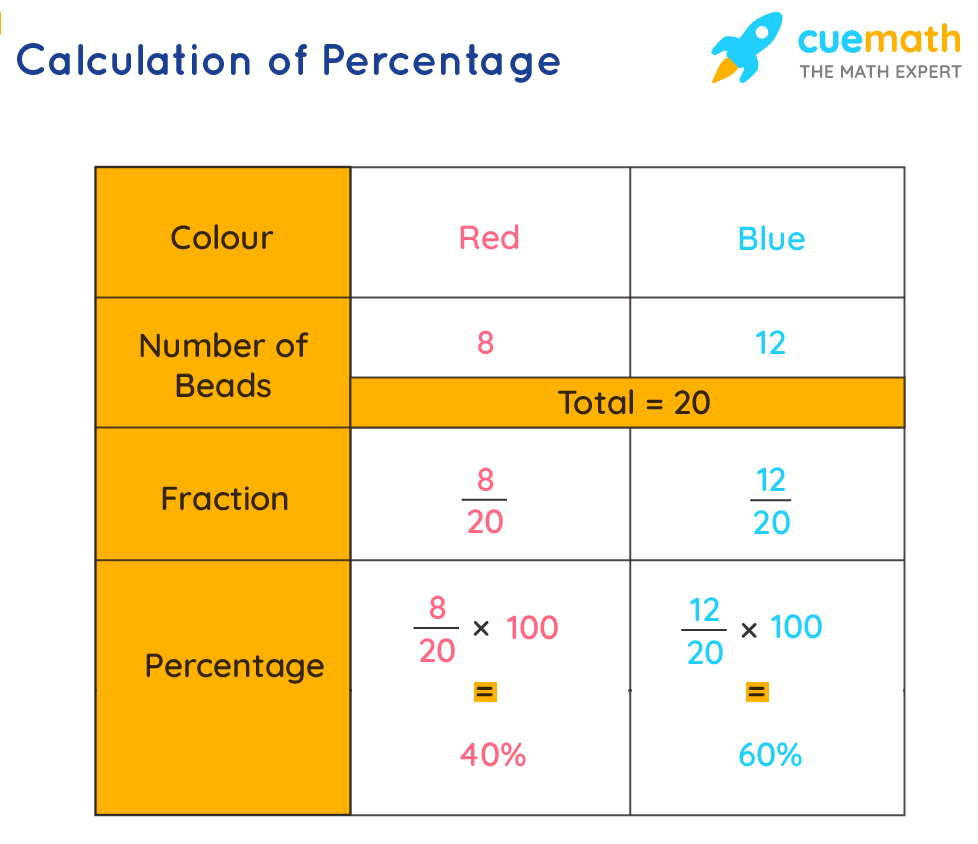
Reverse Percentage Calculations: Working backward from a percentage and a result to find the original number (e.g., if a product costs $120 after a 20% discount, what was the original price?).
-
Fraction to Percentage Conversion: Useful for converting common fractions into percentages.
-
Clear Memory and History Functions: For complex calculations or reviewing previous steps.
The more diverse your percentage calculation needs, the more features you should look for in a chosen tool.
User Experience and Interface Design
A powerful calculator is only effective if it’s easy and intuitive to use.
-
Clarity and Simplicity: The interface should be clean, uncluttered, and easy to understand. Input fields should be clearly labeled, and the results should be presented legibly.
-
Responsiveness: Whether a web page or an app, the calculator should respond quickly to inputs without lag.
-
Error Handling: Good calculators provide helpful feedback if invalid inputs are entered, preventing frustration.
-
Accessibility: Consider features like large buttons, high contrast modes, and compatibility with screen readers for users with visual impairments.
A well-designed interface minimizes the learning curve and makes calculations faster and more enjoyable.
Security, Privacy, and Data Handling
While a simple percent calculator might seem innocuous, it’s prudent to consider data security, especially for online tools or apps that request permissions.
-
No Personal Data Collection: For most simple calculators, there should be no need for them to collect personal data. Be wary of apps or websites that ask for unnecessary permissions or personal information.
-
Ad Experience: Free online calculators often rely on ads. Evaluate whether the ads are intrusive or if they compromise the user experience. Some paid apps offer an ad-free experience.
-
Secure Connections (HTTPS): For browser-based calculators, ensure the website uses HTTPS (indicated by a padlock icon in the browser address bar), especially if you’re entering any sensitive numbers, though this is less critical for basic percentage calculations.
Choosing reputable sources for online calculators and apps minimizes potential security and privacy risks.
Accuracy and Reliability: Trusting Your Calculations
At the core, a calculator must be accurate. While most digital calculators are inherently precise, it’s worth noting a few points:
-
Decimal Precision: Some calculators allow you to specify the number of decimal places for results, which can be important for scientific or financial applications.
-
Rounding Rules: Understand how the calculator handles rounding, as different contexts may require different rounding conventions.
-
Reputation: Stick to well-known and reputable online tools or app developers to ensure the accuracy of the underlying algorithms.
Ultimately, a reliable percent calculator instills confidence in your numerical decisions.
Leveraging Advanced Percent Calculation Features and Integration
Beyond basic calculations, modern digital tools offer sophisticated ways to work with percentages, integrating them into broader analytical and productivity workflows.
Beyond Simple Percentages: Growth, Discount, and Change
Many advanced percent calculators and spreadsheet functions allow for:
-
Compound Percentage Calculations: Essential for understanding investments, loans, and population growth over multiple periods.
-
Weighted Averages: Calculating a percentage where different components have different levels of importance.
-
Percentage Distribution: Breaking down a total into its constituent parts expressed as percentages, often visualized in pie charts.
-
Error Percentages: In scientific contexts, calculating the percentage difference between an observed value and a true or expected value.
These specialized functions elevate a calculator from a basic tool to a powerful analytical instrument.
Integration with Spreadsheets and Productivity Suites
The true power of digital percentage calculations often lies in their integration with other software. As mentioned, spreadsheets are paramount. Learning basic percentage formulas in Excel or Google Sheets (e.g., using SUM, AVERAGE, PERCENTRANK.EXC) unlocks capabilities for:
-
Dynamic Dashboards: Creating interactive reports where percentages update automatically as source data changes.
-
Scenario Planning: Modeling different “what if” scenarios by adjusting input percentages and observing the outcomes.
-
Automated Reporting: Generating regular reports with key performance indicators (KPIs) expressed as percentages, without manual recalculation.
This level of integration transforms raw data into actionable insights, moving beyond simple calculation to sophisticated analysis.
AI-Enhanced Calculators and Future Trends
While most percent calculators are rule-based, the trend towards AI integration is slowly impacting even basic tools. Future calculators might:
-
Natural Language Processing (NLP): Allow users to input queries in conversational language (e.g., “What’s the percentage increase if sales went from 100 to 120?”).
-
Contextual Awareness: Suggest relevant calculations based on the user’s input or common patterns.
-
Predictive Analytics: In more complex financial or business tools, AI might use historical percentage data to predict future trends.
As AI becomes more pervasive, even the humble percent calculator could see enhancements that make it even more intuitive and powerful.
Practical Tips for Efficient Use and Troubleshooting
To get the most out of your chosen percent calculator, a few practical considerations can enhance efficiency and prevent common errors.
Understanding Input Fields and Output Formats
Always double-check what each input field represents. Some calculators might ask for “Total” and “Part,” others for “Number” and “Percentage.” Ensure you’re inputting values into the correct fields to avoid incorrect results. Pay attention to how the output is formatted – is it a decimal, a percentage with the symbol, or a raw number? This is particularly important when transferring results to other documents or systems.
Common Pitfalls and How to Avoid Them
-
Misinterpreting the Base: Ensure you are calculating the percentage of the correct base number. For example, a 10% raise on your salary is calculated on your current salary, not your new salary.
-
Order of Operations: While most digital calculators handle this, be mindful of complex expressions. In spreadsheets, parentheses are crucial for defining the order of operations.
-
Rounding Errors: For multi-step calculations, avoid rounding intermediate results. Keep full precision until the final step to minimize cumulative rounding errors.
-
Data Entry Errors: The most common mistake is simply typing the wrong number. Always review your inputs before hitting “calculate.”
Staying Updated with Calculator Technology
Just like any other software, calculator apps and online tools receive updates. Keep your mobile apps updated to benefit from new features, bug fixes, and performance improvements. For browser-based tools, staying aware of new, more efficient, or feature-rich websites can always be beneficial. Subscribing to tech newsletters or following software review sites can help you discover new tools.
Conclusion: Empowering Your Numerical Decisions
Finding a percent calculator in the digital age is no longer a challenge; the challenge lies in selecting the right tool from a vast array of options. Whether you opt for the instant gratification of a browser-based search engine result, the convenience of a mobile app, or the analytical power of a spreadsheet, understanding the technological landscape of these tools empowers you. By prioritizing features, user experience, security, and accuracy, you can equip yourself with the perfect digital companion for all your percentage calculation needs. In a world increasingly driven by numbers, mastering the art of finding and utilizing the best tech tools for percentages is not just a convenience—it’s a critical skill for making informed, accurate, and insightful decisions.
aViewFromTheCave is a participant in the Amazon Services LLC Associates Program, an affiliate advertising program designed to provide a means for sites to earn advertising fees by advertising and linking to Amazon.com. Amazon, the Amazon logo, AmazonSupply, and the AmazonSupply logo are trademarks of Amazon.com, Inc. or its affiliates. As an Amazon Associate we earn affiliate commissions from qualifying purchases.