
In an increasingly digitized world, an Amazon account serves as a fundamental gateway to a vast ecosystem of products, services, and digital experiences. From online shopping and streaming entertainment to cloud storage and smart home integration, Amazon’s offerings permeate nearly every aspect of modern digital life. For newcomers or those looking to set up a fresh profile, understanding the step-by-step process of creating an account is the first crucial stride. This guide provides a comprehensive, professional walkthrough, ensuring a secure and seamless entry into the Amazon universe.
The Gateway to the Amazon Ecosystem: Why an Account Matters
Creating an Amazon account is more than just signing up for an online store; it’s an enrollment into a sprawling digital infrastructure. An account serves as your unique identifier and personalized hub, centralizing your interactions with all Amazon’s diverse services.

More Than Just Shopping: Services and Benefits Unlocked
While Amazon is synonymous with e-commerce, its account system underpins a much broader suite of technological services. With a single account, users gain access to:
-
Amazon.com: The world’s largest online marketplace, offering millions of products across countless categories.
-
Amazon Prime: A premium subscription service providing expedited shipping, exclusive deals, and access to Prime Video, Prime Music, Prime Reading, and other digital perks. This transforms the shopping experience, leveraging network effects and integrated logistics.
-
Digital Content: Access to Kindle e-books, Audible audiobooks, Amazon Music’s vast library, and the extensive collection of movies and TV shows on Prime Video. Each of these platforms relies on your core Amazon account for content licensing, personalization, and cross-device syncing.
-
Cloud Services: Limited photo storage via Amazon Photos, and for developers, access to a vast array of Amazon Web Services (AWS) – although typical consumer accounts focus on the former.
-
Smart Home Integration: Connection to Alexa-enabled devices like Echo speakers and Fire TV sticks, allowing for voice control, smart home management, and personalized recommendations. Your account acts as the central brain for these interconnected devices.
-
Other Specialized Services: Amazon Fresh for groceries, Amazon Pharmacy for prescriptions, and various niche platforms depending on your geographic region.
Each of these services leverages your account profile to personalize experiences, manage subscriptions, track orders, and secure your digital interactions. Without an account, the vast majority of Amazon’s integrated digital services remain inaccessible.
Why an Amazon Account is Essential in the Digital Age
In an era defined by convenience and connectivity, an Amazon account streamlines numerous daily activities. It eliminates the need for repeated data entry, securely stores payment information (with appropriate security measures enabled), and builds a personalized profile based on your preferences and past interactions. This personalization, driven by sophisticated algorithms, tailors product recommendations, content suggestions, and even advertisements, enhancing user experience and efficiency. Furthermore, with the proliferation of smart home technology, an Amazon account has become a foundational component for integrating and managing devices within a connected living space. It’s a key identifier in the modern digital identity landscape.
Step-by-Step: Your Guide to Account Creation
Creating a new Amazon account is a straightforward process designed for user accessibility. It involves a few critical steps that ensure your identity is verified and your account is secure from the outset.
Initial Navigation and Account Setup Page
-
Accessing Amazon: Open your preferred web browser (e.g., Chrome, Firefox, Safari, Edge) and navigate to
www.amazon.com(or your specific regional Amazon domain, e.g.,amazon.co.uk,amazon.de,amazon.ca). -
Locating the Account Creation Link: On the Amazon homepage, hover over “Account & Lists” (usually located in the top right corner). A dropdown menu will appear.
-
Initiating New Account Registration: Within this dropdown, click on the “Start here” link next to “New customer?” This action will redirect you to the “Create account” page. Alternatively, if you’re on a mobile device or app, look for a “Sign In” or “My Account” option, which typically leads to a “Create New Account” link.
Entering Personal Details and Security Measures
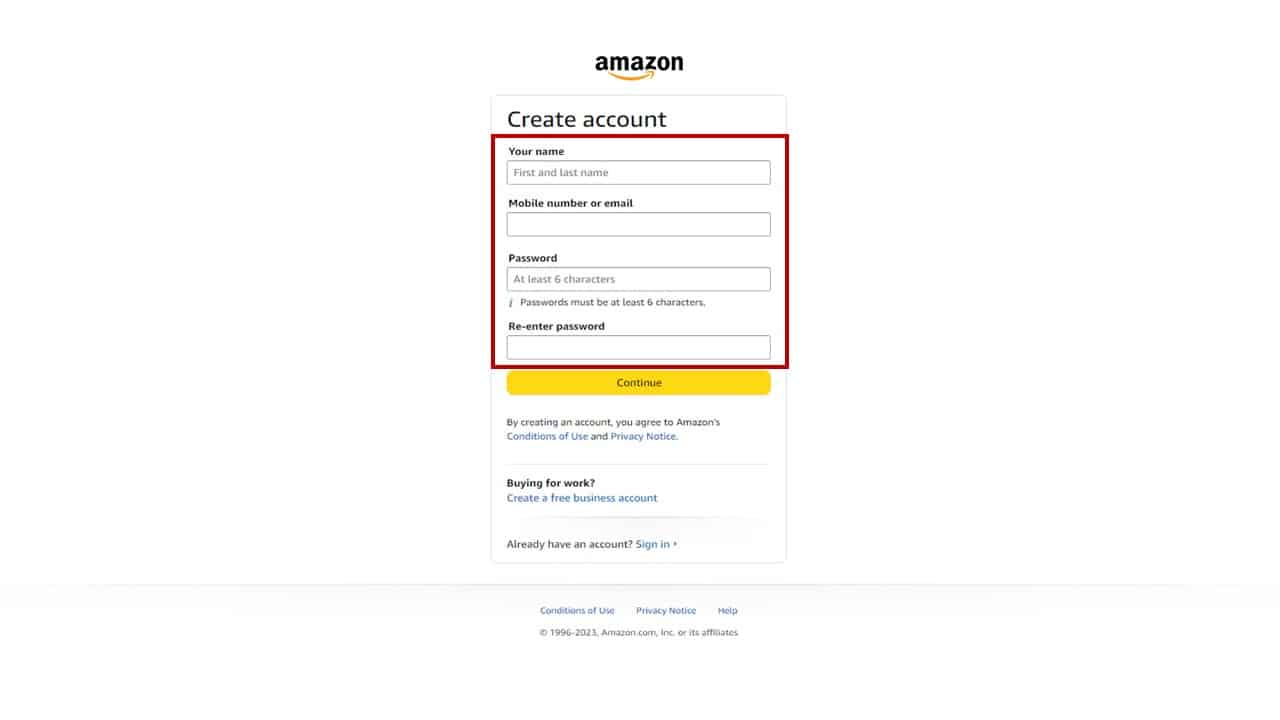
The account creation form requires specific information to establish your identity and secure your future login.
-
Your Name: Enter your full name as you would like it to appear on your account. This helps Amazon personalize your experience and is often used for delivery details.
-
Mobile Number or Email: This is a crucial piece of information that will serve as your primary username and recovery method. You must choose one and provide a valid, active number or email address. Amazon uses this for account verification, password resets, and important notifications. It’s recommended to use an email address you check regularly or a mobile number that is reliably yours.
-
Password: Create a strong, unique password. Amazon typically requires a minimum of 6 characters. A robust password combines uppercase and lowercase letters, numbers, and symbols. Avoid easily guessable information like birthdays, pet names, or consecutive numbers. A strong password is your first line of defense against unauthorized access.
-
Re-enter Password: Type your chosen password again to confirm it matches, preventing typographical errors during the setup process.
Verification and Confirmation
After submitting your details, Amazon implements a crucial security step to verify your ownership of the provided contact information.
-
OTP (One-Time Password) or Link: Depending on whether you provided a mobile number or email, Amazon will send a One-Time Password (OTP) to your phone via SMS or a verification link/code to your email inbox.
-
Entering the Verification Code: Retrieve the OTP from your SMS messages or the code/link from your email. If it’s a code, enter it into the designated field on Amazon’s website. If it’s a link, click it to automatically verify your account.
-
Account Creation Completion: Once the verification is successful, your Amazon account will be created! You will typically be redirected to your Amazon homepage, often with a welcome message, and you can begin exploring the site or configuring further settings.
Enhancing Your Account’s Security and Privacy
Creating an account is just the beginning. In the digital realm, proactive security measures are paramount to protect your personal data and financial information. Amazon, as a major tech platform, provides several tools and best practices to bolster your account’s defenses.
Strong Passwords and Two-Factor Authentication (2FA)
-
Password Best Practices: Beyond the initial creation, regularly review and update your password. Consider using a reputable password manager (e.g., LastPass, 1Password, Bitwarden) to generate and store complex, unique passwords for each of your online accounts. This mitigates the risk of credential stuffing attacks, where a breach on one site compromises your accounts on others.
-
Two-Factor Authentication (2FA): This is arguably the most critical security feature. Once your account is created, navigate to “Account & Lists” > “Your Account” > “Login & security” (or similar path). Enable 2FA, also known as Two-Step Verification. This requires a second form of verification (typically a code sent to your phone or generated by an authenticator app like Google Authenticator or Authy) in addition to your password when logging in from an unrecognized device. This significantly reduces the risk of unauthorized access, even if your password is compromised.
Managing Your Personal Information and Preferences
Your Amazon account settings provide granular control over your data.
-
Privacy Settings: Regularly review the privacy settings within “Your Account.” You can manage your advertising preferences, personalize content recommendations, and control how your data is used by Amazon.
-
Payment Methods: Store only necessary payment methods and delete old or inactive ones. Amazon encrypts your payment information, but regularly checking for unauthorized cards or accounts linked is a good practice.
-
Address Book: Keep your shipping addresses updated and accurate. Remove any outdated or incorrect addresses to prevent delivery issues or potential misuse.
-
Security Alerts: Ensure your contact information for security alerts (email and phone number) is current. Amazon will use these to notify you of suspicious login attempts or changes to your account.
Recognizing and Avoiding Phishing Scams
Phishing is a prevalent cyber threat targeting online accounts. It involves deceptive communications (emails, SMS) designed to trick users into revealing login credentials or other sensitive information.
-
Scrutinize Communications: Always be suspicious of emails or texts asking for your Amazon password, payment information, or personal details, especially if they threaten account closure or offer implausible deals.
-
Check Sender Details: Verify the sender’s email address. Legitimate Amazon communications will come from official Amazon domains (e.g.,
@amazon.com,@amazon.co.uk). -
Hover Over Links: Before clicking any link, hover your mouse over it (on desktop) or long-press (on mobile) to preview the URL. Ensure it points to an official Amazon domain, not a suspicious-looking address.
-
Direct Navigation: If in doubt, do not click links in suspicious messages. Instead, manually type
www.amazon.cominto your browser and log in directly to check your account for any alerts or notifications.
Troubleshooting Common Account Creation Issues
While creating an Amazon account is typically seamless, users may occasionally encounter technical glitches or issues. Knowing how to troubleshoot these common problems can save time and frustration.
Dealing with Verification Problems
-
OTP/Code Not Received:
-
Check Spam/Junk Folder: For email verification, the code might have landed in your spam or junk folder.
-
Verify Contact Info: Ensure you entered the correct mobile number or email address during registration. A typo will prevent the code from reaching you.
-
Resend Option: Look for a “Resend Code” or “Didn’t receive code?” option on the verification page. Click it to request a new OTP.
-
Network Issues: For mobile numbers, temporary network congestion might delay SMS delivery. Wait a few minutes before requesting a resend.
-
-
Expired Code: Verification codes often have a time limit. If you take too long to enter it, it may expire. Request a new one.
Password Reset and Recovery
If you forget your password after account creation, Amazon’s recovery process is designed to be secure and user-friendly.
-
Navigate to Sign-In Page: Go to Amazon’s sign-in page and click “Forgot your password?”
-
Enter Contact Info: You’ll be prompted to enter the email address or mobile number associated with your account.
-
Verification: Amazon will send a verification code to that contact method.
-
New Password: Once verified, you can set a new password. Remember to choose a strong, unique one.
Contacting Amazon Customer Support
If you encounter persistent technical issues that you cannot resolve independently, Amazon’s customer support is available.
-
Help & Customer Service: On the Amazon homepage, scroll to the bottom and find “Help” or “Customer Service” under the “Let Us Help You” section.
-
Contact Options: Look for options like “Contact Us” or “Need More Help?” This typically leads to choices like phone support, live chat, or email support. Live chat is often the quickest for immediate technical assistance.
-
Be Prepared: Have your account details (the email/phone you tried to register with), a description of the issue, and any error messages ready to provide to the support representative. They can guide you through the process or troubleshoot issues from their end.
Leveraging Your New Amazon Account: Beyond the Basics
With your Amazon account successfully created and secured, you are now equipped to dive deeper into the ecosystem. Maximizing your account’s potential involves exploring its advanced features and integrated services.
Exploring Prime Membership and Its Perks
Consider signing up for Amazon Prime. Beyond free and fast shipping, Prime offers a wealth of digital advantages that significantly enhance the tech experience:
-
Prime Video: An extensive library of movies and TV shows, including Amazon Originals, accessible on a myriad of devices from smart TVs to mobile phones.
-
Prime Music: Ad-free access to millions of songs and curated playlists.
-
Prime Reading: Access to a rotating selection of free e-books and magazines.
-
Twitch Prime: Monthly free games, in-game loot, and a free channel subscription on Twitch.
-
Amazon Photos: Unlimited full-resolution photo storage, a valuable cloud service for preserving digital memories.
Utilizing Amazon’s Digital Services (Music, Video, Kindle)
Your Amazon account serves as the central hub for all these digital content platforms. Link your devices, download apps (like the Kindle app, Prime Video app, Amazon Music app), and log in with your new account. Your purchase history, watchlists, listening habits, and reading progress will sync across all devices, ensuring a seamless multi-device experience. This integration is a cornerstone of Amazon’s tech strategy, aiming for a sticky and user-friendly environment.

Personalizing Your Shopping Experience
As you use your account, Amazon’s algorithms will begin to learn your preferences.
-
Wish Lists & Registries: Create and manage multiple wish lists for different occasions or personal interests.
-
Order History: Easily track past purchases, return items, and reorder favorites.
-
Recommendations: The “Recommended for You” section becomes more accurate over time, suggesting products based on your browsing and purchase history, often leading to discovering new items you might genuinely need.
-
Reviews and Ratings: Contribute to the community by leaving product reviews and ratings, helping other shoppers make informed decisions.
Creating an Amazon account is more than a simple registration; it’s an investment in a highly integrated digital lifestyle. By following these steps and prioritizing account security, you unlock a world of technological convenience, entertainment, and commerce, positioning yourself firmly within one of the most comprehensive digital ecosystems available today.
aViewFromTheCave is a participant in the Amazon Services LLC Associates Program, an affiliate advertising program designed to provide a means for sites to earn advertising fees by advertising and linking to Amazon.com. Amazon, the Amazon logo, AmazonSupply, and the AmazonSupply logo are trademarks of Amazon.com, Inc. or its affiliates. As an Amazon Associate we earn affiliate commissions from qualifying purchases.