
Enrolling in Amazon Student Prime is a straightforward process designed to unlock a wealth of digital and physical benefits tailored specifically for higher education students. This guide provides a comprehensive tutorial on navigating the sign-up procedure, understanding eligibility, and maximizing the technological advantages offered by this specialized membership. From streaming entertainment to exclusive discounts on essential study tools, Prime Student integrates seamlessly into a student’s digital ecosystem, enhancing both academic and personal life.
Decoding the Value of Amazon Student Prime for the Digital Age
Amazon Student Prime isn’t merely a discounted version of the standard Prime membership; it’s a strategically curated package of services and perks designed to support the multifaceted lifestyle of a modern student. At its core, it leverages Amazon’s extensive technological infrastructure to deliver unparalleled convenience and cost savings, which are critical for individuals balancing education, budget constraints, and personal time. Understanding the core offerings and eligibility criteria is the first step towards effectively integrating this powerful digital tool into one’s daily routine.

Core Benefits for the Tech-Savvy Student
The primary allure of Prime Student lies in its suite of digital services and expedited logistics. For a significantly reduced monthly or annual fee, students gain access to:
-
Expedited Shipping: Unlimited free two-day shipping on millions of items, and often same-day or one-day shipping options in eligible areas. This is invaluable for receiving textbooks, electronics, dorm supplies, or last-minute essentials without delay, bypassing the traditional retail constraints.
-
Prime Video: An expansive library of movies, TV shows, and Amazon Originals, accessible across a multitude of devices from smartphones and tablets to smart TVs and gaming consoles. This provides a crucial entertainment outlet and can be a cost-effective alternative to other streaming services.
-
Prime Music: Ad-free access to millions of songs and thousands of stations and playlists. This digital music service caters to study sessions, workouts, or simply unwinding, offering a versatile audio experience without interruption.
-
Prime Reading: Unlimited access to a rotating selection of ebooks, magazines, and comics from a diverse catalog. This feature can supplement academic research, offer leisure reading, or even provide free access to required course materials, reducing textbook expenses.
-
Exclusive Student Deals and Discounts: Beyond the standard Prime benefits, students receive unique promotions on textbooks, electronics, fashion, and other necessities. These aren’t just one-off deals; Amazon frequently partners with brands to offer ongoing savings that are only accessible through a verified student Prime account. This extends to discounts on services like Grubhub+, which directly impacts a student’s daily expenses.
-
Amazon Photos: Unlimited full-resolution photo storage and 5 GB of video storage. For students constantly documenting projects, field trips, or personal memories, this cloud-based solution offers a secure and accessible archive, safeguarding precious digital assets without consuming local device storage.
These benefits collectively represent a robust digital toolkit, offering convenience, entertainment, and financial relief, all orchestrated through Amazon’s comprehensive platform.
Eligibility: Verifying Your Student Status
To qualify for Prime Student, Amazon requires proof of enrollment in an accredited two- or four-year college or university. This verification process is crucial for maintaining the exclusivity and integrity of the program. While specific requirements may vary slightly, the general criteria include:
-
Active Enrollment: You must be actively enrolled in at least one course at an accredited institution.
-
Valid Email Address: A
.eduemail address is often the primary method of verification. If you do not possess one, alternative documentation may be required. -
Age Requirement: Generally, applicants must be 18 years or older.
-
Geographic Restrictions: Prime Student is available in specific countries, so ensuring eligibility based on your location is also important.
The system is designed to identify legitimate students, typically through automated checks against academic databases or by requiring uploads of official documents. This ensures that the specialized benefits are directed to the intended demographic, preventing misuse and preserving the program’s value.
Step-by-Step Guide to Prime Student Enrollment
The enrollment process for Amazon Student Prime is engineered for user-friendliness, guiding applicants through a series of intuitive steps. This tutorial breaks down each stage, from initial navigation to final confirmation, ensuring a seamless setup of your new student membership.
Initiating the Sign-Up Process
-
Navigate to the Prime Student Page: Begin by visiting the dedicated Amazon Prime Student sign-up page. This is distinct from the regular Prime sign-up and ensures you access the correct membership tier. A quick search for “Amazon Prime Student” will usually lead you directly to it.
-
Create or Log In to Your Amazon Account:
-
If you already have an Amazon account, simply log in using your existing credentials. It’s often beneficial to use an account you frequently access to consolidate your shopping and digital services.
-
If you don’t have an Amazon account, you will need to create one. This involves providing your name, email address, and creating a secure password. Ensure your email is accessible as it will be used for verification and communication.
-
-
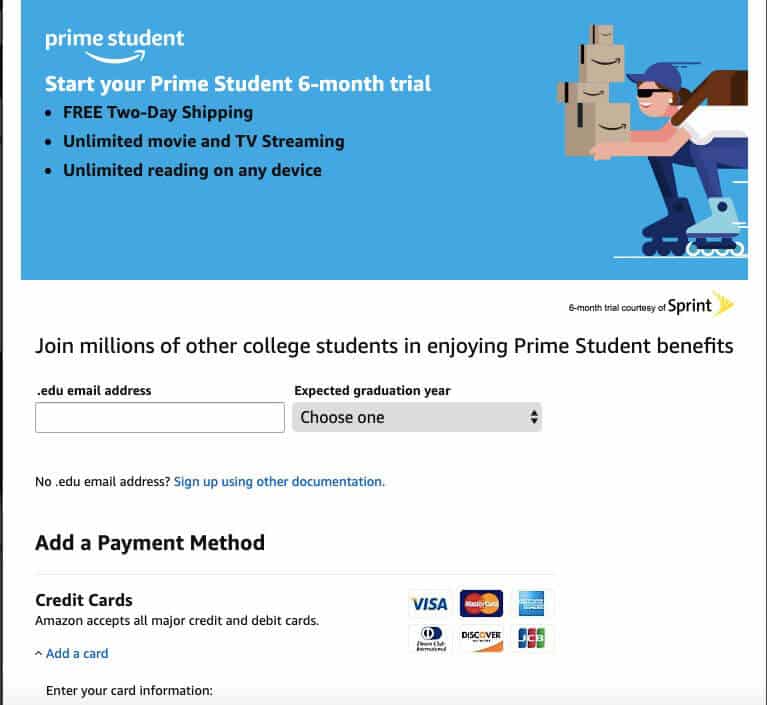
Click “Start Your 6-Month Trial”: Prime Student typically offers an initial six-month free trial, providing ample time to explore the benefits before committing to a paid membership. Click on the prominent call-to-action button to proceed.
Verification of Student Status
This is the most critical step, as it confirms your eligibility. Amazon employs several methods, and you should be prepared with the necessary information:
-
Using Your .edu Email Address:
-
If you have a valid
.eduemail address from your college or university, enter it into the designated field. -
Amazon will send a verification email to this address.
-
Access your student email inbox, locate the email from Amazon (check spam/junk folders if not immediately visible), and click the verification link within it. This link confirms your student status and links your Amazon account to the Prime Student program.
-
-
Alternative Verification Methods (If No .edu Email):
-
If your institution doesn’t provide a
.eduemail or if the automated verification fails, Amazon may offer alternative methods. These typically involve manually uploading documentation. -
Accepted Documents May Include:
-
Official enrollment letter (dated within the last 90 days).
-
Tuition bill (dated within the last 90 days).
-
Transcript (showing current enrollment).
-
Student ID card (showing a valid expiration date).
-
-
Important Considerations: When uploading documents, ensure sensitive information (like social security numbers or excessive financial details) is redacted. The document should clearly show your name, the institution’s name, and a current date indicating active enrollment.
-
Follow the on-screen instructions carefully for uploading, ensuring the file format and size meet Amazon’s specifications.
-
Completing Your Prime Student Membership
Once your student status is verified:
-
Provide Payment Information: Even for the free trial, Amazon requires a valid payment method (credit card, debit card, or an approved payment service). This is to ensure a seamless transition to the paid membership once the trial period concludes. You will not be charged during the trial.
-
Confirm Billing Address: Ensure your billing address is accurate and matches the details associated with your payment method.
-
Review and Activate: Carefully review all the information you’ve provided. Once satisfied, confirm your enrollment. Your Prime Student benefits should become active almost immediately. You will receive a confirmation email detailing your membership and the trial end date.
It’s advisable to make a note of the trial end date to avoid unintended charges. You have the option to cancel your membership at any point before the trial concludes.
Maximizing Your Prime Student Experience Beyond the Basics
Signing up is just the beginning. To truly leverage the power of Amazon Prime Student, it’s essential to understand how to integrate its various features into your academic and personal life. The true value lies not just in having the services, but in actively utilizing them to save time, money, and enhance your digital engagement.
Leveraging Prime Video and Music for Study and Downtime
Prime Video and Prime Music are more than just entertainment platforms; they can be integrated into a student’s lifestyle strategically.
-
Curated Content for Learning: Prime Video hosts a growing collection of documentaries, educational series, and even some classic literary adaptations that can supplement coursework. Utilize the search function to find relevant content.
-
Focus-Enhancing Playlists: Prime Music offers thousands of curated playlists, including “focus” or “study” specific categories. Instrumental music or ambient soundscapes can significantly improve concentration during long study sessions.
-
Offline Access: Both services allow for downloading content for offline viewing/listening. This is incredibly useful for commutes, travel, or areas with unreliable internet access, ensuring your entertainment and study aids are always available. Manage downloads within the respective apps.
-
Device Compatibility: Ensure you have the Prime Video and Amazon Music apps installed on your preferred devices (laptop, tablet, phone). Familiarize yourself with their interfaces for seamless navigation.
Exploiting Textbook and Tech Discounts
One of the most tangible financial benefits for students is the exclusive access to deals on academic necessities and electronics.
-
Amazon Textbooks: Use Amazon’s textbook storefront to search for required readings. Prime Student often grants additional discounts or faster shipping on textbooks, both new and used, or even rental options. Compare prices diligently.
-
Student-Exclusive Deals: Regularly check the “Prime Student” section on the Amazon website for flash sales, percentage discounts, and bundled offers on laptops, tablets, peripherals, software, and other gadgets vital for academic success. These deals are usually time-sensitive and highly competitive.
-
Electronics Upgrades: When considering a new device, always check if Prime Student offers a preferential rate. From noise-canceling headphones for focused study to external hard drives for project backups, these savings can be substantial.
Exploring Additional Student-Exclusive Offers
Amazon continually rolls out new perks and partnerships for Prime Student members. Proactive exploration is key to uncovering these benefits.
-
Grubhub+ Membership: Often, Prime Student includes a complimentary Grubhub+ membership, offering free delivery on restaurant orders. This can be a significant saving for students relying on food delivery services. Ensure you link your Prime Student account with your Grubhub account as instructed.
-
Amazon Fresh/Whole Foods Market: Depending on your location, Prime Student might offer enhanced benefits like discounts or free delivery on groceries, which can be invaluable for maintaining a healthy diet on a student budget.
-
Job Search Assistance: Occasionally, Amazon partners with career services platforms to offer exclusive access or discounts to Prime Student members, aiding in post-graduation job searches.
-
Regular Email Updates: Opt-in to receive promotional emails from Amazon regarding your Prime Student membership. These often highlight new features, exclusive deals, and upcoming events pertinent to students.
Managing Your Prime Student Account: A Digital Responsibility
Effective management of your Prime Student account is crucial to ensure uninterrupted access to benefits and to avoid any unexpected charges. Just like managing any other digital subscription, understanding the terms, renewal processes, and potential transition pathways is part of being a responsible tech user.
Membership Renewal and Expiration
-
Automatic Renewal: After the initial six-month free trial, your Prime Student membership will automatically convert to a paid subscription at the student rate. This rate is typically 50% off the standard Prime membership fee.
-
Email Notifications: Amazon will send reminders before your free trial ends and prior to each subsequent annual renewal. Pay close attention to these emails to avoid unwanted charges.
-
Checking Membership Status: You can always view your membership status, trial end date, and renewal date by logging into your Amazon account and navigating to “Prime Membership” under your account settings.
-
Cancellation Policy: You can cancel your Prime Student membership at any time. If you cancel during the free trial, you won’t be charged. If you cancel during a paid period, you may be eligible for a pro-rated refund depending on usage and local terms.
Troubleshooting Common Sign-Up Issues
While the process is designed to be smooth, technical glitches or documentation issues can arise.
-
Verification Delays: If your
.eduemail verification link doesn’t arrive, check spam folders. If it’s still missing, try resending the verification email. For manual document uploads, processing times can vary, so allow a few business days. -
Document Rejection: If your uploaded document is rejected, carefully review Amazon’s requirements. Ensure clarity, correct file format, and that all necessary information is visible. You may need to provide an alternative document.
-
Payment Method Errors: Double-check your payment information for accuracy (card number, expiration date, security code). Ensure there are sufficient funds or credit available.
-
Contacting Customer Service: If you encounter persistent issues, Amazon’s customer service is equipped to assist with Prime Student enrollment. Be prepared to provide account details and specific error messages.

Transitioning to Regular Prime Post-Graduation
Prime Student is designed for the duration of your academic career. Typically, you can maintain your Prime Student membership for up to four years, or until you graduate, whichever comes first.
-
Automatic Conversion: Once your eligibility expires (either after four years or upon Amazon’s notification of your graduation), your Prime Student membership will automatically convert to a full-price standard Amazon Prime membership.
-
Notification: Amazon usually provides ample notice before this conversion. This gives you time to decide whether you wish to continue with the full Prime membership or cancel.
-
Evaluating Value: Before converting, assess whether the full Prime membership still provides sufficient value for your post-student lifestyle. While the core benefits remain, the student-specific discounts will no longer apply.
By meticulously following these steps and understanding the nuances of the Prime Student program, students can effectively integrate this powerful digital tool into their lives, enhancing convenience, entertainment, and financial efficiency throughout their academic journey.
aViewFromTheCave is a participant in the Amazon Services LLC Associates Program, an affiliate advertising program designed to provide a means for sites to earn advertising fees by advertising and linking to Amazon.com. Amazon, the Amazon logo, AmazonSupply, and the AmazonSupply logo are trademarks of Amazon.com, Inc. or its affiliates. As an Amazon Associate we earn affiliate commissions from qualifying purchases.