
Navigating the financial aspects of online subscriptions like Amazon Prime is a common consideration for consumers looking to maximize value and manage their personal finances effectively. Amazon Prime, with its extensive suite of benefits ranging from expedited shipping to exclusive digital content, represents a significant recurring expense for many households. Understanding the available payment methods, managing your subscription strategically, and integrating it into your financial plan are crucial steps to ensure you’re getting the most out of your membership without overextending your budget.
Understanding Amazon Prime Payment Basics
Before delving into the specifics of payment methods, it’s essential to grasp the fundamental structure of Amazon Prime memberships and their associated costs. This foundational knowledge will empower you to make informed decisions about how you fund your subscription.
Membership Tiers and Their Costs
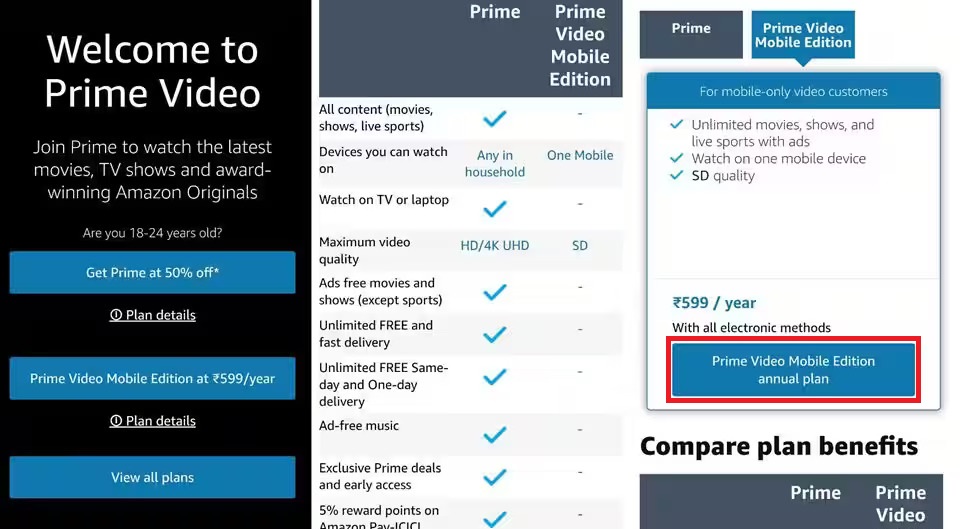
Amazon Prime offers several membership tiers, each with a distinct pricing structure that influences your overall financial commitment. The most common options include:
-
Standard Annual Membership: This is often the most cost-effective option in the long run, as it provides a discount compared to paying monthly. You pay a single lump sum once a year.
-
Standard Monthly Membership: Offers greater flexibility with a recurring monthly charge. While more expensive annually, it allows for easier short-term budgeting and cancellation.
-
Prime Student: A significantly discounted rate for eligible college students, often including a free trial period. This tier is a major financial advantage for students.
-
EBT/Medicaid Discounted Membership: Amazon provides a reduced monthly rate for customers receiving qualifying government assistance. This makes Prime more accessible to a wider demographic.
The choice between these tiers should align with your personal financial situation, cash flow, and how frequently you anticipate using Prime benefits. A higher upfront annual cost might save you money over 12 months, but a lower monthly payment could be preferable if you need to maintain flexibility in your budget or prefer smaller, more frequent outlays.
Accepted Payment Methods
Amazon, as a global e-commerce giant, supports a broad range of payment options to facilitate seamless transactions, including for Prime memberships. The primary methods you can use to pay for Amazon Prime include:
-
Credit Cards: Most major credit cards are accepted, including Visa, MasterCard, American Express, Discover, JCB, and Diner’s Club. Using a credit card can offer benefits such as rewards points, cash back, or purchase protection, which can indirectly offset the cost of your membership. However, it’s crucial to pay off your credit card balance in full each month to avoid interest charges that would negate any rewards.
-
Debit Cards: Debit cards bearing a Visa or MasterCard logo are also widely accepted. When you use a debit card, funds are directly drawn from your linked bank account, offering a straightforward payment process without accumulating credit card debt.
-
Amazon.com Store Card: If you have an Amazon Store Card or an Amazon Rewards Visa Signature Card, these can be used to pay for your Prime membership. These cards often offer specific rewards or financing options related to Amazon purchases, which could be an advantageous strategy for loyal Amazon shoppers.
-
Amazon Gift Cards (with limitations): While Amazon Gift Cards can be used for most purchases on the platform, directly paying for a recurring Prime membership with a gift card is generally not supported. However, you can use a gift card to purchase an Amazon eGift card for yourself, or load the gift card balance into your Amazon account, which might then be used for some purchases, but recurring subscriptions usually require a linked credit/debit card. It’s best to have a primary credit or debit card on file for recurring charges like Prime.
-
Checking Accounts (ACH): In some specific circumstances or for certain Amazon services, direct bank transfers via ACH (Automated Clearing House) might be an option. However, for Amazon Prime specifically, credit and debit cards are the overwhelmingly preferred and most reliable methods.
Billing Cycle and Auto-Renewal
Amazon Prime memberships operate on an auto-renewal system by default. This means that once you subscribe, your chosen payment method will be automatically charged at the end of your billing cycle (either monthly or annually) to ensure uninterrupted service.
Understanding this auto-renewal mechanism is vital for financial planning. It helps you anticipate upcoming charges and prevents unexpected debits from your account. If your payment method on file is expired or declined, Amazon will typically notify you and attempt to charge other payment methods you have saved, or prompt you to update your information. Missing a payment can lead to a temporary suspension of Prime benefits until a successful payment is made.
Navigating Payment Management in Your Amazon Account
Effectively managing your payment methods within your Amazon account is key to a smooth and uninterrupted Prime experience. This involves knowing how to add, update, and prioritize your financial information.
Adding and Updating Payment Methods
Keeping your payment details current is crucial. Expired cards or outdated billing information can lead to service interruptions. Amazon makes it straightforward to manage these details:
-
Access Your Account: Log in to your Amazon account on the website or through the Amazon app.
-
Navigate to “Your Account”: From the homepage, hover over “Account & Lists” (on desktop) or tap the menu icon (on mobile) and select “Your Account.”
-
Go to “Your Payments”: Under the “Ordering and shopping preferences” section, you’ll find a link for “Your Payments” or “Payment options.”
-
Add a New Payment Method: Click “Add a payment method.” You’ll be prompted to enter new credit or debit card details, including the card number, expiration date, and the cardholder’s name and billing address. Ensure the billing address matches the one associated with your card to prevent transaction declines.
-
Update an Existing Method: If a card has expired or you need to change the billing address, locate the specific card under “Your Payments.” You should see an option to “Edit” or “Remove” the card. Update the necessary fields and save your changes.
Regularly reviewing your saved payment methods can also be a good financial habit, ensuring only active and preferred cards are available for use.
Setting Your Preferred Payment Method
While you can have multiple payment methods on file, Amazon allows you to set a preferred method for various purchase types, including subscriptions like Prime. While Amazon typically uses the payment method associated with your Prime membership directly, having a preferred card set up can sometimes influence which card is attempted first if issues arise with the primary Prime payment method.
To check or adjust your preferred payment settings:
-
Follow the steps above to reach “Your Payments.”
-
Review the cards listed. Some users might find an option to set a “Default Payment Method” for different categories. For Prime specifically, the payment method chosen during your initial signup or the one you designated for auto-renewal will be the primary one. If you wish to change it, you typically need to update the payment method directly associated with your Prime membership settings rather than just a general default.
-
To change the payment method for your Prime subscription, go to “Your Account,” then “Prime Membership,” and look for an option to “Manage Prime Membership” or “Update Payment Method.” Here, you can select from your existing cards or add a new one specifically for Prime.
Troubleshooting Payment Issues
Occasionally, you might encounter issues with your Prime payment being declined. Understanding common causes can help you quickly resolve them:
-
Expired Card: The most frequent issue. Ensure the card on file is not past its expiration date.
-
Insufficient Funds (Debit Card) or Credit Limit Exceeded (Credit Card): Verify that your bank account has enough balance for a debit card transaction or that you haven’t exceeded your credit limit for credit card payments.
-
Incorrect Billing Address: The billing address you have on file with Amazon must exactly match the address linked to your payment card by your bank. Even minor discrepancies can cause a decline.
-
Bank Security Flags: Banks sometimes flag recurring charges as potentially fraudulent, especially if they’re from a new merchant or differ significantly from your usual spending patterns. If your payment is declined, contact your bank to verify the transaction.
-
Card Not Enabled for Online Transactions: Some debit or credit cards require you to explicitly enable them for online purchases or international transactions, depending on where Amazon processes the payment.
If you’ve checked these common issues and still can’t resolve the problem, the next step is to contact Amazon Customer Service. They can provide specific details about why a payment failed and guide you through the resolution process.
Strategic Financial Considerations for Your Prime Membership

Paying for Amazon Prime isn’t just about ensuring your payment method works; it’s also about making financially astute decisions that optimize your overall spending and budgeting. From choosing the right billing cycle to leveraging Prime’s benefits for savings, a strategic approach can significantly enhance your financial well-being.
Monthly vs. Annual Billing: A Cost-Benefit Analysis
The choice between paying for Prime monthly or annually has direct implications for your personal cash flow and overall expenditure:
-
Annual Billing: Opting for the annual plan almost always results in a lower total cost over 12 months. This is Amazon’s incentive to encourage longer-term commitments. Financially, it’s akin to buying in bulk – you save money by making a larger, less frequent payment. This option is ideal if you have stable finances, use Prime consistently throughout the year, and want to reduce the frequency of billing cycles. However, it requires a larger upfront sum, which might strain immediate cash flow for some budgets.
-
Monthly Billing: While more expensive over a year, the monthly option offers greater financial flexibility. It spreads the cost into smaller, more manageable payments, which can be easier to integrate into a tight monthly budget. This is beneficial if your income fluctuates, if you’re uncertain about your long-term use of Prime, or if you prefer the option to cancel more easily without having committed to a full year.
When deciding, evaluate your budget: Can you comfortably absorb the annual fee in one go, or do smaller, regular payments better suit your financial rhythm? Consider the “real” annual cost difference and weigh it against your need for flexibility.
Leveraging Prime for Financial Savings
Beyond the core benefit of free, fast shipping, Amazon Prime offers a multitude of services that, when utilized strategically, can translate into significant financial savings and improved value for your subscription fee:
-
Consolidating Entertainment: Prime Video, Prime Music, and Prime Reading are included with your membership. If you pay for separate streaming services or music subscriptions, you might find that Prime’s offerings are sufficient, allowing you to cancel other recurring expenses. Evaluate if Prime’s content library meets your needs to potentially reduce other entertainment outlays.
-
Exclusive Discounts and Deals: Prime members gain access to special pricing, lightning deals, and major shopping events like Prime Day. By strategically planning your purchases around these opportunities, you can achieve substantial savings on items you would have bought anyway.
-
Whole Foods Market Discounts: For grocery shoppers, Prime membership provides exclusive discounts and extra savings at Whole Foods Market, including 10% off sales and special weekly deals. These savings can quickly add up for regular shoppers, partially offsetting the Prime membership cost.
-
Free Shipping Calculation: While often taken for granted, calculate how much you would typically spend on shipping for your Amazon orders without Prime. The savings from free expedited shipping alone can justify the membership cost for frequent online shoppers, especially for smaller, necessary items.
The key is to actively use these benefits. A Prime membership is an investment; maximize its return by integrating its features into your daily financial habits and purchasing decisions.
Budgeting for Your Amazon Prime Subscription
Incorporating your Prime subscription into your personal budget is a fundamental step in responsible financial management.
-
Categorize Appropriately: Decide whether Prime falls under “Entertainment,” “Household Expenses,” or a specific “Subscriptions” category in your budget. This helps you track where your money is going.
-
Allocate Funds: For an annual subscription, you might set aside a small amount each month (e.g., $10-$12) into a dedicated savings account or mental fund so that when the annual charge comes, it doesn’t create a financial shock. For monthly plans, simply ensure the recurring charge is accounted for within your regular budget.
-
Regular Review: Periodically review whether the benefits you receive from Prime genuinely outweigh its cost. Are you using enough of its features to justify the expense? If not, consider if a different subscription model or even cancellation might be more financially prudent.
Alternative Payment Strategies
While direct payment is the norm, smart financial management can involve creative ways to “pay” for Prime:
-
Credit Card Rewards: Many credit cards offer cash back or points for online purchases. Using such a card can effectively provide a small rebate on your Prime membership. Some cards even offer specific bonuses or statement credits for streaming or subscription services, which might include Prime.
-
Amazon Credit Cards: If you have an Amazon Prime Rewards Visa Signature Card, you earn 5% back on Amazon.com purchases. This substantial cash back on your regular Amazon spending can significantly offset the cost of your Prime membership over time.
-
Gift Card Offsets (Indirect): While not for direct payment, if you receive Amazon gift cards, you can use them for other Amazon purchases, freeing up cash that can then be used to cover the Prime membership cost.
Managing Your Prime Membership and Cancellation Options
Understanding how to manage your Prime membership, including options for review, cancellation, and rejoining, is an integral part of responsible financial oversight for any subscription service.
Reviewing Your Membership Details
Regularly checking your Prime membership details helps you stay informed about your billing cycle and ensures you’re on the most suitable plan.
-
Access “Your Prime Membership”: Log into your Amazon account, navigate to “Your Account,” and then click on “Prime Membership.”
-
View Membership Information: This page displays your current membership type (e.g., monthly, annual), the date your membership started, and your next billing date. It also shows the current payment method Amazon has on file for your Prime subscription.
-
Check Payment History: While not always directly on the Prime page, you can review your “Orders” or “Digital Orders” for records of past Prime payments.
Being aware of your renewal date is crucial for budgeting and for making timely decisions about continuing or changing your subscription.
Cancelling or Pausing Your Membership
Life circumstances and financial priorities can change, making cancellation or temporary pausing a necessary option. Amazon provides a straightforward process for this, with important financial implications.
-
Navigate to “End Membership and Benefits”: From the “Your Prime Membership” page, look for an option like “Manage Membership,” and then “End Membership and Benefits” or “Update, Cancel and More.”
-
Understand Your Options: Amazon will present you with choices:
-
End Membership: This will stop the auto-renewal. If you cancel mid-term (especially for an annual plan), Amazon often offers a pro-rata refund for the unused portion of your membership, depending on how much you’ve utilized Prime benefits since your last payment. If you haven’t used any benefits, you might be eligible for a full refund.
-
Remind Me Later: If you’re unsure, you can ask Amazon to send you a reminder closer to your renewal date, giving you more time to decide.
-
Pause Membership (Limited Availability): In some regions or for certain membership types, Amazon might offer a temporary pause option. This is a good middle-ground if you know you won’t be using Prime for a short period but plan to return.
-
-
Confirm Cancellation: Follow the prompts to confirm your decision. You will usually receive an email confirmation of the cancellation.
Cancelling can free up funds in your budget, especially if you find yourself not utilizing enough of Prime’s benefits to justify the cost. Always check Amazon’s specific refund policy at the time of cancellation, as it can vary based on usage and membership type.

Rejoining Prime
If you cancel your Prime membership but later decide you want to rejoin, the process is simple:
-
Visit the Prime Sign-Up Page: Go to the main Amazon Prime page (amazon.com/prime).
-
Sign Up Again: You will be prompted to sign up for Prime again, choosing your preferred membership tier (monthly or annual) and linking a payment method.
-
Previous Benefits: Your previous purchase history and any associated digital content libraries will typically be reactivated upon rejoining.
Managing your Amazon Prime subscription effectively is a small but significant part of overall personal financial health. By understanding payment methods, strategically utilizing benefits, and actively managing your membership, you ensure that this popular service remains a valuable asset rather than an unchecked expense in your budget.
aViewFromTheCave is a participant in the Amazon Services LLC Associates Program, an affiliate advertising program designed to provide a means for sites to earn advertising fees by advertising and linking to Amazon.com. Amazon, the Amazon logo, AmazonSupply, and the AmazonSupply logo are trademarks of Amazon.com, Inc. or its affiliates. As an Amazon Associate we earn affiliate commissions from qualifying purchases.