
Amazon Prime Video has evolved from a simple perk for Prime subscribers into a global streaming powerhouse, offering a vast library of movies, TV shows, and critically acclaimed original content. But beyond the user-friendly interface and the compelling content, a sophisticated technological infrastructure and an intricate user experience design work in concert to deliver entertainment directly to your screens. Understanding “how Amazon Video works” involves delving into its accessibility, the backend technology that ensures seamless streaming, and the clever features that enhance the viewing experience. This exploration will demystify the mechanics behind one of the world’s most popular streaming services, revealing the blend of software, network architecture, and user-centric design that defines its operation.
The Foundation: What is Amazon Prime Video and How to Get Started
At its core, Amazon Prime Video is a digital video streaming service that allows users to watch a broad spectrum of content on demand. Its functionality is deeply integrated with the broader Amazon ecosystem, particularly the Prime membership. Getting started with the service is designed to be straightforward, leveraging existing Amazon accounts and widespread device compatibility.
The Prime Membership Advantage
For most users, access to Amazon Prime Video comes as a significant benefit of an Amazon Prime membership. This subscription service, primarily known for expedited shipping and other perks, bundles a core library of movies and TV shows at no additional cost beyond the annual or monthly Prime fee. This integration is a strategic move, reinforcing the value proposition of Prime and locking users into the Amazon ecosystem. However, Amazon also offers a standalone Prime Video subscription in some regions, catering to users who are solely interested in the streaming service without the other Prime benefits. This dual approach maximizes accessibility and caters to different consumer preferences, making the service available to a wider audience.
Supported Devices and Platform Compatibility
A key aspect of how Amazon Video works is its ubiquitous availability across a vast array of devices. This extensive compatibility ensures that users can access their content wherever and whenever they choose. The service is accessible via dedicated apps on:
-
Smart TVs: Nearly all modern smart TV brands (Samsung, LG, Sony, Vizio, etc.) have a native Prime Video app.
-
Streaming Media Players: Devices like Amazon Fire TV Stick, Roku, Apple TV, Google Chromecast, and NVIDIA Shield all support Prime Video.
-
Game Consoles: PlayStation (PS4, PS5) and Xbox (One, Series X/S) include Prime Video apps.
-
Mobile Devices: Android and iOS smartphones and tablets have dedicated, feature-rich apps.
-
Web Browsers: Users can stream directly through any major web browser (Chrome, Firefox, Edge, Safari) on desktop or laptop computers.
-
Set-top Boxes: Many cable and satellite providers integrate Prime Video into their offerings.
This broad compatibility is crucial for a modern streaming service, reducing friction for users and ensuring that their preferred viewing device is almost always supported. The development teams consistently work to optimize the app for each platform, taking into account screen size, input methods, and device capabilities.
Initial Setup and Account Management
Setting up Amazon Prime Video typically involves signing in with an existing Amazon account. If a user has a Prime membership, the video content is automatically unlocked. New users or those without Prime can sign up for a free trial or subscribe directly. Account management is handled through the Amazon website or within the app settings, allowing users to:
-
Manage their subscription (Prime membership or standalone Prime Video).
-
Add or remove profiles (useful for families).
-
Adjust parental controls for different profiles.
-
View watch history and continue watching lists.
-
Manage download settings for offline viewing.
-
Control payment methods for rentals and purchases.
This centralized approach to account management simplifies the user journey, making it easy to personalize and control their streaming experience within the secure Amazon environment.
Navigating the Prime Video Interface: Discovering and Watching Content
Once logged in, the user interface (UI) and user experience (UX) design become paramount to “how Amazon Video works” from an end-user perspective. A well-designed interface makes content discovery effortless and the playback experience enjoyable.
Intuitive Layout and Personalization
Amazon Prime Video’s interface is designed to be intuitive, presenting content in a visually appealing and organized manner. The homepage typically features:
-
Carousels: Highlighting new releases, trending titles, and Amazon Originals.
-
Categories: Content is neatly categorized by genre, collection (e.g., “Award Winners,” “Kids & Family”), and specific themes.
-
Continue Watching: A prominent section allowing users to pick up where they left off across different devices.
-
Watchlist: A personalized list where users can save titles they want to watch later.
What makes the interface particularly effective is its personalization engine. Based on viewing history, ratings, and interactions, the service learns user preferences and proactively recommends titles that are likely to appeal to them. This algorithm-driven personalization is a standard feature in modern streaming services, but Amazon’s extensive data on user purchases and other Prime activities can further refine these suggestions.
Search, Browse, and Recommendation Engines
Finding specific content is facilitated by robust search and browsing capabilities:
-
Search Functionality: A powerful search bar allows users to find titles, actors, directors, and even specific genres. Results are typically fast and comprehensive.
-
Browsing Options: Users can browse by genre, explore different categories, or check out curated collections. Filters often allow narrowing down choices by language, IMDb rating, release year, or included content (e.g., 4K UHD, HDR).
-
Recommendation Algorithms: As mentioned, Amazon employs sophisticated algorithms to suggest content. These algorithms analyze various data points:
-
Direct Interaction: What you’ve watched, rated, or added to your watchlist.
-
Implicit Signals: How long you watch a title, if you finish it, or if you abandon it.
-
Collaborative Filtering: What users with similar viewing habits are watching.
-
Content Metadata: Tags, genres, actors, directors, and thematic elements associated with titles.
-
Popularity Trends: What’s currently popular or trending on the platform.
-
These engines are constantly being refined to provide more relevant and engaging suggestions, aiming to keep users immersed in the Prime Video library.
The Playback Experience: Controls and Settings
Once a title is selected, the playback experience is designed for convenience and quality. The standard playback controls include:
-
Play/Pause, Fast Forward/Rewind: Standard controls for navigating through content.
-
Volume Control: Adjusting audio levels.
-
Subtitles/Closed Captions: Option to enable or disable subtitles, often with language choices and customization for font size/color.
-
Audio Tracks: Selection of different audio languages or accessibility tracks (e.g., audio descriptions).
-
Quality Settings: While typically automatic (adaptive bitrate), some apps allow manual adjustment of streaming quality, particularly useful for managing data usage.
-
Next Episode/Skip Intro: For TV series, buttons to quickly move to the next episode or skip the opening credits are standard, enhancing binge-watching convenience.
The goal is to provide a smooth, uninterrupted viewing experience, with minimal buffering and high-quality audio and video, automatically adjusting to the user’s internet connection and device capabilities.
The Technical Backbone: Delivering High-Quality Streaming
The magic of “how Amazon Video works” isn’t just in what you see on screen, but also in the complex technical infrastructure that operates behind the scenes. Delivering high-quality video to millions of users globally requires robust networking, efficient encoding, and intelligent content distribution.
Adaptive Bitrate Streaming (ABR)
One of the most critical technologies enabling seamless streaming is Adaptive Bitrate (ABR) streaming. When you press play, Prime Video doesn’t just send one fixed-quality video stream. Instead, it encodes the content into multiple versions, each at a different bitrate (and therefore different resolution and quality). The streaming client (your device) constantly monitors your internet connection speed and device performance.
-
If your connection is strong and stable, the client will request higher bitrate segments, resulting in a clearer, sharper image.
-
If the connection degrades, it will automatically switch to lower bitrate segments to prevent buffering, albeit at a reduced visual quality.
-
As the connection improves, it switches back to higher quality.
This dynamic adjustment happens in real-time, often imperceptibly to the user, ensuring a continuous playback experience even with fluctuating internet conditions. This is fundamental to providing a reliable service across diverse network environments.
Codecs, Resolutions, and Audio Formats
To efficiently store and transmit video and audio, Prime Video relies on advanced compression techniques using various codecs.
-
Video Codecs: Common video codecs include H.264 (AVC) and H.265 (HEVC). HEVC is particularly important for 4K Ultra HD and HDR content, as it offers superior compression efficiency, allowing high-resolution video to be streamed with less bandwidth.
-
Resolutions: Prime Video supports a range of resolutions, from standard definition (SD) up to Full HD (1080p) and 4K Ultra HD. The availability of 4K and High Dynamic Range (HDR – like HDR10, HDR10+, or Dolby Vision) depends on the content, your device’s capabilities, and your internet speed.
-
Audio Formats: For audio, the service supports stereo sound as well as various surround sound formats like Dolby Digital 5.1 and, for premium content, Dolby Atmos, offering an immersive audio experience on compatible sound systems.
The choice of codecs and formats is crucial for balancing file size, bandwidth requirements, and visual/audio fidelity, ensuring a high-quality experience without excessive data consumption.
Content Delivery Networks (CDNs) and Global Infrastructure
Delivering content efficiently to users around the world is a monumental task. Amazon leverages a vast global infrastructure, including its own Content Delivery Network (CDN) – Amazon CloudFront – as well as third-party CDNs.
-
How CDNs Work: Instead of having all users stream from a single central server, CDNs place copies of video content on numerous servers (called edge servers or points of presence) located strategically closer to users geographically.
-
Reduced Latency: When you request a video, the CDN directs your request to the nearest edge server that has the content. This significantly reduces the physical distance data has to travel, minimizing latency and improving streaming start times and buffering.
-
Load Balancing: CDNs also distribute the load across many servers, preventing any single server from becoming overwhelmed during peak usage times.
This distributed architecture is critical for Amazon Prime Video’s global reach and its ability to serve millions of concurrent streams without performance degradation.
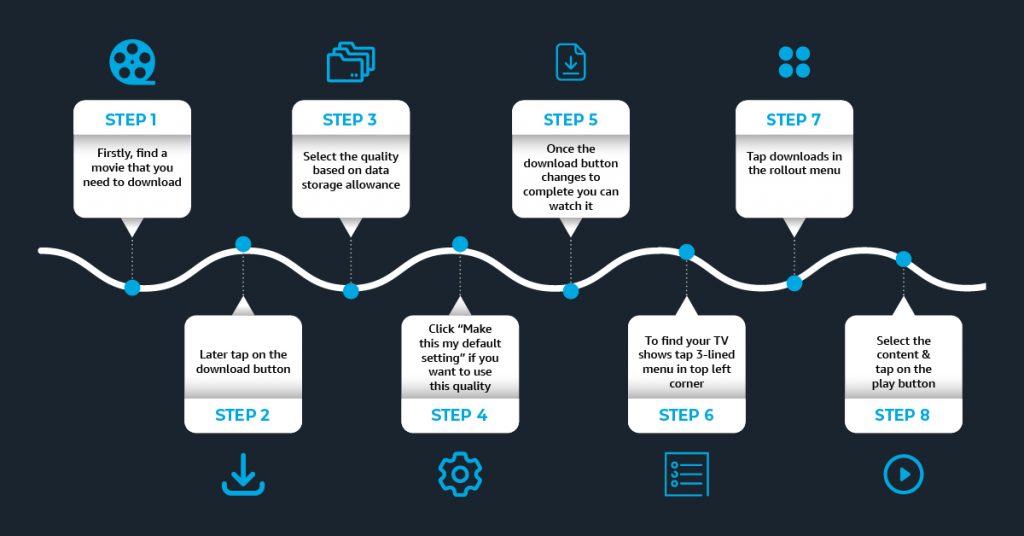
Offline Viewing: Downloads Explained
A popular feature that significantly enhances Prime Video’s usability is the ability to download select titles for offline viewing. This works by:
-
Encoding for Download: When you choose to download a title on a mobile device or tablet, the Prime Video app downloads an encoded version of the video file directly to your device’s local storage.
-
DRM (Digital Rights Management): The downloaded file is protected by Digital Rights Management (DRM) technology. This encryption ensures that the content can only be played back within the Prime Video app, for a limited time (typically 30 days once downloaded, and 48 hours once playback starts), and on authorized devices, respecting content licensing agreements.
-
Storage Management: Users can typically choose the download quality (which affects file size) and manage their downloaded content within the app, deleting titles to free up space.
This feature is invaluable for travelers, commuters, or anyone with unreliable internet access, allowing them to enjoy content without an active connection.
Beyond the Basics: Advanced Features and Ecosystem Integration
Amazon Prime Video is not just a platform for streaming; it’s a feature-rich service that integrates deeply with other Amazon offerings and third-party services, creating a more comprehensive and interactive entertainment experience.
X-Ray Powered by IMDb: Enhanced Viewing
One of Prime Video’s most unique and celebrated features is X-Ray, powered by IMDb (which is owned by Amazon). X-Ray provides context-sensitive information about the content you’re watching, often with a simple tap on the screen or remote.
-
Instant Information: While a scene is playing, X-Ray can display the names of actors currently on screen, the song playing in the background, trivia about the show or movie, and even jump to specific scenes where a particular actor appears.
-
Behind-the-Scenes Access: For Amazon Originals, X-Ray often includes exclusive behind-the-scenes photos, videos, and production notes.
-
Character Bios and Filmographies: Users can delve deeper into characters and actors, viewing their full IMDb profiles without leaving the viewing experience.
X-Ray transforms passive viewing into an interactive experience, satisfying curiosity in real-time and adding another layer of engagement, making it a standout “how Amazon Video works” differentiator.
User Profiles and Parental Controls
Recognizing that streaming services are often shared by multiple household members, Prime Video supports user profiles.
-
Personalized Experience: Each profile gets its own watch history, recommendations, and watchlist, ensuring that a child’s viewing habits don’t skew an adult’s suggestions, and vice versa.
-
Parental Controls: Amazon offers robust parental controls, allowing the primary account holder to:
-
Set age restrictions for content (e.g., block R-rated movies or TV-MA shows).
-
Require a PIN for purchases or rentals.
-
Prevent access to specific profiles.
-
These controls are crucial for managing what children can watch and ensuring a safe viewing environment, giving parents peace of mind.
Amazon Channels, Rentals, and Purchases: Expanding Your Library
While a Prime membership unlocks a vast library, Amazon Prime Video also acts as a hub for expanding your entertainment options:
-
Amazon Channels: This feature allows users to subscribe to additional premium streaming services (like HBO, Showtime, Starz, Paramount+, etc.) directly through Prime Video. This consolidates billing and access under one umbrella, simplifying subscription management. The content from these channels appears seamlessly integrated within the Prime Video app.
-
Rentals and Purchases: Beyond the subscription library, users can rent or purchase thousands of movies and TV show seasons (both new releases and catalog titles) digitally. These are separate transactions from the Prime subscription and allow users to access content not included in their Prime or Channel subscriptions. Purchased content is added to a user’s “digital library” and can be watched indefinitely.
This hybrid model allows Prime Video to serve as a comprehensive entertainment platform, catering to a wide range of content preferences and consumption models.

Watch Parties and Social Viewing
In recent years, Amazon Prime Video introduced Watch Parties, a feature designed for social viewing.
-
Synchronized Playback: Users can invite friends and family to watch content together in a synchronized playback experience. Everyone sees the same thing at the same time.
-
Integrated Chat: A real-time chat function is integrated, allowing participants to discuss the show or movie as they watch, mimicking a shared viewing experience even when geographically apart.
This feature taps into the desire for shared experiences, transforming the solitary act of streaming into a communal event, showcasing Amazon’s commitment to evolving the user experience.
In conclusion, “how Amazon Video works” is a testament to sophisticated technological engineering combined with an acute understanding of user needs. From its adaptive bitrate streaming and global CDN infrastructure to its intuitive interface, personalized recommendations, and innovative features like X-Ray and Watch Parties, Prime Video orchestrates a seamless, high-quality, and engaging entertainment experience for millions worldwide. It stands as a prime example of how advanced software and network capabilities empower a leading digital service in the competitive streaming landscape.
aViewFromTheCave is a participant in the Amazon Services LLC Associates Program, an affiliate advertising program designed to provide a means for sites to earn advertising fees by advertising and linking to Amazon.com. Amazon, the Amazon logo, AmazonSupply, and the AmazonSupply logo are trademarks of Amazon.com, Inc. or its affiliates. As an Amazon Associate we earn affiliate commissions from qualifying purchases.