
In an era saturated with streaming services, Amazon Prime Video (formerly known as Amazon Instant Video) stands out as a colossal player, offering an expansive library of films, TV shows, and exclusive originals. For many, it’s not just another subscription; it’s an integral part of their digital entertainment ecosystem, often bundled with a Prime membership. Yet, despite its ubiquity, navigating the intricacies of how to effectively watch movies and shows on the platform can sometimes feel less intuitive than simply pressing play. This guide delves deep into the technological backbone and user-centric pathways that enable millions to enjoy Amazon’s streaming offerings, providing a professional, insightful, and engaging roadmap for maximizing your viewing experience.
Understanding Amazon Prime Video: From Instant Video to a Global Powerhouse
Amazon’s journey into streaming began with “Amazon Unbox” in 2006, evolving into “Amazon Instant Video” and eventually consolidating under the “Prime Video” banner, signifying its deep integration with the Amazon Prime subscription service. This evolution reflects not just a change in branding but a significant expansion in technological capabilities, content acquisition, and global reach. Today, Prime Video is more than just a place to rent or buy movies; it’s a vast streaming service with its own dedicated infrastructure.
The Evolution from Instant Video to Prime Video
Initially, Amazon Instant Video served primarily as a digital storefront for purchasing or renting individual titles. The shift to Prime Video marked a pivotal moment, leveraging the Amazon Prime subscription to offer a curated, ever-expanding catalog of movies and TV shows at no additional cost beyond the annual or monthly Prime fee. This strategic move positioned Amazon as a direct competitor to Netflix and other subscription-based services, while still retaining its transactional video-on-demand (TVOD) model for newer releases or non-Prime content. The underlying technology had to scale dramatically, supporting millions of concurrent streams globally, managing vast content libraries, and ensuring robust digital rights management (DRM).
Prime Membership vs. A La Carte Content
A key distinction for users is understanding the dual nature of Prime Video’s content access. A significant portion of the library is “Included with Prime,” meaning it’s accessible as part of your Prime subscription. This typically includes Amazon Originals, a rotation of licensed movies, and various TV series. However, Prime Video also functions as a digital video store where you can rent or purchase the latest blockbusters, newly released shows, or content not included in your Prime membership. Technologically, this requires a seamless integration of subscription-based access and secure transactional capabilities, often involving different DRM protocols and content delivery networks (CDNs) to ensure both free and paid content is delivered efficiently and securely. Users should be aware that selecting “Buy” or “Rent” will typically incur an additional charge, even if they have an active Prime membership.
Content Library: Originals, Blockbusters, and More
The content strategy of Prime Video is diverse, encompassing critically acclaimed Amazon Originals like The Boys, The Marvelous Mrs. Maisel, and Rings of Power, alongside a rotating selection of Hollywood blockbusters, classic films, and international cinema. The technology behind this library management is immense, involving complex recommendation algorithms, content metadata indexing, and robust search functionalities that allow users to discover content tailored to their preferences or to easily locate specific titles within the platform’s sprawling collection. The continuous influx of new content, both licensed and original, demands a highly scalable and adaptable content management system.
Accessing Prime Video Across Devices: Your Gateway to Entertainment
One of Prime Video’s strengths lies in its widespread device compatibility, ensuring that users can enjoy their content virtually anywhere, on almost any screen. From the convenience of a smart TV to the portability of a smartphone, the platform is designed for omnipresent access.
Smart TVs and Streaming Devices
The most common way many users access Prime Video is through their smart TV or dedicated streaming devices. Smart TVs from brands like Samsung, LG, Sony, and Hisense typically come with the Prime Video app pre-installed or readily available for download from their app stores. Dedicated streaming devices such as Amazon’s own Fire TV Sticks and Cubes, Roku players, Apple TV, and Google Chromecast also offer robust Prime Video app experiences. These devices are optimized for large-screen viewing, often supporting high-resolution (4K) and high-dynamic-range (HDR) video, and surround sound formats. The app interface on these platforms is usually designed for remote control navigation, prioritizing ease of browsing and playback.
Mobile Devices (Smartphones and Tablets)
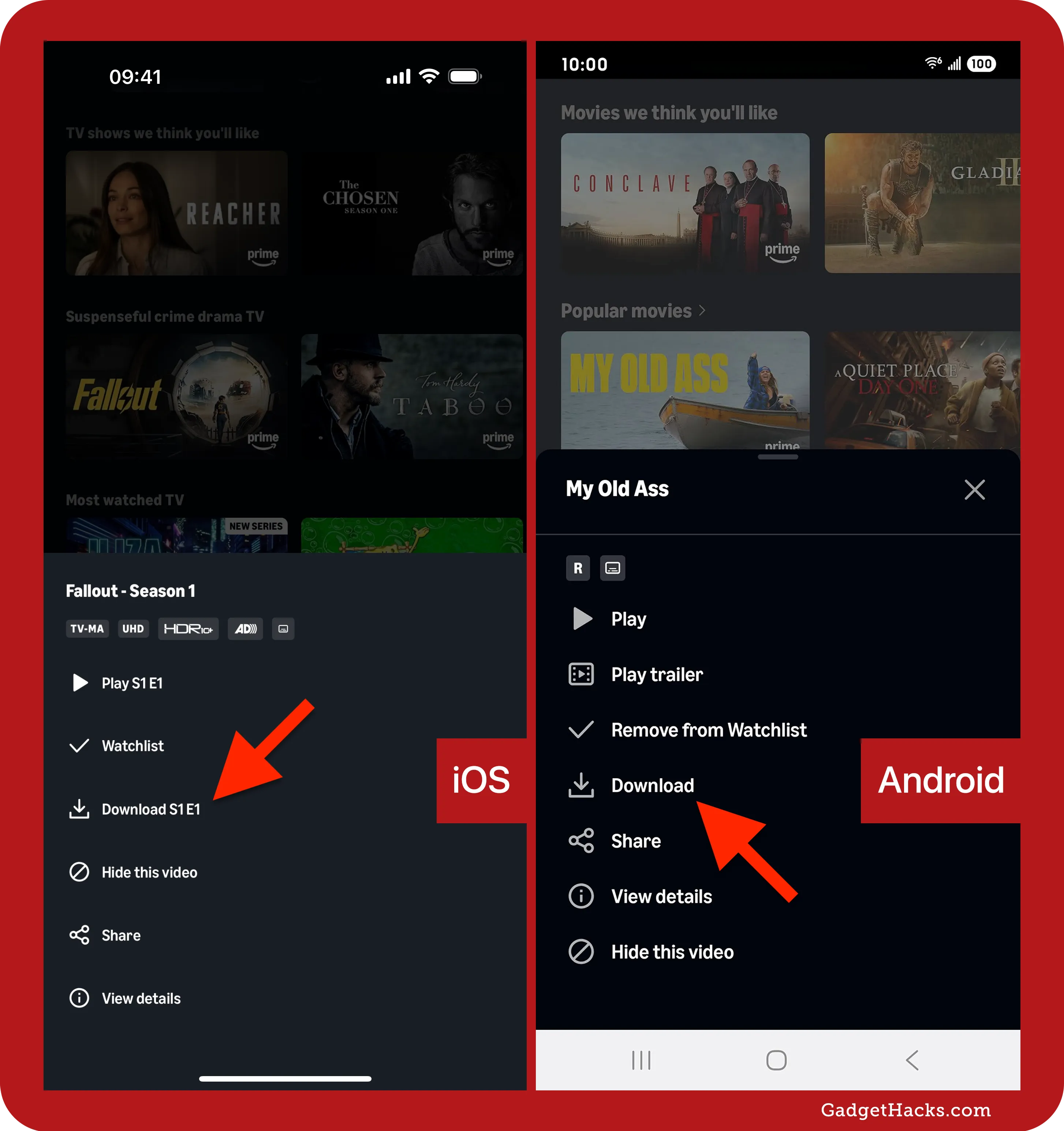
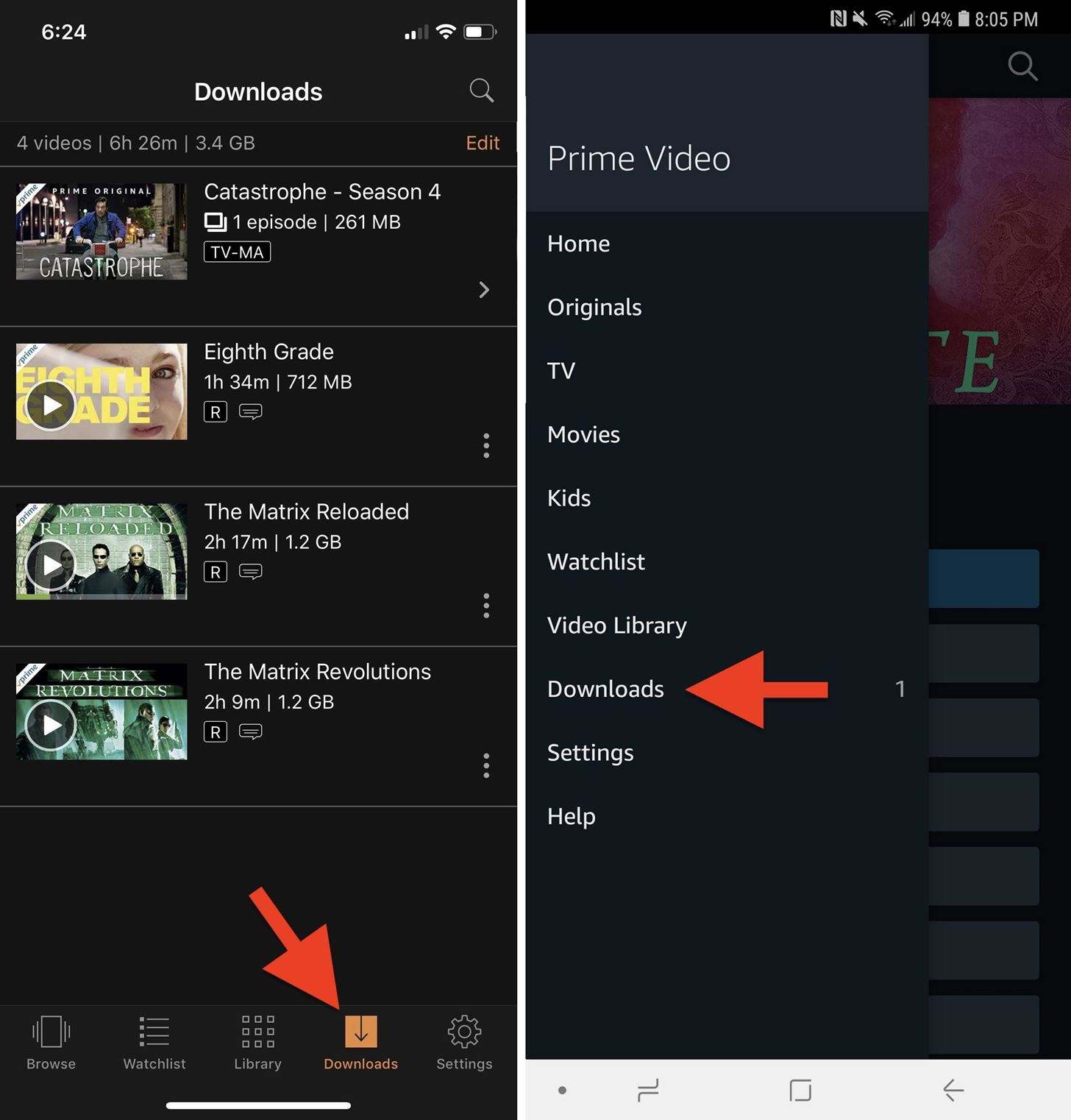
For on-the-go viewing, the Prime Video app for iOS and Android smartphones and tablets is indispensable. These mobile applications are engineered not just for streaming over Wi-Fi or cellular data but also for offline viewing. The app allows users to download movies and TV shows directly to their device’s local storage, a crucial feature for travel or areas with unreliable internet connectivity. The mobile app also offers a compact, touch-optimized interface, with features like picture-in-picture mode and casting capabilities to send content to larger screens.
Web Browsers (Desktops and Laptops)
For those preferring to watch on a computer, Prime Video is fully accessible through most modern web browsers (Chrome, Firefox, Edge, Safari) by simply visiting the Amazon Prime Video website. This web-based interface provides the full range of features, including search, watchlist management, and playback, often leveraging HTML5 video players for smooth performance. Watching on a desktop or laptop offers the flexibility of a larger screen than a phone and the convenience of a familiar computing environment, although it typically requires an active internet connection.
Gaming Consoles (PlayStation, Xbox)
Modern gaming consoles, including PlayStation (PS4, PS5) and Xbox (Xbox One, Xbox Series X/S), have evolved into comprehensive entertainment hubs. The Prime Video app is available on these platforms, providing a high-quality streaming experience that takes advantage of the consoles’ powerful processing capabilities for smooth playback and often superior audio decoding. This integration allows gamers to seamlessly transition from gaming to watching movies and TV shows, using the same device.
Navigating the Prime Video Interface: Discovering Your Next Watch
Once you’ve launched Prime Video on your chosen device, the next step is to find something to watch. The interface is designed to balance vast content availability with personalized discovery, although its complexity can sometimes be daunting due to the sheer volume of options.
User Profiles and Personalization
Prime Video supports user profiles, allowing different members of a household to maintain their own watch history, recommendations, and watchlists. This personalization is crucial in households with diverse viewing tastes, from children’s content to adult dramas. Technologically, this involves storing individual viewing data and preferences, which feeds into Amazon’s sophisticated recommendation engine, ensuring that each profile’s homepage is curated with relevant suggestions. Setting up profiles helps to keep watch histories distinct and makes content discovery more efficient for each user.

Searching and Discovering Content
The platform offers robust search capabilities, allowing users to find titles by name, actor, director, or genre. Beyond direct search, Prime Video employs various discovery mechanisms:
-
Categories and Genres: Content is organized into intuitive categories (Action, Comedy, Drama, Sci-Fi, etc.) and more niche genres.
-
Curated Collections: Amazon frequently curates collections based on themes, holidays, or popular trends.
-
“Included with Prime” Filters: A critical filter allows users to quickly view only the content available as part of their Prime membership, avoiding confusion with paid titles.
-
Recommendations: Based on viewing history and ratings, the recommendation algorithm suggests new titles, helping users explore new content they might enjoy.
Your Watchlist and Library
The “Watchlist” feature allows users to bookmark titles they want to watch later, acting as a personal queue. This is a simple yet effective organizational tool. The “Library” section is where all purchased or rented content resides, providing easy access to owned digital media. Technologically, these features rely on cloud-based storage of user data, ensuring that your watchlist and library are synchronized across all your devices, allowing you to pick up where you left off or access your owned content from any compatible device.
Enhancing Your Viewing Experience: Features and Functionalities
Beyond basic playback, Prime Video offers a suite of advanced features designed to enrich the viewing experience, providing more context, control, and social interaction.
Leveraging X-Ray for Deeper Insights
X-Ray is a unique and highly acclaimed feature of Prime Video, powered by IMDb (which is also owned by Amazon). As you watch, X-Ray provides instant, on-screen access to information about actors, music, trivia, and even behind-the-scenes content related to the scene currently playing. A simple tap or click can reveal details about the actors on screen, the song playing, or interesting facts about the production. This is a technological marvel that synchronizes video playback with a vast database of metadata, enhancing immersion and satisfying viewer curiosity in real-time.
Offline Viewing: Downloading Movies and Shows
For users with mobile devices, the ability to download content for offline viewing is a significant advantage. This feature allows Prime members to download a selection of movies and TV show episodes to their smartphones or tablets, perfect for flights, commutes, or areas without internet access. The technology behind this involves secure local storage of encrypted content files, with time-limited licenses to prevent unauthorized distribution. The app manages download quality options, allowing users to balance file size with video resolution based on their device’s storage capacity.
Parental Controls and Restrictions
Prime Video provides robust parental control options, enabling guardians to restrict access to content based on age ratings. Users can set a PIN to prevent unauthorized purchases and viewing of age-inappropriate material. These controls can be configured per device or globally across all profiles, offering flexibility and peace of mind for families. The underlying system relies on content metadata (ratings from organizations like MPAA, TV Parental Guidelines) and secure user authentication to enforce these restrictions effectively.
Ultra HD (4K) and HDR Streaming
For those with compatible TVs and sufficient internet bandwidth, Prime Video offers content in Ultra HD (4K) resolution and High Dynamic Range (HDR) formats like HDR10 and Dolby Vision. This delivers incredibly sharp images, vibrant colors, and enhanced contrast, significantly elevating the visual quality of the viewing experience. Streaming 4K HDR content requires substantial bandwidth (typically 15-25 Mbps or higher) and a device capable of decoding these advanced video formats, along with an HDMI 2.0 or higher connection. Amazon’s adaptive bitrate streaming technology dynamically adjusts video quality based on network conditions to minimize buffering while maximizing resolution.
The Prime Video Watch Party Feature
Prime Video’s Watch Party feature allows multiple Prime members to watch a movie or TV show together in real-time, synchronized across different locations, while chatting with each other. This social viewing experience leverages a custom real-time communication protocol to keep playback synchronized for all participants, mimicking the shared experience of watching together in the same room. It’s a testament to the platform’s ability to integrate social interaction with media consumption, bridging geographical divides.
Troubleshooting Common Issues: Maintaining a Smooth Stream
Even with the most advanced technology, occasional hiccups can occur. Understanding common issues and their solutions can help users quickly resolve problems and get back to enjoying their content.
Internet Connectivity and Bandwidth Requirements
The vast majority of streaming problems stem from internet connectivity. Prime Video requires a stable internet connection. For standard definition (SD), 1-2 Mbps is generally sufficient; for high definition (HD), 3-5 Mbps is recommended; and for 4K/UHD, 15-25 Mbps is typically needed.
- Solution: Check your internet speed using an online speed test. If it’s below recommendations, restart your router and modem. Consider a wired Ethernet connection for streaming devices instead of Wi-Fi for better stability. Close other bandwidth-intensive applications on your network.
App Crashes and Freezes
Like any software, the Prime Video app can sometimes crash or freeze.
- Solution: For smart TVs and streaming devices, try closing the app completely and reopening it. If that doesn’t work, restart the device itself. On mobile devices, force-quit the app and clear its cache (through device settings). Ensure the app is updated to the latest version.
Playback Errors and Quality Issues
Buffering, pixelation, or error codes during playback can be frustrating.
- Solution: If the issue is persistent, try watching a different title to determine if the problem is content-specific. Lower the streaming quality settings if available (though Prime Video often adjusts this automatically). Clear your browser’s cache and cookies if watching on a computer. Check if other streaming services are experiencing similar issues, which might indicate a broader internet problem. For persistent issues on a specific device, try uninstalling and reinstalling the Prime Video app.
Device Compatibility and Updates
Older devices or outdated operating systems might struggle with the latest Prime Video app versions or content formats.
- Solution: Always ensure your device’s operating system (e.g., Android, iOS, smart TV firmware) and the Prime Video app are updated to their latest versions. Manufacturers regularly release updates to improve performance, fix bugs, and ensure compatibility with modern streaming standards. Consult Amazon’s support pages for specific device compatibility requirements if issues persist.
In conclusion, watching movies on Amazon Prime Video is a technologically rich experience, designed to be accessible across a multitude of devices and enhanced by innovative features. By understanding the platform’s evolution, its diverse access points, navigational tools, and advanced functionalities, users can unlock the full potential of their Prime membership. While occasional technical hurdles may arise, a basic understanding of troubleshooting steps ensures that a seamless, high-quality entertainment experience is always within reach.
aViewFromTheCave is a participant in the Amazon Services LLC Associates Program, an affiliate advertising program designed to provide a means for sites to earn advertising fees by advertising and linking to Amazon.com. Amazon, the Amazon logo, AmazonSupply, and the AmazonSupply logo are trademarks of Amazon.com, Inc. or its affiliates. As an Amazon Associate we earn affiliate commissions from qualifying purchases.