
Moving to a new residence is a significant life event, and one of the most critical administrative tasks often overlooked in the flurry of packing and unpacking is updating your address with your financial institutions. For Bank of America account holders, ensuring your address is current is not just a matter of convenience; it’s a cornerstone of personal financial security, regulatory compliance, and uninterrupted access to your banking services. Neglecting this crucial step can lead to a host of problems, from missed statements and delayed communications to potential fraud and even account restrictions.

This guide provides a comprehensive overview of how to efficiently and securely change your address with Bank of America, detailing the various methods available, the information you’ll need, and important considerations to ensure a smooth transition for your financial life.
The Critical Importance of Updating Your Address with Your Bank
Maintaining an up-to-date address with Bank of America is far more than a simple formality; it’s a vital component of sound personal finance management. Its implications span security, compliance, and the smooth operation of your financial accounts.
Ensuring Financial Security and Fraud Prevention
An outdated address creates significant vulnerabilities for your financial accounts. Official communications, including new debit or credit cards, statements, and fraud alerts, are typically sent to your address on file. If these items are misdirected to an old address, they could fall into the wrong hands, exposing you to identity theft and financial fraud. Banks rely on accurate contact information to verify your identity and alert you to suspicious activity. A discrepancy between your registered address and your current location can delay or prevent these critical security measures from reaching you. Furthermore, if you report a lost or stolen card and a replacement is sent to an old address, it could be intercepted, leading to unauthorized transactions.
Legal and Regulatory Compliance
Financial institutions like Bank of America operate under strict legal and regulatory requirements, including the Bank Secrecy Act and Know Your Customer (KYC) regulations. These mandates require banks to maintain accurate and current information about their customers, including their residential addresses. This data is essential for verifying identity, preventing money laundering, and complying with tax reporting requirements. Failure to keep your address updated can put your bank in a non-compliance situation, and in some cases, it could lead to your account being flagged, temporarily restricted, or even suspended until your information is verified and updated.
Uninterrupted Access to Statements and Communications
Your bank statements, tax documents (like 1099 forms), annual privacy notices, and important service updates are typically mailed to your address of record. Without an accurate address, you risk missing crucial financial information, which can impact your ability to track spending, reconcile accounts, identify errors, or prepare taxes. Timely receipt of these documents is fundamental to effective personal finance management and can prevent unforeseen financial complications. Digital communications can sometimes supplement physical mail, but many official notifications still rely on a current physical address.
Avoiding Account Freezes or Disruptions
In instances where the bank detects a significant discrepancy or an inability to contact you via your registered address, it might take precautionary measures, including temporarily freezing your account or restricting certain transactions. This is often done to protect you from potential fraud or to ensure compliance. While inconvenient, such actions are intended to safeguard your assets. Updating your address proactively prevents these types of disruptions, ensuring uninterrupted access to your funds and banking services.
Step-by-Step Methods to Change Your Address with Bank of America
Bank of America offers several convenient and secure methods for account holders to update their residential address. Choosing the right method depends on your preference for digital convenience, direct assistance, or traditional mail.
Online Banking: The Most Convenient Option
For most Bank of America customers, updating an address through online banking is the quickest and most straightforward method.
Navigating the Bank of America Website
-
Log In: Go to the official Bank of America website (bankofamerica.com) and log in to your online banking account using your User ID and Passcode.
-
Access Profile/Settings: Once logged in, navigate to the “Profile & Settings” or “Customer Service” section. This is typically found in the top right corner or a sidebar menu, often under an icon representing your profile.
-
Find Address Change: Look for an option like “Change Address,” “Update Contact Information,” or “Edit Profile.”
-
Enter New Address: Carefully enter your new residential address, including street number, street name, apartment/unit number (if applicable), city, state, and ZIP code. Double-check for accuracy.
-
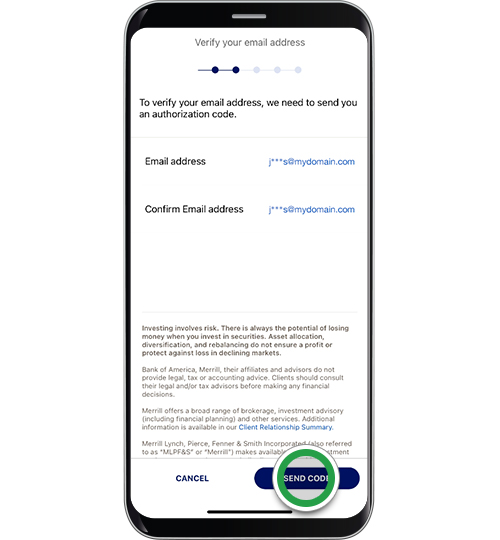
Review and Confirm: Review the entered information to ensure there are no typos. The system may require you to confirm the change via a security code sent to your registered phone or email, or by answering security questions.
-
Submit: Once confirmed, submit the change. You should receive an immediate confirmation message, and often an email or text notification of the change.
Security Measures During Online Updates
Bank of America employs robust security measures, including multi-factor authentication, encryption, and secure login protocols, to protect your personal information during online transactions. Always ensure you are on the official Bank of America website and never share your login credentials.
Bank of America Mobile App: On-the-Go Updates
The Bank of America mobile app offers a similar level of convenience to online banking, allowing you to update your address directly from your smartphone or tablet.
Using the App’s Profile or Settings Section
-
Open and Log In: Launch the Bank of America mobile app and log in using your User ID and Passcode, or biometric authentication (fingerprint/Face ID).
-
Navigate to Profile: Tap on the “Menu” icon (often three lines or dots) and then select “Profile,” “Settings,” or “Customer Service.”
-
Find Address Option: Locate the option to update your address or contact information.
-
Input New Details: Enter your new address carefully, ensuring all details are correct.
-
Verify and Submit: Confirm the details and complete any required security verification steps, such as a one-time passcode or security questions.
Biometric Security and Verification
The mobile app leverages advanced security features like biometric login, adding an extra layer of protection when making changes to your account information. Always keep your app updated to the latest version for optimal security.
Phone Support: Direct Assistance
If you prefer speaking with a representative or encounter issues with online or app-based methods, you can update your address by calling Bank of America’s customer service.
Preparing for Your Call
Before calling, have your account number(s), your old address, and your new address readily available. Be prepared to verify your identity.
Verification Protocols
-
Call Customer Service: Dial Bank of America’s customer service number (typically found on the back of your debit/credit card or the official website).
-
Identity Verification: The representative will ask you a series of security questions and request personal information (e.g., full name, date of birth, last four digits of SSN, account number) to verify your identity.
-
Provide New Address: Clearly state your old and new addresses to the representative.
-
Confirmation: The representative will confirm the change and may provide a reference number for your records.
In-Person at a Bank of America Branch: Personalized Service
For those who prefer face-to-face interaction or require assistance with complex account types, visiting a Bank of America branch is a viable option.
Required Documentation for Branch Visits
-
Locate a Branch: Use the Bank of America website or app to find the nearest branch.
-
Bring ID: Bring at least one form of valid, government-issued photo identification (e.g., driver’s license, state ID, passport).
-
Proof of New Address (Optional but Recommended): While not always strictly required for all changes, having a utility bill, lease agreement, or other official document showing your new address can expedite the process, especially if there are any verification issues.
-
Speak with a Representative: Inform the representative that you wish to update your address. They will guide you through the necessary forms and verification steps.
Meeting with a Financial Specialist
A branch visit allows you to speak directly with a financial specialist who can address any specific questions you may have about your accounts or the address change process.
Changing Address by Mail: A Traditional Approach
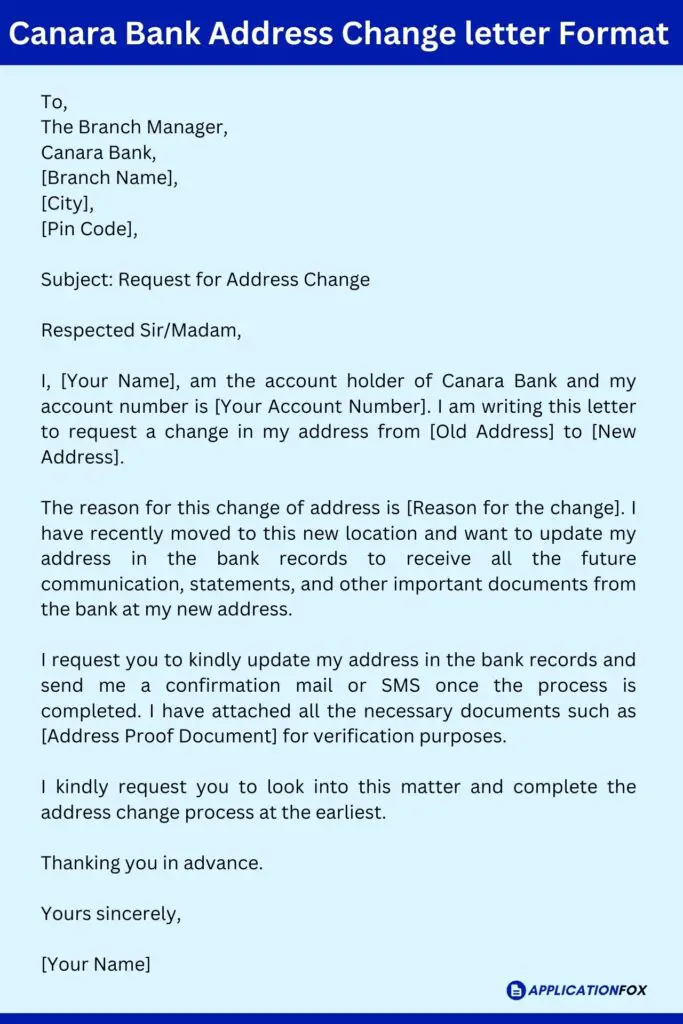
While less common due to the convenience of digital and phone options, you can still change your address by mailing a written request to Bank of America.
What to Include in Your Mailed Request
-
Write a Formal Letter: Clearly state your request to change your address.
-
Provide Key Information: Include your full name, old address, new address, all relevant Bank of America account numbers (checking, savings, credit cards, investments), and your signature.
-
Include Contact Information: Provide a current phone number and email address where Bank of America can reach you if clarification is needed.
-
Photocopy of ID: Consider including a photocopy of a valid government-issued photo ID (do not send original documents).
-
Mail Securely: Send the letter to the appropriate Bank of America mailing address for customer service or account maintenance (this can be found on their website or your statement). Use certified mail with a return receipt for proof of delivery.
Tracking and Confirmation
This method is the slowest. It’s advisable to follow up with Bank of America’s customer service by phone after a reasonable period to confirm that your mailed request has been received and processed.
Essential Information and Documentation You’ll Need
Regardless of the method you choose, having the correct information and, in some cases, documentation ready will significantly streamline the address change process with Bank of America.
Personal Identification Details
You will always need to provide identifying information to verify you are the account holder. This typically includes:
-
Your full legal name.
-
Date of birth.
-
Your Social Security Number (SSN) or Tax Identification Number (TIN).
-
Your previous address on file with the bank.
-
Your current phone number and email address.
Account Information
Have your specific Bank of America account numbers ready for all accounts you wish to update, including:
-
Checking account numbers.
-
Savings account numbers.
-
Credit card numbers.
-
Investment account numbers (Merrill Lynch accounts may have a separate process, but often link to your BOA profile).
Proof of New Address (If Required)
While not always mandatory for a simple address change, Bank of America may request proof of your new address, especially if there’s a security concern or if your identity cannot be sufficiently verified through other means. Acceptable documents typically include:
-
A recent utility bill (electricity, gas, water, internet) in your name at the new address.
-
A valid driver’s license or state ID card with the new address.
-
A lease agreement or mortgage statement.
-
A property tax statement.
-
Official government correspondence.
Security Verification Data
Be prepared to answer security questions that only you would know. These are crucial for identity verification, especially during phone or online updates. Examples include:
-
Mother’s maiden name.
-
Previous addresses.
-
Details about recent transactions.
-
Confirmation of specific personal information.
Post-Update Verification and Best Practices
Once you’ve initiated an address change with Bank of America, your task isn’t quite complete. Several follow-up steps and best practices are crucial to ensure the change has been correctly implemented and to maintain the security of your financial life.
Confirming the Address Change
Within a few days to a week of making the change, take proactive steps to confirm it.
-
Check Online Banking/Mobile App: Log in to your Bank of America online banking account or mobile app and verify that your profile now reflects the new address.
-
Monitor for Confirmation: Look for an email, text message, or physical mail confirmation from Bank of America acknowledging the address update.
-
Review Next Statement: When your next monthly statement arrives (either digitally or physically), check that the new address is printed correctly.
If you don’t see the update or receive confirmation within a reasonable timeframe, contact Bank of America customer service to inquire about the status of your request.
Updating Other Financial Products and Services
An address change with Bank of America for your primary accounts may not automatically update every single financial product or service you have.
-
Linked Accounts: Ensure any linked investment accounts (e.g., Merrill Lynch if you use Bank of America for brokerage), mortgages, or other specialized lending products also reflect the new address. These might require separate updates.
-
Automatic Payments & Bill Pay: While the address on your bank account changes, any companies you pay through Bank of America’s bill pay service might need their records updated individually. Additionally, if you have recurring automatic payments set up directly from your Bank of America account, ensure the companies receiving these payments have your new address for their records.
-
Other Financial Institutions: Remember to update your address with all other banks, credit card companies, investment firms, insurance providers, and retirement accounts (e.g., 401k, IRA providers). Each institution will have its own process.
Monitoring Your Accounts
In the weeks following your address change, it’s particularly important to keep a close eye on your Bank of America accounts.
-
Regular Statement Review: Scrutinize your bank and credit card statements for any unusual activity.
-
Transaction Alerts: Ensure any fraud or transaction alerts you have set up are still active and being delivered correctly to your current contact information.
-
Mail Delivery: Confirm that you are receiving all expected mail from Bank of America at your new address.
Setting Up Mail Forwarding
Even with meticulous planning, some mail might still be sent to your old address. To catch any stragglers, set up mail forwarding with the United States Postal Service (USPS) or your national postal service if you’re outside the U.S. This service typically lasts for 6 to 12 months and provides a crucial safety net for any overlooked correspondence.
Special Considerations for Specific Situations
While the general steps for changing an address are consistent, certain account types or circumstances require additional attention.
Joint Accounts and Business Accounts
-
Joint Accounts: For joint personal accounts, both account holders might need to provide identification or confirmation, or at least one primary account holder will need to initiate and verify the change. It’s best to confirm Bank of America’s specific policy for joint accounts during the process.
-
Business Accounts: Changing an address for a business account often involves more stringent documentation requirements. You may need to provide updated business registration documents, articles of incorporation, or other official records linking the new address to the business entity. Authorized signers will typically be required to make the change. Contact Bank of America’s business banking services directly for precise instructions.
Military Personnel and Overseas Moves
Military personnel face unique challenges due to frequent relocations and deployments. Bank of America often has dedicated services or protocols for military customers, which can simplify address changes. If moving overseas, be aware of international address formatting requirements and potential limitations on receiving certain banking communications. It’s critical to confirm whether your accounts can fully operate from an international address and what steps are needed for tax compliance in both countries.
Protecting Your Information During the Process
Throughout the address change process, prioritize the security of your personal and financial information.
-
Official Channels Only: Always use official Bank of America channels (secure website, verified app, official phone numbers, or branches) for any updates.
-
Beware of Phishing: Be wary of emails or texts requesting your address change information, even if they appear to be from Bank of America. Banks will never ask for your full SSN, login credentials, or PIN via email or unsolicited text.
-
Public Wi-Fi Caution: Avoid making sensitive account changes over unsecured public Wi-Fi networks.
-
Shred Old Documents: Once you’ve moved, shred any old banking documents containing your previous address or account information before discarding them.
By following these guidelines, you can ensure your address change with Bank of America is handled efficiently, securely, and without disruption to your financial well-being. Keeping your information current is a simple yet powerful way to safeguard your assets and maintain seamless access to your banking services.
aViewFromTheCave is a participant in the Amazon Services LLC Associates Program, an affiliate advertising program designed to provide a means for sites to earn advertising fees by advertising and linking to Amazon.com. Amazon, the Amazon logo, AmazonSupply, and the AmazonSupply logo are trademarks of Amazon.com, Inc. or its affiliates. As an Amazon Associate we earn affiliate commissions from qualifying purchases.