
For over a decade, Intel’s “Core” branding has been the primary roadmap for consumers navigating the world of personal computing. Whether you are shopping for a sleek ultrabook, a high-octane gaming rig, or a professional workstation, the choice almost always boils down to a fundamental question: Intel Core i5 or Intel Core i7? While the numbering suggests a simple “good vs. better” relationship, the technical reality is far more nuanced. Understanding the difference between these two tiers requires looking beyond the sticker on the palm rest and diving into architecture, thermal dynamics, and workload optimization.
Choosing the right processor is not just about raw speed; it is about efficiency, longevity, and matching hardware to your specific digital lifestyle. To the casual observer, the i7 is simply “faster,” but for the modern user, the distinction lies in how the processor handles multitasking, professional creative suites, and high-frequency gaming.
The Architectural Foundation: Cores, Threads, and Hybrid Design
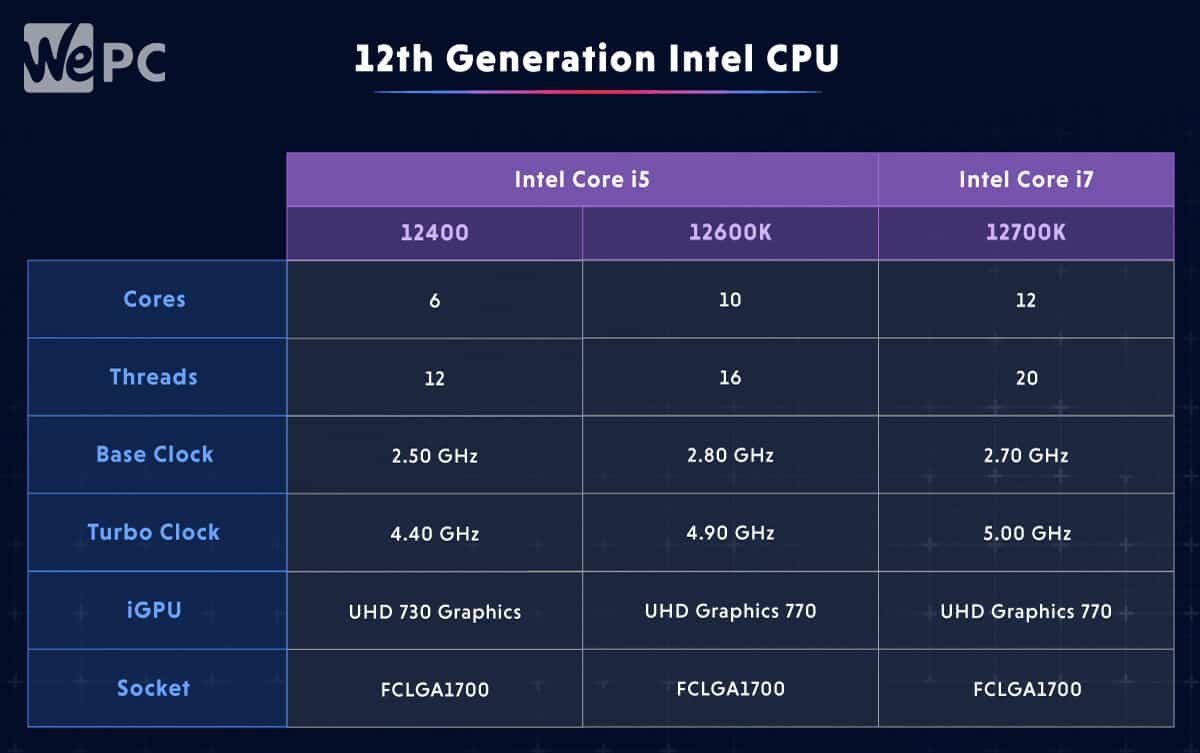
At the most basic level, the difference between an i5 and an i7 processor is defined by its resources. Historically, this meant the i7 had more physical cores or the addition of Hyper-Threading. However, with the introduction of Intel’s Performance Hybrid Architecture (starting with the 12th Generation “Alder Lake”), the landscape has shifted significantly.
Performance Cores vs. Efficient Cores
Modern Intel processors use a mix of two types of cores: Performance-cores (P-cores) and Efficient-cores (E-cores). P-cores are designed for high-frequency, single-threaded tasks like gaming and heavy productivity, while E-cores handle background tasks and multi-threaded scaling.
An Intel Core i7 typically features a higher count of both P-cores and E-cores compared to an i5 within the same generation. For example, a desktop i5 might feature 6 P-cores and 8 E-cores, whereas an i7 might boast 8 P-cores and 12 E-cores. This disparity directly impacts “throughput”—the amount of work the CPU can finish in a given timeframe.
Hyper-Threading and Logical Processing
Hyper-Threading is a technology that allows a single physical core to act as two logical cores, allowing the processor to execute two threads simultaneously. While most modern i5 processors now include Hyper-Threading on their P-cores, the i7 manages a higher total thread count because it has more physical cores to begin with. This makes the i7 significantly more capable in scenarios where the software is designed to spread its workload across as many threads as possible, such as 3D rendering or high-definition video encoding.
The Role of Intel Thread Director
To manage this complex mix of cores, Intel utilizes a hardware-level feature called the Thread Director. While both i5 and i7 chips use this technology, the i7 benefits more from it because it has more “options” for task delegation. The Thread Director communicates with the operating system (primarily Windows 11) to ensure that a demanding game stays on the high-power P-cores, while a browser update or a virus scan is shunted to the E-cores. With more cores at its disposal, the i7 maintains a smoother user experience under heavy multitasking.
Performance Metrics: Clock Speeds and Cache Size
Beyond the number of cores, two of the most critical technical differentiators are clock speed and “Smart Cache.” These are the metrics that define how “snappy” a computer feels during daily use and how quickly it can crunch through massive datasets.
Frequency and Turbo Boost
Clock speed, measured in Gigahertz (GHz), refers to how many cycles a core can perform per second. Intel Core i7 processors are almost always binned—a process of testing and categorizing chips—to run at higher frequencies than i5s.
Specifically, i7 processors often feature higher “Max Turbo Frequencies.” This is the peak speed a processor can reach when it detects a demanding task. Furthermore, i7 chips often support Intel Turbo Boost Max Technology 3.0, which identifies the fastest physical cores on the die and directs the most critical workloads to them. This slight edge in frequency may only be 200–500 MHz, but in the world of high-end computing, those extra cycles translate to faster load times and higher frame rates in CPU-bound games.
The Importance of L3 Cache
One of the most overlooked differences is the size of the L3 Cache (Intel Smart Cache). Think of the cache as the processor’s “short-term memory.” It stores data that the CPU is likely to need again soon, reducing the time spent fetching data from the much slower RAM.
Intel Core i7 processors consistently feature larger cache sizes than i5s. While an i5 might have 20MB or 24MB of L3 cache, an i7 might have 30MB or 33MB. In data-heavy applications—like complex spreadsheets, large-scale database management, or open-world gaming—a larger cache allows the processor to work more fluidly without waiting for external data transfers. It is often the cache size, rather than the core count, that makes an i7 feel noticeably faster in professional software environments.
Real-World Use Cases: Matching the Tier to the Task

The technical specifications are only half the story. The true difference between an i5 and an i7 is revealed when we look at how different users interact with their machines.
The Productivity Sweet Spot: The Core i5
For the vast majority of users—students, office professionals, and casual gamers—the Core i5 is the “Goldilocks” processor. It provides enough power for heavy web browsing (with dozens of tabs open), smooth streaming in 4K, and efficient use of the Microsoft Office suite.
In gaming, the i5 is often the most cost-effective choice. Most modern games are optimized for 6 to 8 cores; therefore, the extra cores provided by an i7 often go unused in a gaming context. When paired with a powerful discrete Graphics Processing Unit (GPU), an i5 system will often deliver nearly identical frame rates to an i7 system, making it the preferred choice for budget-conscious builders.
The Creative Powerhouse: The Core i7
The Intel Core i7 is designed for users who push their hardware to the limit. If your workflow involves Adobe Premiere Pro, After Effects, or DaVinci Resolve, the i7’s additional cores and cache become essential. Video rendering is a “parallel” task, meaning it can use every bit of processing power you throw at it. An i7 can shave minutes, or even hours, off a long export process compared to an i5.
Similarly, for developers compiling large codebases or engineers running CAD (Computer-Aided Design) simulations, the i7’s multi-threaded superiority is non-negotiable. It is also the ideal choice for “Mega-taskers”—individuals who stream their gameplay to platforms like Twitch while simultaneously running OBS, a web browser, discord, and the game itself.
Form Factor and Thermal Considerations
When discussing the i5 vs. i7 debate, we must distinguish between desktop and laptop versions. The “silicon lottery” and thermal constraints play a massive role in how these chips actually perform in the wild.
Desktop Performance
In a desktop environment, where power is abundant and cooling solutions (like large air coolers or liquid AIOs) are robust, an i7 can truly stretch its wings. It can maintain its high turbo frequencies for extended periods. Here, the i7 is a clear upgrade for anyone looking for a high-end experience.
The Laptop Dilemma
In the realm of laptops, the gap between an i5 and an i7 can sometimes narrow due to “thermal throttling.” Because laptops have limited space for heat dissipation, a high-power i7 chip can generate heat faster than the fans can remove it. When this happens, the processor automatically lowers its clock speed to protect itself from damage.
In thin-and-light ultrabooks, an i7 might only perform marginally better than an i5 because both are limited by the same thermal envelope. In some cases, a well-cooled i5 laptop can actually outperform a poorly cooled i7 laptop. However, in “H-series” laptops (high-performance machines designed for gaming or workstations), the i7 is usually given enough thermal headroom to justify the price premium.
Longevity and the Question of Value
The final consideration in the i5 vs. i7 debate is future-proofing. Technology does not stand still, and software requirements are constantly escalating.
Is the i7 More Future-Proof?
Generally, yes. By opting for an i7, you are essentially buying a “buffer.” As operating systems become more resource-intensive and background AI-driven tools (like Windows Copilot or background noise cancellation) become standard, having extra cores and a larger cache ensures that your system remains responsive for years to come. While an i5 purchased today will likely feel adequate for three to four years, an i7 may still feel snappy five or six years down the line.
The Price-to-Performance Ratio
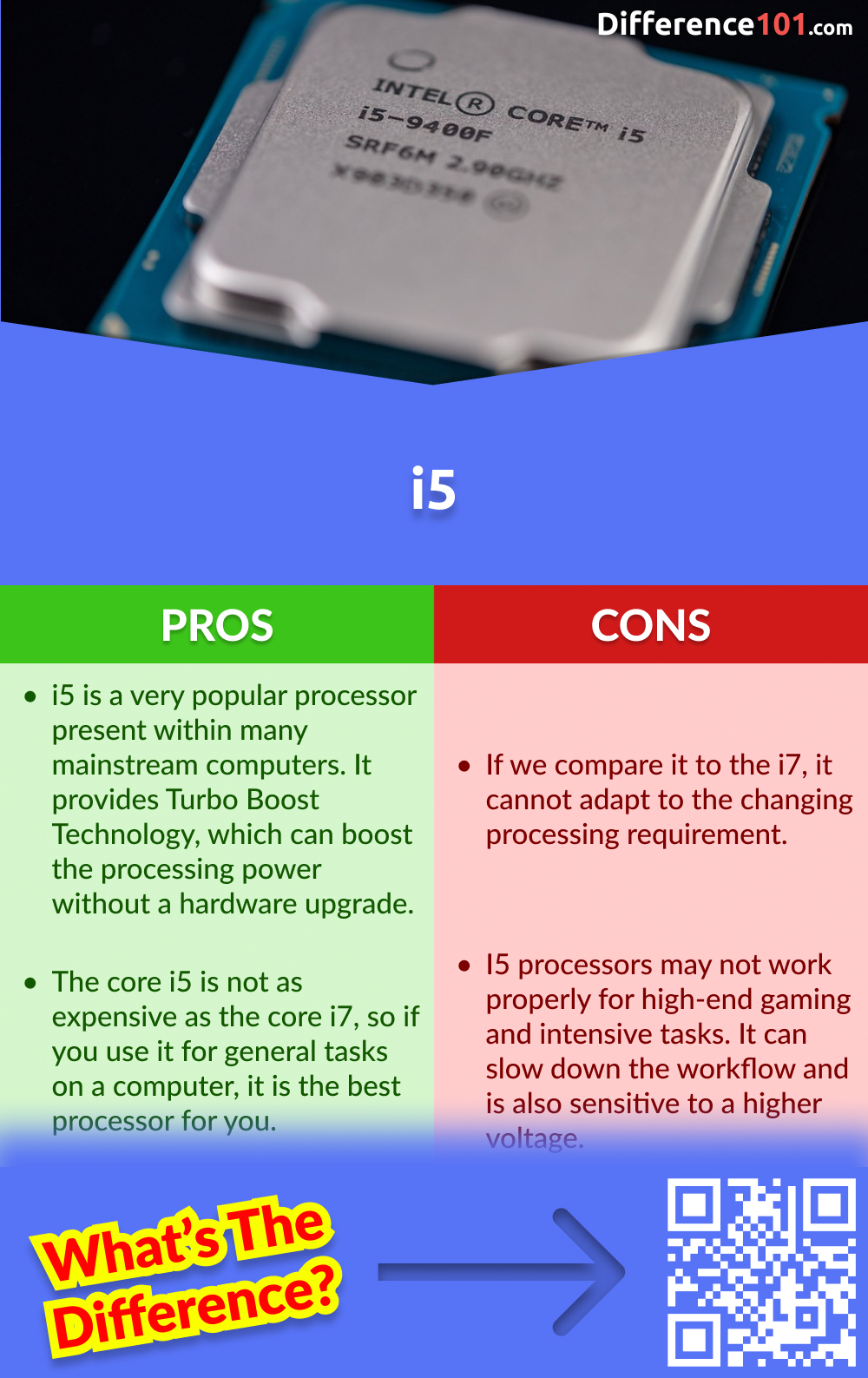
The Core i5 consistently wins the value argument. It offers roughly 80-90% of the performance of an i7 for roughly 60-70% of the cost. For many, that extra $100 to $200 is better spent on increasing RAM from 16GB to 32GB or upgrading to a larger, faster NVMe SSD.
However, for the professional whose time is literally money, the i7 is an investment in productivity. The reduction in “wait time”—whether that is waiting for a file to decompress, a video to render, or a complex filter to apply in Photoshop—eventually pays for the cost of the upgrade.
In summary, the difference between an i7 and an i5 is a balance of architecture and application. The i5 is the versatile workhorse of the digital world, perfect for the mainstream user and the gamer. The i7 is the high-performance engine designed for those who demand the most from their machines, offering the extra threads and cache necessary to tackle the most demanding computational tasks of today and tomorrow.
aViewFromTheCave is a participant in the Amazon Services LLC Associates Program, an affiliate advertising program designed to provide a means for sites to earn advertising fees by advertising and linking to Amazon.com. Amazon, the Amazon logo, AmazonSupply, and the AmazonSupply logo are trademarks of Amazon.com, Inc. or its affiliates. As an Amazon Associate we earn affiliate commissions from qualifying purchases.