
In the landscape of modern data management, the balance between performance, capacity, and reliability is a constant challenge for IT professionals and data enthusiasts alike. RAID (Redundant Array of Independent Disks) has long been the standard solution for managing multiple hard drives as a single logical unit. Among the various configurations available, RAID 6 has emerged as one of the most robust and widely adopted levels for enterprise-grade storage and high-capacity consumer systems. Known as “independent data disks with double-block parity,” RAID 6 provides a layer of data protection that is essential in an era where hard drive capacities are ballooning and the cost of downtime is higher than ever.

How RAID 6 Works: The Mechanics of Dual Parity
To understand RAID 6, one must first understand the fundamental concept of data striping and parity. RAID 6 utilizes block-level striping, meaning data is broken into segments and distributed across all the drives in the array. However, what sets RAID 6 apart from its predecessor, RAID 5, is its implementation of dual parity.
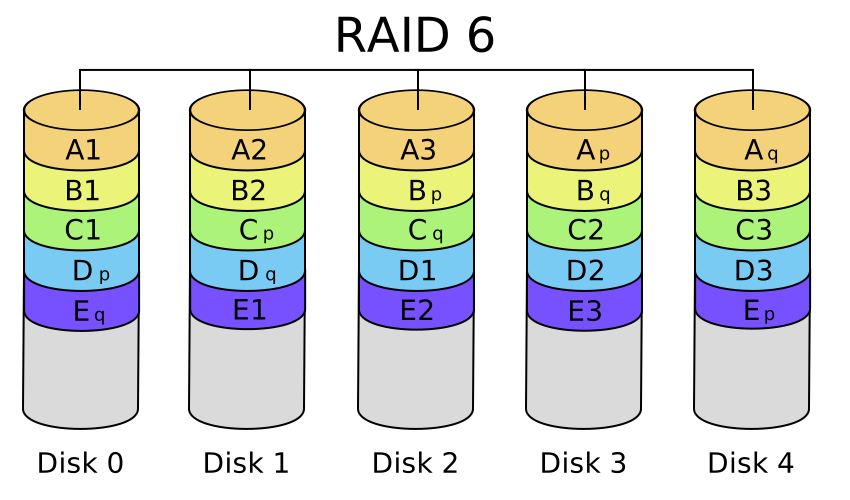
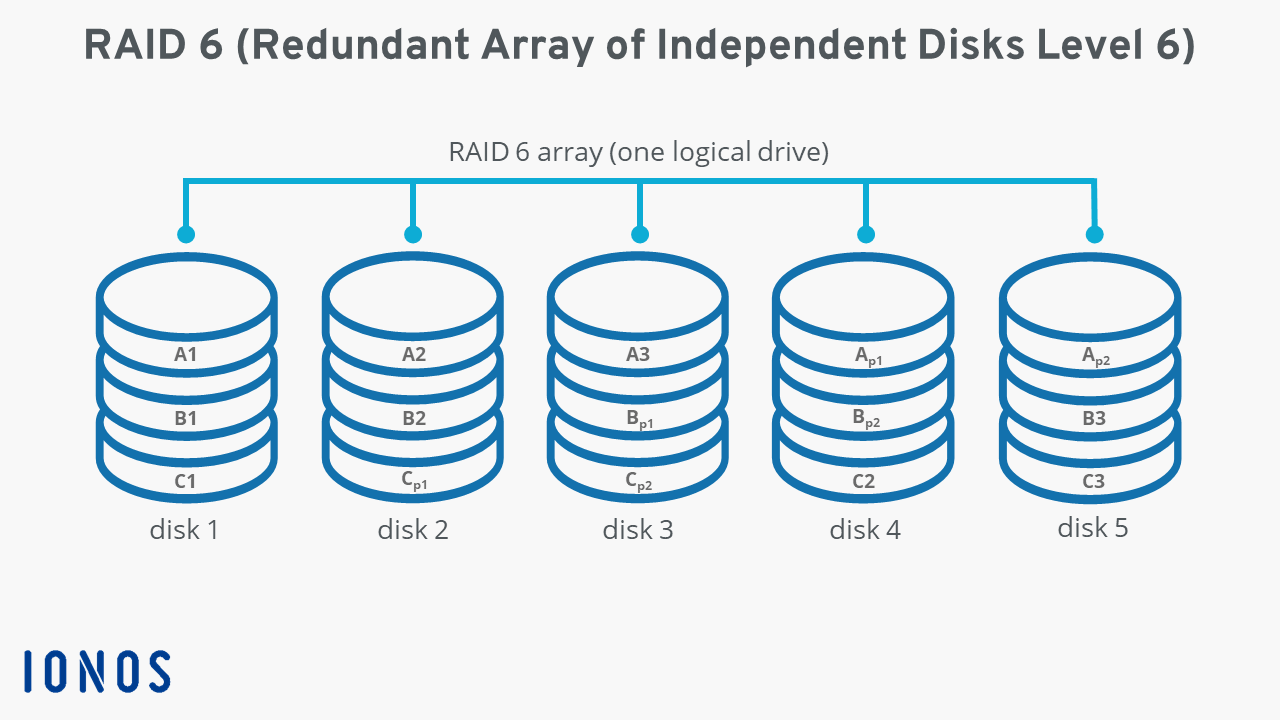
In a RAID 6 environment, the system calculates two different sets of parity information for every block of data written to the disks. These parity blocks are distributed across all the disks in the array in a rotating fashion, ensuring that no single disk becomes a bottleneck for parity information. This dual-parity architecture allows the array to remain functional even if two physical drives fail simultaneously.
The Concept of Striping
Striping is the process of interleaving data across multiple disks. When a file is written to a RAID 6 array, it is sliced into segments. For example, in a four-disk array, data blocks A, B, and C might be written to the first three disks, while the fourth and fifth disks (logically speaking) hold the parity information. This distribution allows for parallel processing, which significantly improves read speeds compared to a single disk, as multiple heads can read different parts of a file at the same time.
Understanding Dual Parity (P + Q)
The most critical feature of RAID 6 is the “P + Q” parity scheme. The “P” parity is typically a simple XOR (Exclusive OR) calculation, similar to what is used in RAID 5. This calculation compares bits across data drives to generate a parity bit that can reconstruct a single missing piece of data.
The “Q” parity is more complex. It usually employs Reed-Solomon error correction or another advanced mathematical algorithm to create a second, independent parity bit. Because the P and Q calculations are independent, the system can solve for two missing variables. Mathematically, if you lose two drives, you have a system of two equations with two unknowns, which is solvable. This is why RAID 6 requires a minimum of four drives to function: two for data and two for the redundant parity information.
RAID 6 vs. RAID 5: Why the Extra Parity Matters
For many years, RAID 5 was the gold standard for balanced storage. It requires only three disks and sacrifices only one disk’s worth of capacity for parity. However, as hard drive capacities shifted from gigabytes to terabytes, the vulnerabilities of RAID 5 became apparent, leading to the rise of RAID 6.
Tolerance for Dual Drive Failure
The primary advantage of RAID 6 is its ability to withstand two simultaneous drive failures. In a RAID 5 array, if one drive fails, the array enters a “degraded” mode. If a second drive fails before the first one is replaced and the data is rebuilt, the entire array is lost. In a RAID 6 array, the system continues to operate normally (though with some performance degradation) even if two drives are completely offline. This provides a critical safety net during the “rebuild” window—the time it takes to integrate a new drive and reconstruct the lost data.
The Danger of URE during Rebuilds
One of the most technical reasons for choosing RAID 6 over RAID 5 involves Unrecoverable Read Errors (URE). Every hard drive has a statistical probability of encountering a bit it cannot read. On modern high-capacity drives, the probability of hitting a URE during the process of reading several terabytes of data is surprisingly high.
When a RAID 5 array is rebuilding a failed drive, it must read every single bit on the remaining drives to calculate the missing data. If it encounters a URE during this process, the rebuild fails, and data loss occurs. Because RAID 6 has a second parity block, it can use the “Q” parity to correct a URE encountered during the rebuild of a failed drive. This makes RAID 6 significantly more reliable for large-scale storage volumes.
Performance Trade-offs: The Write Penalty
While RAID 6 offers superior protection, it comes at a performance cost, specifically regarding write operations. Every time data is written to a RAID 6 array, the system must perform a “read-modify-write” cycle for both the P and Q parity blocks. This means a single write operation involves more disk I/O (Input/Output) than in a RAID 0, 1, or 5 configuration. This is often referred to as the “write penalty.” While read speeds are excellent (comparable to RAID 5), write-intensive applications like high-frequency database logging may require dedicated hardware RAID controllers with onboard cache to mitigate this latency.
Key Benefits and Use Cases for RAID 6
RAID 6 is not a universal solution, but for specific environments, it is the most logical choice. Its design prioritizes data availability and integrity over raw write speed or maximum storage efficiency.
Enterprise Storage and NAS Configurations
RAID 6 is the preferred choice for Network Attached Storage (NAS) devices used in small to medium businesses and large enterprises. Since these devices often house critical backups, file shares, and virtual machine images, the “two-drive-fail” protection is non-negotiable. As businesses move toward 14TB, 18TB, and 22TB drives, the time required to rebuild an array can span days. The peace of mind offered by RAID 6 during these multi-day rebuilds is invaluable.
Large Capacity Data Pools
For creative professionals handling massive amounts of 4K or 8K video footage, RAID 6 provides a massive, high-speed volume that can survive hardware hiccups. Video editing requires high read throughput to stream multiple clips simultaneously, which RAID 6 provides, while also protecting the hundreds of hours of raw footage from drive mechanical failure.
High Availability Requirements
In environments where “five nines” (99.999%) of availability are required, RAID 6 serves as a foundational layer of the storage stack. It ensures that hardware failures do not result in service outages. When combined with hot-spare drives—drives that sit idle in the system and automatically take over when another drive fails—RAID 6 creates a self-healing storage environment that can withstand significant hardware trauma without human intervention.
Implementation Requirements and Limitations
Deploying a RAID 6 array requires careful planning regarding hardware and cost-to-capacity ratios. It is a more “expensive” configuration in terms of hardware overhead, but often cheaper than the alternative of data recovery services.
Minimum Drive Count and Capacity Loss
The “Rule of Four” is the first hurdle for RAID 6. You cannot build a RAID 6 array with fewer than four physical disks. Regardless of how many disks you add to the array, you will always “lose” the capacity of exactly two disks to parity. For example, if you have eight 10TB drives in RAID 6, your total usable capacity will be 60TB (80TB total minus 20TB for parity). In a four-drive array, you only get 50% of your total capacity. As you add more drives to the array, the storage efficiency increases, making RAID 6 more cost-effective in larger configurations.
Hardware vs. Software RAID
Because of the complex math involved in calculating dual parity (especially the Q parity), RAID 6 is computationally intensive.
- Software RAID: While modern CPUs are powerful enough to handle RAID 6 calculations via software (such as Linux MDRAID or ZFS’s RAID-Z2), this consumes CPU cycles that could be used for other tasks.
- Hardware RAID: High-end RAID controllers feature dedicated processors (I/O Processors) specifically designed to handle XOR and Reed-Solomon calculations. These controllers also usually feature Battery Backed Write Cache (BBWC) or Flash Backed Write Cache (FBWC), which protects data in the event of a power failure during a write operation. For mission-critical RAID 6, a dedicated hardware controller is highly recommended.
Storage Efficiency Calculations
When planning a RAID 6 deployment, the formula for usable capacity is (n - 2) * s, where n is the number of drives and s is the capacity of the smallest drive in the array. This highlights another limitation: like most RAID levels, RAID 6 is limited by the smallest disk. If you mix 4TB and 8TB drives, the 8TB drives will only be treated as 4TB drives by the array. Consistency in drive model and capacity is key to a healthy RAID 6 implementation.
Is RAID 6 Right for Your Infrastructure?
Choosing the right RAID level involves navigating the “Storage Triangle”: Performance, Protection, and Price. RAID 6 occupies a unique position that leans heavily toward Protection and Performance (Read), with a slight compromise on Price (Capacity) and Write Performance.
For users who prioritize the safety of their data above all else, especially when using modern, high-capacity mechanical hard drives, RAID 6 is the gold standard. It provides a level of insurance against the “double-disk-failure” nightmare and protects against the rising threat of UREs during array rebuilds. While RAID 10 (mirroring and striping) offers better write performance and faster rebuilds, it requires 50% of total disk capacity for redundancy regardless of the number of drives, making RAID 6 the more storage-efficient choice for arrays with five or more disks.
In summary, RAID 6 is a sophisticated, reliable, and powerful tool in the arsenal of digital security and infrastructure management. Whether you are managing an enterprise data center or a home media server, understanding the mechanics of dual parity ensures that your data remains accessible, intact, and resilient against the inevitable failures of physical hardware.
aViewFromTheCave is a participant in the Amazon Services LLC Associates Program, an affiliate advertising program designed to provide a means for sites to earn advertising fees by advertising and linking to Amazon.com. Amazon, the Amazon logo, AmazonSupply, and the AmazonSupply logo are trademarks of Amazon.com, Inc. or its affiliates. As an Amazon Associate we earn affiliate commissions from qualifying purchases.