
In the top-right quadrant of most full-sized computer keyboards, nestled among the clusters of the Print Screen and Scroll Lock keys, sits a button that many modern users have never intentionally pressed. Often labeled as “Pause” or “Pause/Break,” this relic of the early computing era remains a standard fixture on the 101-key layout. While it may seem like a vestigial organ of hardware design—much like the appendix in human anatomy—the Pause key carries a rich technical history and continues to serve niche but vital functions in programming, system administration, and modern operating systems.
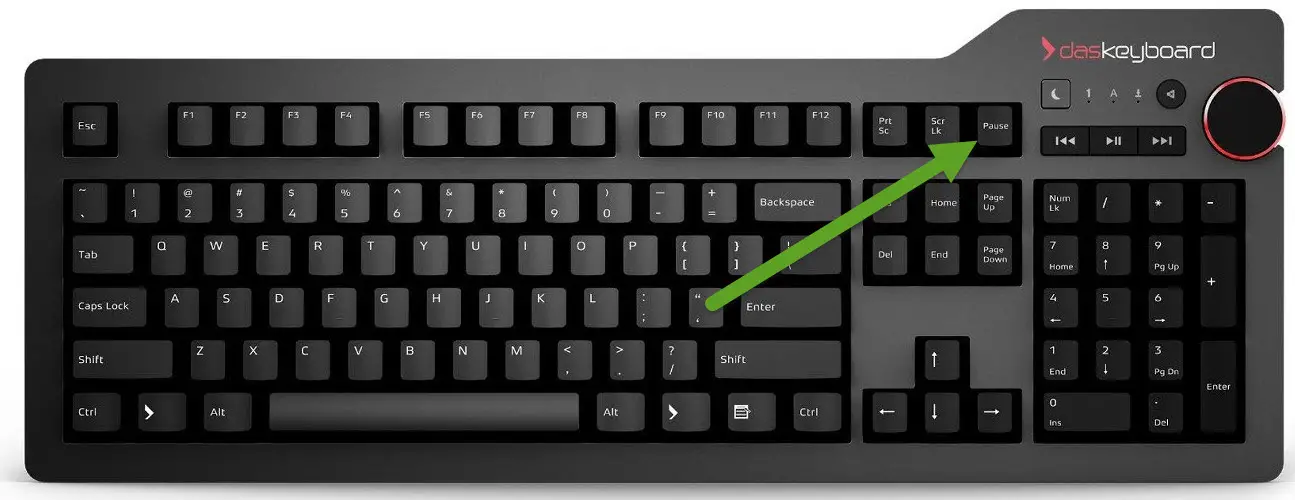
To understand what the Pause key is, one must look beyond its physical presence and examine how it interacts with software interrupts and legacy hardware protocols. In an era of touchscreens and minimalist 60% keyboards, the Pause key represents a bridge between the mechanical origins of data transmission and the complex software environments of today.
The Historical Origins of the Pause/Break Key
The Pause key did not originate with the personal computer. Its lineage can be traced back to the era of the telegraph and the mechanical teleprinter. In those early days of telecommunication, “Break” was a literal term. To signal an interruption in a transmission, an operator would physically break the electrical circuit. This signaled the sending station to stop transmitting data immediately.
From Teleprinters to the IBM PC
When computers began to replace teleprinters, the need for a similar interrupt function remained. On early mainframe terminals, a dedicated key was required to stop the flow of data across a serial line. When IBM introduced the 101-key Model M keyboard in the mid-1980s, the “Pause/Break” key was formalized as a standard.
During the DOS (Disk Operating System) era, the Pause key was indispensable. Because computers of that time did not have sophisticated windowing environments or scroll-back buffers, text would often fly across the screen faster than a human could read. By pressing the Pause key, a user could freeze the output of a command-line program, allowing them to read the data before it scrolled into oblivion. Pressing any other key would resume the process.
The Distinction Between Pause and Break
While they share the same physical button, “Pause” and “Break” historically performed different logical functions. In the PC BIOS (Basic Input/Output System), the Pause key is unique because it does not have a “make” and “break” code in the traditional sense. Most keys send a signal when pressed and another when released; however, the Pause key sends a specific interrupt signal that tells the processor to halt current operations temporarily.
The “Break” function, usually triggered by holding the Control (Ctrl) key while pressing Pause, served as a more forceful instruction. While “Pause” would merely suspend output, “Break” would often terminate the program entirely, returning the user to the command prompt. This distinction remains a fundamental concept in software development and command-line interfaces today.
Common Modern Uses for the Pause Key
Despite the shift toward graphical user interfaces (GUIs), the Pause key has not been rendered entirely obsolete. It remains mapped to several important shortcuts within the Windows environment and various professional software suites.
System Properties Shortcut in Windows
Perhaps the most practical use for the Pause key for a modern Windows user is its role in a system shortcut. By pressing the Windows Key + Pause, users can instantly open the “About” section of the System Settings menu. This provides immediate access to critical information such as the processor type, installed RAM, device ID, and Windows version. In a professional IT or help desk environment, this shortcut is a significant time-saver, bypassing the need to click through multiple layers of the Control Panel or Settings app.
Command Prompt and PowerShell Controls
For developers and system administrators working within the Windows Command Prompt (CMD) or PowerShell, the Pause key still functions much as it did in the days of DOS. If a script is running or a directory listing is scrolling too quickly, pressing Pause will suspend the output. This is particularly useful when auditing long logs or checking for specific errors in a real-time stream of data. To resume the output, the user simply needs to press the Enter key or any other character key.
Role in Programming and Debugging
In the world of software engineering, the Pause/Break key serves as a “panic button” during the debugging process. In integrated development environments (IDEs) like Microsoft Visual Studio, pressing Ctrl + Break can stop a program that has entered an infinite loop or hung during execution.

Similarly, in older programming languages like BASIC or within the VBA (Visual Basic for Applications) editor used in Microsoft Excel, Ctrl + Break is the standard command to halt a running macro. For financial analysts or data scientists working with complex spreadsheets, this key is often the only way to stop a runaway script without force-closing the entire application and losing unsaved data.
The Pause Key in Specialized Computing and Gaming
Beyond standard office tasks and programming, the Pause key finds utility in specialized sectors of technology, ranging from industrial automation to retro gaming.
Legacy Gaming and Emulator Control
For gamers who enjoy classic titles from the 1980s and 1990s, the Pause key is often the default hardware interrupt for pausing the game engine. Modern games typically use the “Esc” key to bring up a menu, but legacy software frequently utilized the dedicated Pause key to freeze the game state without overlaying a menu UI.
In the realm of emulation—software that allows modern PCs to run games from consoles like the NES, Sega Genesis, or arcade machines—the Pause key is often used to toggle “Frame Advance” or to freeze the emulation state. This allows players to capture specific screenshots or analyze game mechanics frame-by-frame.
Use in Automation and Scripting (AutoHotkey)
Power users who utilize automation tools like AutoHotkey frequently remap the Pause key. Because it is rarely used by standard applications, it serves as an excellent “Global Hotkey.” A user might script the Pause key to mute their microphone across all applications, toggle a dark mode across the OS, or launch a specific set of professional tools. Its isolation from the main typing area makes it difficult to press by accident, which is a desirable trait for high-level system commands.
Dealing with Modern Keyboards: When the Pause Key is Missing
As hardware design trends toward portability and minimalism, the Pause key is increasingly being omitted from laptop keyboards and “Tenkeyless” (TKL) or 60% mechanical keyboards. This can pose a challenge for users who rely on the key for the specialized tasks mentioned above.
Laptop Key Combinations and Fn Keys
Most laptop manufacturers haven’t removed the functionality; they have simply hidden it behind a Function (Fn) key layer. On many Dell, HP, or Lenovo laptops, the Pause function can be accessed by pressing Fn + P, Fn + B, or Fn + Right Shift. The specific combination varies by brand, often requiring users to consult their manual or look for small secondary labels printed on the keys.
Remapping via Software
For users with high-end mechanical keyboards that physically lack the key, the solution is usually software-based remapping. Tools like Microsoft PowerToys (using the “Keyboard Manager” utility) or SharpKeys allow users to designate a different, less-used key—such as the Caps Lock or the right-side Alt key—to act as the Pause key. This ensures that even on a minimalist setup, the technical functionality remains accessible.

The Future of the Pause Key: Is It Obsolete?
The trajectory of hardware design suggests that the Pause key may eventually vanish from consumer-grade hardware. As operating systems become more abstracted from their command-line roots and as keyboards prioritize aesthetic minimalism, the “real estate” occupied by the Pause/Break key is becoming harder for manufacturers to justify.
However, its obsolescence is far from guaranteed. In the professional and industrial spheres, where stability and legacy support are paramount, the Pause key remains a standard. It is a tool for the “power user”—the person who needs to break an infinite loop, the admin who needs system specs in a heartbeat, and the scripter who needs a dedicated, unconflicted trigger for automation.
The Pause key is a reminder that computing is built upon layers of history. While its original purpose of breaking electrical circuits in a teleprinter is long gone, its logical function as a high-priority interrupt remains a foundational concept in computer science. Whether it remains a physical button or evolves into a standardized software shortcut, the “Pause” function will continue to be a necessary component of the human-to-machine interface, providing a vital moment of stillness in the fast-paced world of digital processing.
aViewFromTheCave is a participant in the Amazon Services LLC Associates Program, an affiliate advertising program designed to provide a means for sites to earn advertising fees by advertising and linking to Amazon.com. Amazon, the Amazon logo, AmazonSupply, and the AmazonSupply logo are trademarks of Amazon.com, Inc. or its affiliates. As an Amazon Associate we earn affiliate commissions from qualifying purchases.