
In the landscape of modern computing, the keyboard is often the most overlooked component of the workstation. However, for software developers, competitive gamers, and hardware enthusiasts, the keyboard is much more than a peripheral; it is a precision instrument. While the majority of consumer-grade laptops and desktop bundles utilize inexpensive membrane technology, a significant shift has occurred toward mechanical keyboards. These devices represent a return to high-quality engineering, prioritizing tactile feedback, durability, and extreme customization.
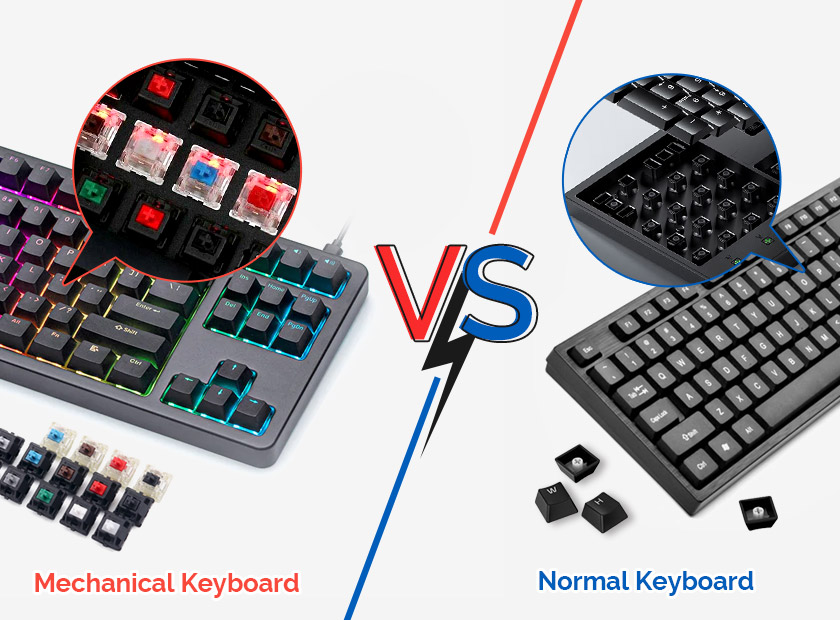
At its core, a mechanical keyboard is defined by its individual switches. Unlike a standard membrane keyboard, which uses a single rubber sheet to register keypresses, a mechanical keyboard utilizes a physical switch under every single key. This architectural difference transforms the typing experience from a mushy, inconsistent task into a responsive, tactile interaction.

The Engineering of the Mechanical Switch
To understand why mechanical keyboards are superior in the tech space, one must analyze the anatomy of the switch. Each switch is a self-contained unit consisting of a housing, a stem, a spring, and metal contact leaves. When you press a key, the stem pushes down, allowing the metal contacts to meet and complete an electrical circuit, which then sends a signal to the computer.
The Three Pillars of Switch Profiles
Mechanical switches are generally categorized into three distinct types based on their feel and sound:
- Linear Switches: These switches provide a smooth, consistent keystroke from the top to the bottom without any tactile bump or audible click. In the tech and gaming sectors, linear switches are preferred for their speed and lack of resistance, making them ideal for rapid-fire inputs.
- Tactile Switches: These feature a noticeable “bump” in the middle of the travel distance. This provides physical confirmation that the keypress has been registered without needing to “bottom out” the key. This is the preferred choice for programmers and writers who require precision and feedback to reduce typing errors.
- Clicky Switches: Similar to tactile switches, these include an additional mechanism (often a click bar or click jacket) that produces a sharp, audible sound upon actuation. While popular for the nostalgic “typewriter” feel, they are often avoided in open-office environments due to their high decibel output.
Actuation and Reset Points
In high-performance computing, the “actuation point” is a critical metric. This is the exact distance a key must travel before the signal is sent. Standard membrane keys usually require you to press the key all the way down. In contrast, mechanical switches can actuate halfway through the press. This allows for faster typing speeds and reduced finger fatigue. Furthermore, the “reset point”—where the switch deactivates—is often very close to the actuation point, allowing for rapid repeated presses, a feature essential for competitive gaming and high-speed data entry.
Engineering Superiority: Mechanical vs. Membrane
The technical advantages of mechanical hardware extend beyond just the feel of the keys. When comparing mechanical boards to the membrane alternatives found in standard office environments, several key performance metrics stand out.
Durability and Longevity
Membrane keyboards are designed with a limited lifespan, typically rated for 5 million to 10 million keystrokes. Over time, the rubber domes degrade, leading to a “mushy” feel and inconsistent registration. Mechanical switches, however, are rated for 50 million to 100 million keystrokes. Because the components are made of high-grade plastics and metal springs, the typing experience remains consistent from the first day to the tenth year.
N-Key Rollover (NKRO) and Anti-Ghosting
For power users, “ghosting” is a significant technical hurdle. On cheaper keyboards, the internal circuitry often limits the number of keys that can be pressed simultaneously. If you press three keys at once, the third might not register, or a fourth “ghost” key might appear. Mechanical keyboards almost universally feature N-Key Rollover, meaning every single key pressed simultaneously will be registered by the OS. This is achieved through diodes on the PCB (Printed Circuit Board) that prevent electrical “backflow,” ensuring 100% accuracy during complex keyboard shortcuts or high-intensity gaming.
Build Quality and Rigidness
Mechanical keyboards are often built with internal steel or aluminum plates to mount the switches. This adds significant weight and structural integrity, preventing the keyboard from flexing or sliding across the desk. In the professional tech world, this stability is synonymous with quality, providing a solid foundation for long hours of coding or system administration.
Form Factors and Layout Evolution
One of the most significant trends in the mechanical keyboard community is the move away from the traditional “Full-Sized” layout. As desk real estate becomes more valuable and ergonomics take center stage, different form factors have emerged to suit specific tech workflows.
Full-Sized and Tenkeyless (TKL)
The 100% or Full-Sized keyboard includes the alphanumeric cluster, function row, navigation cluster, and a dedicated number pad. While comprehensive, many users find it pushes the mouse too far to the right, straining the shoulder. The Tenkeyless (TKL) or 80% layout removes the number pad, providing a more ergonomic alignment for the mouse while retaining all essential keys for software navigation.
The Rise of Compact Layouts (60%, 65%, and 75%)
The “60% keyboard” has become a staple for minimalist setups and developers. It removes the numpad, navigation keys, and function row, relying on “layers” (accessed via a function key) to trigger those commands. The benefit is a tiny footprint and the ability to keep hands centered on the home row at all times. The 65% and 75% layouts are common middle grounds, adding back dedicated arrow keys and a slimmed-down function row, balancing compactness with utility.
Ergonomic and Split Designs
Beyond standard rectangles, the tech industry has embraced split mechanical keyboards. These allow the user to position the two halves of the keyboard at shoulder width, preventing ulnar deviation and carpal tunnel syndrome. Coupled with “tenting” (angling the keyboard upward), these designs represent the pinnacle of ergonomic hardware engineering.
The Ecosystem of Customization and Modularity
What truly separates the mechanical keyboard market from the rest of the peripheral industry is the level of end-user customization. For a tech enthusiast, the keyboard is not a static tool but a modular platform.
Hot-Swappable PCBs
Traditionally, changing switches required soldering and desoldering components. Modern mechanical keyboards often feature “hot-swap” sockets. This allows users to pull out a switch and snap in a new one in seconds without any electrical knowledge. This modularity allows users to test different actuation forces or switch types on a single board.
Keycap Materials: PBT vs. ABS
Even the plastic on top of the switch matters. Most cheap keyboards use ABS (Acrylonitrile Butadiene Styrene) plastic, which is prone to “shining” over time as skin oils wear down the texture. Enthusiast boards use PBT (Polybutylene Terephthalate), a denser, more durable plastic that resists shine and maintains a textured grip. Furthermore, “Double-shot” molding ensures that the legends (letters) on the keys are physically molded from a second piece of plastic, meaning they can never fade or wear off.
Firmware and Open-Source Control
Unlike consumer keyboards that rely on bloated, proprietary software, many mechanical keyboards use open-source firmware like QMK or VIA. This allows users to remap any key, create complex macros, and control RGB lighting at the hardware level. The configuration is stored directly on the keyboard’s internal memory, meaning your custom settings work on any computer without needing to install drivers.

The Future of Typing Tech: Optical and Hall Effect
While traditional mechanical switches rely on physical metal contact, the next frontier of keyboard technology involves light and magnets.
Optical Switches use an infrared light beam to detect a keypress. When the stem lowers, it blocks the beam, triggering actuation. This eliminates “debounce delay”—the small amount of time a traditional switch needs to stop vibrating before a signal is sent—resulting in near-instantaneous response times.
Hall Effect (Magnetic) Switches are the latest innovation in the high-end market. Instead of a physical contact or a light beam, these use magnets and sensors to measure the exact position of the key. This allows for “Rapid Trigger” technology, where a key resets the instant you start lifting your finger, rather than waiting for it to pass a fixed reset point. It also allows for “analog” input, where the computer can detect how far down a key is pressed, similar to a controller trigger.
Mechanical keyboards represent a rare intersection of nostalgia and cutting-edge engineering. By moving away from the “disposable” nature of membrane peripherals, users gain a tool that is more durable, more precise, and infinitely more personal. Whether it is the tactile bump of a well-engineered switch or the efficiency of a compact layout, mechanical keyboards have solidified their place as the gold standard for anyone who spends their life behind a screen.
aViewFromTheCave is a participant in the Amazon Services LLC Associates Program, an affiliate advertising program designed to provide a means for sites to earn advertising fees by advertising and linking to Amazon.com. Amazon, the Amazon logo, AmazonSupply, and the AmazonSupply logo are trademarks of Amazon.com, Inc. or its affiliates. As an Amazon Associate we earn affiliate commissions from qualifying purchases.