
Instagram has evolved from a simple photo-sharing application into a complex digital ecosystem powered by sophisticated algorithms and intricate user interface designs. For many users, the act of “liking” a post—represented by that iconic heart icon—is a reflexive action, a way to acknowledge a friend’s update, save an inspirational quote, or signal interest to the platform’s recommendation engine. However, as our digital footprints grow, finding a specific post we interacted with weeks or even months ago can become a challenge. Unlike the “Saved” folder, which many users utilize as a deliberate bookmarking tool, the record of “Liked” posts is often tucked away within the deeper layers of the application’s settings.

Understanding how to access this history is not just a matter of convenience; it is a vital part of managing one’s digital presence and understanding how the platform’s software architecture tracks user behavior. Whether you are looking to revisit a tutorial, find a product you saw in an ad, or audit your interaction history for privacy reasons, knowing the technical path to your liked content is essential.
Navigating the Instagram Interface: A Step-by-Step Technical Guide
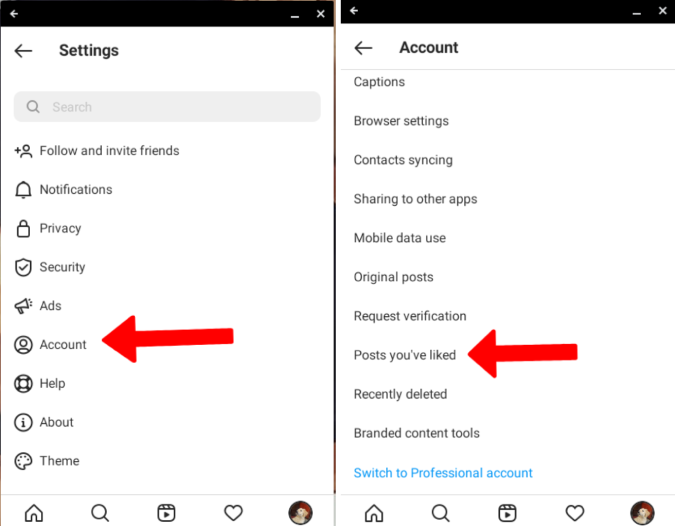
Instagram’s user interface (UI) undergoes frequent updates, often moving features to streamline the “Your Activity” dashboard. In the current iteration of the software, the history of your likes is no longer found directly under the “Account” tab in the main settings menu. Instead, it is housed within a comprehensive data management suite designed to give users more transparency over their interactions.
Accessing the “Your Activity” Dashboard
To begin the process, ensure your application is updated to the latest version via the Apple App Store or Google Play Store. Open the Instagram app and navigate to your profile by tapping your profile picture in the bottom right corner. From there, locate the “hamburger” menu (three horizontal lines) in the top right corner of the screen. This menu acts as the gateway to the application’s core configurations.
Within this menu, you will see a variety of options ranging from “Settings and Privacy” to “Insights.” You must select “Your Activity.” This section is the central hub for all behavioral data tracked by the app, including time spent on the platform, search history, and, crucially, interactions.
Locating “Interactions” and “Likes”
Once inside the “Your Activity” dashboard, you will find a category labeled “Interactions.” This sub-section aggregates every way you have engaged with content on the platform, including comments, likes, story replies, and reviews. Tapping on “Likes” will open a chronological grid of every post you have ever double-tapped or liked using the heart icon.
This grid view is a powerful tool for digital retrospection. It displays posts from both public accounts and private accounts you follow. However, keep in mind that if a user has deleted their post or archived it, it will no longer appear in your liked history, as the underlying data source has been removed from Instagram’s active servers.
Filtering and Sorting Your Liked Content
One of the most useful technical features of the “Likes” dashboard is the ability to filter and sort through large volumes of data. For users who have been on the platform for years, the list of liked posts can number in the tens of thousands. Instagram provides several parameters to help you narrow down your search:
- Sort by Date: You can view your likes from “Newest to Oldest” or “Oldest to Newest.” This is particularly helpful for those looking to rediscover content from the early days of their account.
- Date Range: If you remember that you liked a post during a specific month or year, you can set a “Start Date” and “End Date” to filter the results.
- Author Filter: If you are looking for a post from a specific creator, you can filter your likes to only show interactions with that specific handle.
The Software Logic: Why “Likes” Matter to the Algorithm
From a technical perspective, your list of liked posts is more than just a trip down memory lane; it is the primary training data for Instagram’s recommendation engine. Every time you interact with a post, you are sending a high-value signal to the platform’s machine learning models about your preferences, interests, and psychological triggers.
Signal Weighting and the “Explore” Page
In the world of social media software development, not all interactions are created equal. A “Like” is considered a medium-weight signal, ranking higher than a simple “View” or “Scroll-past,” but generally lower than a “Save,” a “Share,” or a “Comment.” When you view your liked history, you are essentially looking at the blueprint that dictates what appears on your “Explore” page and in your main feed.
If you find that your feed is cluttered with content that no longer interests you, auditing your likes is the first step in a “technical reset.” By unliking posts that no longer align with your current interests, you can gradually influence the algorithm to shift its content delivery. This is a manual way to retrain the neural networks that govern your digital experience.
Data Privacy and the Right to Access
The accessibility of your liked history is also a result of evolving data privacy regulations such as the General Data Protection Regulation (GDPR) in Europe and the California Consumer Privacy Act (CCPA) in the United States. These laws require tech giants like Meta (Instagram’s parent company) to provide users with a clear and accessible record of the data being collected about them.
By providing the “Your Activity” dashboard, Instagram satisfies these legal requirements while also offering a functional tool for the user. It allows for a level of transparency that was absent in the early days of social media, where user interactions were often obfuscated and difficult to track.
Advanced Management: Bulk Actions and Data Portability
For power users or those concerned with digital security and privacy, Instagram offers advanced tools for managing interaction data. It is often not enough to simply see what you have liked; sometimes, you need to manage that data at scale.
Bulk Unliking for Profile Maintenance
Within the “Likes” section of “Your Activity,” there is a “Select” button in the top right corner. This allows you to select multiple posts simultaneously. Once selected, you can “Unlike” them in a single batch. This is an essential feature for users who wish to quickly scrub their interaction history or remove associations with specific brands, individuals, or movements without having to navigate to each post individually.
This feature is particularly useful for professionals who may be undergoing a “digital audit” before a job search or for individuals who want to minimize their data footprint for security reasons. By reducing the number of active interactions, you reduce the metadata associated with your profile.
Downloading Your Interaction History
If you want a permanent, offline record of your likes—perhaps for archival purposes or to analyze your own data—Instagram provides a “Download Your Information” tool. This is located in the “Accounts Center” under “Your Information and Permissions.”
When you request a data download, Instagram generates a file (usually in HTML or JSON format) containing every action you have taken on the platform. This includes a comprehensive list of every post you have liked, complete with timestamps and links. For users with a technical background, these JSON files can be imported into data visualization tools to map out interaction patterns over time, providing a fascinating look at one’s own digital evolution.
Troubleshooting Common Technical Issues
While the process of viewing liked posts is generally straightforward, users may occasionally encounter technical hurdles. These can range from interface inconsistencies to synchronization errors between the mobile app and the desktop environment.
Desktop vs. Mobile Limitations
One of the most common points of confusion is the discrepancy between the Instagram mobile app and the desktop web browser version. As of the current software build, the web version of Instagram is significantly more limited than the app. While you can view your profile and interact with the feed on a PC or Mac, the comprehensive “Your Activity” dashboard is often missing or truncated in the browser interface. For the full suite of filtering and sorting tools, the mobile application remains the primary environment for data management.
Cache and Sync Issues
Sometimes, a user might unlike a post, only to see it reappear in their history later. This is usually a synchronization issue between the local cache on the mobile device and Instagram’s cloud servers. If the “Likes” page isn’t updating correctly, the technical solution is usually to clear the application cache (on Android) or offload and reinstall the app (on iOS). This forces the software to fetch a fresh set of data from the server, ensuring that your interaction history is accurate and up to date.
Another common issue involves “shadow-banning” or temporary action blocks. If a user unlikes hundreds of posts in a very short window, Instagram’s automated security systems may flag the behavior as bot-like activity and temporarily restrict the ability to modify interactions. To avoid this, it is recommended to perform bulk actions in moderate increments.
The Future of Interaction Tracking on Social Platforms
As we look toward the future of social media technology, the way we view and manage our “Likes” is likely to become even more integrated with AI-driven insights. We are moving toward an era where platforms may not just show us what we liked, but why we liked it, categorizing our interactions by mood, topic, or aesthetic.
For the modern user, staying technically literate regarding these features is paramount. The ability to navigate the “Your Activity” dashboard, utilize bulk management tools, and understand the algorithmic implications of a “Like” is a fundamental skill in the digital age. By mastering these tools, you transform from a passive consumer of content into an active curator of your own digital identity, ensuring that your Instagram experience remains a reflection of your true interests and professional standards.
aViewFromTheCave is a participant in the Amazon Services LLC Associates Program, an affiliate advertising program designed to provide a means for sites to earn advertising fees by advertising and linking to Amazon.com. Amazon, the Amazon logo, AmazonSupply, and the AmazonSupply logo are trademarks of Amazon.com, Inc. or its affiliates. As an Amazon Associate we earn affiliate commissions from qualifying purchases.